# Seamless Developer Portal
> Developer documentation for Seamless OS — the API platform for launching and running a mobile operator: orders, subscriptions, billing, payments, and telecom inventory.
This document is every page of https://docs.valdyr.tech in navigation order: the guides, concepts and resource pages first, then the generated API reference. It is large enough to exceed most context windows — prefer https://docs.valdyr.tech/llms-full-guides.txt for the prose alone, https://docs.valdyr.tech/llms-full-api.txt for the reference alone, or a single page's `.md` twin.
## Get started
### Intro to Seamless OS
Canonical URL: https://docs.valdyr.tech/developer-guide/intro
Seamless OS is a telecom platform. With it a business can launch as a mobile operator, upgrade
an existing operation, or add connectivity to what it already sells. It carries everything a
startup needs to enter telecom, and everything an established business needs to add mobile
services.
- [New: MCP server](/developer-guide/mcp.md) — Let Claude, Cursor, or your own agent manage customers and subscriptions in natural language.
#### Complete platform features
Seamless OS carries a full BSS and OSS stack. BSS is Business Support Systems. OSS is
Operational Support Systems.
- **Billing systems** — Billing and payment processing, on more than one payment gateway.
- **Mobile applications** — Native iOS and Android apps that carry your own brand.
- [AI-ready infrastructure](/developer-guide/mcp.md) — Built-in AI, and a Model Context Protocol (MCP) server.
- **Open APIs** — APIs across the platform, for your own integrations and for a third party.
#### Platform editions
Select the edition for your business:
- **Seamless OS**: For a startup and for a new entrant to the market.
- **Seamless OS+**: For an established telecom provider.
- **Seamless OS enterprise**: For a large business outside telecom that adds connectivity.
#### Get started
- [Get started guide](/api-reference/choose-your-integration.md) — Select your integration style, then place your first order.
### Get started
Canonical URL: https://docs.valdyr.tech/api-reference/get-started
#### Get your first order
This guide takes you through your **first order** on the Seamless OS API. You authenticate,
read the products, create an order, collect the payment, and submit the order for
provisioning.
#### Authentication
Every request needs an API key in the `X-API-Key` header. For the full rules, read the
[Authentication guide](/api-reference/authentication.md).
#### Quick path
**1. List product offerings**
Get the offerings that you can show to a customer.
**2. Create order**
Start an order with the customer, the subscriber, and the product.
**3. Read price**
Read the taxes and the total off the order before the payment.
**4. Create payment link**
Generate a payment link to collect the prepaid funds.
**5. Submit order**
Lock the paid order for provisioning.
#### 1. List product offerings
Get the product offerings that you can present to your customers. The response gives the
plans, the prices, and the features that a customer can buy.
```bash
curl "{BASE_URL}/products/offerings" \
-H "X-API-Key: $API_KEY"
```
See [List Product Offerings](/api-reference/product-offerings.md#tag/product-offerings/GET/product-offerings)
#### 2. Create order
Create a draft order with the customer, the subscriber, and the selected product offering. A
draft order carries no price and no confirmation yet.
```bash
curl -X POST "{BASE_URL}/orders" \
-H "X-API-Key: $API_KEY" \
-H "Content-Type: application/json" \
-d '{
"customer": {
"customerId": "123e4567-e89b-12d3-a456-426614174000"
},
"lineItems": [
{
"type": "SUBSCRIPTION",
"lineItemId": "line-1",
"productOfferingId": "456a789b-cd12-34ef-567g-890123456789",
"subscriber": {
"name": "John Doe",
"email": "john@acme.com"
},
"sim": {
"esim": true
}
}
]
}'
```
See [Create Order](/api-reference/orders.md#tag/orders/POST/orders)
#### 3. Read the order price
The platform calculates the taxes and the total again each time the order changes, and returns
them as `pricing` on the order. Read them before you collect the payment. On a US purchase, the
tax is calculated per jurisdiction from the addresses on the order.
```bash
curl "{BASE_URL}/orders/{orderId}" \
-H "X-API-Key: $API_KEY"
```
See [Get Order](/api-reference/orders.md#tag/orders/GET/orders/{orderId})
#### 4. Create payment link
Create a payment link for the order. The amount comes from the calculated price of the order,
so you never send an amount yourself. The link opens a hosted page where the customer pays.
```bash
curl -X POST "{BASE_URL}/payment-links" \
-H "X-API-Key: $API_KEY" \
-H "Content-Type: application/json" \
-d '{
"orderId": "{orderId}",
"returnUrl": "https://yourapp.com/payment/success",
"cancelUrl": "https://yourapp.com/payment/cancel"
}'
```
See [Create Payment Link](/api-reference/payment-links.md#tag/payment-links/POST/payment-links)
#### 5. Submit order
After the payment succeeds, submit the order. The submit locks the price and starts
provisioning.
```bash
curl -X POST "{BASE_URL}/orders/{orderId}/submit" \
-H "X-API-Key: $API_KEY"
```
See [Submit Order](/api-reference/orders.md#tag/orders/POST/orders/{orderId}/submit)
#### 6. Read the result
Get the new subscription and make sure that it is active:
```bash
# Fetch the full subscription details
curl "{BASE_URL}/subscriptions/{subscriptionId}" \
-H "X-API-Key: $API_KEY"
```
You placed your first order on the Seamless OS API.
#### Next steps
- [Conventions](/api-reference/conventions.md) — The design principles and the naming patterns of the API.
- [Authentication](/api-reference/authentication.md) — API keys, user tokens, and how to keep them safe.
- [Versioning](/api-reference/versioning.md) — The revision your key is pinned to, and when you move it.
- [Payment links](/resources/payment-links.md) — The payment flow in full.
- [Webhooks](/api-reference/webhooks.md) — Configure event notifications for an order.
- [Contact support](https://valdyr.tech/contact) — Write to our support team.
### Choose your integration
Canonical URL: https://docs.valdyr.tech/api-reference/choose-your-integration
You can integrate with the Seamless OS API in three styles. Each style draws the line between
what you own and what we run in a different place. Pick the one that matches your technical
setup and your business model.
#### Integration styles
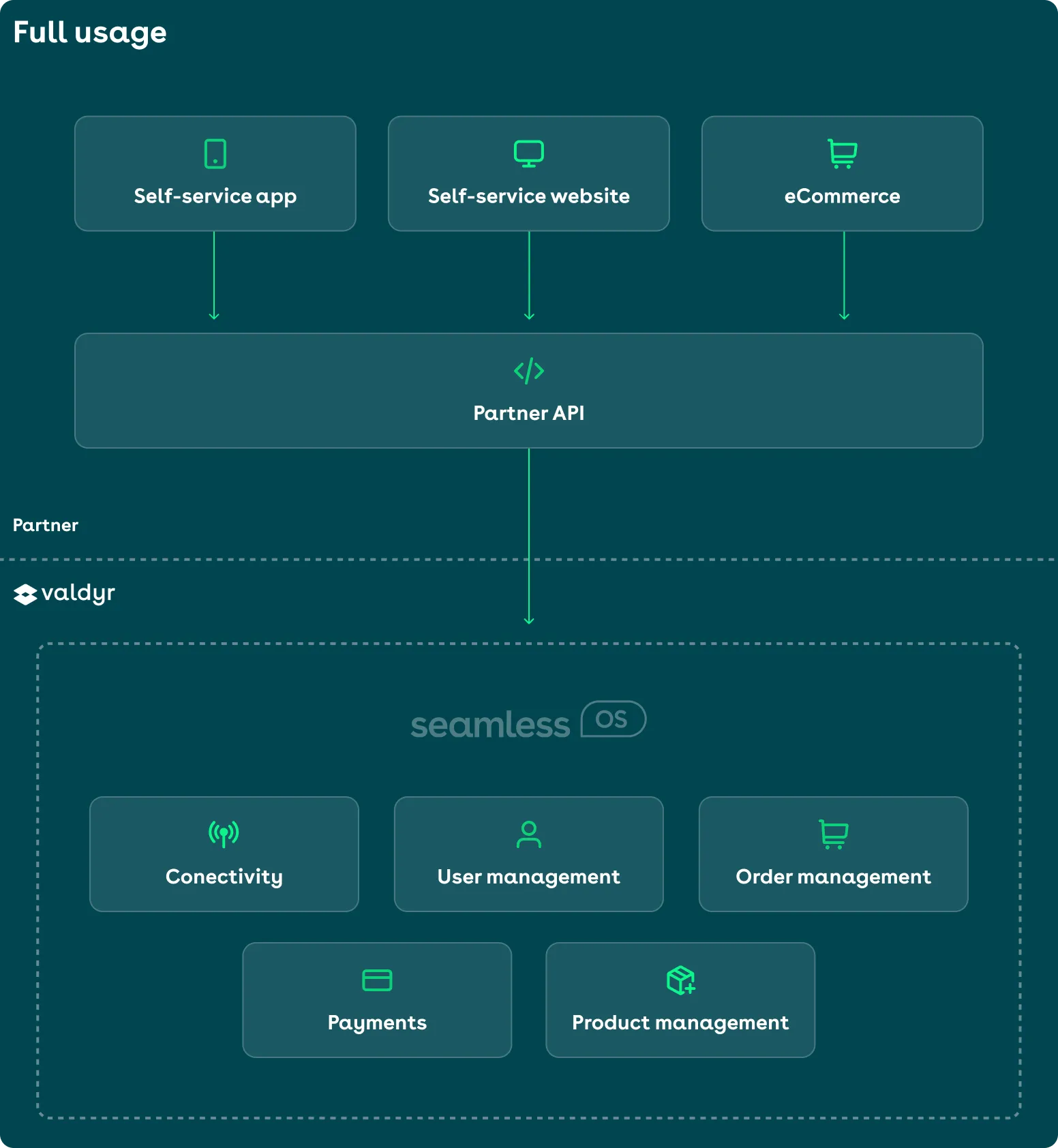
- [Platform](#platform-integrators) — Seamless OS as the platform: you own the end-user flows (shop, checkout, app), and we run payments and user management.
- [Embedded](#embedded-integrators) — Seamless OS for telecom fulfillment: you own the whole customer experience (users, payments, ordering), and we provide the connectivity.
- [Embedded+](#embedded-integrators-1) — Mix-and-match: you own the journey, and we provide connectivity and the other modules that you select.
---
#### Platform integrators
A `platform` integrator does this:
- Builds and maintains its own checkout, landing pages, and self-service apps.
- Owns the end-user experience, but leaves payments and user management to us.
- Connects its own flows to our backend through the Seamless OS APIs.
Your customers are our customers, and your users are our users. Your frontend calls your own
backend, and your backend calls the Seamless OS API with your API key. An API key never
belongs in frontend code — read [Authentication](/api-reference/authentication.md).
Platform integration example:
---
#### Embedded integrators
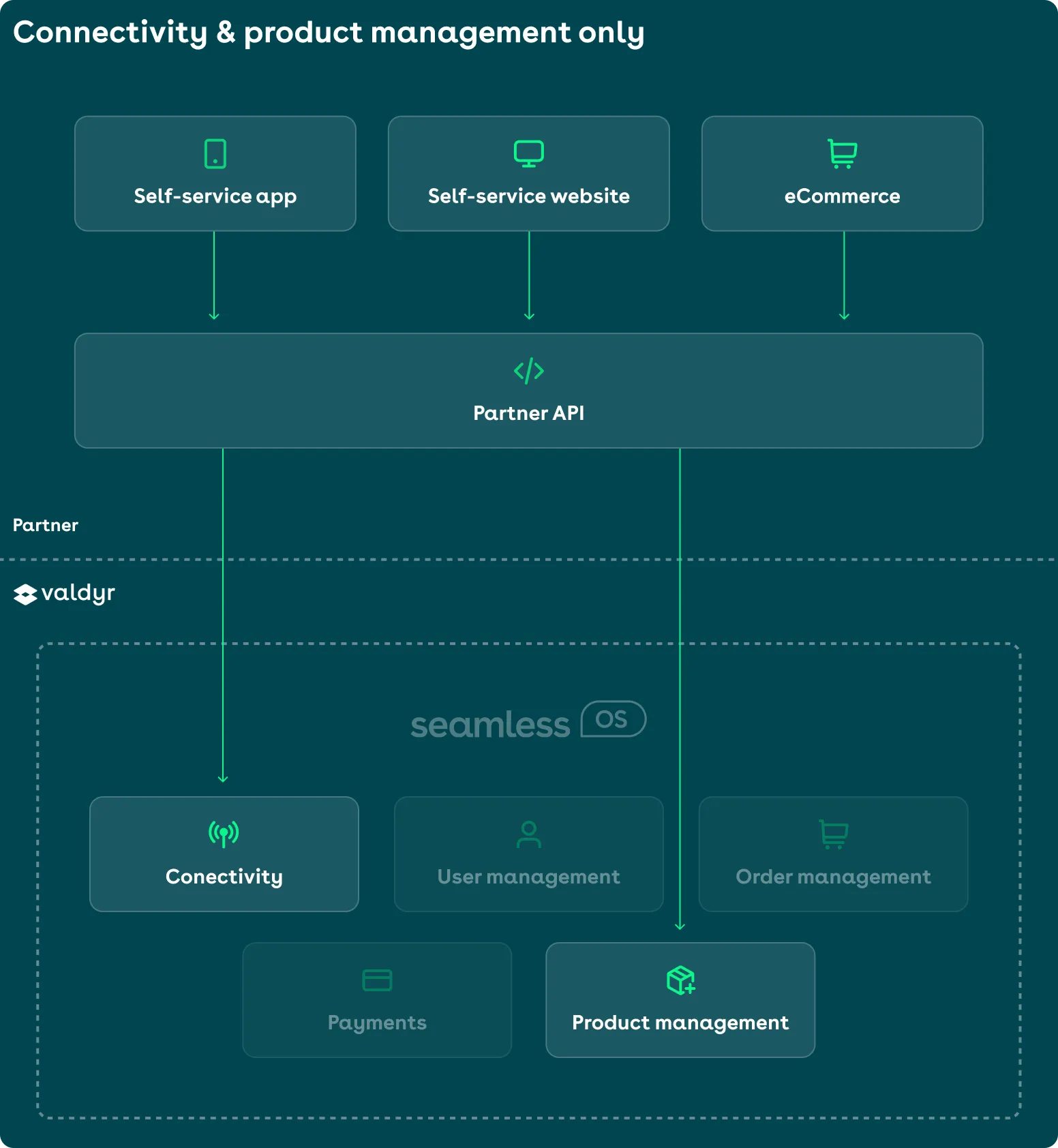
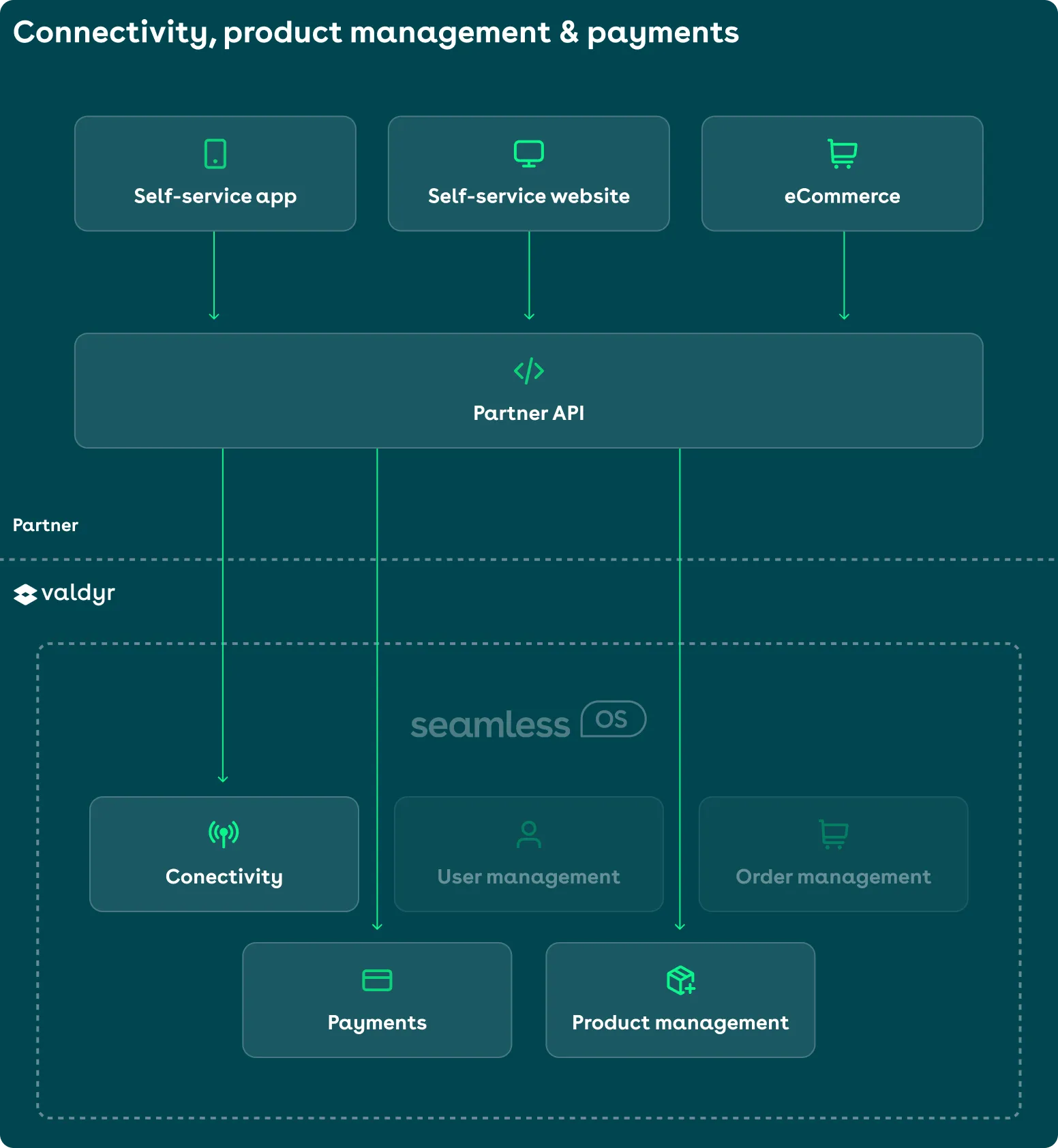
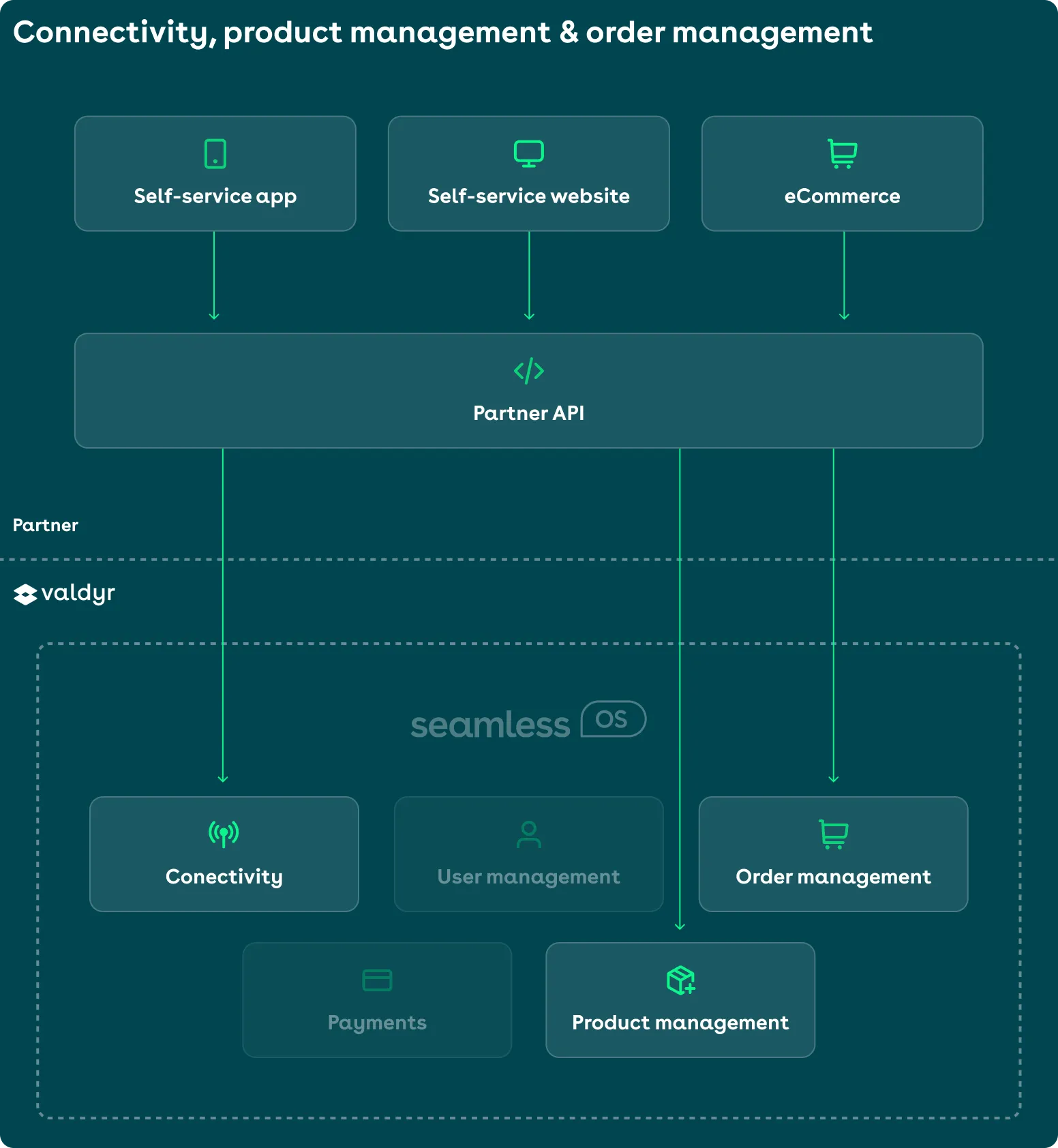
`embedded` and `embedded+` are modular. You select the parts of Seamless OS that you use.
##### Available modules
- **Connectivity** — Subscription management: create, update, delete, upgrade, downgrade, topup, addon, and port-in.
- **User management** — User management: create, update, and delete.
- **Payments** — Our payment APIs take billing and payments off your side.
- **Order management** — Manage customer orders and fulfillment.
- **Product management** — Configure your products and your offers with our product catalog APIs.
##### Example setups
**Connectivity and product management only**
**Connectivity, product management, and payments**
**Connectivity, product management, and order management**
#### Embedded+ integrators
`embedded+` gives you the most control. You own the whole customer journey, and you select the
parts that we run for you.
This is the **mix-and-match integration**. Select connectivity, payments, order management,
product management, or any combination of them.
#### Next steps
- [Get started](/api-reference/get-started.md) — Place your first order with the Seamless OS API.
## Guides
### Place an order
Canonical URL: https://docs.valdyr.tech/developer-guide/use-cases/place-an-order
Orders are the API's shopping cart. You create a draft order, configure it step by step with line items and customer details, price it, and submit it for fulfillment. Until submission, everything is editable — nothing is provisioned and nothing is charged.
This guide takes you through one complete integration. A US consumer, Jane Smith, orders a new
mobile subscription with a new phone number. The subscription is delivered as an eSIM to her
iPhone.
On the way, the guide covers every decision that you meet. An existing customer or a new one.
The pre-order validation tools. The price calculation, the submission requirements, and
cancellation.
#### Prerequisites
You need all of these before you start:
- **API credentials**: Every request carries both an `Authorization: Bearer` access token and an `X-API-Key` header
- **Product offerings**: At least one `AVAILABLE` product offering to sell — see [Product Management](/developer-guide/use-cases/product-management.md)
- **Payment integration**: If your orders require payment, a way to run payment sessions — see [Payment Processing](/developer-guide/use-cases/payment-processing.md)
#### Overview
**1. Choose a product offering**
List product offerings and pick the plan the customer is buying.
**2. Verify customer input with the order tools**
Validate the address, read the network coverage, and make sure that the device supports an eSIM.
Do all three before you build the order.
**3. Create a draft order**
Start an order for an existing customer or create the customer together with the order.
**4. Add a subscription line item**
Attach the product offering, subscriber details, and SIM configuration.
**5. Review the validation state**
Fetch the order and resolve any missing fields or validation errors.
**6. Read the price**
Read the exact total, including jurisdiction-level US taxes, before asking the customer to pay.
**7. Meet the requirements and submit**
Complete payment, payment profile, or signing requirements, then submit the order.
**8. Track the order to completion**
Watch the order state until the subscription is created and activated.
#### The order lifecycle
An order's `state` tells you exactly what you can do with it:
| State | Meaning |
| ------------------ | ------------------------------------------------------------------------------------------------------- |
| `PENDING` | Draft (cart) state. The order can be modified, priced, and submitted. |
| `PENDING_PAYMENT` | The order is locked and awaiting payment completion. |
| `SUBMITTED` | You submitted the order for processing. |
| `PENDING_APPROVAL` | The order needs admin or manager approval through `POST /orders/{orderId}/approve` before it continues. |
| `PROCESSING` | The order is in fulfillment. |
| `COMPLETED` | The order was successfully fulfilled. |
| `CANCELLED` | The order was canceled before completion. |
| `EXPIRED` | The order expired due to inactivity. |
| `FAILED` | Order fulfillment failed. |
> **Note**
>
> A draft order expires. Every order carries an `expiresAt` timestamp, and each update moves it
> forward. A cart that nobody touches goes to `EXPIRED`.
#### Step-by-step implementation
> **Info**
>
> Example responses in this guide are trimmed to the fields relevant to each step. The API always
> returns the complete object.
##### Step 1: Choose a product offering
List the product offerings available to your customer type. The `productOfferingId` you pick here is what you attach to the order's line item. Filter by `types=SUBSCRIPTION` to only see plans that create a mobile subscription.
```bash
curl -X GET "{BASE_URL}/product-offerings?customerType=CONSUMER&types=SUBSCRIPTION" \
-H "Authorization: Bearer YOUR_ACCESS_TOKEN" \
-H "X-API-Key: YOUR_API_KEY"
```
Jane picks the 10 GB plan:
```json
{
"items": [
{
"productOfferingId": "3f2504e0-4f89-41d3-9a0c-0305e82c3301",
"status": "AVAILABLE",
"name": "Seamless 10GB",
"description": "10GB of high-speed data with unlimited calls and texts",
"customerType": "CONSUMER",
"product": {
"productId": "9b2f80c4-6a1d-4e3b-8c5f-7d9e0a1b2c3d",
"internalName": "seamless_cell_10gb_us",
"type": "SUBSCRIPTION",
"category": "PRODUCT_CATEGORY_SUBSCRIPTION_CELL",
"networkProviderId": "tmobile-us",
"features": {
"dataMb": 10240,
"includedCallSeconds": 3600,
"includedSms": 500
}
},
"price": {
"netPriceMinor": 2999,
"currency": "USD",
"priceType": "RECURRING",
"billingCycle": {
"period": "MONTHLY",
"interval": 1
},
"standardDiscount": { "amountMinor": 500 },
"bindingContract": {
"duration": {
"unit": "MONTHS",
"value": 12
},
"discount": {
"amountMinor": 200
}
},
"customUpfrontPayment": {
"billingCycles": 3,
"discount": {
"amountMinor": 300,
"duration": { "unit": "MONTHS", "value": 3 }
}
},
"currencyOptionsMinor": {
"USD": 2999,
"SEK": 29900
}
}
}
],
"pagination": {
"nextCursor": null
}
}
```
##### Step 2: Verify customer input with the order tools
With the order tools you validate customer input at form time, before it becomes a validation error on the order. All four are stateless `POST` endpoints — call them as often as you like.
###### Validate the service address
In the US, the subscriber's address doubles as the E911 emergency address, so it must be precise. Validate it as soon as the customer types it.
```bash
curl -X POST "{BASE_URL}/tools/validate-address" \
-H "Authorization: Bearer YOUR_ACCESS_TOKEN" \
-H "X-API-Key: YOUR_API_KEY" \
-H "Content-Type: application/json" \
-d '{
"address": {
"street1": "826 Valencia St",
"city": "San Francisco",
"state": "CA",
"zip": "94110",
"country": "US"
}
}'
```
```json
{
"valid": true
}
```
> **Note**
>
> A response can carry a `suggestedAddress` for a valid input, when the network registry holds a
> more exact form of the address. Take that form. The formatting of the network prevents a
> provisioning fault later.
###### Check network coverage
Make sure that the customer gets service at their address. Show them the quality to expect on each technology.
```bash
curl -X POST "{BASE_URL}/tools/check-network-coverage" \
-H "Authorization: Bearer YOUR_ACCESS_TOKEN" \
-H "X-API-Key: YOUR_API_KEY" \
-H "Content-Type: application/json" \
-d '{
"address": {
"street1": "826 Valencia St",
"city": "San Francisco",
"state": "CA",
"zip": "94110",
"country": "US"
}
}'
```
The `coverageLevel` is one of `EXCELLENT`, `GOOD`, `FAIR`, `POOR`, or `NO_COVERAGE`:
```json
{
"address": {
"street1": "826 Valencia St",
"city": "San Francisco",
"state": "CA",
"zip": "94110",
"country": "US"
},
"coverageLevel": "EXCELLENT",
"networkProviderId": "tmobile-us"
}
```
###### Check device eSIM support
Jane wants an eSIM, so look up the IMEI of her phone. The response says whether the device supports an eSIM. Some networks also need the IMEI later, to activate the eSIM, so collect it now.
```bash
curl -X POST "{BASE_URL}/tools/get-device-info" \
-H "Authorization: Bearer YOUR_ACCESS_TOKEN" \
-H "X-API-Key: YOUR_API_KEY" \
-H "Content-Type: application/json" \
-d '{
"imei": "356938035643809"
}'
```
```json
{
"imei": "356938035643809",
"tac": "35693803",
"esim": true,
"manufacturer": "Apple",
"model": "A2653",
"marketingName": "iPhone 15 Pro"
}
```
###### Check porting eligibility (port-ins only)
Jane takes a new number, so this step does not apply to her. If your customer wants to bring
their own number, make sure that the number is portable before you collect the porting
details.
```bash
curl -X POST "{BASE_URL}/tools/check-porting-eligibility" \
-H "Authorization: Bearer YOUR_ACCESS_TOKEN" \
-H "X-API-Key: YOUR_API_KEY" \
-H "Content-Type: application/json" \
-d '{
"msisdn": "+14155550188"
}'
```
```json
{
"msisdn": "+14155550188",
"eligible": true,
"networkProviderId": "att-us"
}
```
##### Step 3: Create a draft order
Every order needs a `customerType` (`CONSUMER` or `BUSINESS`). Everything else can be added later, but the `customer` field is where you make your first real decision:
- **Existing customer** — pass `"customer": { "customerId": "..." }`. The `customerId` accepts
the internal UUID and your own external reference ID. An external reference ID needs the
`rid_` prefix, as in `rid_crm-customer-12345`, so that the API can tell it from a UUID.
- **New customer** — pass the details of the customer. `name` and `customerType` are required.
The API creates the customer as part of order fulfillment. If you also pass a `referenceId`
that a customer already carries, the API takes that customer and creates no duplicate. You
can call this from a flow that does not know whether the customer exists.
The `user` field names the person who uses the services. It follows the same pattern. Pass
`userId` for a returning user, or `name` and `email` to create one.
Jane is new, so we create both the customer and the user with the order:
```bash
curl -X POST "{BASE_URL}/orders" \
-H "Authorization: Bearer YOUR_ACCESS_TOKEN" \
-H "X-API-Key: YOUR_API_KEY" \
-H "Content-Type: application/json" \
-d '{
"customerType": "CONSUMER",
"customer": {
"name": "Jane Smith",
"customerType": "CONSUMER",
"referenceId": "crm-cust-84321",
"contact": {
"email": "jane.smith@example.com",
"msisdn": "+14155550123"
},
"billing": {
"method": "EMAIL_INVOICE",
"email": "jane.smith@example.com",
"currency": "USD",
"address": {
"street1": "826 Valencia St",
"city": "San Francisco",
"state": "CA",
"zip": "94110",
"country": "US"
}
}
},
"user": {
"name": "Jane Smith",
"email": "jane.smith@example.com",
"msisdn": "+14155550123"
},
"billing": {
"name": "Jane Smith",
"email": "jane.smith@example.com",
"address": {
"street1": "826 Valencia St",
"city": "San Francisco",
"state": "CA",
"zip": "94110",
"country": "US"
}
}
}'
```
The response is a draft order in `PENDING` state. Note `newCustomer: true` — the customer record itself is created during fulfillment, so it has no `customerId` yet:
```json
{
"orderId": "296af5b6-f3b3-4128-b307-5ddc9190502f",
"state": "PENDING",
"customer": {
"customerType": "CONSUMER",
"name": "Jane Smith",
"newCustomer": true
},
"user": {
"userId": "c47ac10b-58cc-4372-a567-0e02b2c3d479",
"name": "Jane Smith",
"newUser": true
},
"lineItems": [],
"validation": {
"isValid": false,
"missingFields": ["lineItems"]
},
"requirements": {
"requiresPayment": "REQUIRED",
"requiresPaymentProfile": "NOT_REQUIRED",
"requiresSigning": "NOT_REQUIRED"
},
"createdAt": "2026-07-12T17:00:00Z",
"updatedAt": "2026-07-12T17:00:00Z",
"expiresAt": "2026-07-19T17:00:00Z"
}
```
For an existing customer, the request collapses to:
```json
{
"customerType": "CONSUMER",
"customer": {
"customerId": "b47ac10b-58cc-4372-a567-0e02b2c3d479"
}
}
```
> **Note**
>
> You can also pass initial `lineItems` and a `promoCode` directly in the create request. This guide
> adds line items separately to show the progressive flow, but a single create call with everything
> inline is equally valid.
##### Step 4: Add a subscription line item
Add the plan to the order with `POST /orders/{orderId}/line-items`. A `SUBSCRIPTION` line item requires `type`, a `lineItemId` you choose (unique within the order), and the `productOfferingId`. The `subscriber` and `sim` objects are required eventually — provide them here or fill them in later with an update.
For the phone number, you have three options:
- **Leave `msisdn` empty** to have a number assigned automatically (what Jane does).
- **Pick a number from the number pool** and pass both the `msisdn` and the `leaseToken` you received when leasing it.
- **Port in an existing number** by setting the `msisdn`, `portingRequested: true`, and `porting.details`.
```bash
curl -X POST "{BASE_URL}/orders/296af5b6-f3b3-4128-b307-5ddc9190502f/line-items" \
-H "Authorization: Bearer YOUR_ACCESS_TOKEN" \
-H "X-API-Key: YOUR_API_KEY" \
-H "Content-Type: application/json" \
-d '{
"lineItem": {
"type": "SUBSCRIPTION",
"lineItemId": "line-item-1",
"productOfferingId": "3f2504e0-4f89-41d3-9a0c-0305e82c3301",
"subscriber": {
"name": "Jane Smith",
"email": "jane.smith@example.com",
"address": {
"street1": "826 Valencia St",
"city": "San Francisco",
"state": "CA",
"zip": "94110",
"country": "US"
}
},
"sim": {
"esim": true,
"imei": "356938035643809"
}
}
}'
```
The response echoes the line item:
```json
{
"type": "SUBSCRIPTION",
"lineItemId": "line-item-1",
"productOfferingId": "3f2504e0-4f89-41d3-9a0c-0305e82c3301",
"subscriber": {
"name": "Jane Smith",
"email": "jane.smith@example.com",
"address": {
"street1": "826 Valencia St",
"city": "San Francisco",
"state": "CA",
"zip": "94110",
"country": "US"
}
},
"sim": {
"esim": true,
"imei": "356938035643809"
}
}
```
A line item for a port-in looks like this instead. US porting details require `firstName`,
`lastName`, and `address`. With `tempNumber: true` the customer gets a temporary number to use
until the port completes.
```json
{
"type": "SUBSCRIPTION",
"lineItemId": "line-item-1",
"productOfferingId": "3f2504e0-4f89-41d3-9a0c-0305e82c3301",
"msisdn": "+14155550188",
"portingRequested": true,
"tempNumber": true,
"porting": {
"details": {
"firstName": "Jane",
"lastName": "Smith",
"accountNumber": "7724318842",
"passcode": "4821",
"address": {
"street1": "826 Valencia St",
"city": "San Francisco",
"state": "CA",
"zip": "94110",
"country": "US"
}
}
},
"subscriber": {
"name": "Jane Smith",
"email": "jane.smith@example.com"
},
"sim": {
"esim": true,
"imei": "356938035643809"
}
}
```
To change a line item while the order is still `PENDING`, use `PUT
/orders/{orderId}/line-items/{lineItemId}`. To remove one, use `DELETE
/orders/{orderId}/line-items/{lineItemId}`.
> **Warning**
>
> If the order carries anything to ship, add a `shipping` object with a recipient `name` and
> `address`. A physical SIM (`"esim": false`) and hardware both ship. Jane takes an eSIM, so this
> order needs no `shipping` object.
##### Step 5: Review the order's validation state
Line items are returned as part of the order, so `GET /orders/{orderId}` is your single read for everything: line items, validation, requirements, and pricing.
```bash
curl -X GET "{BASE_URL}/orders/296af5b6-f3b3-4128-b307-5ddc9190502f" \
-H "Authorization: Bearer YOUR_ACCESS_TOKEN" \
-H "X-API-Key: YOUR_API_KEY"
```
Jane's order is now complete and ready to submit:
```json
{
"orderId": "296af5b6-f3b3-4128-b307-5ddc9190502f",
"state": "PENDING",
"customer": {
"customerType": "CONSUMER",
"name": "Jane Smith",
"newCustomer": true
},
"lineItems": [
{
"type": "SUBSCRIPTION",
"lineItemId": "line-item-1",
"productOfferingId": "3f2504e0-4f89-41d3-9a0c-0305e82c3301",
"sim": {
"esim": true,
"imei": "356938035643809"
}
}
],
"validation": {
"isValid": true
},
"requirements": {
"requiresPayment": "REQUIRED",
"requiresPaymentProfile": "NOT_REQUIRED",
"requiresSigning": "NOT_REQUIRED"
},
"createdAt": "2026-07-12T17:00:00Z",
"updatedAt": "2026-07-12T17:04:00Z",
"expiresAt": "2026-07-19T17:04:00Z"
}
```
When something is missing, `validation` tells you exactly what, at both the order level and per line item:
```json
{
"isValid": false,
"missingFields": ["billing.address"],
"lineItemValidation": [
{
"lineItemId": "line-item-1",
"isValid": false,
"missingFields": ["subscriber.name", "sim.iccid"]
}
]
}
```
Fix missing fields with `PUT /orders/{orderId}` (order details) and `PUT /orders/{orderId}/line-items/{lineItemId}` (line item details), then re-fetch.
##### Step 6: Read the price
The platform calculates the price again each time the order changes, and returns it as `pricing`
on the order. Read the order to get the exact amount due before you collect the payment. On a US
order the tax is calculated per jurisdiction, from the addresses on the order. The address fields
in Step 5 must be correct before this number means anything.
```bash
curl "{BASE_URL}/orders/296af5b6-f3b3-4128-b307-5ddc9190502f" \
-H "Authorization: Bearer YOUR_ACCESS_TOKEN" \
-H "X-API-Key: YOUR_API_KEY"
```
```json
{
"pricing": {
"subtotalMinor": 2999,
"taxAmountMinor": 450,
"totalMinor": 2749,
"taxIncluded": false,
"currency": "USD",
"recurringCosts": {
"subtotalMinor": 2299,
"totalMinor": 2299,
"taxIncluded": false,
"billingCycle": {
"period": "MONTHLY",
"interval": 1
}
},
"lineItems": [
{
"lineItemId": "line-item-1",
"description": "Seamless 10GB",
"subtotalMinor": 2999,
"discounts": [
{ "name": "Standard discount", "amountMinor": 500 },
{ "name": "12-month commitment", "amountMinor": 200 }
],
"totalDiscountsMinor": 700,
"taxAmountMinor": 450,
"taxIncluded": false,
"totalMinor": 2749,
"recurringAmountMinor": 2299
}
],
"calculatedAt": "2026-07-12T17:05:00Z"
}
}
```
This is where the discounts of the offering turn into money. The catalog listed Seamless 10GB
at `2999` in Step 1, and it still does. Here that `2999` is the `subtotalMinor`. The
`standardDiscount` and the `bindingContract.discount` of the offering come off as
`totalDiscountsMinor`. The platform calculates the tax on what is left, and `totalMinor` is the
amount to charge.
Three more discounts apply at this same point. A promo code on the order. A price list
assigned to the customer. A discount on the subscription.
> **Note**
>
> The platform cannot price an invalid order. If this operation returns an error, get the order and
> correct the `validation` problems first.
Amounts are integers in the minor units of `currency`, so `2749` is $27.49. The `subtotalMinor`
field gives the amount before discounts and tax. The platform reports the discounts of each line
item, so the total is `2999`, less the `700` of `totalDiscountsMinor`, plus the `450` of tax.
In the US, `recurringCosts` does not include `taxAmountMinor`. The platform calculates the tax on
a recurring charge when it makes the invoice. It does not estimate that tax here.
##### Step 7: Meet the submission requirements and submit
The `requirements` object of the order tells you what must happen before you submit it. Each
requirement is `NOT_REQUIRED`, `OPTIONAL`, or `REQUIRED`. What you get depends on the platform
configuration and on the contents of the order. A prepaid order of free items alone can need
nothing. A postpaid order normally requires a card capture or a signature.
| Requirement | When `REQUIRED` | Provide on submit |
| ------------------------ | ---------------------------------------------------- | ---------------------------------------------------------------------------------------- |
| `requiresPayment` | The order total must be paid before fulfillment | an `externalPayment` reference, or pay through a payment session — no submit call needed |
| `requiresPaymentProfile` | A stored payment method is needed for future billing | `paymentProfileSessionId` from a completed profile session |
| `requiresSigning` | The customer must digitally sign the order | `signingSessionId` from a completed signing session |
[Payment processing](/developer-guide/use-cases/payment-processing.md) covers how to create and
complete a payment session and a payment profile session. The [API reference](/api-reference.md)
documents a signing session.
An order that pays through a payment session or a payment link moves to `PENDING_PAYMENT`. The
platform submits it as soon as the payment succeeds. If the customer paid outside the platform,
pass an `externalPayment` object on submit, with a `reference` in it. The order then counts as
paid.
Jane's order has `requiresPayment: "REQUIRED"` and she pays through a hosted payment session, so there is no submit call to make. Once her payment succeeds, the platform submits the order — poll it until it leaves `PENDING_PAYMENT`:
```bash
curl "{BASE_URL}/orders/296af5b6-f3b3-4128-b307-5ddc9190502f" \
-H "Authorization: Bearer YOUR_ACCESS_TOKEN" \
-H "X-API-Key: YOUR_API_KEY"
```
```json
{
"orderId": "296af5b6-f3b3-4128-b307-5ddc9190502f",
"state": "SUBMITTED",
"paymentSessionId": "a1b2c3d4-e5f6-7890-1234-56789abcdef0",
"submittedAt": "2026-07-12T17:08:00Z"
}
```
The submit endpoint accepts an order in the `PENDING` state only, and a payment can start on a
complete order only. A payment session and a payment link run the same validation as a submit,
so an order in `PENDING_PAYMENT` is known to be submittable already. Call submit yourself when
the requirements are met outside a payment session: an `externalPayment` reference, a payment
profile session, or a signing session.
##### Step 8: Track the order to completion
After the submit, the order moves through `SUBMITTED` → `PROCESSING` → `COMPLETED`. It can
also go to `PENDING_APPROVAL` or `FAILED` on the way. Poll `GET /orders/{orderId}` for the
state. To poll nothing, subscribe to the `order.statusChanged` webhook event.
```bash
curl -X GET "{BASE_URL}/orders/296af5b6-f3b3-4128-b307-5ddc9190502f" \
-H "Authorization: Bearer YOUR_ACCESS_TOKEN" \
-H "X-API-Key: YOUR_API_KEY"
```
On completion, `createdEntities` maps each line item to what it produced — Jane's subscription, with her newly assigned number:
```json
{
"orderId": "296af5b6-f3b3-4128-b307-5ddc9190502f",
"state": "COMPLETED",
"customer": {
"customerId": "b47ac10b-58cc-4372-a567-0e02b2c3d479",
"customerType": "CONSUMER",
"name": "Jane Smith",
"newCustomer": true
},
"lineItems": [
{
"type": "SUBSCRIPTION",
"lineItemId": "line-item-1",
"productOfferingId": "3f2504e0-4f89-41d3-9a0c-0305e82c3301"
}
],
"createdEntities": {
"subscriptions": [
{
"subscriptionId": "d5f7a2b1-3c4e-4f5a-8b9c-0d1e2f3a4b5c",
"status": "ACTIVATED",
"msisdn": "+14155550111",
"display": "(415) 555-0111",
"createdByLineItem": "line-item-1"
}
]
},
"submittedAt": "2026-07-12T17:08:00Z",
"completedAt": "2026-07-12T17:11:00Z"
}
```
> **Warning**
>
> Read `state` on the order before you tell the customer that the service is live. An order fulfills
> all its line items or none of them.
##### Canceling a draft order
If the customer abandons the purchase, cancel the order. The cancel releases the resources that
the order reserved. Only an order in the `PENDING` state can be canceled. The optional body
accepts `metadata` for your own bookkeeping. An abandoned order that nobody cancels expires by
itself at its `expiresAt`.
```bash
curl -X POST "{BASE_URL}/orders/296af5b6-f3b3-4128-b307-5ddc9190502f/cancel" \
-H "Authorization: Bearer YOUR_ACCESS_TOKEN" \
-H "X-API-Key: YOUR_API_KEY" \
-H "Content-Type: application/json" \
-d '{
"metadata": {
"reason": "customer abandoned checkout"
}
}'
```
```json
{
"orderId": "296af5b6-f3b3-4128-b307-5ddc9190502f",
"state": "CANCELLED"
}
```
#### Error handling
All order endpoints return a consistent error body with a human-readable `message`, a machine-readable `code`, optional per-field `details`, and a `hint` for resolution:
```json
{
"message": "Order cannot be submitted",
"code": "failed_precondition",
"details": [
{
"message": "A completed payment session is required to submit this order",
"code": "missing_payment_session",
"property": "paymentSessionId"
}
],
"hint": "Fetch the order to review its validation state and requirements, then retry."
}
```
Your order flow must handle these statuses:
| Status | When it happens |
| ------ | ----------------------------------------------------------------------------------------------------------------------------------------------------------------------- |
| `400` | Malformed request — inspect `details` for the offending property. |
| `401` | Missing or expired access token. |
| `403` | The API key or token does not grant access to this resource. |
| `404` | Unknown `orderId` or `lineItemId`. |
| `409` | The order is not in a state that allows the operation — for example, modifying or canceling an order after submission. |
| `412` | Submission preconditions are not met — the order is invalid or a `REQUIRED` requirement is unfulfilled. Re-fetch the order and inspect `validation` and `requirements`. |
| `429` | Rate limited — back off and retry. |
| `500` | Unexpected server error — safe to retry. |
Every order endpoint that changes something accepts an `X-Idempotency-Key` header. Send one
unique key per logical operation, and a retry becomes safe. The same key on the same request
returns the original result. The same key on a modified request gets a `409`. A key expires
after 24 hours.
#### Next steps
- [Order fulfillment](/developer-guide/use-cases/order-fulfillment.md) — Follow the order after submission: provisioning, activation, and fulfillment monitoring
- [Payment processing](/developer-guide/use-cases/payment-processing.md) — Create payment sessions and payment profiles to satisfy order requirements
### Order fulfillment
Canonical URL: https://docs.valdyr.tech/developer-guide/use-cases/order-fulfillment
Automate the complete order fulfillment process from order submission to service activation. This use case covers the workflows needed to provision telecommunications services, handle payments, and activate subscriptions for customers.
#### Prerequisites
You need all of these before you start:
- **Order management**: Understanding of order creation and submission flows
- **Payment processing**: Integration with payment collection systems
- **Service provisioning**: Access to subscription and license management endpoints
- **Inventory management**: Phone number inventory for mobile services
#### Overview
Order fulfillment encompasses the complete process after order creation:
1. Submit orders for processing
2. Handle payment collection and validation
3. Provision services and create subscriptions
4. Activate services and manage inventory
5. Monitor fulfillment status and handle exceptions
#### Step-by-step implementation
##### Step 1: Submit Order for Fulfillment
Transform draft orders into submitted orders ready for processing:
```bash
# Submit order for fulfillment
curl -X POST "{BASE_URL}/orders/{orderId}/submit" \
-H "Authorization: Bearer YOUR_ACCESS_TOKEN" \
-H "X-API-Key: YOUR_API_KEY" \
-H "Content-Type: application/json"
# Monitor order status
curl -X GET "{BASE_URL}/orders/{orderId}" \
-H "Authorization: Bearer YOUR_ACCESS_TOKEN" \
-H "X-API-Key: YOUR_API_KEY" \
-H "Content-Type: application/json"
```
##### Step 2: Handle payment collection
Create payment sessions to collect payment for orders:
```bash
# Create payment session
curl -X POST "{BASE_URL}/payment-sessions" \
-H "Authorization: Bearer YOUR_ACCESS_TOKEN" \
-H "X-API-Key: YOUR_API_KEY" \
-H "Content-Type: application/json" \
-d '{
"orderId": "296af5b6-f3b3-4128-b307-5ddc9190502f",
"paymentProvider": "STRIPE",
"hosted": true,
"returnUrl": "https://yourstore.com/success",
"cancelUrl": "https://yourstore.com/cancel"
}'
# Check payment status
curl -X GET "{BASE_URL}/payment-sessions/{paymentSessionId}" \
-H "Authorization: Bearer YOUR_ACCESS_TOKEN" \
-H "X-API-Key: YOUR_API_KEY" \
-H "Content-Type: application/json"
```
##### Step 3: Reserve phone numbers (for mobile services)
Reserve phone numbers from inventory before service activation:
```bash
# Lease phone numbers
curl -X POST "{BASE_URL}/inventory/lease-numbers" \
-H "Authorization: Bearer YOUR_ACCESS_TOKEN" \
-H "X-API-Key: YOUR_API_KEY" \
-H "Content-Type: application/json" \
-d '{
"quantity": 1,
"region": "SE",
"numberType": "mobile",
"preferences": {
"areaCode": "08"
}
}'
```
##### Step 4: Activate subscriptions
Activate subscription services after successful payment:
```bash
# List subscriptions for order
curl -X GET "{BASE_URL}/subscriptions?orderId={orderId}" \
-H "Authorization: Bearer YOUR_ACCESS_TOKEN" \
-H "X-API-Key: YOUR_API_KEY" \
-H "Content-Type: application/json"
# Activate subscription
curl -X POST "{BASE_URL}/subscriptions/{subscriptionId}/activate" \
-H "Authorization: Bearer YOUR_ACCESS_TOKEN" \
-H "X-API-Key: YOUR_API_KEY" \
-H "Content-Type: application/json" \
-d '{
"activationDate": "2024-01-15T10:00:00Z"
}'
```
#### Error handling and retry logic
Handle common fulfillment scenarios with proper error handling:
```javascript
// Comprehensive error handling for fulfillment
const handleFulfillmentError = async (error, orderId, step) => {
console.error(`Fulfillment error at step ${step}:`, error.message);
const errorHandling = {
payment_failed: {
action: 'retry_payment',
message: 'Payment collection failed - customer needs to retry payment',
},
inventory_unavailable: {
action: 'wait_inventory',
message: 'Phone numbers unavailable - waiting for inventory replenishment',
},
activation_failed: {
action: 'manual_review',
message: 'Service activation failed - requires manual intervention',
},
network_error: {
action: 'retry_with_backoff',
message: 'Network connectivity issue - will retry automatically',
},
};
const handling = errorHandling[error.code] || {
action: 'escalate',
message: 'Unknown error - escalating to support',
};
// Log error for monitoring
await logFulfillmentError(orderId, step, error, handling);
// Take appropriate action
switch (handling.action) {
case 'retry_payment':
return await createPaymentSession(orderId);
case 'wait_inventory':
return await retryWithBackoff(() => processStep(orderId, step));
case 'retry_with_backoff':
return await retryWithBackoff(() => processStep(orderId, step));
case 'manual_review':
return await escalateToSupport(orderId, error);
default:
throw error;
}
};
// Retry with exponential backoff
const retryWithBackoff = async (operation, maxRetries = 3) => {
for (let attempt = 1; attempt <= maxRetries; attempt++) {
try {
return await operation();
} catch (error) {
if (attempt === maxRetries) throw error;
const delay = Math.pow(2, attempt) * 1000; // Exponential backoff
console.log(`Retry attempt ${attempt} failed, waiting ${delay}ms`);
await new Promise((resolve) => setTimeout(resolve, delay));
}
}
};
```
#### Webhook Integration
Set up webhooks to handle asynchronous fulfillment events:
```javascript
// Webhook handler for fulfillment events
const handleFulfillmentWebhook = (event) => {
switch (event.type) {
case 'order.submitted':
console.log('Order submitted:', event.data.orderId);
// Start fulfillment process
return initiateFulfillment(event.data.orderId);
case 'payment.completed':
console.log('Payment completed:', event.data.paymentId);
// Proceed with service activation
return processServiceActivation(event.data.orderId);
case 'subscription.activated':
console.log('Subscription activated:', event.data.subscriptionId);
// Send welcome notifications
return sendActivationNotification(event.data);
case 'fulfillment.completed':
console.log('Fulfillment completed:', event.data.orderId);
// Final cleanup and customer notification
return completeFulfillmentNotification(event.data);
case 'fulfillment.failed':
console.error('Fulfillment failed:', event.data);
// Handle fulfillment failure
return handleFulfillmentFailure(event.data);
default:
console.log('Unknown webhook event:', event.type);
}
};
// Express webhook endpoint example
app.post('/webhooks/connect', express.raw({ type: 'application/json' }), (req, res) => {
const event = JSON.parse(req.body);
try {
handleFulfillmentWebhook(event);
res.status(200).send('OK');
} catch (error) {
console.error('Webhook handling failed:', error);
res.status(500).send('Internal Server Error');
}
});
```
#### Complete fulfillment workflow
Put the steps together in one fulfillment orchestrator:
```javascript
// Complete fulfillment orchestrator
class OrderFulfillmentOrchestrator {
async processOrder(orderId) {
try {
console.log(`Starting fulfillment for order: ${orderId}`);
// Step 1: Submit order
const submittedOrder = await this.submitOrder(orderId);
// Step 2: Handle payment
const paymentSession = await this.createPaymentSession(orderId);
await this.waitForPaymentCompletion(paymentSession.paymentSessionId);
// Step 3: Reserve resources
const resources = await this.reserveResources(submittedOrder);
// Step 4: Activate services
const subscriptions = await this.activateServices(orderId);
// Step 5: Complete fulfillment
await this.completeFulfillment(orderId, subscriptions);
console.log(`Fulfillment completed successfully for order: ${orderId}`);
return { success: true, subscriptions };
} catch (error) {
console.error(`Fulfillment failed for order ${orderId}:`, error);
await this.handleFulfillmentError(error, orderId);
throw error;
}
}
async waitForPaymentCompletion(paymentSessionId, timeout = 300000) {
const startTime = Date.now();
while (Date.now() - startTime < timeout) {
const session = await this.checkPaymentStatus(paymentSessionId);
if (session.status === 'completed') {
return session;
} else if (session.status === 'failed' || session.status === 'cancelled') {
throw new Error(`Payment ${session.status}: ${session.failureReason}`);
}
// Poll every 5 seconds
await new Promise((resolve) => setTimeout(resolve, 5000));
}
throw new Error('Payment completion timeout');
}
async reserveResources(order) {
const resources = {};
// Reserve phone numbers for mobile services
for (const lineItem of order.lineItems) {
if (lineItem.productType === 'mobile') {
const phoneNumber = await this.leasePhoneNumbers({
quantity: 1,
region: order.customer.region,
});
resources[lineItem.lineItemId] = phoneNumber;
}
}
return resources;
}
}
// Usage example
const fulfillmentOrchestrator = new OrderFulfillmentOrchestrator();
// Process order fulfillment
fulfillmentOrchestrator
.processOrder('296af5b6-f3b3-4128-b307-5ddc9190502fe4567-e89b-12d3-a456-426614174000')
.then((result) => console.log('Fulfillment successful:', result))
.catch((error) => console.error('Fulfillment failed:', error));
```
#### Best practices
##### Fulfillment monitoring
- Log every fulfillment step.
- Set up alerts for failed fulfillments or unusual delays
- Track fulfillment metrics (completion time, success rate, failure reasons)
- Use correlation IDs to trace orders through the entire process
##### Resource management
- Reserve inventory (phone numbers) early in the process
- Implement inventory validation before order submission
- Handle inventory exhaustion gracefully with customer communication
- Clean up reserved resources if fulfillment fails
##### Payment handling
- Validate payment completion before service activation
- Implement payment retry mechanisms for failed transactions
- Handle partial payments appropriately
- Secure payment session data and comply with PCI standards
#### Next steps
After implementing order fulfillment:
- [Customer self-service](/developer-guide/use-cases/self-management.md) — A customer manages their own subscriptions and services
- [Payment processing](/developer-guide/use-cases/payment-processing.md) — Set up recurring billing and ongoing payment management
#### Common questions
**Q: How long does typical fulfillment take?**
A: The fulfillment time depends on the service type. A mobile service activates in 15 to 30 minutes. A specialized service can take longer.
**Q: What happens if payment fails during fulfillment?**
A: The order remains in a pending state. Payment sessions can be retried, or new payment methods can be collected.
**Q: Can I customize the fulfillment workflow?**
A: Yes, you can implement custom fulfillment logic using webhooks and the various API endpoints to match your business requirements.
### Orders and payments
Canonical URL: https://docs.valdyr.tech/developer-guide/use-cases/orders-and-payments
An order and a payment work together on every purchase. The order records what the customer
buys. The payment satisfies the payment requirement of that order, and the order cannot be
submitted before it does. You collect the payment through your own provider, or through a
managed payment session.
#### Core concept
Every order has **requirements** that must be met before submission:
- `requiresPayment`: Whether the order needs payment before it can be fulfilled
- `requiresPaymentProfile`: Whether a stored payment method is needed for future billing
- `requiresSigning`: Whether the order requires a digital signature
Each requirement is `NOT_REQUIRED`, `OPTIONAL`, or `REQUIRED`. Read them after you calculate
the price. They tell you the correct submission flow. An order with a total of zero can need
no payment at all. Read the requirements, and do not assume that a payment is due.
> **Note**
>
> The requirements are per order. One order can need a payment where the order before it did not.
#### Quick path
**1. Create order**
Create an order and add line items for the products the customer wants to buy.
**2. Read price**
Read the taxes and totals off the order to determine the amount due.
**3. Check requirements**
Inspect the order requirements to determine if payment, a payment profile, or signing is needed.
**4. Collect payment**
Collect payment through your own provider or use a managed payment session.
**5. Submit order**
Submit the order with the external payment reference to begin fulfillment. Orders paying through
a managed payment session or payment link are submitted automatically once the payment succeeds.
#### Choosing a payment approach
You have three ways to collect a payment. Use your own payment infrastructure, or use a
managed payment session.
- **Your own provider (Recommended)** — Collect the payment on your own payment stack, such as Stripe, Adyen, or Braintree. Pass the reference when you submit the order. You keep full control of the checkout, the payment methods, and the provider relationship.
- **Hosted payment page** — Use a managed payment session with `hosted: true`. The response carries a checkout URL that the provider hosts. Send the customer there. You build no payment interface.
- **Embedded payment widget** — Use a managed payment session with `hosted: false`. The response carries the provider credentials. Render the payment form in your own interface with the SDK of the provider.
##### When to use each approach
| Approach | Best for |
| ----------------------- | ---------------------------------------------------------------------------------------------------- |
| **Your own provider** | A team that already runs a payment infrastructure and wants control of the provider and the checkout |
| **Hosted payment page** | A fast integration that needs no payment components of its own |
| **Embedded widget** | A team that wants a managed payment backend, but its own payment interface |
> **Info**
>
> Most integrations collect the payment on their own provider. That way one payment relationship
> covers everything, and the checkout stays under their control.
#### 1. Create an order and add line items
Create an order for a customer and include the products they want to purchase.
```bash
curl -X POST "{BASE_URL}/orders" \
-H "X-API-Key: $API_KEY" \
-H "Content-Type: application/json" \
-d '{
"customer": {
"customerId": "123e4567-e89b-12d3-a456-426614174000"
},
"lineItems": [
{
"type": "SUBSCRIPTION",
"lineItemId": "sub-1",
"productOfferingId": "offering-id",
"subscriber": {
"name": "Jane Doe",
"email": "jane@example.com"
}
}
]
}'
```
You can also add line items to an existing order separately:
```bash
curl -X POST "{BASE_URL}/orders/{orderId}/line-items" \
-H "X-API-Key: $API_KEY" \
-H "Content-Type: application/json" \
-d '{
"type": "ADDON",
"lineItemId": "addon-1",
"productOfferingId": "addon-offering-id",
"parentLineItemId": "sub-1"
}'
```
See [Create Order](/api-reference/orders.md#tag/orders/POST/orders) and [Add Line Items](/api-reference/orders.md#tag/orders/POST/orders/{orderId}/line-items)
#### 2. Read the price
Taxes and totals are recalculated whenever the order changes, so read them off the order before collecting payment.
```bash
curl "{BASE_URL}/orders/{orderId}" \
-H "X-API-Key: $API_KEY"
```
See [Get Order](/api-reference/orders.md#tag/orders/GET/orders/{orderId})
#### 3. Check order requirements
After calculating the price, inspect the order to determine what is needed before submission.
```bash
# Fetch the order and inspect the requirements object
curl "{BASE_URL}/orders/{orderId}" \
-H "X-API-Key: $API_KEY"
```
See [Get Order](/api-reference/orders.md#tag/orders/GET/orders/{orderId})
#### 4. Collect payment
Once you know the order requires payment, choose one of the following approaches.
##### Option A: Your own payment provider (recommended)
Collect the payment through your own payment provider: Stripe, Adyen, Braintree, or another
one. You keep full control of the checkout, and you keep the payment infrastructure that you
already run. This approach adds no dependency.
After collecting payment on your side, submit the order with an `externalPayment` reference:
```bash
# Step 1: Collect payment through your own provider
# (This happens in your existing payment flow)
# Step 2: Submit the order with the payment reference
curl -X POST "{BASE_URL}/orders/{orderId}/submit" \
-H "X-API-Key: $API_KEY" \
-H "Content-Type: application/json" \
-d '{
"externalPayment": {
"reference": "pi_3ABC123def456",
"receiptDescription": "Subscription activation payment",
"receiptUrl": "https://yourapp.com/receipts/abc123"
}
}'
```
The `externalPayment` object accepts:
| Field | Required | Description |
| -------------------- | -------- | ---------------------------------------------------------- |
| `reference` | Yes | The payment reference or transaction ID from your provider |
| `receiptDescription` | No | A human-readable description of the payment |
| `receiptUrl` | No | A URL to the payment receipt or confirmation page |
> **Note**
>
> When using external payments, you are responsible for collecting the correct amount and handling
> refunds through your payment provider.
See [Submit Order](/api-reference/orders.md#tag/orders/POST/orders/{orderId}/submit)
##### Option B: Hosted payment page
If you prefer a managed payment flow, create a payment session with `hosted: true` to get a checkout URL. Redirect the customer to the provider-hosted payment page.
```bash
curl -X POST "{BASE_URL}/payment-sessions" \
-H "X-API-Key: $API_KEY" \
-H "Content-Type: application/json" \
-d '{
"orderId": "{orderId}",
"paymentProvider": "STRIPE",
"hosted": true,
"returnUrl": "https://yourapp.com/payment/success",
"cancelUrl": "https://yourapp.com/payment/cancel"
}'
# Redirect the customer to provider.checkoutUrl from the response
```
After the customer completes payment, they are redirected to your `returnUrl`. There is no submit call to make — once the payment succeeds, the order is submitted automatically. Poll the order until it leaves `PENDING_PAYMENT`, or subscribe to the `order.statusChanged` webhook event.
```bash
# Poll the order state
curl "{BASE_URL}/orders/{orderId}" \
-H "X-API-Key: $API_KEY"
# When the payment succeeds, the state moves from PENDING_PAYMENT to SUBMITTED
```
See [Create Payment Session](/api-reference/payment-sessions.md#tag/payment-sessions/POST/payment-sessions) and [Get Payment Session](/api-reference/payment-sessions.md#tag/payment-sessions/GET/payment-sessions/{paymentSessionId})
##### Option C: Embedded payment widget
Create a payment session with `hosted: false` (or omit the field) to get provider credentials for rendering a payment form directly in your UI.
```bash
curl -X POST "{BASE_URL}/payment-sessions" \
-H "X-API-Key: $API_KEY" \
-H "Content-Type: application/json" \
-d '{
"orderId": "{orderId}",
"paymentProvider": "STRIPE"
}'
# Use provider.clientSecret and provider.publishableKey from the response
# to render a payment widget
```
Use the returned credentials with the provider's client SDK. For example, with Stripe Elements:
```javascript
const stripe = Stripe(publishableKey);
const elements = stripe.elements({ clientSecret });
const paymentElement = elements.create('payment');
paymentElement.mount('#payment-element');
// When the customer submits the form:
const { error } = await stripe.confirmPayment({
elements,
confirmParams: {
return_url: 'https://yourapp.com/payment/success',
},
});
```
After the payment completes, the order is submitted automatically — no submit call is needed. Poll the order until it leaves `PENDING_PAYMENT`, or subscribe to the `order.statusChanged` webhook event:
```bash
curl "{BASE_URL}/orders/{orderId}" \
-H "X-API-Key: $API_KEY"
# When the payment succeeds, the state moves from PENDING_PAYMENT to SUBMITTED
```
See [Create Payment Session](/api-reference/payment-sessions.md#tag/payment-sessions/POST/payment-sessions)
#### Zero-total orders with payment profile
An order with a total of zero can still need a stored payment method, as a trial subscription does. Submit that order with a payment profile session ID.
```bash
curl -X POST "{BASE_URL}/orders/{orderId}/submit" \
-H "X-API-Key: $API_KEY" \
-H "Content-Type: application/json" \
-d '{
"paymentProfileSessionId": "profile-session-id"
}'
```
#### Order states
| State | Description |
| ------------------ | ---------------------------------------------- |
| `PENDING` | The order is a cart. You can still change it |
| `PENDING_PAYMENT` | The order is locked and waits for the payment |
| `SUBMITTED` | You submitted the order for processing |
| `PENDING_APPROVAL` | The order waits for an approval |
| `PROCESSING` | The order is in fulfillment |
| `COMPLETED` | The platform fulfilled the order |
| `CANCELLED` | The order was canceled before it completed |
| `EXPIRED` | The order expired after a period of inactivity |
| `FAILED` | The fulfillment of the order failed |
#### Payment session statuses
| Status | Description |
| ----------------- | ------------------------------------------------- |
| `PENDING` | Session created, awaiting customer payment |
| `REQUIRES_ACTION` | The customer has one more step, such as 3D Secure |
| `COMPLETED` | Payment successfully collected |
| `FAILED` | Payment failed |
#### Requirements reference
When you retrieve an order after calculating the price, the `requirements` object tells you what is needed before submission.
| Requirement | Values | Description |
| ------------------------ | -------------------------------------- | ----------------------------------------- |
| `requiresPayment` | `NOT_REQUIRED`, `OPTIONAL`, `REQUIRED` | Whether payment must be collected |
| `requiresPaymentProfile` | `NOT_REQUIRED`, `OPTIONAL`, `REQUIRED` | Whether a stored payment method is needed |
| `requiresSigning` | `NOT_REQUIRED`, `OPTIONAL`, `REQUIRED` | Whether a digital signature is needed |
#### Next steps
- [Orders](/api-reference/orders.md) — Full order management API reference
- [Payment sessions](/api-reference/payment-sessions.md) — Managed payment session creation and management
- [Payment profiles](/api-reference/payment-profiles.md) — Stored payment methods for recurring billing
- [Webhooks](/api-reference/webhooks.md) — Set up notifications for order and payment events
### Payment processing
Canonical URL: https://docs.valdyr.tech/developer-guide/use-cases/payment-processing
This guide covers payment processing for a telecom service from end to end. It takes you
through the first collection, the stored payment methods, the billing, and a failed payment.
#### Prerequisites
You need all of these before you start:
- **Order management**: Understanding of order creation and pricing flows
- **Customer management**: Active customers with subscription services
- **Payment gateway integration**: Access to payment processors (cards, bank transfers, digital wallets)
- **Billing system**: Understanding of billing cycles and pricing models
- **Compliance**: PCI DSS compliance for handling payment data
#### Overview
Payment processing encompasses:
1. Payment session creation for secure payment collection
2. Payment profile management for stored payment methods
3. Payment processing and transaction handling
4. Payment failure management and retry logic
5. Billing and invoice management
6. Promotional pricing and discount handling
#### Step-by-step implementation
##### Step 1: Create payment sessions for orders
Create secure payment sessions to collect payment for orders:
```bash
# Create payment session for order
curl -X POST "{BASE_URL}/payment-sessions" \
-H "Authorization: Bearer YOUR_ACCESS_TOKEN" \
-H "X-API-Key: YOUR_API_KEY" \
-H "Content-Type: application/json" \
-d '{
"orderId": "123e4567-e89b-12d3-a456-426614174000",
"paymentProvider": "STRIPE",
"hosted": true,
"returnUrl": "https://yourstore.com/payment/success",
"cancelUrl": "https://yourstore.com/payment/cancel"
}'
# Check payment session status
curl -X GET "{BASE_URL}/payment-sessions/{paymentSessionId}" \
-H "Authorization: Bearer YOUR_ACCESS_TOKEN" \
-H "X-API-Key: YOUR_API_KEY" \
-H "Content-Type: application/json"
```
##### Step 2: Manage payment profiles
Set up stored payment methods for recurring billing:
```bash
# Create payment profile session
curl -X POST "{BASE_URL}/payment-profiles/sessions" \
-H "Authorization: Bearer YOUR_ACCESS_TOKEN" \
-H "X-API-Key: YOUR_API_KEY" \
-H "Content-Type: application/json" \
-d '{
"returnUrl": "https://yourstore.com/billing/payment-methods",
"paymentMethods": ["card", "bank_account"]
}'
# Get payment profiles
curl -X GET "{BASE_URL}/payment-profiles" \
-H "Authorization: Bearer YOUR_ACCESS_TOKEN" \
-H "X-API-Key: YOUR_API_KEY" \
-H "Content-Type: application/json"
```
##### Step 3: Process payments
Handle payment processing and transaction management:
```bash
# List payments
curl -X GET "{BASE_URL}/payments?customerId={customerId}&limit=50" \
-H "Authorization: Bearer YOUR_ACCESS_TOKEN" \
-H "X-API-Key: YOUR_API_KEY" \
-H "Content-Type: application/json"
# Get payment details
curl -X GET "{BASE_URL}/payments/{paymentId}" \
-H "Authorization: Bearer YOUR_ACCESS_TOKEN" \
-H "X-API-Key: YOUR_API_KEY" \
-H "Content-Type: application/json"
```
#### Handling payment failures and retries
Handle a failed payment with retry logic:
```javascript
// Payment failure handler with exponential backoff
class PaymentRetryHandler {
constructor(maxRetries = 3) {
this.maxRetries = maxRetries;
this.retryDelays = [24, 72, 168]; // Hours: 1 day, 3 days, 1 week
}
async handlePaymentFailure(paymentSessionId, failureReason) {
console.log(`Payment failed for session ${paymentSessionId}: ${failureReason}`);
// Get payment session details
const session = await checkPaymentSessionStatus(paymentSessionId);
const customer = await getOrderCustomer(session.orderId);
// Categorize failure type
const failureCategory = this.categorizeFailure(failureReason);
switch (failureCategory) {
case 'insufficient_funds':
await this.scheduleRetry(paymentSessionId, 24); // Retry in 24 hours
await this.notifyCustomer(customer.customerId, 'insufficient_funds');
break;
case 'expired_card':
await this.requestPaymentMethodUpdate(customer.customerId);
break;
case 'fraud_suspected':
await this.escalateToFraud(session);
break;
case 'technical_error':
await this.scheduleRetry(paymentSessionId, 1); // Retry in 1 hour
break;
default:
await this.escalateToSupport(session);
}
}
categorizeFailure(reason) {
const failureMap = {
insufficient_funds: 'insufficient_funds',
card_declined: 'insufficient_funds',
expired_card: 'expired_card',
invalid_cvc: 'expired_card',
fraud_suspected: 'fraud_suspected',
processing_error: 'technical_error',
network_error: 'technical_error',
};
return failureMap[reason] || 'unknown';
}
async scheduleRetry(paymentSessionId, delayHours) {
// In production, this would schedule a background job
setTimeout(
async () => {
try {
// Create new payment session with same order
const originalSession = await checkPaymentSessionStatus(paymentSessionId);
const customer = await getOrderCustomer(originalSession.orderId);
const newSession = await createOrderPaymentSession(originalSession.orderId);
// Notify customer of retry attempt
await this.notifyCustomerRetry(customer.customerId, newSession.hostedUrl);
} catch (error) {
console.error('Payment retry failed:', error);
}
},
delayHours * 60 * 60 * 1000,
);
}
async notifyCustomer(customerId, failureType) {
// Implement customer notification logic
console.log(`Notifying customer ${customerId} about ${failureType}`);
}
async requestPaymentMethodUpdate(customerId) {
// Create payment profile session for updating payment method
const session = await createPaymentProfileSession(
`${process.env.BASE_URL}/billing/update-payment`,
{ customerId },
);
// Send email with update link
await this.notifyCustomer(customerId, 'payment_method_update_required');
}
}
```
#### Promotional pricing and discounts
Handle promotional codes and discount applications:
```javascript
// Get promotion by promo code
const getPromotionByCode = async (promoCode) => {
const response = await fetch(`{BASE_URL}/discounts/promotions/promo-code/${promoCode}`, {
method: 'GET',
headers: {
Authorization: 'Bearer YOUR_ACCESS_TOKEN',
'X-API-Key': 'YOUR_API_KEY',
'Content-Type': 'application/json',
},
});
if (!response.ok) {
const error = await response.json();
throw new Error(`Invalid promo code: ${error.message}`);
}
return await response.json();
};
// Apply promo code to an order and re-price it
const applyPromoCodeToOrder = async (orderId, promoCode) => {
try {
// Validate promo code first
const promotion = await getPromotionByCode(promoCode);
// The promo code lives on the order itself
const updateResponse = await fetch(`{BASE_URL}/orders/${orderId}`, {
method: 'PUT',
headers: {
Authorization: 'Bearer YOUR_ACCESS_TOKEN',
'X-API-Key': 'YOUR_API_KEY',
'Content-Type': 'application/json',
},
body: JSON.stringify({ promoCode }),
});
if (!updateResponse.ok) {
const error = await updateResponse.json();
throw new Error(`Failed to apply promo code: ${error.message}`);
}
// Read the order back to see the promotion applied
const pricingResponse = await fetch(`{BASE_URL}/orders/${orderId}`, {
headers: {
Authorization: 'Bearer YOUR_ACCESS_TOKEN',
'X-API-Key': 'YOUR_API_KEY',
},
});
if (!pricingResponse.ok) {
const error = await pricingResponse.json();
throw new Error(`Reading the order failed: ${error.message}`);
}
const { pricing } = await pricingResponse.json();
const discountsMinor = (pricing.lineItems ?? []).reduce(
(sum, item) => sum + (item.totalDiscountsMinor ?? 0),
0,
);
// Amounts are integers in the minor units of pricing.currency: 2749 is $27.49
return {
subtotalMinor: pricing.subtotalMinor,
discountsMinor,
totalMinor: pricing.totalMinor,
currency: pricing.currency,
promotion,
};
} catch (error) {
console.error('Failed to apply promo code:', error);
throw error;
}
};
// Promo code component
const PromoCodeInput = ({ orderId, onApplied, onError }) => {
const [promoCode, setPromoCode] = useState('');
const [loading, setLoading] = useState(false);
const [applied, setApplied] = useState(null);
const handleApply = async () => {
if (!promoCode.trim()) return;
setLoading(true);
try {
const result = await applyPromoCodeToOrder(orderId, promoCode);
setApplied(result);
onApplied(result);
} catch (error) {
onError(error.message);
} finally {
setLoading(false);
}
};
return (
);
};
```
#### Next steps
After implementing payment processing:
- [Order fulfillment](/developer-guide/use-cases/order-fulfillment.md) — Handle service provisioning after successful payment
- [Customer self-service](/developer-guide/use-cases/self-management.md) — A customer manages their own payment methods
#### Best practices
##### Security
- Never store raw payment card data - use tokenized payment profiles
- Implement PCI DSS compliance for card processing
- Use HTTPS for all payment-related communications
- Validate all payment webhooks and callbacks
##### User experience
- Provide clear payment status updates to customers
- Implement user-friendly error messages for payment failures
- Offer multiple payment methods when possible
- Save successful payment methods for future use
##### Reliability
- Retry a failed payment on a schedule that you control.
- Handle payment processor downtime gracefully
- Monitor payment success rates and failure patterns
- Set up alerts for payment processing issues
#### Common questions
**Q: How do I handle different currencies?**
A: The API supports more than one currency. Name the currency in the payment session. Your payment processor must support that currency.
**Q: Can I process refunds through the API?**
A: A refund normally goes through your payment processor's dashboard or API, then reflected in the API payment records.
**Q: How do I implement recurring billing?**
A: Use stored payment profiles with scheduled payment sessions. The billing system can automatically create payment sessions for recurring charges.
### Product management
Canonical URL: https://docs.valdyr.tech/developer-guide/use-cases/product-management
Everything that a customer can buy through the API is a **product offering**: a mobile plan, a
travel eSIM, an addon, and a license. This guide shows you how to find what is available and
how to read a price. It then resolves the exact set of offerings that one customer can buy.
Last, it puts an offering ID into an order and into a subscription change.
#### Prerequisites
You need all of these before you start:
- **API credentials**: A valid access token and API key for the API
- **Customer context**: Whether you are selling to `CONSUMER` or `BUSINESS` customers
- **Order basics**: Familiarity with [placing an order](/developer-guide/use-cases/place-an-order.md) helps for the later steps
#### Overview
A typical catalog integration follows this flow:
**1. Explore catalogs**
List product catalogs to understand how offerings are segmented.
**2. List offerings**
Fetch product offerings, filtered by type, category, or catalog.
**3. Interpret pricing**
Read prices, billing cycles, and promotional discounts correctly.
**4. Resolve per-customer catalogs**
Fetch the exact offerings and groups available to one customer.
**5. Sell and change**
Use offering IDs in orders, addons, and subscription changes.
#### The object model
Four concepts make up the catalog, from the technical core outward:
- **Product** — The technical definition of a service: its type, category, network provider, and included features (data, calls, SMS, coverage). Products are reusable — several offerings can wrap the same product at different prices.
- **Product offering** — A product combined with a price. This is the unit customers actually buy, and its `productOfferingId` is what you pass to orders, addons, and change endpoints.
- **Product offering group** — Organizes related offerings of the same category — for example all mobile plans. Groups are the natural unit for rendering plan pickers and upgrade ladders.
- **Product catalog** — A curated set of offerings for a context such as a customer segment, region, or sales channel. A catalog can extend the default catalog, inheriting all of its offerings.
Every offering carries its product inline, so one list call gives you the whole picture. The
`product` field says what the service is. The `price` field says what it costs. The `group`,
`name`, `description`, and `imageUrl` fields say how to present it.
##### Offering types and categories
The `product.type` field determines what buying the offering creates:
| Type | Creates | Examples |
| -------------------- | ---------------------------------------------------------- | --------------------------------------- |
| `SUBSCRIPTION` | A standalone subscription with its own lifecycle | Mobile plan, broadband, travel eSIM |
| `SUBSCRIPTION_ADDON` | A feature or resource attached to an existing subscription | Extra data package, travel eSIM package |
| `LICENSE` | A license for business/PBX features | Enterprise telephony seat |
| `EXTERNAL_PRODUCT` | A purchasable item outside the core telecom platform | Hardware, accessories |
The `product.category` field is a sub-type within each type, such as `PRODUCT_CATEGORY_SUBSCRIPTION_CELL`, `PRODUCT_CATEGORY_SUBSCRIPTION_BROADBAND`, `PRODUCT_CATEGORY_TRAVEL_ESIM`, or `PRODUCT_CATEGORY_TRAVEL_ESIM_PACKAGE`. Offerings of the same type and category are generally interchangeable — that is what makes upgrades and downgrades within a group possible.
> **Note**
>
> Addon offerings additionally carry `addonCategories`: the subscription categories the addon can be
> attached to. For example, a `PRODUCT_CATEGORY_TRAVEL_ESIM_PACKAGE` addon that applies to
> `PRODUCT_CATEGORY_TRAVEL_ESIM` subscriptions.
#### Step-by-step implementation
##### Step 1: List product catalogs
Start by listing the catalogs configured for your tenant. Catalogs segment offerings by market or channel, and their IDs can be used to filter offering lists:
```bash
# List product catalogs, optionally filtered by name
curl -X GET "{BASE_URL}/product-catalogs?filter=US&limit=100" \
-H "Authorization: Bearer YOUR_ACCESS_TOKEN" \
-H "X-API-Key: YOUR_API_KEY"
```
A catalog listing looks like this:
```json
{
"items": [
{
"productCatalogId": "f47ac10b-58cc-4372-a567-0e02b2c3d479",
"name": "US Consumer Catalog",
"description": "Consumer plans sold through the US web store",
"extendsDefault": true
},
{
"productCatalogId": "8d3e5f70-12ab-4cd6-9e8f-a01b23c45d67",
"name": "US Business Catalog",
"description": "Business plans with pooled data and licenses",
"extendsDefault": false
}
],
"pagination": {
"nextCursor": null
}
}
```
`extendsDefault` tells you how a catalog is composed. When it is `true`, the catalog inherits
every offering of the default catalog and adds its own. When it is `false`, the catalog stands
alone, and it carries only the offerings assigned to it.
##### Step 2: List product offerings
Get the offerings themselves. The `customerType` parameter is required. Every other parameter
narrows the result:
- `types` — filter by offering type (`SUBSCRIPTION`, `SUBSCRIPTION_ADDON`, `LICENSE`, `EXTERNAL_PRODUCT`)
- `categories` — filter by product category
- `productCatalogId` — only offerings belonging to a specific catalog
- `includeArchived` — include `ARCHIVED` offerings (default `false`)
- `countries` / `regions` — coverage filters for travel eSIM offerings (see below)
```bash
# List consumer subscription offerings in a specific catalog
curl -X GET "{BASE_URL}/product-offerings?customerType=CONSUMER&types=SUBSCRIPTION&productCatalogId=f47ac10b-58cc-4372-a567-0e02b2c3d479&limit=100" \
-H "Authorization: Bearer YOUR_ACCESS_TOKEN" \
-H "X-API-Key: YOUR_API_KEY"
# Fetch the next page using the cursor from the previous response
curl -X GET "{BASE_URL}/product-offerings?customerType=CONSUMER&types=SUBSCRIPTION&limit=100&cursor=NEXT_CURSOR_VALUE" \
-H "Authorization: Bearer YOUR_ACCESS_TOKEN" \
-H "X-API-Key: YOUR_API_KEY"
```
Each item is a full `ProductOffering` with its product embedded:
```json
{
"items": [
{
"productOfferingId": "0b54a9c2-7f13-4e8a-b2d6-91c37f5a04e8",
"status": "AVAILABLE",
"name": "Seamless 10GB",
"description": "10GB of high-speed data on nationwide 5G",
"customerType": "CONSUMER",
"product": {
"productId": "4c6a1e83-b25f-4d90-87ce-3f19a0d6b524",
"internalName": "seamless_cell_10gb_us",
"type": "SUBSCRIPTION",
"category": "PRODUCT_CATEGORY_SUBSCRIPTION_CELL",
"networkProviderId": "tmobile-us",
"features": {
"dataMb": 10240,
"includedCallSeconds": 60000,
"includedSms": 1000
}
},
"price": {
"netPriceMinor": 2999,
"currency": "USD",
"priceType": "RECURRING",
"billingCycle": {
"period": "MONTHLY",
"interval": 1
},
"standardDiscount": { "amountMinor": 500 },
"bindingContract": {
"duration": {
"unit": "MONTHS",
"value": 12
},
"discount": {
"amountMinor": 200
}
},
"customUpfrontPayment": {
"billingCycles": 3,
"discount": {
"amountMinor": 300,
"duration": { "unit": "MONTHS", "value": 3 }
}
},
"currencyOptionsMinor": {
"USD": 2999,
"SEK": 29900
}
},
"group": {
"productOfferingGroupId": "mobile-plans",
"name": "Mobile Plans",
"description": "Cell subscriptions with data, calls, and SMS included",
"category": "PRODUCT_CATEGORY_SUBSCRIPTION_CELL"
},
"imageUrl": "https://cdn.example.com/images/seamless-10gb.png"
}
],
"pagination": {
"nextCursor": null
}
}
```
The `product.features` object tells you what the service includes. A cellular plan carries
`dataMb`, `includedCallSeconds`, and `includedSms`. A travel eSIM package carries
`validityDays`, `countries`, `regions`, and `activationType`.
> **Warning**
>
> When you show the details of an existing subscription, pass `includeArchived=true`, or get the
> offering by its ID. Nobody can order an `ARCHIVED` offering any more, but an existing subscription
> can still point at one, and the lookup then comes back empty.
To fetch a single offering — for example to render a detail page or re-validate before checkout — use its ID:
```bash
curl -X GET "{BASE_URL}/product-offerings/0b54a9c2-7f13-4e8a-b2d6-91c37f5a04e8" \
-H "Authorization: Bearer YOUR_ACCESS_TOKEN" \
-H "X-API-Key: YOUR_API_KEY"
```
##### Step 3: Understand pricing and billing cycles
Every offering carries one `price` object. Read it with these fields:
| Field | Meaning |
| ---------------------- | --------------------------------------------------------------------------------------------------------------- |
| `netPriceMinor` | The offering's configured price for one billing period, with no discount deducted |
| `currency` | The currency code, such as `USD` |
| `priceType` | `ONE_TIME` for a single charge, `RECURRING` for repeated billing |
| `billingCycle` | For recurring prices: the billing `period` (`MONTHLY`) and `interval` (1 = every month, 3 = every three months) |
| `standardDiscount` | An unconditional discount: `amountMinor` per billing period, and an optional `duration` |
| `bindingContract` | A commitment to keep the subscription for a fixed `duration`, and the `discount` granted in exchange |
| `customUpfrontPayment` | Billing cycles the customer pays for in advance at checkout, and the `discount` granted for doing so |
| `currencyOptionsMinor` | Per-currency price overrides keyed by ISO currency code, for offerings sold in multiple currencies |
> **Warning**
>
> **A price is the catalog entry, not a quote.** Do not charge a customer from it. Each field
> reports the offering exactly as it is configured. `netPriceMinor` has no discount deducted, not
> even the discounts on the same object. The price also knows nothing about the customer that reads
> it, so it carries no promotion and no negotiated price list.
The order is the one place that resolves a discount, a promotion, a price list, and the tax. Add
the offering to an order, then read
[the order's `pricing`](/api-reference/orders.md#tag/orders/GET/orders/{orderId}). That answer is
what the customer pays.
Every monetary amount is an integer in the **minor units** of its currency. A minor unit is one
hundredth of the major unit, for every currency that the platform bills in. As a result, `2999`
is $29.99 in `USD`, and 299.00 kr in `SEK`. Divide by 100 to display an amount.
The decimal `netPrice`, `currencyOptions`, `discount` and `discountMinor` fields are gone from
the response. An older revision still receives the first two. See [Versioning](/api-reference/versioning.md).
Only `currency` and `priceType` are always present. Every example in this
documentation shows the same offering with each optional field filled in, so that you see the
whole shape in one place. A real offering carries only the discounts and the currency options
that it is configured with. Read all of them as optional.
The two price types match two selling motions:
- **`RECURRING`** — A subscription, a license, and a recurring addon. The `billingCycle` gives
the cadence. `{ "period": "MONTHLY", "interval": 1 }` bills every month.
- **`ONE_TIME`** — One charge, such as a travel eSIM package or an external product. There is no
`billingCycle`.
> **Warning**
>
> **A recurring price is quoted for one billing period, not for one charge.** Bill and total
> `netPriceMinor × billingCycle.interval`, and display the per-period figure. An `interval` of more
> than 1 collects that many periods at once. A `netPriceMinor` of `2999` with a `MONTHLY` period and
> an `interval` of 3 charges `8997` every three months, not `2999`.
###### Discounts
An offering can carry up to three discounts, each with its own condition. This is the Seamless 10GB price used throughout this documentation:
```json
{
"price": {
"netPriceMinor": 2999,
"currency": "USD",
"priceType": "RECURRING",
"billingCycle": { "period": "MONTHLY", "interval": 1 },
"standardDiscount": { "amountMinor": 500 },
"bindingContract": {
"duration": { "unit": "MONTHS", "value": 12 },
"discount": { "amountMinor": 200 }
},
"customUpfrontPayment": {
"billingCycles": 3,
"discount": { "amountMinor": 300, "duration": { "unit": "MONTHS", "value": 3 } }
},
"currencyOptionsMinor": { "USD": 2999, "SEK": 29900 }
}
}
```
Read that price this way. The plan lists at $29.99 a month. A customer that takes it as sold
pays $22.99. The $5.00 standard discount and the $2.00 binding-contract discount come off when
the order is priced. A customer that also prepays three billing cycles pays $19.99 per period,
which is $59.97 at checkout. From the fourth month the upfront discount stops and the price
returns to $22.99.
**None of that comes off `netPriceMinor`, which stays 2999.** Each discount has its own
condition, and the order decides which ones apply:
- **`standardDiscount`** — unconditional. It applies to every purchase of the offering.
- **`bindingContract.discount`** — applies when the subscription is bound for `duration` months.
- **`customUpfrontPayment.discount`** — applies when the customer pays `billingCycles` cycles in advance at checkout. Its `duration` covers those cycles, and the price then returns to the full amount.
A discount `amountMinor` is **per billing period**, like the price itself. It is never a total.
`{ "amountMinor": 300 }` takes $3.00 off every period, not $3.00 once. On a quarterly price it
comes off all three periods of each invoice.
You can subtract the discounts yourself to show an indicative price before an order exists. That
is what the fields are for. But the order price is the number that you charge.
###### Discounts that expire
A discount can carry a `duration`, which makes it an introductory offer rather than the standing price:
```json
{
"standardDiscount": {
"amountMinor": 500,
"duration": { "unit": "MONTHS", "value": 3 }
}
}
```
That takes $5.00 off each of the first three months, $15.00 in all. After that the customer pays
the full price. A discount with no `duration` never stops.
Read `duration` to find out whether a saving that you advertise has an end date. When it does,
say so: "$24.99/mo for 3 months, then $29.99".
`currencyOptionsMinor` is the price of the same offering in the other currencies of the catalog.
This plan is $29.99 in the US and 299.00 kr in Sweden. The key that matches `currency` repeats
`netPriceMinor`.
###### Promotional pricing
Promo codes belong to the order, not to the catalog. Set `promoCode` when you create or update the order, then read the order back:
```bash
# Apply the promo code to the order
curl -X PUT "{BASE_URL}/orders/296af5b6-f3b3-4128-b307-5ddc9190502f" \
-H "Authorization: Bearer YOUR_ACCESS_TOKEN" \
-H "X-API-Key: YOUR_API_KEY" \
-H "Content-Type: application/json" \
-d '{ "promoCode": "SPRING25" }'
# Read the order back to see what the customer pays
curl "{BASE_URL}/orders/296af5b6-f3b3-4128-b307-5ddc9190502f" \
-H "Authorization: Bearer YOUR_ACCESS_TOKEN" \
-H "X-API-Key: YOUR_API_KEY"
```
To examine a code before an order exists, call [Get
promotion](/api-reference/product-discounts.md#tag/product-discounts/GET/discounts/promotions/promo-code/{promoCode}).
It tells you whether the code is valid, and what discount it carries.
##### Step 4: Fetch a customer's product catalog
To find out what one customer can buy, ask the API. Do not filter the global list yourself. The
customer catalog endpoint merges the default catalog with every catalog assigned to that
customer, and it returns a result that you can render directly:
```bash
# By internal customer UUID
curl -X GET "{BASE_URL}/customers/5b8f3c72-94d1-4a06-8e2b-c1d7f0a63e94/product-catalog" \
-H "Authorization: Bearer YOUR_ACCESS_TOKEN" \
-H "X-API-Key: YOUR_API_KEY"
# By external reference identifier (rid_ prefix)
curl -X GET "{BASE_URL}/customers/rid_crm-customer-12345/product-catalog" \
-H "Authorization: Bearer YOUR_ACCESS_TOKEN" \
-H "X-API-Key: YOUR_API_KEY"
```
The response contains the groups and the offerings side by side:
```json
{
"productOfferingGroups": [
{
"productOfferingGroupId": "mobile-plans",
"name": "Mobile Plans",
"description": "Cell subscriptions with data, calls, and SMS included",
"category": "PRODUCT_CATEGORY_SUBSCRIPTION_CELL"
}
],
"productOfferings": [
{
"productOfferingId": "0b54a9c2-7f13-4e8a-b2d6-91c37f5a04e8",
"status": "AVAILABLE",
"name": "Seamless 10GB",
"customerType": "CONSUMER",
"product": {
"productId": "4c6a1e83-b25f-4d90-87ce-3f19a0d6b524",
"internalName": "seamless_cell_10gb_us",
"type": "SUBSCRIPTION",
"category": "PRODUCT_CATEGORY_SUBSCRIPTION_CELL"
},
"price": {
"netPriceMinor": 2999,
"currency": "USD",
"priceType": "RECURRING",
"billingCycle": {
"period": "MONTHLY",
"interval": 1
},
"standardDiscount": { "amountMinor": 500 },
"bindingContract": {
"duration": {
"unit": "MONTHS",
"value": 12
},
"discount": {
"amountMinor": 200
}
},
"customUpfrontPayment": {
"billingCycles": 3,
"discount": {
"amountMinor": 300,
"duration": { "unit": "MONTHS", "value": 3 }
}
},
"currencyOptionsMinor": {
"USD": 2999,
"SEK": 29900
}
},
"group": {
"productOfferingGroupId": "mobile-plans",
"name": "Mobile Plans",
"category": "PRODUCT_CATEGORY_SUBSCRIPTION_CELL"
}
},
{
"productOfferingId": "6d2f8e11-3c49-4b7a-a5e0-84b9d1c72f35",
"status": "AVAILABLE",
"name": "Seamless 25GB",
"customerType": "CONSUMER",
"product": {
"productId": "4c6a1e83-b25f-4d90-87ce-3f19a0d6b524",
"internalName": "seamless_cell_25gb_us",
"type": "SUBSCRIPTION",
"category": "PRODUCT_CATEGORY_SUBSCRIPTION_CELL"
},
"price": {
"netPriceMinor": 3999,
"currency": "USD",
"priceType": "RECURRING",
"billingCycle": {
"period": "MONTHLY",
"interval": 1
},
"standardDiscount": { "amountMinor": 500 },
"bindingContract": {
"duration": {
"unit": "MONTHS",
"value": 12
},
"discount": {
"amountMinor": 300
}
},
"customUpfrontPayment": {
"billingCycles": 3,
"discount": {
"amountMinor": 400,
"duration": { "unit": "MONTHS", "value": 3 }
}
},
"currencyOptionsMinor": {
"USD": 3999,
"SEK": 39900
}
},
"group": {
"productOfferingGroupId": "mobile-plans",
"name": "Mobile Plans",
"category": "PRODUCT_CATEGORY_SUBSCRIPTION_CELL"
}
}
]
}
```
> **Info**
>
> Customer identifiers can be internal UUIDs or your own reference identifiers. Reference
> identifiers must be prefixed with `rid_` (for example `rid_crm-customer-12345`) so the API can
> distinguish them from UUIDs.
##### Step 5: Use offerings in orders and addons
The `productOfferingId` is the currency of the rest of the platform. In an order, each line item names the offering it purchases:
```bash
# Create an order with a subscription line item for a chosen offering
curl -X POST "{BASE_URL}/orders" \
-H "Authorization: Bearer YOUR_ACCESS_TOKEN" \
-H "X-API-Key: YOUR_API_KEY" \
-H "Content-Type: application/json" \
-d '{
"customerType": "CONSUMER",
"lineItems": [
{
"type": "SUBSCRIPTION",
"lineItemId": "line-item-1",
"productOfferingId": "0b54a9c2-7f13-4e8a-b2d6-91c37f5a04e8",
"sim": { "esim": true }
}
]
}'
```
Addon offerings (`type: SUBSCRIPTION_ADDON`) attach to an existing subscription instead. Pick an addon whose `addonCategories` includes the subscription's category, then add it:
```bash
# Add a travel eSIM package to an existing travel eSIM subscription
curl -X POST "{BASE_URL}/subscriptions/e7a12b90-45cd-4f38-9a61-08b3d5c2ef47/addons" \
-H "Authorization: Bearer YOUR_ACCESS_TOKEN" \
-H "X-API-Key: YOUR_API_KEY" \
-H "X-Idempotency-Key: addon-e7a12b90-2a91cf64" \
-H "Content-Type: application/json" \
-d '{
"productOfferingId": "2a91cf64-8e05-47d3-b18c-f60a24d9e573"
}'
```
##### Step 6: Discover and apply subscription changes
For upgrades and downgrades, never guess which offerings a subscription can move to. The change-options endpoint returns exactly what the subscription can become and **when** each change can take effect:
```bash
curl -X GET "{BASE_URL}/subscriptions/e7a12b90-45cd-4f38-9a61-08b3d5c2ef47/product-offering-options" \
-H "Authorization: Bearer YOUR_ACCESS_TOKEN" \
-H "X-API-Key: YOUR_API_KEY"
```
Each option pairs an offering with a change schedule:
```json
{
"items": [
{
"productOffering": {
"productOfferingId": "6d2f8e11-3c49-4b7a-a5e0-84b9d1c72f35",
"name": "Seamless 25GB",
"price": {
"netPriceMinor": 3999,
"currency": "USD",
"priceType": "RECURRING",
"billingCycle": {
"period": "MONTHLY",
"interval": 1
},
"standardDiscount": { "amountMinor": 500 },
"bindingContract": {
"duration": {
"unit": "MONTHS",
"value": 12
},
"discount": {
"amountMinor": 300
}
},
"customUpfrontPayment": {
"billingCycles": 3,
"discount": {
"amountMinor": 400,
"duration": { "unit": "MONTHS", "value": 3 }
}
},
"currencyOptionsMinor": {
"USD": 3999,
"SEK": 39900
}
}
},
"changeSchedule": "INSTANT",
"changeScheduleDate": "2026-07-12"
},
{
"productOffering": {
"productOfferingId": "9f3b6d84-2c71-4a5e-b90d-57e1f8a3c266",
"name": "Seamless 5GB",
"price": {
"netPriceMinor": 1999,
"currency": "USD",
"priceType": "RECURRING",
"billingCycle": {
"period": "MONTHLY",
"interval": 1
},
"standardDiscount": { "amountMinor": 300 },
"bindingContract": {
"duration": {
"unit": "MONTHS",
"value": 12
},
"discount": {
"amountMinor": 200
}
},
"customUpfrontPayment": {
"billingCycles": 3,
"discount": {
"amountMinor": 200,
"duration": { "unit": "MONTHS", "value": 3 }
}
},
"currencyOptionsMinor": {
"USD": 1999,
"SEK": 19900
}
}
},
"changeSchedule": "NEXT_RENEWAL_DAY",
"changeScheduleDate": "2026-08-01"
}
]
}
```
The `changeSchedule` values are:
| Schedule | Takes effect |
| --------------------- | --------------------------------------------------------- |
| `INSTANT` | Immediately |
| `FIRST_OF_NEXT_MONTH` | On the first day of the next calendar month |
| `NEXT_RENEWAL_DAY` | On the subscription's next renewal date |
| `NEXT_PAYMENT_DAY` | At the end of the prepaid period, on the next payment day |
As a rule of thumb, upgrades and lateral moves are immediate while downgrades wait for the next renewal — but always trust `changeSchedule` and `changeScheduleDate` over assumptions. To apply a change, pass the chosen offering to the change endpoint:
```bash
curl -X PUT "{BASE_URL}/subscriptions/e7a12b90-45cd-4f38-9a61-08b3d5c2ef47/product-offering-change" \
-H "Authorization: Bearer YOUR_ACCESS_TOKEN" \
-H "X-API-Key: YOUR_API_KEY" \
-H "X-Idempotency-Key: change-e7a12b90-20260712" \
-H "Content-Type: application/json" \
-d '{
"productOfferingId": "6d2f8e11-3c49-4b7a-a5e0-84b9d1c72f35"
}'
```
The same options-then-change pattern exists for addons and licenses:
- `GET /subscriptions/{subscriptionId}/addons/product-offering-options?currentProductOfferingId=...` and `PUT /subscriptions/{subscriptionId}/addons/product-offering-change` for changing an existing addon
- `GET /licenses/{licenseId}/product-offering-options` and `PUT /licenses/{licenseId}/product-offering-change` for licenses
#### Filtering travel eSIM offerings by coverage
Travel eSIM packages carry coverage in `product.features.countries` (ISO 3166-1 alpha-3 codes) and `product.features.regions`. To build a destination picker, first fetch the full coverage map:
```bash
# List all countries and regions covered by travel eSIM offerings
curl -X GET "{BASE_URL}/product-offerings/countries?customerType=CONSUMER" \
-H "Authorization: Bearer YOUR_ACCESS_TOKEN" \
-H "X-API-Key: YOUR_API_KEY"
# Then list offerings that cover the selected destination
curl -X GET "{BASE_URL}/product-offerings?customerType=CONSUMER&types=SUBSCRIPTION_ADDON&categories=PRODUCT_CATEGORY_TRAVEL_ESIM_PACKAGE&countries=MEX" \
-H "Authorization: Bearer YOUR_ACCESS_TOKEN" \
-H "X-API-Key: YOUR_API_KEY"
```
The coverage response deduplicates countries across all offerings and lists each region with its constituent countries:
```json
{
"countries": [
{ "code": "USA", "name": "United States" },
{ "code": "CAN", "name": "Canada" },
{ "code": "MEX", "name": "Mexico" }
],
"regions": [{ "region": "NORTH_AMERICA", "countries": ["USA", "CAN", "MEX"] }]
}
```
A matching travel eSIM package offering looks like this — note the one-time price, the coverage features, and `addonCategories` binding it to travel eSIM subscriptions:
```json
{
"productOfferingId": "2a91cf64-8e05-47d3-b18c-f60a24d9e573",
"status": "AVAILABLE",
"name": "North America 5GB",
"customerType": "CONSUMER",
"addonCategories": ["PRODUCT_CATEGORY_TRAVEL_ESIM"],
"product": {
"productId": "d80e6f21-5a4c-49b7-93d2-6c1e8b0f47a9",
"internalName": "travel_esim_na_5gb",
"type": "SUBSCRIPTION_ADDON",
"category": "PRODUCT_CATEGORY_TRAVEL_ESIM_PACKAGE",
"features": {
"dataMb": 5120,
"validityDays": 30,
"countries": ["USA", "CAN", "MEX"],
"regions": ["NORTH_AMERICA"],
"activationType": "FIRST_USE"
}
},
"price": {
"netPriceMinor": 1900,
"currency": "USD",
"priceType": "ONE_TIME",
"standardDiscount": {
"amountMinor": 200
},
"currencyOptionsMinor": {
"USD": 1900,
"SEK": 18900
}
}
}
```
The country filter matches an offering that lists the country, **and** an offering that belongs
to a region with that country in it. A filter of `MEX` thus finds a Mexico-only package and
this North America package.
#### Best practices
##### Catalog data handling
- Cache the catalog and the offering data with a short TTL. Do not get them on every page view.
An offering changes far less often than it is read.
- Identify an offering in your own systems by its `productOfferingId`. For a stable mapping
across environments, use `product.internalName` or `metadata`. Never match on the display
`name`.
- Price the order before checkout, and charge that number. A catalog price carries no discount,
no promotion, no price list, and no tax, so it drifts away from what the customer pays.
##### Presentation
- Drive your plan picker from `group`. Render one section per `productOfferingGroup`, and sort
the offerings in it by `price.netPriceMinor`.
- Show what a discounted price becomes when its discount ends.
`standardDiscount.duration` and `bindingContract.duration` carry the end date.
`netPriceMinor` alone does not.
- Use `richContent` on a detail page and `description` on a card. Both are optional, so keep a
fallback for each.
- Obey `customerType`. A consumer and a business see different offerings, and the parameter is
required on every list call.
##### Lifecycle safety
- Take the options endpoints as the authority on an upgrade and a downgrade. A raw catalog
listing does not know the network, the billing cycle, or the current offering of the
subscription.
- Send an `X-Idempotency-Key` header on an addon request and on a change request. Every retry
of that one request must carry the same key and the same body, and the change then happens
once. A new key starts a separate operation, and a key expires after 24 hours.
- Expect an `ARCHIVED` offering on an existing subscription, and handle it in your rendering and
in your reporting.
#### Next steps
With catalog discovery in place, put the offering IDs to work:
- [Place an order](/developer-guide/use-cases/place-an-order.md) — Turn a chosen product offering into a draft order, price it, and collect payment
- [Customer self-service](/developer-guide/use-cases/self-management.md) — Let customers browse their catalog and change plans from your own UI
#### Common questions
**Q: What is the difference between a product and a product offering?**
A: A product is the technical definition of a service: its network, its features, and its
category. A product offering wraps a product with a price and a presentation. An order and a
subscription always point at the offering, not at the product.
**Q: Why does the same offering show different prices at different times?**
A: It does not. The price of an offering is the catalog entry, and it is the same for every
caller. It changes only when somebody edits the offering. What differs per customer is what
they pay. The order resolves that amount. It reads the discounts on the offering, and the promo
code, the price list, and the tax of that customer.
**Q: Can I change a subscription to any offering in the catalog?**
A: No. Call `GET /subscriptions/{subscriptionId}/product-offering-options` for the valid
targets. The platform limits a change by category, by network setup, and by billing cycle. The
response also tells you when each change can take effect.
**Q: What happens to a subscription when its offering is archived?**
A: The subscription keeps running on the archived offering. Archiving stops a new purchase, and
nothing else. Pass `includeArchived=true` when you need an archived offering in a list response.
### Customer self-service
Canonical URL: https://docs.valdyr.tech/developer-guide/use-cases/self-management
Build a self-service portal for your end users. In it a user signs in, reads their
subscriptions and their remaining data, and changes their plan up or down. The user also buys
an addon or a topup, downloads an eSIM, and manages their invoices and payment methods. None
of this needs a call to support.
#### Prerequisites
You need all of these before you start:
- **API key**: An API key created in the portal, sent as the `X-API-Key` header on every request
- **Product management**: Familiarity with product offerings and pricing (see the [product management guide](/developer-guide/use-cases/product-management.md))
- **Active subscriptions**: Customers with provisioned subscriptions to manage
- **Payment provider**: A configured payment provider (for the saved payment method features)
#### Overview
A self-service portal implements these flows:
1. Authenticate the end user with passwordless email login
2. Load the user's profile and customer context
3. Show the user's subscriptions and current usage
4. Change plans (upgrades and downgrades)
5. Manage addons and sell data topups
6. Deliver eSIM activation QR codes
7. Show invoices and manage saved payment methods
8. Cancel service with structured churn feedback
Every request carries two credentials. Your API key in `X-API-Key` identifies your
integration. The JWT of the user in `Authorization: Bearer ...` limits the request to what
that user can see and do. A user lists their own subscriptions, invoices, and payment methods,
and nothing else. The API applies this limit whichever API key you send.
#### Step-by-step implementation
##### Step 1: Authenticate the end user
An end user signs in through a passwordless email flow. Start the login, and the API sends a
6-digit verification code. Send the code back, and the API answers with a JWT access token.
Start the login flow:
```bash
curl -X POST "{BASE_URL}/auth/email/start" \
-H "Content-Type: application/json" \
-d '{
"email": "emma.johnson@example.com"
}'
```
The endpoint always returns `202 Accepted` — even for unknown email addresses — to prevent email enumeration. The response contains a `nonce` that references this login attempt:
```json
{
"nonce": "a1b2c3d4-e5f6-7890-abcd-ef1234567890",
"expiresIn": 300,
"createdAt": "2026-07-12T10:00:00Z",
"expiresAt": "2026-07-12T10:05:00Z"
}
```
The user receives a 6-digit code by email. Verify it together with the email and nonce:
```bash
curl -X POST "{BASE_URL}/auth/email/verify" \
-H "Content-Type: application/json" \
-d '{
"email": "emma.johnson@example.com",
"nonce": "a1b2c3d4-e5f6-7890-abcd-ef1234567890",
"code": "482913"
}'
```
On success you receive an OAuth2-compatible token response:
```json
{
"accessToken": "eyJhbGciOiJSUzI1NiIsInR5cCI6IkpXVCJ9...",
"tokenType": "Bearer",
"expiresIn": 604800,
"userId": "f47ac10b-58cc-4372-a567-0e02b2c3d479"
}
```
Store the `accessToken` safely. Send it as `Authorization: Bearer YOUR_ACCESS_TOKEN` on every
later request, beside your `X-API-Key`. A verification code expires after `expiresIn` seconds,
which is 300 seconds in this example. If a code expires, start a new login.
> **Note**
>
> The two login endpoints need no authentication header. Both are rate limited, and both answer `429
> Too Many Requests` when you reach the limit.
##### Step 2: Load the user's profile
Use the `userId` from the token response to load the user's profile. The `customers` array tells you which customer accounts the user belongs to — you need a `customerId` later for invoices and payment methods.
```bash
curl -X GET "{BASE_URL}/users/f47ac10b-58cc-4372-a567-0e02b2c3d479" \
-H "Authorization: Bearer YOUR_ACCESS_TOKEN" \
-H "X-API-Key: YOUR_API_KEY"
```
```json
{
"userId": "f47ac10b-58cc-4372-a567-0e02b2c3d479",
"name": "Emma Johnson",
"email": "emma.johnson@example.com",
"msisdn": "+12065550142",
"customers": [
{
"customerId": "6b1f44a0-52d3-4f7a-9b3e-2c8d5e91f0a4",
"name": "Emma Johnson"
}
],
"createdAt": "2026-03-10T14:22:05Z",
"updatedAt": "2026-03-10T14:22:05Z"
}
```
##### Step 3: Get the user's subscriptions
List the user's subscriptions to render the portal's home screen. With a user JWT, the list is automatically scoped to subscriptions the user has access to. Filter by `status` to hide cancelled services, and page through results with `limit` and `cursor`.
```bash
# List the user's active subscriptions
curl -X GET "{BASE_URL}/subscriptions?status=ACTIVATED" \
-H "Authorization: Bearer YOUR_ACCESS_TOKEN" \
-H "X-API-Key: YOUR_API_KEY"
# Get a single subscription
curl -X GET "{BASE_URL}/subscriptions/d8174435-6378-4be5-a9f5-8b4aaadae5d4" \
-H "Authorization: Bearer YOUR_ACCESS_TOKEN" \
-H "X-API-Key: YOUR_API_KEY"
```
Each subscription embeds everything a portal detail page needs — phone number, SIM details, and the current plan with pricing:
```json
{
"subscriptionId": "d8174435-6378-4be5-a9f5-8b4aaadae5d4",
"status": "ACTIVATED",
"type": "CELL",
"display": "(206) 555-0142",
"msisdn": "+12065550142",
"customer": {
"customerId": "6b1f44a0-52d3-4f7a-9b3e-2c8d5e91f0a4",
"name": "Emma Johnson"
},
"productOffering": {
"productOfferingId": "cell-10gb",
"name": "Seamless 10GB",
"price": {
"netPriceMinor": 2999,
"currency": "USD",
"priceType": "RECURRING",
"billingCycle": {
"period": "MONTHLY",
"interval": 1
},
"standardDiscount": { "amountMinor": 500 },
"bindingContract": {
"duration": {
"unit": "MONTHS",
"value": 12
},
"discount": {
"amountMinor": 200
}
},
"customUpfrontPayment": {
"billingCycles": 3,
"discount": {
"amountMinor": 300,
"duration": { "unit": "MONTHS", "value": 3 }
}
},
"currencyOptionsMinor": {
"USD": 2999,
"SEK": 29900
}
}
},
"subscriber": {
"subscriberId": "2c7e91f0-3a4b-4c5d-8e6f-7a8b9c0d1e2f",
"name": "Emma Johnson"
},
"sim": {
"esim": true,
"iccid": "89012608522901821364"
},
"activatedAt": "2026-03-15T09:30:00Z",
"createdAt": "2026-03-10T14:22:05Z",
"updatedAt": "2026-07-12T08:45:00Z"
}
```
Subscription `status` is one of `PENDING`, `ACTIVATED`, `BLOCKED`, `CANCELLED`, `PAUSED`, or `SUSPENDED`. Scheduled changes surface as `pendingStatus`, `pendingMsisdn`, and `pendingProductOffering` objects on the subscription, so the portal can show banners like "Your plan changes on August 1".
##### Step 4: Show current usage
Retrieve the current period's usage to render data, voice, and SMS meters. Usage is grouped by service (`data`, `voice`, `sms`, `mms`) and scope (`national`, `roaming`, `ild`), with one entry per package.
```bash
curl -X GET "{BASE_URL}/subscriptions/d8174435-6378-4be5-a9f5-8b4aaadae5d4/usage" \
-H "Authorization: Bearer YOUR_ACCESS_TOKEN" \
-H "X-API-Key: YOUR_API_KEY"
```
```json
{
"data": {
"national": [
{
"name": "Seamless 10GB Data",
"dataBytesUsed": 4831838208,
"dataBytesRemaining": 5905580032,
"dataBytesTotal": 10737418240,
"status": "ACTIVE",
"validFrom": "2026-07-01T00:00:00Z",
"validTo": "2026-08-01T00:00:00Z"
}
]
},
"voice": {
"national": [
{
"name": "National Minutes",
"callSeconds": 5460,
"callCount": 32,
"callRemainingSeconds": 30540,
"callTotalSeconds": 36000,
"status": "ACTIVE",
"validFrom": "2026-07-01T00:00:00Z",
"validTo": "2026-08-01T00:00:00Z"
}
]
},
"sms": {
"national": [
{
"name": "National SMS",
"smsCount": 118,
"smsRemaining": 382,
"smsTotal": 500,
"status": "ACTIVE",
"validFrom": "2026-07-01T00:00:00Z",
"validTo": "2026-08-01T00:00:00Z"
}
]
},
"updatedAt": "2026-07-12T08:45:00Z"
}
```
Data amounts are in bytes. Each package's `status` is `ACTIVE`, `NOT_ACTIVE`, or `EXPIRED`, and packages that come from an addon carry a `subscriptionAddonId` so you can label them separately from the base plan.
For an overview screen that shows usage across several subscriptions, fetch up to 100 at once:
```bash
curl -X GET "{BASE_URL}/subscriptions/usage?subscriptionIds=d8174435-6378-4be5-a9f5-8b4aaadae5d4&subscriptionIds=b9285546-7489-4cf6-b0a6-9c5bbbebf6e5" \
-H "Authorization: Bearer YOUR_ACCESS_TOKEN" \
-H "X-API-Key: YOUR_API_KEY"
```
##### Step 5: Change plan
###### Get change options for the subscription
Get all available product offerings a subscription can be changed to and when the change can take effect.
The date a subscription can change depends on the network setup, billing cycle, and current product offering. As a rule of thumb (though not always), upgrades and lateral moves are immediate, while downgrades take effect at the next renewal date.
```bash
curl -X GET "{BASE_URL}/subscriptions/d8174435-6378-4be5-a9f5-8b4aaadae5d4/product-offering-options" \
-H "Authorization: Bearer YOUR_ACCESS_TOKEN" \
-H "X-API-Key: YOUR_API_KEY"
```
```json
{
"items": [
{
"productOffering": {
"productOfferingId": "cell-unlimited",
"name": "Seamless Unlimited",
"price": {
"netPriceMinor": 5499,
"currency": "USD",
"priceType": "RECURRING",
"billingCycle": {
"period": "MONTHLY",
"interval": 1
},
"standardDiscount": { "amountMinor": 500 },
"bindingContract": {
"duration": {
"unit": "MONTHS",
"value": 12
},
"discount": {
"amountMinor": 500
}
},
"customUpfrontPayment": {
"billingCycles": 3,
"discount": {
"amountMinor": 500,
"duration": { "unit": "MONTHS", "value": 3 }
}
},
"currencyOptionsMinor": {
"USD": 5499,
"SEK": 54900
}
}
},
"changeSchedule": "INSTANT",
"changeScheduleDate": "2026-07-12"
},
{
"productOffering": {
"productOfferingId": "cell-5gb",
"name": "Seamless 5GB",
"price": {
"netPriceMinor": 1999,
"currency": "USD",
"priceType": "RECURRING",
"billingCycle": {
"period": "MONTHLY",
"interval": 1
},
"standardDiscount": { "amountMinor": 300 },
"bindingContract": {
"duration": {
"unit": "MONTHS",
"value": 12
},
"discount": {
"amountMinor": 200
}
},
"customUpfrontPayment": {
"billingCycles": 3,
"discount": {
"amountMinor": 200,
"duration": { "unit": "MONTHS", "value": 3 }
}
},
"currencyOptionsMinor": {
"USD": 1999,
"SEK": 19900
}
}
},
"changeSchedule": "NEXT_RENEWAL_DAY",
"changeScheduleDate": "2026-08-01"
}
]
}
```
`changeSchedule` tells you when each option takes effect:
- `INSTANT` — change takes effect immediately
- `FIRST_OF_NEXT_MONTH` — first day of the next calendar month
- `NEXT_RENEWAL_DAY` — next renewal date
- `NEXT_PAYMENT_DAY` — end of the prepaid period, the next payment day
Render `changeScheduleDate` next to each plan so users know exactly when the switch happens.
###### Change the subscription's product offering
Submit the change with the `productOfferingId` that the user selected. The offering decides
when the change takes effect, and that date follows from the network setup and the billing
cycle. You can also pass `scheduledAt` as the earliest date for the change. If the change
schedule does not permit that date, the API takes the first permitted date after it.
```bash
curl -X PUT "{BASE_URL}/subscriptions/d8174435-6378-4be5-a9f5-8b4aaadae5d4/product-offering-change" \
-H "Authorization: Bearer YOUR_ACCESS_TOKEN" \
-H "X-API-Key: YOUR_API_KEY" \
-H "X-Idempotency-Key: plan-change-7f3a2b1c" \
-H "Content-Type: application/json" \
-d '{
"productOfferingId": "cell-5gb"
}'
```
The response is the updated subscription. For a non-instant change (like this downgrade), the current plan stays in place and the scheduled change appears under `pendingProductOffering`:
```json
{
"subscriptionId": "d8174435-6378-4be5-a9f5-8b4aaadae5d4",
"status": "ACTIVATED",
"type": "CELL",
"display": "(206) 555-0142",
"msisdn": "+12065550142",
"customer": {
"customerId": "6b1f44a0-52d3-4f7a-9b3e-2c8d5e91f0a4",
"name": "Emma Johnson"
},
"productOffering": {
"productOfferingId": "cell-10gb",
"name": "Seamless 10GB",
"price": {
"netPriceMinor": 2999,
"currency": "USD",
"priceType": "RECURRING",
"billingCycle": {
"period": "MONTHLY",
"interval": 1
},
"standardDiscount": { "amountMinor": 500 },
"bindingContract": {
"duration": {
"unit": "MONTHS",
"value": 12
},
"discount": {
"amountMinor": 200
}
},
"customUpfrontPayment": {
"billingCycles": 3,
"discount": {
"amountMinor": 300,
"duration": { "unit": "MONTHS", "value": 3 }
}
},
"currencyOptionsMinor": {
"USD": 2999,
"SEK": 29900
}
}
},
"pendingProductOffering": {
"scheduledAt": "2026-08-01",
"product": {
"productOfferingId": "cell-5gb",
"name": "Seamless 5GB",
"price": {
"netPriceMinor": 1999,
"currency": "USD",
"priceType": "RECURRING",
"billingCycle": {
"period": "MONTHLY",
"interval": 1
},
"standardDiscount": { "amountMinor": 300 },
"bindingContract": {
"duration": {
"unit": "MONTHS",
"value": 12
},
"discount": {
"amountMinor": 200
}
},
"customUpfrontPayment": {
"billingCycles": 3,
"discount": {
"amountMinor": 200,
"duration": { "unit": "MONTHS", "value": 3 }
}
},
"currencyOptionsMinor": {
"USD": 1999,
"SEK": 19900
}
}
}
},
"sim": {
"esim": true,
"iccid": "89012608522901821364"
},
"activatedAt": "2026-03-15T09:30:00Z",
"createdAt": "2026-03-10T14:22:05Z",
"updatedAt": "2026-07-12T09:12:41Z"
}
```
For an `INSTANT` option, the response instead shows the new plan directly in `productOffering` with no `pendingProductOffering`.
##### Step 6: Manage addons
###### List active addons
Get all active and pending addons currently attached to a subscription. Filter by `status` (`PENDING`, `ACTIVE`, `CANCELLED`, `EXPIRED`) if needed.
```bash
curl -X GET "{BASE_URL}/subscriptions/d8174435-6378-4be5-a9f5-8b4aaadae5d4/addons?status=ACTIVE" \
-H "Authorization: Bearer YOUR_ACCESS_TOKEN" \
-H "X-API-Key: YOUR_API_KEY"
```
```json
{
"items": [
{
"subscriptionAddonId": "a47ac10b-58cc-4372-a567-0e02b2c3d479",
"subscriptionId": "d8174435-6378-4be5-a9f5-8b4aaadae5d4",
"status": "ACTIVE",
"productOffering": {
"productOfferingId": "addon-roaming-na",
"name": "North America Roaming",
"price": {
"netPriceMinor": 1499,
"currency": "USD",
"priceType": "RECURRING",
"billingCycle": {
"period": "MONTHLY",
"interval": 1
},
"standardDiscount": { "amountMinor": 200 },
"bindingContract": {
"duration": {
"unit": "MONTHS",
"value": 12
},
"discount": {
"amountMinor": 100
}
},
"customUpfrontPayment": {
"billingCycles": 3,
"discount": {
"amountMinor": 100,
"duration": { "unit": "MONTHS", "value": 3 }
}
},
"currencyOptionsMinor": {
"USD": 1499,
"SEK": 14900
}
}
},
"addedAt": "2026-05-01T12:00:00Z",
"updatedAt": "2026-05-01T12:00:00Z"
}
]
}
```
###### Find addons available to purchase
To build a store of the addons that a user can buy, list the product offerings with
`types=SUBSCRIPTION_ADDON`. The `customerType` parameter is required. Use `categories` to
narrow the list, such as `PRODUCT_CATEGORY_EXTRA_DATA` for a data package or
`PRODUCT_CATEGORY_ABROAD` for roaming. The `addonCategories` field of an addon offering lists
the subscription categories that it attaches to.
```bash
curl -X GET "{BASE_URL}/product-offerings?types=SUBSCRIPTION_ADDON&customerType=CONSUMER" \
-H "Authorization: Bearer YOUR_ACCESS_TOKEN" \
-H "X-API-Key: YOUR_API_KEY"
```
###### Add an addon to the subscription
Add the chosen offering to the subscription. The addon activates immediately, or on `scheduledAt` if provided.
```bash
curl -X POST "{BASE_URL}/subscriptions/d8174435-6378-4be5-a9f5-8b4aaadae5d4/addons" \
-H "Authorization: Bearer YOUR_ACCESS_TOKEN" \
-H "X-API-Key: YOUR_API_KEY" \
-H "X-Idempotency-Key: add-addon-2c9e4f7a" \
-H "Content-Type: application/json" \
-d '{
"productOfferingId": "addon-roaming-na"
}'
```
Returns `201 Created` with the new addon, including its `subscriptionAddonId` for later changes or cancellation.
###### Get change options for a subscription addon
Get all product offerings an existing addon can be changed to and when the change can take effect. Pass the addon's current offering as `currentProductOfferingId` (required).
```bash
curl -X GET "{BASE_URL}/subscriptions/d8174435-6378-4be5-a9f5-8b4aaadae5d4/addons/product-offering-options?currentProductOfferingId=addon-roaming-na" \
-H "Authorization: Bearer YOUR_ACCESS_TOKEN" \
-H "X-API-Key: YOUR_API_KEY"
```
```json
{
"items": [
{
"productOffering": {
"productOfferingId": "addon-roaming-global",
"name": "Global Roaming",
"price": {
"netPriceMinor": 2499,
"currency": "USD",
"priceType": "RECURRING",
"billingCycle": {
"period": "MONTHLY",
"interval": 1
},
"standardDiscount": { "amountMinor": 300 },
"bindingContract": {
"duration": {
"unit": "MONTHS",
"value": 12
},
"discount": {
"amountMinor": 200
}
},
"customUpfrontPayment": {
"billingCycles": 3,
"discount": {
"amountMinor": 200,
"duration": { "unit": "MONTHS", "value": 3 }
}
},
"currencyOptionsMinor": {
"USD": 2499,
"SEK": 24900
}
}
},
"changeSchedule": "INSTANT",
"changeScheduleDate": "2026-07-12"
}
]
}
```
###### Change a subscription addon's product offering
Change an existing addon to a different offering (upgrade or downgrade). Identify the addon with its `subscriptionAddonId`.
```bash
curl -X PUT "{BASE_URL}/subscriptions/d8174435-6378-4be5-a9f5-8b4aaadae5d4/addons/product-offering-change" \
-H "Authorization: Bearer YOUR_ACCESS_TOKEN" \
-H "X-API-Key: YOUR_API_KEY" \
-H "X-Idempotency-Key: change-addon-9b4d1e6f" \
-H "Content-Type: application/json" \
-d '{
"subscriptionAddonId": "a47ac10b-58cc-4372-a567-0e02b2c3d479",
"productOfferingId": "addon-roaming-global",
"reason": "Customer upgrade request"
}'
```
The response is the updated addon. Like plan changes, a scheduled change appears under the addon's `pendingProductOffering` until it takes effect.
###### Cancel an addon
Cancel an active addon. Without `scheduledAt`, the addon is cancelled immediately or according to the default schedule.
```bash
curl -X POST "{BASE_URL}/subscriptions/d8174435-6378-4be5-a9f5-8b4aaadae5d4/addons/cancel" \
-H "Authorization: Bearer YOUR_ACCESS_TOKEN" \
-H "X-API-Key: YOUR_API_KEY" \
-H "X-Idempotency-Key: cancel-addon-5e8c3a2d" \
-H "Content-Type: application/json" \
-d '{
"subscriptionAddonId": "a47ac10b-58cc-4372-a567-0e02b2c3d479",
"reason": "No longer needed"
}'
```
A scheduled cancellation shows up in the addon's `pendingStatus`:
```json
{
"subscriptionAddonId": "a47ac10b-58cc-4372-a567-0e02b2c3d479",
"subscriptionId": "d8174435-6378-4be5-a9f5-8b4aaadae5d4",
"status": "ACTIVE",
"productOffering": {
"productOfferingId": "addon-roaming-na",
"name": "North America Roaming",
"price": {
"netPriceMinor": 1499,
"currency": "USD",
"priceType": "RECURRING",
"billingCycle": {
"period": "MONTHLY",
"interval": 1
},
"standardDiscount": { "amountMinor": 200 },
"bindingContract": {
"duration": {
"unit": "MONTHS",
"value": 12
},
"discount": {
"amountMinor": 100
}
},
"customUpfrontPayment": {
"billingCycles": 3,
"discount": {
"amountMinor": 100,
"duration": { "unit": "MONTHS", "value": 3 }
}
},
"currencyOptionsMinor": {
"USD": 1499,
"SEK": 14900
}
}
},
"pendingStatus": {
"status": "CANCELLED",
"scheduledAt": "2026-08-01"
},
"addedAt": "2026-05-01T12:00:00Z",
"updatedAt": "2026-07-12T09:30:12Z"
}
```
##### Step 7: Sell data topups
A data topup is a one-time addon: a `SUBSCRIPTION_ADDON` offering in the `PRODUCT_CATEGORY_EXTRA_DATA` category with a `ONE_TIME` price. The flow is the same as any addon purchase — find the offering, then add it to the subscription.
The `price` of an offering is the catalog price. It carries no discount, no promotion, and no
price list. Present it as the list price. The amount that the customer pays is settled when
the addon is invoiced. For the full rules, read [interpreting
pricing](/developer-guide/use-cases/product-management.md).
```bash
# Find available data top-up offerings
curl -X GET "{BASE_URL}/product-offerings?types=SUBSCRIPTION_ADDON&categories=PRODUCT_CATEGORY_EXTRA_DATA&customerType=CONSUMER" \
-H "Authorization: Bearer YOUR_ACCESS_TOKEN" \
-H "X-API-Key: YOUR_API_KEY"
# Buy the top-up
curl -X POST "{BASE_URL}/subscriptions/d8174435-6378-4be5-a9f5-8b4aaadae5d4/addons" \
-H "Authorization: Bearer YOUR_ACCESS_TOKEN" \
-H "X-API-Key: YOUR_API_KEY" \
-H "X-Idempotency-Key: topup-1d7f9c3b" \
-H "Content-Type: application/json" \
-d '{
"productOfferingId": "addon-data-5gb"
}'
```
```json
{
"subscriptionAddonId": "b58a1c7e-9d24-4f6a-8e13-5c2d7b9f0a46",
"subscriptionId": "d8174435-6378-4be5-a9f5-8b4aaadae5d4",
"status": "ACTIVE",
"productOffering": {
"productOfferingId": "addon-data-5gb",
"name": "Extra Data 5GB",
"price": {
"netPriceMinor": 1000,
"currency": "USD",
"priceType": "ONE_TIME",
"standardDiscount": {
"amountMinor": 100
},
"currencyOptionsMinor": {
"USD": 1000,
"SEK": 9900
}
}
},
"addedAt": "2026-07-12T10:15:00Z",
"updatedAt": "2026-07-12T10:15:00Z"
}
```
After the topup is active, it appears as an extra package in the usage response of Step 4, with
its `subscriptionAddonId` set. Your usage meter can then show "Extra Data 5GB: 0 of 5 GB used"
beside the base plan.
##### Step 8: Deliver eSIM activation codes
For eSIM subscriptions (`sim.esim: true`), let users retrieve their activation QR code directly from the portal instead of contacting support. The response contains both the raw LPA activation string and a hosted QR code image URL.
```bash
curl -X GET "{BASE_URL}/subscriptions/d8174435-6378-4be5-a9f5-8b4aaadae5d4/esim/qrcode" \
-H "Authorization: Bearer YOUR_ACCESS_TOKEN" \
-H "X-API-Key: YOUR_API_KEY"
```
```json
{
"subscriptionId": "d8174435-6378-4be5-a9f5-8b4aaadae5d4",
"qrCodeData": "LPA:1$rsp-prod.example.com$K2-1EA0C7-8834B2",
"qrCodeUrl": "https://esim.example.com/qr/d8174435-6378-4be5-a9f5-8b4aaadae5d4",
"expiresAt": "2026-07-13T10:15:00Z"
}
```
> **Warning**
>
> Do not cache a QR code. Request a new one when the user opens the installation screen. Anybody who
> scans a QR code can install the eSIM profile, and each code expires at its `expiresAt`.
##### Step 9: Show invoices
List the invoices of the customer for a billing history page. Filter by `status`, and by the
date ranges `fromDate`/`toDate` and `dueDateFrom`/`dueDateTo`. Get one invoice to read its
full line-item breakdown.
```bash
# List invoices for the customer
curl -X GET "{BASE_URL}/invoices?customerId=6b1f44a0-52d3-4f7a-9b3e-2c8d5e91f0a4&status=SENT&status=PAID&status=OVERDUE" \
-H "Authorization: Bearer YOUR_ACCESS_TOKEN" \
-H "X-API-Key: YOUR_API_KEY"
# Get a single invoice with line items
curl -X GET "{BASE_URL}/invoices/094f10ca-616e-441c-b264-9a2305d6692d" \
-H "Authorization: Bearer YOUR_ACCESS_TOKEN" \
-H "X-API-Key: YOUR_API_KEY"
```
A single invoice includes the line items, tax breakdown, and a hosted `invoiceUrl` you can link to for viewing or downloading:
```json
{
"invoiceId": "094f10ca-616e-441c-b264-9a2305d6692d",
"customerId": "6b1f44a0-52d3-4f7a-9b3e-2c8d5e91f0a4",
"invoiceNumber": "INV-2026-0042",
"status": "SENT",
"dueDate": "2026-07-25",
"lineItems": [
{
"description": "Seamless 10GB - (206) 555-0142",
"subscriptionId": "d8174435-6378-4be5-a9f5-8b4aaadae5d4",
"productOfferingId": "cell-10gb",
"quantity": 1,
"unitPriceMinor": 2999,
"subtotalMinor": 2999,
"taxAmountMinor": 270,
"taxIncluded": false,
"totalMinor": 3269
},
{
"description": "Extra Data 5GB - (206) 555-0142",
"subscriptionId": "d8174435-6378-4be5-a9f5-8b4aaadae5d4",
"productOfferingId": "addon-data-5gb",
"quantity": 1,
"unitPriceMinor": 1000,
"subtotalMinor": 1000,
"taxAmountMinor": 90,
"taxIncluded": false,
"totalMinor": 1090
}
],
"subtotalAmountMinor": 3999,
"taxAmountMinor": 360,
"totalAmountMinor": 4359,
"currency": "USD",
"sentAt": "2026-07-01T06:00:00Z",
"invoiceUrl": "https://invoices.example.com/094f10ca-616e-441c-b264-9a2305d6692d",
"createdAt": "2026-07-01T06:00:00Z",
"updatedAt": "2026-07-01T06:00:00Z"
}
```
Invoice `status` is one of `DRAFT`, `SENT`, `PAID`, `VOID`, or `OVERDUE` — highlight `OVERDUE` invoices prominently in the portal.
##### Step 10: Manage saved payment methods
List the customer's saved payment methods so users can see and manage what is on file. The `displayName` is safe to show as-is (for example "Visa ending in 4242").
```bash
curl -X GET "{BASE_URL}/payment-profiles?customerId=6b1f44a0-52d3-4f7a-9b3e-2c8d5e91f0a4" \
-H "Authorization: Bearer YOUR_ACCESS_TOKEN" \
-H "X-API-Key: YOUR_API_KEY"
```
```json
{
"items": [
{
"paymentProfileId": "e1f2a3b4-c5d6-7890-1234-f01234567890",
"paymentProvider": "STRIPE",
"type": "CARD",
"status": "ACTIVE",
"displayName": "Visa ending in 4242",
"isDefault": true,
"expiresAt": "2027-08-31",
"createdAt": "2026-03-10T14:25:11Z"
}
]
}
```
Profile `status` is `ACTIVE`, `INACTIVE`, `EXPIRED`, or `REQUIRES_ACTION`. Surface `EXPIRED` cards with a prompt to add a new payment method.
To save a new payment method, create a payment profile session. Then send the user to its
hosted page. A payment profile session always belongs to an order. Its purpose is an order
with a total of zero, where no payment is due but a payment method must be stored. The
[payment processing guide](/developer-guide/use-cases/payment-processing.md) explains how orders,
payment sessions, and payment profiles fit together.
```bash
# Create the session
curl -X POST "{BASE_URL}/payment-profiles/sessions" \
-H "Authorization: Bearer YOUR_ACCESS_TOKEN" \
-H "X-API-Key: YOUR_API_KEY" \
-H "X-Idempotency-Key: setup-payment-4a1c8e2f" \
-H "Content-Type: application/json" \
-d '{
"orderId": "9f8e7d6c-5b4a-3210-9876-543210987654",
"paymentProvider": "STRIPE",
"returnUrl": "https://portal.example.com/billing/payment-methods?setup=complete",
"cancelUrl": "https://portal.example.com/billing/payment-methods",
"setAsDefaultPaymentProfile": true
}'
# Check the session after the user returns
curl -X GET "{BASE_URL}/payment-profiles/sessions/69321a62-f1fe-461f-8761-a19ae6587bb2" \
-H "Authorization: Bearer YOUR_ACCESS_TOKEN" \
-H "X-API-Key: YOUR_API_KEY"
```
```json
{
"paymentProfileSessionId": "69321a62-f1fe-461f-8761-a19ae6587bb2",
"orderId": "9f8e7d6c-5b4a-3210-9876-543210987654",
"paymentProvider": "STRIPE",
"status": "PENDING",
"hostedUrl": "https://payments.example.com/setup/69321a62-f1fe-461f-8761-a19ae6587bb2",
"metadata": {},
"createdAt": "2026-07-12T10:40:00Z",
"updatedAt": "2026-07-12T10:40:00Z"
}
```
Session `status` moves through `PENDING`, `REQUIRES_ACTION`, and finally `COMPLETED`, `FAILED`, or `CANCELED`. When the user lands back on your `returnUrl`, fetch the session and refresh the payment profile list once it is `COMPLETED`. You can abandon an in-progress session with `POST /payment-profiles/sessions/{paymentProfileSessionId}/cancel`.
To remove a saved payment method:
```bash
curl -X DELETE "{BASE_URL}/payment-profiles/e1f2a3b4-c5d6-7890-1234-f01234567890" \
-H "Authorization: Bearer YOUR_ACCESS_TOKEN" \
-H "X-API-Key: YOUR_API_KEY"
```
> **Warning**
>
> Deletion is permanent, and the customer's default payment profile cannot be deleted — another
> profile must be made the default first. Attempting to delete the default returns `409 Conflict`.
##### Step 11: Cancel a Subscription
Offer self-service cancellation with structured churn feedback. The `cancelAt` field accepts exactly one of three timing options: `{"nextDay": true}`, `{"nextMonth": true}` (beginning of next month), or `{"date": "2026-09-01"}` for a specific date.
```bash
curl -X POST "{BASE_URL}/subscriptions/d8174435-6378-4be5-a9f5-8b4aaadae5d4/cancel" \
-H "Authorization: Bearer YOUR_ACCESS_TOKEN" \
-H "X-API-Key: YOUR_API_KEY" \
-H "X-Idempotency-Key: cancel-sub-8f2b6d4a" \
-H "Content-Type: application/json" \
-d '{
"cancelAt": { "nextMonth": true },
"churn": "NO_NEED",
"comment": "Moving abroad later this year"
}'
```
The response is the subscription with the scheduled cancellation in `pendingStatus`:
```json
{
"subscriptionId": "d8174435-6378-4be5-a9f5-8b4aaadae5d4",
"status": "ACTIVATED",
"type": "CELL",
"display": "(206) 555-0142",
"msisdn": "+12065550142",
"customer": {
"customerId": "6b1f44a0-52d3-4f7a-9b3e-2c8d5e91f0a4",
"name": "Emma Johnson"
},
"pendingStatus": {
"status": "CANCELLED",
"scheduledAt": "2026-08-01"
},
"sim": {
"esim": true,
"iccid": "89012608522901821364"
},
"activatedAt": "2026-03-15T09:30:00Z",
"createdAt": "2026-03-10T14:22:05Z",
"updatedAt": "2026-07-12T11:02:33Z"
}
```
Valid `churn` values: `BETTER_DEAL_PRICE`, `NOT_HAPPY_MISSING_FUNCTIONS`, `NOT_HAPPY_COVERAGE_SLA`, `NOT_HAPPY_COMPLEX_ADMIN`, `NOT_HAPPY_SUPPORT_ENGAGEMENT`, `FRAUD`, `FRAUD_ATTEMPT`, `TEST_OR_MARKETING`, `NO_NEED`, `WRONG_ORDER`, and `OTHER`. If the user picks `OTHER`, also collect a `comment`. Present these as a dropdown in the cancellation flow — the standardized reasons feed churn reporting.
#### Error handling
All errors share a common shape with a machine-readable `code`, a human-readable `message`, optional per-field `details`, and sometimes a `hint`:
```json
{
"message": "The request was malformed or invalid.",
"code": "BAD_REQUEST",
"details": [
{
"message": "must match pattern ^[0-9]{6}$",
"code": "INVALID_FORMAT",
"property": "code"
}
],
"hint": "Check the verification code and try again."
}
```
Handle the statuses that matter most in a portal:
- **401 Unauthorized** — the JWT is missing or expired. Send the user back through the email login flow (Step 1).
- **403 Forbidden** — the token of the user does not reach that resource. Stop there. Never
show the data of another customer, and never retry the request.
- **404 Not Found** — the resource does not exist or is outside the user's scope.
- **409 Conflict** — a conflicting change is already pending, or an `X-Idempotency-Key` was reused with a modified request body. Refresh the resource and let the user retry deliberately.
- **429 Too Many Requests** — rate limited (the login endpoints in particular). Back off exponentially before retrying.
```javascript
const withPortalErrorHandling = async (operation) => {
try {
return await operation();
} catch (error) {
if (error.status === 401) {
return redirectToLogin();
}
if (error.status === 429) {
return retryWithBackoff(operation);
}
console.error('Portal request failed:', error.message);
showErrorToast('Something went wrong. Please try again.');
throw error;
}
};
const retryWithBackoff = async (operation, maxRetries = 3) => {
for (let attempt = 1; attempt <= maxRetries; attempt++) {
try {
return await operation();
} catch (error) {
if (attempt === maxRetries) throw error;
const delay = Math.pow(2, attempt) * 1000;
await new Promise((resolve) => setTimeout(resolve, delay));
}
}
};
```
Send an `X-Idempotency-Key` header on every call that changes something: a plan change, an
addon purchase, and a cancellation. The same change then never happens twice after a
double-click or a retried request. A key expires after 24 hours. Use a new key for each
distinct operation.
#### Best practices
- **Scope with the JWT of the user, not with a filter.** A list endpoint already restricts its
results to what the authenticated user can reach. Do not use a `customerId` filter in your
own code as access control.
- **Show every pending change.** `pendingProductOffering`, `pendingStatus`, and `pendingMsisdn`
tell the user what is scheduled already. Show all three. A user who sees them does not
request the same change twice.
- **Get the change options first.** Offer only the plans and the addons that the
`product-offering-options` endpoints return, and show `changeScheduleDate` before the user
accepts the change. An offering that is not in the options fails on submit.
- **Refresh the usage when the user opens the view, not on a timer.** The usage carries an
`updatedAt` timestamp. Show it, as in "Updated 5 minutes ago".
- **Keep a token short-lived on a shared device.** The `expiresIn` of an access token is the
maximum, not a target. Erase the token at logout and authenticate again.
#### Next steps
- [Payment processing](/developer-guide/use-cases/payment-processing.md) — Handle payment sessions, recurring billing, and payment failures
- [Product management](/developer-guide/use-cases/product-management.md) — Model plans, addons, and pricing that power your self-service store
#### Common questions
**Q: How do end users get API access — do they need their own API keys?**
A: No. Your integration uses one API key, and each end user authenticates with the passwordless email flow to get a personal JWT. The JWT scopes every request to that user's own subscriptions, invoices, and payment methods.
**Q: Why is there no dedicated topup endpoint?**
A: Topups are modeled as one-time addons: `SUBSCRIPTION_ADDON` offerings in the `PRODUCT_CATEGORY_EXTRA_DATA` category with a `ONE_TIME` price. Purchasing one through the addons endpoint immediately grants an extra usage package.
**Q: When does a plan change actually take effect?**
A: It depends on the offering's `changeSchedule`: `INSTANT` changes apply immediately, while `FIRST_OF_NEXT_MONTH`, `NEXT_RENEWAL_DAY`, and `NEXT_PAYMENT_DAY` changes are scheduled and appear under the subscription's `pendingProductOffering` until they land.
### Travel eSIM
Canonical URL: https://docs.valdyr.tech/developer-guide/use-cases/travel-esim
Travel eSIM provides prepaid international data connectivity for travelers. This guide walks you through the Travel eSIM integration, from browsing available packages to provisioning and topups.
#### Core concept
A Travel eSIM consists of two components:
- **Subscription**: The eSIM container that holds the SIM reference (ICC, MSISDN)
- **Data package (Addon)**: Contains the actual data allowance, validity period, and supported countries/regions
> **Note**
>
> A subscription always requires at least one data package to be usable. Topups are handled by
> adding additional packages to an existing subscription.
#### Quick path
**1. Browse packages**
List available Travel eSIM data packages filtered by country or region.
**2. Create order**
Create an order with both the subscription and initial data package.
**3. Read price**
Read the taxes and totals off the order before payment.
**4. Collect payment**
Collect payment through your own provider or use a managed payment session.
**5. Submit order**
Submit the order to provision the eSIM and activate the data package.
#### Order structure
When creating a Travel eSIM order, you need two line items:
1. **Subscription line item** (`TRAVEL_ESIM`): Creates the eSIM profile
2. **Addon line item** (`TRAVEL_ESIM_PACKAGE`): Activates the data package
```
Order
├── Line Item 1: Subscription (TRAVEL_ESIM)
│ └── Gets ICC, MSISDN from provisioning
│
└── Line Item 2: Addon (TRAVEL_ESIM_PACKAGE)
├── dataGb
├── validityDays
├── countries[] (ISO 3166-1 alpha-2: "ES", "FR")
├── regions[] (EUROPE, AMERICAS, ASIA_PACIFIC, GLOBAL)
└── activationType (INSTANT, FIRST_USE)
```
> **Info**
>
> Use `parentLineItemId` to link the addon to a new subscription in the same order. Use
> `subscriptionId` when adding packages to an existing subscription.
#### 1. Browse available packages
List Travel eSIM data packages available for purchase. You can filter by country or region to show relevant options to your customers.
```bash
# List all Travel eSIM addon packages
curl "{BASE_URL}/products/offerings?categories=TRAVEL_ESIM_PACKAGE" \
-H "X-API-Key: $API_KEY"
```
##### Filter by country
```bash
# List packages available in Spain
curl "{BASE_URL}/products/offerings?categories=TRAVEL_ESIM_PACKAGE&countries=ES" \
-H "X-API-Key: $API_KEY"
```
##### Filter by region
```bash
# List packages for Europe
curl "{BASE_URL}/products/offerings?categories=TRAVEL_ESIM_PACKAGE®ions=EUROPE" \
-H "X-API-Key: $API_KEY"
```
Available regions: `EUROPE`, `AMERICAS`, `ASIA_PACIFIC`, `GLOBAL`
See [List Product Offerings](/api-reference/product-offerings.md#tag/product-offerings/GET/product-offerings)
#### 2. Create order
Create an order with both the subscription (eSIM container) and the initial data package.
```bash
curl -X POST "{BASE_URL}/orders" \
-H "X-API-Key: $API_KEY" \
-H "Content-Type: application/json" \
-d '{
"customer": {
"customerId": "123e4567-e89b-12d3-a456-426614174000"
},
"lineItems": [
{
"type": "SUBSCRIPTION",
"lineItemId": "esim-container",
"productOfferingId": "travel-esim-subscription-offering-id",
"subscriber": {
"name": "John Doe",
"email": "john@example.com"
},
"sim": {
"esim": true
}
},
{
"type": "ADDON",
"lineItemId": "data-package",
"productOfferingId": "europe-5gb-30days-offering-id",
"parentLineItemId": "esim-container"
}
]
}'
```
> **Warning**
>
> Orders with a `TRAVEL_ESIM` subscription must include at least one `TRAVEL_ESIM_PACKAGE` line
> item. The order will be rejected if no data package is included.
See [Create Order](/api-reference/orders.md#tag/orders/POST/orders)
#### 3. Read the order price
Taxes and totals are recalculated whenever the order changes, so read them off the order before collecting payment.
```bash
curl "{BASE_URL}/orders/{orderId}" \
-H "X-API-Key: $API_KEY"
```
See [Get Order](/api-reference/orders.md#tag/orders/GET/orders/{orderId})
#### 4. Collect payment
Travel eSIM orders require prepaid payment before submission. You can collect payment through your own payment provider or use a managed payment session.
##### Option A: Your own payment provider (recommended)
Collect the payment through your own payment provider, such as Stripe, Adyen, or Braintree.
Then pass the payment reference when you submit the order. You keep full control of the
checkout, and you keep the payment infrastructure that you already run.
```bash
# Step 1: Collect payment through your own provider
# (This happens in your existing payment flow)
# Step 2: Submit the order with the payment reference
curl -X POST "{BASE_URL}/orders/{orderId}/submit" \
-H "X-API-Key: $API_KEY" \
-H "Content-Type: application/json" \
-d '{
"externalPayment": {
"reference": "pi_3ABC123def456",
"receiptDescription": "Travel eSIM data package",
"receiptUrl": "https://yourapp.com/receipts/abc123"
}
}'
```
> **Note**
>
> When using external payments, you are responsible for collecting the correct amount and handling
> refunds through your payment provider.
##### Option B: Payment session API
If you prefer a managed payment flow, use the Payment Session API to create a payment session. You can use a hosted checkout page or an embedded payment widget.
```bash
curl -X POST "{BASE_URL}/payment-sessions" \
-H "X-API-Key: $API_KEY" \
-H "Content-Type: application/json" \
-d '{
"orderId": "{orderId}",
"paymentProvider": "STRIPE",
"hosted": true,
"returnUrl": "https://yourapp.com/payment/success",
"cancelUrl": "https://yourapp.com/payment/cancel"
}'
# Redirect customer to provider.checkoutUrl from the response for payment
```
See [Create Payment Session](/api-reference/payment-sessions.md#tag/payment-sessions/POST/payment-sessions)
#### 5. Submit order
Submit the order to provision the eSIM and activate the data package. If you used external payment (Option A), the order is already submitted from step 4. If you used a payment session (Option B), submit the order with the payment session ID.
```bash
curl -X POST "{BASE_URL}/orders/{orderId}/submit" \
-H "X-API-Key: $API_KEY" \
-H "Content-Type: application/json" \
-d '{
"paymentSessionId": "{paymentSessionId}"
}'
# The created subscription ID is in createdEntities.subscriptions in the response
```
See [Submit Order](/api-reference/orders.md#tag/orders/POST/orders/{orderId}/submit)
#### 6. Retrieve eSIM QR code
After the order is submitted, retrieve the eSIM QR code for the customer to install on their device.
```bash
curl "{BASE_URL}/subscriptions/{subscriptionId}/esim/qrcode" \
-H "X-API-Key: $API_KEY"
# Display the returned QR code to the customer for eSIM installation
```
See [Get eSIM QR Code](/api-reference/subscriptions.md#tag/subscriptions/GET/subscriptions/{subscriptionId}/esim/qrcode)
#### Topup to add more data
When a customer needs more data, create a new order with an addon line item linked to the existing subscription.
```bash
curl -X POST "{BASE_URL}/orders" \
-H "X-API-Key: $API_KEY" \
-H "Content-Type: application/json" \
-d '{
"customer": {
"customerId": "123e4567-e89b-12d3-a456-426614174000"
},
"lineItems": [
{
"type": "ADDON",
"lineItemId": "topup-package",
"productOfferingId": "europe-10gb-30days-offering-id",
"subscriptionId": "{subscriptionId}"
}
]
}'
# Continue with reading the price, payment, and submit as above
```
> **Note**
>
> Multiple data packages can coexist on one subscription, even covering different regions. Each
> package has its own validity period and data allowance.
#### Check usage
Monitor data consumption for a Travel eSIM subscription.
```bash
curl "{BASE_URL}/subscriptions/{subscriptionId}/usage" \
-H "X-API-Key: $API_KEY"
```
See [Get Subscription Usage](/api-reference/subscription-usage.md#tag/subscription-usage/GET/subscriptions/{subscriptionId}/usage)
#### Subscription states
| State | Description |
| ----------- | -------------------------------------- |
| `PENDING` | Order submitted, awaiting provisioning |
| `ACTIVE` | eSIM provisioned and ready for use |
| `CANCELLED` | Subscription terminated |
> **Info**
>
> The subscription stays `ACTIVE` even when data packages expire. Customers can always add more
> packages to continue using the eSIM.
#### Data package states
| State | Description |
| ----------- | ------------------------------------ |
| `PENDING` | Package ordered, awaiting activation |
| `ACTIVE` | Package activated and data available |
| `EXPIRED` | Validity period ended |
| `CANCELLED` | Package canceled before expiration |
#### Activation types
Data packages support two activation types:
- **INSTANT**: Package activates immediately upon order submission
- **FIRST_USE**: Package activates when the customer first connects to the network
#### Cancel subscription
To cancel a Travel eSIM subscription:
```bash
curl -X POST "{BASE_URL}/subscriptions/{subscriptionId}/cancel" \
-H "X-API-Key: $API_KEY"
```
See [Cancel Subscription](/api-reference/subscriptions.md#tag/subscriptions/POST/subscriptions/{subscriptionId}/cancel)
#### Next steps
- [Product offerings](/api-reference/product-offerings.md) — Browse and filter available Travel eSIM packages
- [Orders](/api-reference/orders.md) — Learn more about order management
- [Subscription usage](/api-reference/subscription-usage.md) — Monitor data consumption and usage patterns
- [Webhooks](/api-reference/webhooks.md) — Set up notifications for order and subscription events
### MCP server
Canonical URL: https://docs.valdyr.tech/developer-guide/mcp
Seamless OS ships a remote [Model Context Protocol](https://modelcontextprotocol.io) server.
Through it an AI agent can read customers, subscriptions, licenses, invoices, catalogs, orders,
SIM cards, and usage data. It can also purchase offerings and change subscription service.
ChatGPT, Cursor, VS Code Copilot, and your own agent can connect to it.
The server is deployed per brand, beside your API. Every tool runs with the permissions of the
signed-in user, so an agent sees and changes only what the person who authorized it can. The
server is in preview. Its tools, its resources, and their schemas can still change.
A separate server, with no authentication, exposes this documentation site to an agent. Read
[Docs for agents](/developer-guide/docs-for-agents.md).
#### Endpoint
| Transport | URL | Notes |
| --------------- | ----------------------------- | ---------------------------------------------------------- |
| Streamable HTTP | `https://mcp.example.com/mcp` | Recommended for all current MCP clients. |
| SSE (legacy) | `https://mcp.example.com/sse` | For clients that have not yet migrated to Streamable HTTP. |
Replace `mcp.example.com` with the MCP domain of your deployment. It sits next to your API
domain.
#### Statelessness
The `/mcp` endpoint implements the stateless Streamable HTTP transport of the [2026-07-28 MCP
revision](https://modelcontextprotocol.io/specification/2026-07-28/basic/transports/streamable-http).
Every request is one self-contained HTTP POST, and the server keeps no state between two
requests.
- The server speaks protocol versions 2025-03-26 to 2026-07-28, which is every revision of
Streamable HTTP. A client on an older revision opens with an `initialize` handshake and
still works. The server answers the handshake, but it never issues a session. A client on
the 2024-11-05 revision predates Streamable HTTP, so it uses the legacy `/sse` transport.
- The server issues no `Mcp-Session-Id` header, and it ignores one that an older client sends.
No session exists, so no session expires. A long-running agent never loses its connection
state between two calls.
- `GET` and `DELETE` on `/mcp` answer `405 Method Not Allowed`. There is no separate
server-push stream. An older protocol revision requires a client to tolerate exactly this
from a server with no sessions and no push stream.
- When the client closes the response stream, the server cancels the request, and it cancels
the API calls that the request started.
Each request carries everything that the server needs. A load balancer can send it
to any replica, with no session affinity.
#### Authentication
The server implements the standard MCP authorization flow: OAuth 2.0 with dynamic client
registration and metadata discovery. The two discovery documents are
`/.well-known/oauth-authorization-server` and `/.well-known/oauth-protected-resource`.
As a result, you configure nothing. Put the server URL into an MCP client. The client registers
itself and opens a browser window, and you sign in there with your ordinary Seamless OS
account. The sign-in is the login page of the brand portal, or a hosted page for your email
address and a verification code. Which one you get depends on the deployment. The client then
holds a token scoped to your user, and every tool call is authorized as you.
#### Connect a client
**Claude Code**
```bash
claude mcp add --transport http seamless-os https://mcp.example.com/mcp
```
Claude Code discovers the OAuth configuration and prompts you to sign in on first use.
**ChatGPT**
In ChatGPT, turn on developer mode at **Settings → Connectors → Advanced → Developer mode**.
Developer mode is available on a paid plan. Then go to **Settings → Connectors → Create** and
enter this URL:
```
https://mcp.example.com/mcp
```
ChatGPT opens the sign-in flow when you create the connector. Then enable the connector in a
conversation to use its tools.
**Cursor**
Add the server to `.cursor/mcp.json`:
```json
{
"mcpServers": {
"seamless-os": {
"url": "https://mcp.example.com/mcp"
}
}
}
```
Cursor handles OAuth registration and sign-in automatically.
**VS Code**
Add the server to `.vscode/mcp.json`:
```json
{
"servers": {
"seamless-os": {
"type": "http",
"url": "https://mcp.example.com/mcp"
}
}
}
```
VS Code handles OAuth registration and sign-in automatically.
#### Tools
Start a conversation with `get_context`. It returns the signed-in user and the data that the
user can access. The server applies the same access rules to every other tool.
| Tool | What it does |
| ------------------------------- | ------------------------------------------------------------------------------------------------------------------------ |
| `get_context` | Get the user, accessible customers, and one customer's subscriptions, active licenses, open orders, and brand. |
| `search` | Find accessible entities by phone number, portal URL, ID, reference ID, name, or email address. |
| `get_portal_link` | Get an account-scoped portal link for work that no MCP tool supports. |
| `get_customer_profile` | Get a customer's profile, contact details, billing details, and customer-level service address. |
| `update_customer_profile` | Update confirmed customer name, email, billing-address, and customer-level service-address changes. |
| `list_product_offerings` | List a personalized catalog, or list the plan and add-on options for a subscription. |
| `get_subscription` | List or fetch subscriptions with their add-ons. The list supports filters and cursor pagination. |
| `add_to_order` | Add a subscription, plan change, add-on, top-up, or external product to a draft order. |
| `order_new_sim_card` | Create a replacement SIM-card order from a catalog offering. The tool submits a priced zero-total order. |
| `remove_from_order` | Remove a line item from a draft order. |
| `get_order` | List a customer's order summaries, or get one full order with its state, items, price, validation, and created entities. |
| `checkout_order` | Create a temporary storefront link where the customer can review, complete, and pay for a draft order. |
| `block_subscription_sim` | Prepare a support handover by default, or suspend SIM service when direct action is enabled. |
| `restore_subscription` | Restore a customer pause. It refuses payment, fraud, operator, and MCP SIM suspensions. |
| `cancel_subscription` | Prepare a support handover by default, or cancel the subscription when direct action is enabled. |
| `get_subscription_esim_qr_code` | Get the eSIM activation string, its expiration, and a hosted QR-code URL when one is available. |
| `get_subscription_usage` | Get data, voice, SMS, and MMS allowance use across a subscription's base plan and add-ons. |
| `list_licenses` | List a customer's licenses by type, with product offerings, prices, and cursor pagination. |
| `list_invoices` | List a customer's invoices with their lifecycle, balances, currency, due date, and provider reference. |
| `list_payment_intents` | List payment collections, including overdue prepaid renewals without invoices, with type, status, due time, and amount. |
| `get_invoice` | Get an invoice and its related payment intent, payment attempts, refunds, and billed line items. |
| `assess_invoice_recovery` | Check provider payment state and return a safe service-recovery decision or a support handover. |
| `prepare_support_handover` | Prepare scoped diagnostic context and a machine-readable topic for a support handover. |
| `get_app_config` | Get the deployment's country, currency, internal brand name, and portal URL. |
| `get_available_enums_by_name` | List the valid enum values for a supported entity name. |
| `get_domain_help` | Get descriptions of the domain entities and their relationships. |
##### Tool availability and effects
The server does not register `get_subscription_usage` when the deployment has no usage service.
`cancel_subscription` and `block_subscription_sim` require a support handover by default. In this mode, both tools are read-only and do not change service.
`MCPSERVER_DIRECT_ACTION_TOOLS` can allow direct actions for a deployment. Set it to a comma-separated list of `cancel_subscription` and `block_subscription_sim`. Set it to `*` to allow every known support-gated action. Set it to `none` to require support for all actions. Unknown tool names stop the MCP server at startup.
A directly enabled tool publishes its write and destructive annotations. The server marks `order_new_sim_card` and `remove_from_order` as destructive, but they are not support-gated.
Direct cancellation and SIM blocking require the exact `customer_id` and `subscription_id`. They also require `confirmed: true` after the person approves the action.
Handovers from `prepare_support_handover` label diagnostics as `CLIENT_REPORTED_UNVERIFIED`. Handovers created inside another tool label diagnostics as `SERVER_OBSERVED`.
Each tool publishes MCP annotations for read-only, destructive, idempotent, and open-world effects
when these annotations apply. A client can use these annotations before it permits a tool call.
#### Resources
The server publishes these fixed resources:
| Resource | What it contains |
| ---------------------------------- | -------------------------------------------------------------- |
| `json://config/app` | The country, currency, internal brand name, and portal URL. |
| `json://users/me` | The signed-in user and the customers that the user can access. |
| `text://entities/app_config` | A description of the application configuration. |
| `text://entities/customer` | A description of a customer. |
| `text://entities/invoice` | A description of an invoice. |
| `text://entities/license` | A description of a license. |
| `text://entities/order` | A description of an order. |
| `text://entities/products/catalog` | A description of a personalized product catalog. |
| `text://entities/subscription` | A description of a subscription. |
| `text://entities/user` | A description of a user. |
The `get_domain_help` tool returns the same entity descriptions.
The server also publishes these resource templates:
- **`json://products/catalogs/{customer_id}`** — A customer's personalized product catalog.
- **`json://config/enums/{entity_name}`** — The valid enum values for a supported entity name.
The server does not publish MCP prompts.
#### Next steps
- [API reference](/api-reference.md) — The API the MCP tools are built on.
- [Authentication](/api-reference/authentication.md) — How Seamless OS authenticates users and API calls.
### Docs for agents
Canonical URL: https://docs.valdyr.tech/developer-guide/docs-for-agents
Everything on this site is published in machine-readable form. Point your own agent at any of
the surfaces on this page. All of them are public, and none of them needs authentication.
#### Markdown pages
Every page has a markdown version at the same URL plus `.md`:
```
https://docs.valdyr.tech/api-reference/errors HTML
https://docs.valdyr.tech/api-reference/errors.md markdown
```
On an API reference page the markdown carries every schema level. The HTML puts the deepest
levels behind a click.
The server also negotiates on the `Accept` header. A request that ranks `text/markdown` above
`text/html` gets the markdown at the page URL itself.
```bash
curl -H 'Accept: text/markdown' https://docs.valdyr.tech/api-reference/errors
```
Every HTML page links its markdown version two ways: with `` and with a `Link` response header. The page header also has a **Copy
page** button that copies the markdown.
#### The llms.txt indexes
| File | Contents |
| ---------------------------------------------- | ------------------------------------------------------------------------- |
| [/llms.txt](/llms.txt) | Index of every page with a one-line description, grouped like the sidebar |
| [/llms-full-guides.txt](/llms-full-guides.txt) | Every guide, concept, and resource page in one document |
| [/llms-full-api.txt](/llms-full-api.txt) | Every endpoint, webhook, and schema in one document |
| [/llms-full.txt](/llms-full.txt) | Both halves in one document |
Start with `/llms.txt`, then get the pages that you need. The three full-text files are in the
order of the sidebar. If you read one from the start, it takes you from orientation, through
the guides, to the reference.
Take `/llms-full-guides.txt` for the prose, or `/llms-full-api.txt` for the endpoints.
`/llms-full.txt` is both halves at once, and it is larger than most context windows. Prefer
one half, the markdown of one page, or the OpenAPI spec.
#### Docs MCP server
The docs are exposed over the [Model Context Protocol](https://modelcontextprotocol.io) at:
```
https://docs.valdyr.tech/mcp
```
The transport is Streamable HTTP. There is no authentication and no session state. The server
implements the 2026-07-28 protocol revision, and it stays compatible with a client on an
earlier initialization-based revision.
The server has two tools:
- `search_docs`: The same search as the ⌘K dialog of the site. It covers the
content, the endpoint names, the schema field names, and the webhook events, and each result
carries a deep-link anchor. The index splits a word on its case and punctuation boundaries,
so `line item`, `lineItems`, and `line-items` all match each other.
- `get_page`: Get one page as markdown by its path, such as `/api-reference/subscriptions`.
Connect from Claude Code:
```bash
claude mcp add --transport http seamless-docs https://docs.valdyr.tech/mcp
```
Any client that speaks Streamable HTTP can take `https://docs.valdyr.tech/mcp` directly.
There is no sign-in step. The endpoint does not serve the older HTTP+SSE transport. If your
client offers a choice, select the HTTP or Streamable HTTP option, not SSE.
The server publishes discovery cards under `/.well-known/mcp/`, for a client or a registry
that probes a domain for an MCP server. The [Discovery](#discovery) section lists them.
This server reads the documentation only. To read and manage the live platform data — the
customers, the subscriptions, and the catalogs — use the [Seamless OS MCP
server](/developer-guide/mcp.md). That server is deployed per brand, and it authorizes as the
signed-in user.
#### OpenAPI spec
The bundled OpenAPI 3.1 document the reference is rendered from:
```
https://docs.valdyr.tech/bundled_openapi.json
```
Use it for code generation and for exact request, response, and webhook schemas. The API reference pages are rendered from this same file, so the two cannot disagree.
#### Search index
The prebuilt index behind the site's search is public JSON:
```
https://docs.valdyr.tech/search-index.json
```
Each document carries a page `href`, a title, and a list of entries with anchor links. An entry
is a heading, a piece of prose, a schema field, or an enum value. If you do not want to rank
the results yourself, use the `search_docs` tool of the MCP server. It runs the ranking of the
site over this same index.
#### Discovery
An agent that has nothing but the domain can find every surface above from the root:
| Path | Contents |
| ---------------------------------------------------------------------- | ----------------------------------------------------------------------------------------------------------------------------------- |
| [/.well-known/api-catalog](/.well-known/api-catalog) | Linkset ([RFC 9727](https://www.rfc-editor.org/rfc/rfc9727)) pointing at the OpenAPI spec, the reference, and the docs MCP endpoint |
| [/.well-known/mcp/server-card.json](/.well-known/mcp/server-card.json) | Server card for the docs MCP server: identity and connection details, also served at `/mcp/server-card` |
| [/.well-known/mcp/server.json](/.well-known/mcp/server.json) | The same server described for MCP registries |
Every HTML and markdown response also carries `Link` headers with the `api-catalog`, `service-desc`, `service-doc`, and `describedby` relations, so one request to any page reveals the rest:
```bash
curl -sI https://docs.valdyr.tech/ | grep -i '^link:'
```
The API's own base URL is not listed, because each brand runs on its own host. The OpenAPI document declares its server as a `BASE_URL` variable rather than a fixed origin.
#### Crawling and training
`robots.txt` allows AI crawlers, for both training and retrieval, and declares `Content-Signal: search=yes, ai-input=yes, ai-train=yes`. The sitemap is at [/sitemap-index.xml](/sitemap-index.xml).
## Concepts
### Conventions
Canonical URL: https://docs.valdyr.tech/api-reference/conventions
The Seamless OS API keeps to the same design principles on every endpoint. Read these
conventions once, and the rest of the API behaves the way you expect.
#### Identifier naming
**Specific identifier names.** An identifier field carries the name of its entity:
`subscriptionId`, `customerId`, `productOfferingId`. We do not use a generic `id` field, so a
payload never leaves the entity type in doubt.
**One name in every object.** The same entity always has the same identifier field name. You
can join and filter on that one name across every endpoint and every response.
##### Common identifier patterns
| Entity | Identifier Field |
| ---------------- | ------------------- |
| Customer | `customerId` |
| Subscription | `subscriptionId` |
| Order | `orderId` |
| Product Offering | `productOfferingId` |
| Payment Link | `paymentLinkId` |
| Payment Session | `paymentSessionId` |
| Invoice | `invoiceId` |
| License | `licenseId` |
#### Backward compatibility
The API changes continuously. This contract tells you which changes to expect at any time,
and which changes we treat as breaking.
##### Changes to expect at any time
Your integration has to tolerate all of these:
- **New fields in a response.** Response objects are open. We add fields to them as the
platform grows, and a field you never saw before can appear in any response.
- **New endpoints**, beside the existing ones.
- **New optional fields in a request body.** These never change what is already required.
- **New webhook event types**, and new fields in the payload of an existing one.
Your code has to do one thing for this: **ignore fields that you do not recognize**. If you
generate a client from our specification, examine how that client treats an unknown property.
Some generators reject an unfamiliar field outright. A routine addition on our side then
becomes a failed request on yours. Most generators have a flag for this.
##### Changes we treat as breaking
A breaking change never reaches your integration unannounced. We pin your API key to a
revision, and we publish a breaking change as a new revision. Your key keeps its revision until
you move the pin. [Versioning](/api-reference/versioning.md) gives the full contract.
These are the changes we treat as breaking:
- We remove or rename a field, an endpoint, or a webhook event type.
- We make an optional request field required, or we narrow what a field accepts.
- We change the type or the meaning of an existing field.
- **We add a value to an existing enum.** A generated client turns an enum into a closed set
of constants, so a new value fails to decode. This makes the addition breaking in practice,
whatever the specification permits.
##### Request bodies are strict
A request body is the mirror image of a response. We reject a body that carries a field the
endpoint does not define, and we do not ignore it. A misspelled property name gets a `400`
that names the offending field, not a value that disappears without a word.
### Authentication
Canonical URL: https://docs.valdyr.tech/api-reference/authentication
The Seamless OS API authenticates a caller in two layers. An API key carries the trust
between your service and ours. A user token narrows one request to the permissions of one
user.
#### Quick start
Every request needs an API key in the `X-API-Key` header. For an operation on behalf of one
user, add a JWT token in the `Authorization` header.
```bash
# API key only (full permissions)
curl "{BASE_URL}/customers" \
-H "X-API-Key: $API_KEY"
# API key + user token (user's permissions only)
curl "{BASE_URL}/customers" \
-H "X-API-Key: $API_KEY" \
-H "Authorization: Bearer $USER_TOKEN"
```
#### API keys
An API key carries the trust between your application and the Seamless OS API. It grants full
access to every resource in the scope of your organization.
##### Security model
**An API key gives complete access to the system.** Treat it like a root password:
- **Keep it out of frontend code.** An API key belongs on your own backend servers.
- **Rotate it.** Generate a new key every month, and again after a security incident.
- **Separate your environments.** Use a different key for development, for staging, and for
production.
- **Store it safely.** Put the key in an environment variable or in a credential manager.
##### Getting an API key
Create and manage your API keys in the Seamless OS portal. Each key belongs to your
organization and reaches every resource that you have permission to manage.
##### Usage
Put your API key in the `X-API-Key` header of every request:
```bash
curl "{BASE_URL}/subscriptions" \
-H "X-API-Key: $API_KEY" \
-H "Content-Type: application/json"
```
#### User authentication
With a user token you can act on behalf of one user. The token limits the request to what that
user has permission to reach.
##### JWT bearer tokens
A user token is a JWT. Put it in the `Authorization` header with the `Bearer` scheme:
```bash
# Include user token in Authorization header
curl "{BASE_URL}/subscriptions" \
-H "X-API-Key: $API_KEY" \
-H "Authorization: Bearer $USER_TOKEN"
```
##### Permission scoping
When a request carries both an API key and a user token, three rules apply:
1. The **API key** authenticates the right of your application to use the API.
2. The **user token** identifies the one user and their permissions.
3. The **effective permissions** are the intersection of the two.
Your API key has full access, but the request reaches only what the authenticated user can
reach.
**Example scenarios:**
- An admin user token reaches every customer and every subscription.
- A limited user token reaches only the customer accounts assigned to that user.
- A support user token reads a subscription, but it cannot change one.
##### Integration patterns
**Backend integration.** Send the API key alone for a system-level operation: bulk
processing, reporting, or an administrative task.
**User-facing operations.** Add a user token to every action that one user starts in your
application.
```bash
# System operation - API key only
curl "{BASE_URL}/subscriptions" \
-H "X-API-Key: $API_KEY"
# User operation - API key + user token
curl "{BASE_URL}/subscriptions" \
-H "X-API-Key: $API_KEY" \
-H "Authorization: Bearer $USER_TOKEN"
```
#### Security best practices
##### API key management
- **Server side only.** Never put an API key in client-side JavaScript or in a mobile app.
- **Environment variables.** Store the key in the `API_KEY` environment variable.
- **Key rotation.** Replace the key on a schedule, and at once after a suspected compromise.
- **Monitoring.** Watch the traffic of each API key, so an unusual pattern reaches you.
##### Token handling
- **Secure transmission.** Send every request over HTTPS.
- **Token expiration.** Refresh an access token before it expires.
- **Minimal scope.** Request only the permissions that your application needs.
##### Request security
```javascript
// ✅ Good - Secure backend request
const response = await fetch('/api/v2/orders', {
method: 'POST',
headers: {
'X-API-Key': process.env.API_KEY, // From secure environment
Authorization: `Bearer ${validUserToken}`, // From authenticated session
'Content-Type': 'application/json',
},
body: JSON.stringify(orderData),
});
// ❌ Bad - Never expose API keys client-side
const response = await fetch('/api/v2/orders', {
headers: {
'X-API-Key': 'api_123abc456def', // Exposed in browser!
},
});
```
#### Email authentication flow
The Seamless OS API has a passwordless email flow that gives your application a JWT token.
The flow has two steps, and it sends a code to the email address of the user.
##### Step 1: Start email login
Ask the API to send a login code to the email address of the user:
```bash
curl -X POST "{BASE_URL}/auth/email/start" \
-H "X-API-Key: $API_KEY" \
-H "Content-Type: application/json" \
-d '{
"email": "user@example.com"
}'
```
The user gets an email with a verification code.
##### Step 2: Verify the code
After the user enters the code, send it to the API. The response carries a JWT token:
```bash
curl -X POST "{BASE_URL}/auth/email/verify" \
-H "X-API-Key: $API_KEY" \
-H "Content-Type: application/json" \
-d '{
"email": "user@example.com",
"code": "123456"
}'
```
Send the `accessToken` as a Bearer token on every later request. Store the `refreshToken`
safely. With it you can get a new access token when the current one expires.
#### Troubleshooting
**401 Unauthorized.** The credentials are absent or invalid. Make sure that your API key is
valid, that the `X-API-Key` header carries it in the correct format, and that the user token
is not expired.
**403 Forbidden.** The credentials are valid, but they do not carry the permissions of the
operation. With a user token, make sure that the user has those permissions. The API applies
the most restrictive permissions of the two: what your API key can do, and what the user is
assigned.
### Versioning
Canonical URL: https://docs.valdyr.tech/api-reference/versioning
`/api/v2` is permanent. Breaking changes are published as **revisions**. Your API key is pinned to
the revision that was current on the day we issued the key. You get that revision on every call.
The `Api-Revision` header overrides the pin for one request. The portal shows the pin on the key
and lets you move it when your integration is ready.
```bash
curl "{BASE_URL}/orders/{orderId}" \
--header 'X-Api-Key: YOUR_API_KEY' \
--header 'Api-Revision: 2026-08-21.auk'
```
Every response echoes back the revision that produced it, so you can always tell which contract
you are reading:
```http
Api-Revision: 2026-08-21.auk
```
#### Revisions
A revision is a date and a name — `2026-08-21.auk`. Names run alphabetically, so the ordering is
readable without a lookup. The full value is the only accepted form. A date or a name on its own is
rejected with `400 unknown_api_revision`.
Every revision has an OpenAPI document of its own, and that is the one to generate a client from.
The reference on this site documents the current revision, which is also served as
[`/bundled_openapi.json`](/bundled_openapi.json).
##### 2026-09-01.bullfinch
**Current.** [OpenAPI document](/openapi/2026-09-01.bullfinch.json)
- Removed the deprecated order pricing amounts in major currency units. Read the integer `*Minor` field instead: `subtotalMinor`, `taxAmountMinor`, `totalMinor`, `totalDiscountsMinor`, `recurringAmountMinor`, `initialInvoiceAmountMinor`, `amountMinor`.
- Removed `netPrice`, `currencyOptions` and `balance`, the deprecated amounts in major currency units. Read `netPriceMinor`, `currencyOptionsMinor` and `balanceMinor` instead.
- Removed `Price.boundMonths`. Read `bindingContract.duration` instead, which carries the unit alongside the count.
- Removed `POST /orders/{orderId}/calculate-price`. The order endpoints return the current price as `pricing`, and the platform calculates it again each time the order changes. The removed call only read back what `GET /orders/{orderId}` returns.
##### 2026-08-21.auk
**Supported until 2026-12-01.** [OpenAPI document](/openapi/2026-08-21.auk.json)
- The baseline.
#### What we will not do to you
**Publishing a revision does not move you onto it.** Your key keeps the revision it was issued
with, and we never move that pin. A revision that we publish tomorrow reaches you only when you ask
for it, with the header, with a new key, or in the portal.
The exception is the retirement date in the list. When the revision your key is pinned to retires,
your calls resolve to the oldest revision that is still supported. That is a breaking change on a
published date, not on a deploy.
A call that carries no API key resolves to the oldest supported revision.
**A webhook has a revision of its own.** A delivery is not a call, so it cannot take the pin of
a key. One setting decides the shape of every webhook payload that we send to you. It starts at
the oldest supported revision, and we never move it. To read it or to move it, open
**Admin > Advanced > Webhooks** in the portal. Every delivery repeats the revision that produced
it in the `apiRevision` field of the envelope. [Webhooks](/api-reference/webhooks.md) has the
detail.
**Additive changes are not revisions.** We add response fields, response enum values and new
endpoints without cutting a revision, and they reach every revision at once. Write clients that
ignore unknown fields and handle unknown enum values, because a new value can appear on the
revision you are pinned to.
A breaking change only happens in a new revision. These changes are breaking: a field that is
removed or renamed, an endpoint that is removed, and a field that changes type or meaning.
**You get at least three months.** A revision is served for a full quarter after its replacement
ships. The day it stops is published here as soon as that replacement lands.
#### Upgrading
Send the new revision on a single non-production call first and compare the response with what you
store. When it matches, set the header everywhere. Nothing changes for you until you send it.
To move the key itself, open **Admin > Advanced > API Tokens** in the portal. The key lists the
revision it is pinned to, and how far that revision is behind the current one. **Change API
revision** shows what each hop changed before you commit to it.
[Upgrading](/api-reference/upgrading.md) is the step-by-step version. It lists every field and
operation that each revision changed, so you can check it against the calls your integration
makes.
### Upgrading
Canonical URL: https://docs.valdyr.tech/api-reference/upgrading
Upgrading is a code change on your side followed by one header change. Nothing you receive changes
until you send the new `Api-Revision` value. The two steps are independent. Write the code, deploy
it, and set the header when you are ready.
Each section below is one hop between revisions. Start at the revision you send today and work
forward. If you send no `Api-Revision` header, you are on the oldest supported revision. You move off it on
the day that revision retires. Set the header as soon as you know which revision you want. Every
response tells you which one produced it:
```http
Api-Revision: 2026-08-21.auk
```
See [Versioning](/api-reference/versioning.md) for the revision list, the support window, and how the
header is resolved.
#### Moving to 2026-09-01.bullfinch
Nearly all of this hop is one change: **every monetary amount is an integer in minor currency
units**. The major-unit field beside it is gone. The rest is a binding period that carries a unit,
and one endpoint that returned nothing new.
Every field named here is already served on `2026-08-21.auk`, so you can make all of these changes
and verify them before you touch the header.
**1. Read every amount from its minor-unit field**
A minor unit is the smallest unit of the currency — cents for `USD`, öre for `SEK` — so `$136.07`
is `13607`. The `currency` field sits on the same object and tells you which currency to divide by.
```json
// 2026-08-21.auk
{ "subtotal": 125.99, "taxAmount": 10.08, "total": 136.07, "currency": "USD" }
// 2026-09-01.bullfinch
{ "subtotalMinor": 12599, "taxAmountMinor": 1008, "totalMinor": 13607, "currency": "USD" }
```
Change the type in your own model while you are there. An integer count of minor units is exact. A
decimal amount that you parse into a binary float is not, and that is the reason for the change. Do
not store the new value in a float.
The [change inventory](#change-inventory) below has the complete list. Amounts appear in three
places:
- Order pricing: `subtotal`, `taxAmount` and `total`, on the summary and again under
`recurringCosts` and `initialInvoice`.
- Line item pricing: `totalDiscounts`, `recurringAmount` and `initialInvoiceAmount`.
- Each discount and each tax breakdown entry: `amount`.
Each of these has a `*Minor` twin with the same meaning.
**2. Catalog prices and ILD balances**
Three amounts outside order pricing move the same way:
- `Price.netPrice` becomes `netPriceMinor`.
- `Price.currencyOptions` becomes `currencyOptionsMinor`.
- `UsageVoiceIldPackage.balance` becomes `balanceMinor`.
`currencyOptionsMinor` keeps the shape it had — a map from ISO currency code to the price in that
currency — with integer values:
```json
// 2026-08-21.auk
{ "netPrice": 29.99, "currencyOptions": { "SEK": 329.0, "EUR": 27.5 } }
// 2026-09-01.bullfinch
{ "netPriceMinor": 2999, "currencyOptionsMinor": { "SEK": 32900, "EUR": 2750 } }
```
**3. Read the binding period from bindingContract.duration**
`Price.boundMonths` is replaced by `Price.bindingContract.duration`, which carries the unit
alongside the count:
```json
// 2026-08-21.auk
{ "boundMonths": 12 }
// 2026-09-01.bullfinch
{ "bindingContract": { "duration": { "unit": "MONTHS", "value": 12 } } }
```
`bindingContract` is absent when the price has no binding period, exactly as `boundMonths` was, so
the check for "is this price bound" moves rather than changing shape.
Read `unit`. Do not assume it. `MONTHS` is its only value today. A client that reads `value` alone
will report a term in the wrong unit on the day another unit is added. That is why this field
replaced a bare month count.
**4. Stop calling POST /orders/{orderId}/calculate-price**
The platform calculates an order's price again each time the order changes, and the call that made
the change returns the result. `POST /orders`, `PUT /orders/{orderId}`, and the add-on and
line-item endpoints all carry the new `pricing` in their own response. A second call reads back a
value you already have.
When you need the current pricing without changing anything, read it off the order:
```bash
curl "{BASE_URL}/orders/{orderId}" \
--header 'X-Api-Key: YOUR_API_KEY' \
--header 'Api-Revision: 2026-09-01.bullfinch'
```
On `2026-09-01.bullfinch` the removed endpoint responds `404` with the error code
`endpoint_removed`. On `2026-08-21.auk` it keeps working until that revision is retired.
**5. Send the new revision and verify**
Send `Api-Revision: 2026-09-01.bullfinch` on a single non-production call and compare the response
against what you store. When it matches, set the header everywhere.
```bash
curl "{BASE_URL}/orders/{orderId}" \
--header 'X-Api-Key: YOUR_API_KEY' \
--header 'Api-Revision: 2026-09-01.bullfinch'
```
If you generate a client, generate it from
[the revision's own OpenAPI document](/openapi/2026-09-01.bullfinch.json). The reference on this
site always documents the current revision, so it stops matching you the moment a newer one ships.
#### Change inventory
Every field and operation each revision changed. The steps above cover the same ground, in the order you do the work. Use this list to check your own integration.
##### From 2026-08-21.auk to 2026-09-01.bullfinch
`2026-08-21.auk` is served until 2026-12-01.
Removed the deprecated order pricing amounts in major currency units. Read the integer `*Minor` field instead: `subtotalMinor`, `taxAmountMinor`, `totalMinor`, `totalDiscountsMinor`, `recurringAmountMinor`, `initialInvoiceAmountMinor`, `amountMinor`.
- `OrderLineItemPricing.initialInvoiceAmount`
- `OrderLineItemPricing.recurringAmount`
- `OrderLineItemPricing.subtotal`
- `OrderLineItemPricing.taxAmount`
- `OrderLineItemPricing.total`
- `OrderLineItemPricing.totalDiscounts`
- `OrderListItem.pricing.total`
- `OrderPricingDiscount.amount`
- `OrderPricingSummary.initialInvoice.subtotal`
- `OrderPricingSummary.initialInvoice.taxAmount`
- `OrderPricingSummary.initialInvoice.total`
- `OrderPricingSummary.recurringCosts.subtotal`
- `OrderPricingSummary.recurringCosts.taxAmount`
- `OrderPricingSummary.recurringCosts.total`
- `OrderPricingSummary.subtotal`
- `OrderPricingSummary.taxAmount`
- `OrderPricingSummary.total`
- `TaxBreakdownItem.amount`
Removed `netPrice`, `currencyOptions` and `balance`, the deprecated amounts in major currency units. Read `netPriceMinor`, `currencyOptionsMinor` and `balanceMinor` instead.
- `Price.currencyOptions`
- `Price.netPrice`
- `UsageVoiceIldPackage.balance`
Removed `Price.boundMonths`. Read `bindingContract.duration` instead, which carries the unit alongside the count.
- `Price.boundMonths`
Removed `POST /orders/{orderId}/calculate-price`. The order endpoints return the current price as `pricing`, and the platform calculates it again each time the order changes. The removed call only read back what `GET /orders/{orderId}` returns.
- `POST /orders/{orderId}/calculate-price`
This affects the following operations. An integration calling none of them can move to `2026-09-01.bullfinch` without changing anything.
- `GET /customers/{customerId}/product-catalog`
- `GET /invoices/{invoiceId}`
- `POST /invoices/{invoiceId}/mark-paid`
- `GET /licenses`
- `POST /licenses`
- `GET /licenses/{licenseId}`
- `POST /licenses/{licenseId}/cancel`
- `PUT /licenses/{licenseId}/product-offering-change`
- `GET /licenses/{licenseId}/product-offering-options`
- `GET /orders`
- `POST /orders`
- `GET /orders/{orderId}`
- `PUT /orders/{orderId}`
- `POST /orders/{orderId}/approve`
- `POST /orders/{orderId}/calculate-price`
- `POST /orders/{orderId}/cancel`
- `POST /orders/{orderId}/submit`
- `GET /product-offerings`
- `GET /product-offerings/{productOfferingId}`
- `GET /subscribers/{subscriberId}`
- `PUT /subscribers/{subscriberId}`
- `GET /subscriptions`
- `POST /subscriptions`
- `GET /subscriptions/usage`
- `GET /subscriptions/{subscriptionId}`
- `POST /subscriptions/{subscriptionId}/activate`
- `GET /subscriptions/{subscriptionId}/addon-options`
- `GET /subscriptions/{subscriptionId}/addons`
- `POST /subscriptions/{subscriptionId}/addons`
- `POST /subscriptions/{subscriptionId}/addons/cancel`
- `PUT /subscriptions/{subscriptionId}/addons/product-offering-change`
- `GET /subscriptions/{subscriptionId}/addons/product-offering-options`
- `POST /subscriptions/{subscriptionId}/block-sim`
- `POST /subscriptions/{subscriptionId}/cancel`
- `POST /subscriptions/{subscriptionId}/change-sim`
- `POST /subscriptions/{subscriptionId}/in-porting`
- `POST /subscriptions/{subscriptionId}/pause`
- `PUT /subscriptions/{subscriptionId}/product-offering-change`
- `GET /subscriptions/{subscriptionId}/product-offering-options`
- `POST /subscriptions/{subscriptionId}/restore`
- `POST /subscriptions/{subscriptionId}/suspend`
- `GET /subscriptions/{subscriptionId}/usage`
This affects the following webhook events. The webhook revision of your account decides which shape they carry, and it moves only when you move it.
- `license.activated`
- `license.cancelled`
- `license.created`
- `license.ended`
- `license.renewed`
- `license.updated`
- `order.cancelled`
- `order.created`
- `order.expired`
- `order.lineItemStatusChanged`
- `order.statusChanged`
- `order.submitted`
- `order.updated`
- `subscription.activated`
- `subscription.cancelled`
- `subscription.created`
- `subscription.ended`
- `subscription.first_activated`
- `subscription.paused`
- `subscription.portIn.completed`
- `subscription.portIn.created`
- `subscription.portIn.failed`
- `subscription.portIn.updated`
- `subscription.quotaNotification`
- `subscription.renewed`
- `subscription.restored`
- `subscription.subscriber_set`
- `subscription.suspended`
- `subscription.updated`
### Errors
Canonical URL: https://docs.valdyr.tech/api-reference/errors
The Seamless OS API answers with a standard HTTP status code and a structured error body. The
body names the fault in a form that a person can read and in a form that your code can match
on.
#### Error response structure
Every error response has the same structure:
```json
{
"message": "Validation failed",
"internalCode": "4240",
"code": "invalid_input",
"details": [
{
"message": "email is required",
"code": "invalid_argument",
"property": "contact.email"
},
{
"message": "msisdn is not a phone number",
"code": "invalid_argument",
"property": "subscriber.msisdn"
}
],
"hint": "Correct the fields that the details name, then send the request again.",
"traceId": "cc4a73acca1bb07e0e54bd41f5ce1e7e",
"spanId": "37cec694d3b99f0f"
}
```
#### Error fields
**`message`** (required): A description of the fault for a developer to read in a log or in a
console.
**`internalCode`**: A string of digits that names the condition that failed. It comes from our own
registry, so the same condition always carries the same code. It is independent of the HTTP
status and of which system reported the fault, and it is stable across releases. Branch on this
field. An unexpected fault on our side can carry no `internalCode`. Then use the HTTP status.
**`code`** (required, deprecated): Use `internalCode` instead. This field mixes three unrelated
codes, and it does not say which one you have. The three are a code that we publish, an
operator's own code, and the request status.
**`details`**: A list of the individual faults. Each entry carries these fields:
- `message`: A description of the one fault for a person to read.
- `code`: The request status of the one fault, such as `invalid_argument`.
- `property`: The field or the parameter that caused the fault. A nested field uses dot
notation, such as `billing.email`.
- `suggestion`: A correct value, when the API can propose one.
**`hint`**: One more sentence about how to correct the request.
**`traceId`** and **`spanId`**: The trace that your request produced, and the span inside it that
failed. Quote the trace identifier when you report a fault to us. It is what lets us find your
request among everything else the platform served.
#### HTTP status codes
The status code gives the category of the fault:
| Status Code | Description |
| ----------- | ----------------------------------------------------------------------------------------------------------------- |
| `400` | **Bad Request** - Invalid request syntax, or a validation fault |
| `401` | **Unauthorized** - The authentication credentials are absent or invalid |
| `403` | **Forbidden** - The credentials are valid, but the permissions are not sufficient |
| `404` | **Not Found** - The requested resource does not exist |
| `409` | **Conflict** - The request conflicts with the current state, such as a reused idempotency key with different data |
| `412` | **Precondition Failed** - The resource is not in a state that allows this request |
| `429` | **Too Many Requests** - You reached the rate limit |
| `500` | **Internal Server Error** - An unexpected fault on our side |
| `501` | **Not Implemented** - The endpoint is not available for your brand |
| `503` | **Service Unavailable** - A system that we depend on did not answer. Send the request again |
### Idempotency
Canonical URL: https://docs.valdyr.tech/api-reference/idempotency
With the `X-Idempotency-Key` header you can retry a request without the risk of a duplicate
operation. When a request carries an idempotency key, the operation happens exactly once, even
when you send the request many times.
#### How it works
**The first request.** We do the operation and cache the whole response against your
idempotency key. The cache holds the status code, the headers, and the body.
**Every later request.** When a request arrives with the same key, we answer with the cached
response at once. We do not do the operation again.
#### Key requirements
**One key per operation.** Generate a new identifier for each distinct operation. Never reuse
a key for a different operation.
**The request fingerprint must not change.** These parts of a retry must be identical to the
first request:
- The request method, such as POST or PUT.
- The request URL, with its path and its query parameters.
- The request body, byte for byte.
- The request headers that change the result, such as `Content-Type` and `Authorization`.
**A modified request gets rejected.** If you send the same idempotency key with different
request data, the API answers `409 Conflict`. This rejection catches the mistake of a key
reused for another operation.
#### Response behavior
| Scenario | Response |
| --------------------------------- | ---------------------------------------------------------------------- |
| First request with key | Normal processing, response cached |
| Retry with identical request | Cached response returned (same status, headers, body) |
| **Concurrent identical requests** | `409 Conflict` with `idempotency_key_locked` (retry after brief delay) |
| Retry with **modified** request | `409 Conflict` with `idempotency_key_mismatch` (do not retry) |
##### Error handling guidance
**A concurrent collision** (`idempotency_key_locked`) means that another request with the same
key is still in progress. This state is temporary. Wait 100 to 500 ms, then send the identical
request again.
**A request mismatch** (`idempotency_key_mismatch`) means that the key already carried
different request parameters. This is a fault in your code. Generate a new idempotency key for
the new operation.
#### Expiration
An idempotency key expires 24 hours after its first use. After that, the same key starts a new
operation.
#### Best practices
- Generate the key in your own code, before you send the request.
- Store the key with your request context, so a retry can carry the same key.
- Use an idempotency key on every operation that is not idempotent by itself: POST and PATCH.
- Generate the key from cryptographically random values. A timestamp and a sequential
identifier are both predictable.
#### Example
```bash
# First request
curl -X POST "{BASE_URL}/orders" \
-H "X-Idempotency-Key: 550e8400-e29b-41d4-a716-446655440000" \
-H "X-API-Key: $API_KEY" \
-H "Content-Type: application/json" \
-d '{"customerId": "cust_123", "items": [...]}'
# Response: 201 Created
# {"orderId": "1b11f175-f0e6-4b6c-8c4b-4eee806123a3", "status": "CONFIRMED", ...}
# Retry (network timeout, uncertain state)
# Use the same idempotency key and request data
curl -X POST "{BASE_URL}/orders" \
-H "X-Idempotency-Key: 550e8400-e29b-41d4-a716-446655440000" \
-H "X-API-Key: $API_KEY" \
-H "Content-Type: application/json" \
-d '{"customerId": "cust_123", "items": [...]}'
# Response: 201 Created (identical to first request)
# {"orderId": "1b11f175-f0e6-4b6c-8c4b-4eee806123a3", "status": "CONFIRMED", ...}
# No duplicate order created
```
### Rate limiting
Canonical URL: https://docs.valdyr.tech/api-reference/rate-limiting
The Seamless OS API limits how many requests one API key can send. The limits sit well above
what an integration needs, so they catch a runaway caller and leave normal traffic alone.
#### How it works
**The limits are high.** A normal integration never reaches one. You do not have to pace your
requests to stay under a limit during ordinary work.
**The limits protect every tenant.** One caller that sends too many requests degrades the
service for everybody. We find that pattern and limit it. We do not restrict legitimate
traffic.
**The window resets on its own.** A short spike in your traffic has no lasting effect on your
integration.
#### When limits apply
Each limit applies per API key. The limits catch these callers:
- A runaway script, or an infinite loop.
- A bulk operation that sends every request at once.
- A request volume far above your normal business pattern.
#### Rate limit exceeded
When you reach a limit, the API answers `429 Too Many Requests` with a `Retry-After` header.
The header gives the wait in seconds:
```
HTTP/1.1 429 Too Many Requests
Retry-After: 60
```
```json
{
"message": "Rate limit exceeded",
"code": "RATE_LIMIT_EXCEEDED",
"hint": "Wait before retrying or reduce request frequency"
}
```
#### Best practices
**Obey `Retry-After`.** When the API answers `429`, wait the number of seconds in the header
before you send the request again.
**Use exponential backoff.** If a response carries no `Retry-After` header, back off
exponentially and add jitter. The jitter prevents a thundering herd.
**Send bulk work in batches.** Process a bulk operation in batches with a delay between them.
Do not send every request at the same time.
**Cache what does not change.** A cached response is one request that you do not send.
#### Example retry logic
```javascript
async function makeRequestWithRetry(url, options, maxRetries = 3) {
for (let attempt = 0; attempt <= maxRetries; attempt++) {
const response = await fetch(url, options);
if (response.status !== 429) {
return response;
}
if (attempt === maxRetries) {
throw new Error('Rate limit exceeded after max retries');
}
// Use Retry-After header if provided, otherwise exponential backoff with jitter
const retryAfter = response.headers.get('Retry-After');
const backoff = Math.pow(2, attempt) * 1000;
const delay = retryAfter ? parseInt(retryAfter) * 1000 : backoff + Math.random() * backoff;
await new Promise((resolve) => setTimeout(resolve, delay));
}
}
```
### Webhooks
Canonical URL: https://docs.valdyr.tech/api-reference/webhooks
A webhook tells you about an event in the Seamless OS platform as it happens, so you do not
have to poll the API. Your endpoint gets an HTTPS POST directly after a subscription is
created, a payment succeeds, or usage passes a threshold.
#### Enabling webhooks
You manage webhook delivery from **Admin → Advanced → Webhooks** in the Seamless OS portal.
Your portal user needs the **View webhooks** permission to open that page. On the page you do
four things:
1. **Add an endpoint.** This is the HTTPS URL that gets the deliveries.
2. **Subscribe to event types** from the catalog. The catalog lists every event that we send.
3. **Copy the signing secret** of that endpoint. It starts with `whsec_`.
4. **Send a test event.** The endpoint must answer before you depend on it.
Each endpoint has its own signing secret. The same page shows the delivery attempts, the
response codes, and the payload of every message. You can examine a failed delivery and send
it again without our help. An endpoint can also carry custom request headers. Use one for a
static token when your gateway needs a token before your handler verifies the signature.
> **Note**
>
> Webhook delivery is enabled per deployment. If the page is absent, write to us and we enable it
> for your environment.
#### Quick start
Every delivery carries a full snapshot of the resource in the same envelope. One event holds
everything that you need to update your own systems.
##### Basic integration
1. **Configure your endpoint** to accept an HTTPS POST request.
2. **Verify the signature** over the raw request body, before you read the body.
3. **Parse the JSON payload** and take the `eventId` for deduplication.
4. **Put the event on a durable queue.** Do this before you answer.
5. **Answer HTTP 200** to acknowledge the delivery.
6. **Process the event out of band.** A slow handler blocks the next delivery.
##### The verification pattern
```javascript
import { Webhook } from 'svix';
const webhook = new Webhook(process.env.WEBHOOK_SIGNING_SECRET);
// The raw body is required: verification runs over the exact bytes we signed,
// so a JSON body parser on this route breaks it.
app.post('/webhooks/valdyr', express.raw({ type: 'application/json' }), async (req, res) => {
let event;
try {
event = webhook.verify(req.body, req.headers);
} catch {
return res.status(400).send('Invalid signature');
}
const { eventId, type, data } = event;
try {
// Atomic lock acquisition to prevent duplicate processing
const acquired = await redis.setnx(`webhook:${eventId}`, 'processing');
if (!acquired) {
return res.status(200).send('OK'); // Already processed
}
// Set expiration in case of crash
await redis.expire(`webhook:${eventId}`, 3600);
// Queue event for async processing
await eventQueue.add('process-webhook', { eventId, type, data });
// Mark as completed only after successful queuing
await redis.set(`webhook:${eventId}`, 'completed', 'EX', 86400);
res.status(200).send('OK');
} catch (error) {
// Clean up on failure to allow retry
await redis.del(`webhook:${eventId}`);
console.error('Webhook processing error:', error);
res.status(500).send('Internal Server Error');
}
});
```
#### Verifying signatures
Your webhook endpoint is a public HTTPS URL, so anyone who discovers it can post to
it. Every delivery is signed, and **verifying that signature is what tells you a
request came from us** rather than from someone who guessed the URL.
> **Warning**
>
> Treat an unverified payload as untrusted input. Without verification, an attacker who knows your
> endpoint can fabricate any event on this page, including payment and subscription state changes.
##### Use the official libraries
Deliveries are signed in the [Svix](https://docs.svix.com/receiving/verifying-payloads/how)
format, which has maintained libraries for most languages. They handle the signature
comparison, the timestamp check, and secret rotation for you:
```bash
npm install svix # JavaScript / TypeScript
pip install svix # Python
go get github.com/svix/svix-webhooks/go # Go
composer require svix/svix # PHP
```
Pass the raw request body and the request headers, and the library either returns the
parsed event or throws:
```javascript
import { Webhook } from 'svix';
const webhook = new Webhook(process.env.WEBHOOK_SIGNING_SECRET);
const event = webhook.verify(rawRequestBody, requestHeaders);
```
##### Signature headers
If you verify by hand, three headers carry what you need:
| Header | Description |
| ---------------- | ------------------------------------------------------------------- |
| `svix-id` | Unique message identifier, stable across retries of one delivery |
| `svix-timestamp` | Delivery timestamp, in seconds since the Unix epoch |
| `svix-signature` | Space-delimited list of versioned signatures, such as `v1,` |
The signature is an HMAC-SHA256 over `{svix-id}.{svix-timestamp}.{rawBody}`. The key is the
part of your signing secret after the `whsec_` prefix, base64-decoded. The result is encoded
as base64. Compare it in constant time.
`svix-signature` can list more than one signature. During a secret rotation, the old secret
and the new secret both sign each delivery. A verifier that reads the first entry only breaks
in the middle of the rotation. Accept the delivery when **one** of the listed signatures
matches.
##### Replay protection
Include `svix-timestamp` in the signed content, and reject deliveries whose timestamp
is outside a tolerance you choose. Five minutes is a reasonable default. Without that
check a signature stays valid forever, so a captured request can be replayed
indefinitely. The official libraries enforce this by default.
The timestamp check does not replace `eventId` deduplication. A retry of a genuine failed
delivery arrives with a new timestamp and a valid signature. Your handler must tolerate it.
##### Two things verification does not give you
- **It is not authentication of a user.** A verified delivery proves the payload came
from your Seamless OS deployment, nothing about who triggered it.
- **It is not a freshness guarantee for the resource.** The payload is a snapshot from
when the event occurred, and a retry can arrive hours later. Re-fetch through the API
when you need current state.
#### Event structure
All webhook payloads use the same envelope format with complete resource snapshots:
```jsonc
{
"eventId": "8d7e6c5b-4a3f-2e1d-9c0b-112233445566",
"type": "subscription.activated",
"occurredAt": "2025-09-30T12:34:56Z",
"apiRevision": "2026-08-21.auk",
"data": {
"subscriptionId": "123e4567-e89b-12d3-a456-426614174000",
"status": "ACTIVATED",
"customer": {
"customerId": "987f6543-21cb-a0ed-654f-987654321000",
"name": "Acme Corporation",
},
"productOffering": {
"productOfferingId": "456a789b-cd12-34ef-567g-890123456789",
"name": "Seamless 10GB",
"price": {
"netPriceMinor": 2999,
"currency": "USD",
"priceType": "RECURRING",
"billingCycle": { "period": "MONTHLY", "interval": 1 },
"standardDiscount": { "amountMinor": 500 },
"bindingContract": {
"duration": { "unit": "MONTHS", "value": 12 },
"discount": { "amountMinor": 200 },
},
"customUpfrontPayment": {
"billingCycles": 3,
"discount": { "amountMinor": 300, "duration": { "unit": "MONTHS", "value": 3 } },
},
"currencyOptionsMinor": { "USD": 2999, "SEK": 29900 },
},
},
"subscriber": {
"msisdn": "+46701234567",
"email": "user@acme.com",
},
"createdAt": "2025-09-25T08:15:30Z",
"updatedAt": "2025-09-30T12:34:56Z",
},
}
```
##### Envelope fields
| Field | Description |
| ------------- | ------------------------------------------------------------------------- |
| `eventId` | Unique identifier for this logical event (stable across delivery retries) |
| `type` | Dot-namespaced event identifier (domain.action) |
| `occurredAt` | When the underlying business event happened |
| `apiRevision` | The API revision that the payload is in |
| `data` | Complete snapshot of the affected resource at that moment |
#### Payload revision
A webhook payload follows the same [revisions](/api-reference/versioning.md) as the API. A delivery
is not a call, so it carries no API key and cannot take the pin of one. One setting decides the
shape instead.
Open **Admin > Advanced > Webhooks** in the portal to read the setting and to move it. **Change
revision** shows what each hop changes before you commit to it. Your portal user needs the
**Manage webhooks** permission to move the setting.
Three rules apply to this setting:
- It starts at the oldest supported revision, and we never move it for you.
- It applies to every endpoint of your account at the same time.
- The next delivery after the change carries the new shape.
Every delivery repeats the revision in the `apiRevision` field, so a stored payload always says
which contract it follows. Each revision has an OpenAPI document that describes the webhook
bodies as well as the endpoints.
> **Note**
>
> Move the setting after your handler accepts the new shape, not before. A delivery in flight is not
> rewritten, and the platform sends no payload twice.
#### API integration
A webhook payload carries the same resource data as the API endpoints. The `data` object has
the schema of the matching GET response, so one model covers your events and your API calls.
**Example correlations:**
- `subscription.created` → GET `/subscriptions/{subscriptionId}`
- `paymentLink.expired` → GET `/payment-links/{paymentLinkId}`
- `order.submitted` → GET `/orders/{orderId}`
As a result, you can use the webhook data as it arrives. You can also get more detail from the
API with the identifiers in the payload.
#### Delivery guarantees
**Reliability.** Delivery is at least once. A failed delivery is retried with exponential
backoff for about one day.
**Idempotency.** Use the `eventId` field as your deduplication key. Every retry of one logical
event carries the same `eventId`.
**Ordering.** Events on different resource types can arrive in any order. Events on one
resource normally arrive in causal order. Your handler must be idempotent either way.
**Payload format.** The payload carries the full snapshot of the resource, where a snapshot
applies.
##### When retries run out
A message that uses up its retries is marked failed, not dropped. You can retry it, or
recover a whole batch, from **Admin → Advanced → Webhooks**. That is the path back after an
outage longer than the retry window. An endpoint that fails continuously for days is
**disabled automatically**. Examine the state of the endpoint before you read a quiet period
as quiet traffic.
#### Implementation guide
##### Recommended processing flow
1. **Parse the JSON payload** and validate its structure.
2. **Find duplicates** with `eventId`, before you do anything else.
3. **Put the event on a durable queue.** Your business logic then runs outside the handler.
4. **Acknowledge with HTTP 200,** after the queue accepted the event and not before.
5. **Do the side effects out of band:** the database writes and the notifications.
##### Idempotency best practices
- **Use `eventId` as your deduplication key.** It is stable across every retry.
- **Look for the key first.** Always find out whether you handled the event already.
- **Mark the event processed only after it succeeds.** Otherwise a failure drops it.
- **Put a TTL on every lock.** A crash or a timeout then cannot leave a lock behind.
- **Erase the lock after a failure,** so the retry can take it.
For more idempotency patterns, read the [Idempotency guide](/api-reference/idempotency.md).
##### Error handling
**We read the HTTP status code only. We ignore the response body.** Answer with a 2xx status
code after the event is queued or processed, and not before. Any other status code starts a
retry with exponential backoff.
**Best practices:**
- Answer 200 for an event that you processed, and for a duplicate.
- Answer 4xx for a malformed payload. This stops the retries.
- Answer 5xx for a temporary fault. This starts a retry.
- Put nothing in the response body. We do not read it.
#### Troubleshooting
**Missing events.** Make sure that your endpoint answers HTTP 200, and that it answers in less
than 10 seconds.
**Duplicate processing.** Look up the `eventId` before every operation that is not idempotent.
**Event ordering.** Build your handler for events in any order. Do not depend on chronological
delivery.
**Large payloads.** An event carries the full snapshot of its resource. That snapshot is large
for a complex order or subscription.
#### Anything missing?
We add to the platform continuously. If you want a webhook event or a feature that is not
here, write to us.
## Resources
### Billing
Canonical URL: https://docs.valdyr.tech/resources/billing
Billing covers the whole billing lifecycle of a customer. It generates the bill, delivers it,
and collects the payment. A brand can bill on several cycles, and each customer can have their
own delivery preference.
#### Billing entity
Billing in the API holds four parts:
- **Bill generation**: The bill is created from the subscription charges and the usage.
- **Billing cycles**: The cycle is monthly, quarterly, or annual.
- **Bill delivery**: The bill goes out by email, by SMS, on paper, or through the customer
portal.
- **Payment collection**: Payment processing settles the bill.
#### Key capabilities
- **Automated billing** — Generate a bill from the subscription charges and the usage of the customer.
- **Billing cycles** — Bill on the cycle that the customer and the business want.
- **Multi-channel delivery** — Deliver a bill by email, by paper mail, by SMS, or in the self-service portal.
- **Payment integration** — Collect a bill automatically, or take a manual payment for it.
#### Common use cases
- **Subscription billing** — Bill a recurring telecom subscription or service plan.
- **Usage billing** — Bill variable usage: a data overage, or a premium service.
- **Bill delivery** — Send a bill on the channel and in the format that the customer selected.
- **Payment collection** — Collect a bill through the payment processing that the brand uses.
#### Related resources
A billing entity connects to these API resources:
- **Customers**: The billing preferences and the billing relationship of one customer.
- **Subscriptions**: The service charges and the subscription fees on the bill.
- **Invoices**: The formal statement that the billing lifecycle generates.
- **Payments**: The payment that settles the bill.
- **Usage**: The consumption that a usage-based charge is calculated from.
- **Taxes**: The tax that the platform calculates and puts on the bill.
#### Next steps
- [View invoices](/api-reference/invoices.md) — Read the invoice records and the billing statements.
- [Manage payments](/api-reference/payment-intents.md) — Track the payment transactions and the collections.
### Customers
Canonical URL: https://docs.valdyr.tech/resources/customers
A customer is a billable entity: one person, or one organization. The customer owns the
subscriptions and pays for them. Billing and service management in the API are built around
this entity.
#### Customer entity
A customer in the API represents:
- **Billable entity**: Individual person or organization responsible for payments
- **Service owner**: Entity that owns telecommunications subscriptions and licenses
- **Billing configuration**: Payment methods, billing cycles, and financial preferences
- **Contact information**: Communication details for service notifications and support
#### Key capabilities
- **Customer lifecycle** — Create a customer, update it, and hold its profile and its billing configuration.
- **User management** — Add or remove users from customer accounts to manage access permissions and service administration.
- **Billing configuration** — Configure billing methods, payment preferences, and financial settings per customer.
- **Service ownership** — Track all subscriptions, licenses, and services owned by each customer entity.
#### Common use cases
- **Customer onboarding** — Create new customer accounts with required billing and contact information during signup flows.
- **Account management** — Update customer profiles, billing preferences, and contact details through self-service portals.
- **Multi-user access** — Associate multiple users with business customers for shared service management and administration.
- **Billing administration** — Configure billing methods, payment schedules, and financial settings for automated revenue collection.
#### Related resources
Customer entities are closely integrated with other API resources:
- **Users**: Platform access and permissions for customer account management
- **Subscriptions**: Telecommunications services owned by the customer
- **Orders**: Purchase requests and service provisioning for the customer
- **Payments**: Financial transactions and billing for customer services
- **Billing settings**: Configure billing methods, preferences, and payment automation per customer
- **Licenses**: Software licenses and digital services owned by the customer
#### Next steps
- [List customers](/api-reference/customers.md#tag/customers/GET/customers) — Retrieve all customers you have access to
- [Create customer](/api-reference/customers.md#tag/customers/POST/customers) — Create a new customer account
- [Update customer](/api-reference/customers.md#tag/customers/PUT/customers/{customerId}) — Modify customer details and preferences
### Discounts
Canonical URL: https://docs.valdyr.tech/resources/discounts
A discount reduces a price through a promo code or a special offer. With a discount you can
change the price of a product offering, and the total of an order.
#### Discount entity
A discount in the API represents:
- **Promotional code**: Alphanumeric code that unlocks special pricing or offers
- **Pricing adjustment**: Percentage or fixed amount reductions in product costs
- **Eligibility rules**: Customer type, geographic, and product-specific restrictions
- **Campaign management**: Time-limited offers and promotional campaign tracking
#### Key capabilities
- **Promo code management** — Create and manage promotional codes with configurable discounts and eligibility rules.
- **Dynamic pricing** — Apply percentage or fixed amount discounts to product offerings and order totals.
- **Campaign tracking** — Monitor promotional code usage and campaign performance metrics.
- **Eligibility control** — Configure customer, product, and geographic restrictions for targeted promotions.
#### Common use cases
- **Promotional campaigns** — Launch time-limited promotional campaigns with trackable promo codes.
- **Customer incentives** — Provide targeted discounts to specific customer segments or new subscribers.
- **Partner offers** — Create partner-specific promotional codes for reseller and affiliate programs.
- **Seasonal promotions** — Manage holiday sales, back-to-school offers, and seasonal promotional pricing.
#### Related resources
Discount entities integrate with other API resources:
- **Orders**: Promo codes are applied during order configuration and pricing calculation
- **Product catalogs**: Promotional pricing within specific catalog contexts
- **Product offerings**: Discounted pricing on individual telecommunications products
- **Customers**: Customer-specific promotional eligibility and usage tracking
- **Payments**: Adjusted pricing reflected in payment sessions and billing
#### Next steps
- [Validate promo code](/api-reference/product-discounts.md#tag/product-discounts/GET/discounts/promotions/promo-code/{promoCode}) — Verify and retrieve promotional code details
### Inventory
Canonical URL: https://docs.valdyr.tech/resources/inventory
Inventory holds the telecom resources of a brand: the phone numbers, the SIM cards, and the
hardware devices. With it you find what is available, reserve an item, and track where each
item went. It covers physical assets and virtual ones.
#### Inventory entity
Inventory in the API represents:
- **Resource management**: Physical and virtual telecommunications assets including phone numbers and SIM cards
- **Availability tracking**: Real-time inventory levels and resource availability status
- **Reservation system**: Temporary holds on inventory items during order processing
- **Allocation control**: Assignment of resources to specific customers and subscriptions
#### Key capabilities
- **Resource availability** — Check real-time availability of phone numbers, SIM cards, and hardware devices.
- **Inventory reservation** — Reserve inventory items temporarily during order configuration and checkout processes.
- **Asset allocation** — Assign telecommunications resources to specific customers and service subscriptions.
- **Stock management** — Track inventory levels, replenishment needs, and resource utilization metrics.
#### Common use cases
- **Number selection** — Browse and select available phone numbers during service activation workflows.
- **SIM provisioning** — Check SIM card availability and allocate cards for new service activations.
- **Hardware fulfillment** — Manage device inventory for customer equipment orders and replacement programs.
- **Resource planning** — Monitor inventory levels and plan resource procurement based on demand forecasting.
#### Related resources
Inventory entities integrate with other API resources:
- **Orders**: Inventory allocation during order configuration and fulfillment
- **Subscriptions**: Resource assignment to active telecommunications services
- **Product offerings**: Available inventory determines product offering availability
- **Customers**: Customer-specific inventory assignments and service resources
- **Licenses**: Software licenses and digital resource allocation
#### Next steps
- [Lease phone numbers](/api-reference/inventory.md#tag/inventory/POST/inventory/lease-numbers) — Reserve phone numbers for service activation
### Invoices
Canonical URL: https://docs.valdyr.tech/resources/invoices
An invoice is the formal billing statement for a telecom service. It carries the charge
breakdown, the payment terms, and the billing details of the customer. The platform issues an
invoice on any billing cycle, and collects it through any payment method that the brand
supports.
#### Invoice entity
An invoice in the API represents:
- **Billing statement**: Formal document detailing charges for telecommunications services and products
- **Charge breakdown**: Itemized listing of subscription fees, usage charges, taxes, and adjustments
- **Payment terms**: Due dates, payment methods, and collection policies for invoice settlement
- **Legal documentation**: Compliant billing records for regulatory requirements and customer disputes
#### Key capabilities
- **Detailed billing** — Generate an invoice with the itemized charges, the taxes, and the service details.
- **Payment integration** — Enable direct payment collection through integrated payment links and hosted flows.
- **Billing cycles** — Support various billing frequencies including monthly, quarterly, and annual cycles.
- **Tax compliance** — Automatic tax calculation and compliance with regional tax requirements and regulations.
#### Common use cases
- **Recurring billing** — Generate monthly or periodic invoices for subscription services and recurring charges.
- **Usage billing** — Create invoices for variable usage charges including data overages and premium services.
- **Payment collection** — Collect an invoice through a payment link or the customer portal.
- **Billing support** — Provide detailed billing documentation for customer service and dispute resolution.
#### Related resources
Invoice entities integrate with other API resources:
- **Customers**: Customer-specific invoicing with billing preferences and contact information
- **Subscriptions**: Service charges and subscription fees itemized on customer invoices
- **Payments**: Payment allocation and invoice settlement tracking
- **Payment links**: Direct payment collection through shareable invoice payment links
- **Taxes**: Automatic tax calculation and compliance for invoice line items
- **Usage**: Usage-based charges and consumption billing integrated into invoices
#### Next steps
- [List invoices](/api-reference/invoices.md#tag/invoices/GET/invoices) — Retrieve all invoices for your customers
- [Get invoice](/api-reference/invoices.md#tag/invoices/GET/invoices/{invoiceId}) — View detailed invoice information and line items
### Licenses
Canonical URL: https://docs.valdyr.tech/resources/licenses
A license is an entitlement to a piece of software or to a digital service. Licenses control
access to an application, to a software feature, and to a digital service that a brand sells
beside its telecom products.
#### License entity
A license in the API represents:
- **Software entitlement**: Rights to use specific software applications or digital services
- **Usage control**: License terms, restrictions, and permitted usage parameters
- **Activation management**: License activation, deactivation, and transfer capabilities
- **Compliance tracking**: License usage monitoring and compliance with software terms
#### Key capabilities
- **License provisioning** — Provision and activate software licenses for customers and their telecommunications services.
- **Usage monitoring** — Track the usage of a license, and keep to the terms of the software.
- **Entitlement management** — Manage customer entitlements to software features and digital service access.
- **License lifecycle** — Handle license activation, renewal, transfer, and termination workflows.
#### Common use cases
- **Bundle activation** — Activate software licenses included with telecommunications service bundles and packages.
- **Feature enablement** — Enable premium features and capabilities through license provisioning and activation.
- **Corporate licensing** — Manage enterprise software licenses for business telecommunications customers.
- **License compliance** — Watch the usage of a license, and keep to the terms of the software vendor.
#### Related resources
License entities integrate with other API resources:
- **Subscriptions**: Software licenses associated with active telecommunications subscriptions
- **Customers**: Customer-owned licenses with entitlement and usage tracking
- **Product offerings**: Software licenses included in telecommunications product bundles
- **Orders**: License provisioning following successful order completion and payment
- **Subscribers**: Individual license assignments to specific service users
#### Next steps
- [List licenses](/api-reference/licenses.md#tag/licenses/GET/licenses) — Retrieve all licenses you have access to
- [Create license](/api-reference/licenses.md#tag/licenses/POST/licenses) — Provision a new software license
- [Get license](/api-reference/licenses.md#tag/licenses/GET/licenses/{licenseId}) — Retrieve detailed license information
- [Cancel license](/api-reference/licenses.md#tag/licenses/POST/licenses/{licenseId}/cancel) — Terminate an active license
### Orders
Canonical URL: https://docs.valdyr.tech/resources/orders
An order is the purchase request of a customer for telecom products and services. It carries
the whole ordering flow: the first configuration, the submit, and the coordination of
fulfillment.
#### Order entity
An order in the API represents:
- **Purchase request**: Customer intent to purchase specific telecommunications products
- **Configuration management**: Product selection, pricing calculation, and line item management
- **Workflow orchestration**: Multi-step ordering process with validation and approval stages
- **Fulfillment coordination**: Integration with payment processing and service provisioning
#### Key capabilities
- **Order configuration** — Build and configure orders with multiple product line items and pricing calculations.
- **Progressive workflow** — Guide customers through step-by-step ordering with validation at each stage.
- **Price calculation** — Real-time pricing updates with promotional codes and dynamic discounting.
- **Submission management** — Submit completed orders for payment processing and service fulfillment.
#### Common use cases
- **Product selection** — Configure orders with multiple telecommunications products and service addons.
- **Pricing calculation** — Calculate real-time pricing with promotional codes and customer-specific discounts.
- **Multi-step checkout** — Guide customers through progressive order configuration and validation workflows.
- **Bulk ordering** — Manage enterprise orders with multiple subscribers and service configurations.
#### Related resources
Order entities coordinate with other API resources:
- **Product offerings**: Products selected and configured within order line items
- **Product catalogs**: Product availability and pricing context for order configuration
- **Customers**: Order ownership and billing responsibility
- **Discounts**: Promotional codes and pricing adjustments applied to orders
- **Payment sessions**: Payment processing for submitted order configurations
- **Subscriptions**: Service provisioning and activation following successful order fulfillment
#### Next steps
- [List orders](/api-reference/orders.md#tag/orders/GET/orders) — Retrieve all orders you have access to
- [Create order](/api-reference/orders.md#tag/orders/POST/orders) — Create a new order configuration
- [Get order](/api-reference/orders.md#tag/orders/GET/orders/{orderId}) — Read an order's state, validation and pricing
- [Submit order](/api-reference/orders.md#tag/orders/POST/orders/{orderId}/submit) — Submit order for payment and fulfillment
### Payment links
Canonical URL: https://docs.valdyr.tech/resources/payment-links
A payment link is a URL that you can send to a customer. The customer pays through it without
a login and without an account. Use a payment link to collect an invoice, an order, or a
service payment.
#### Payment link entity
A payment link in the API represents:
- **Shareable payment URL**: Secure link that enables payment collection without authentication requirements
- **Payment context**: Pre-configured payment information including amount, description, and customer details
- **Distribution channel**: Links distributed via email, SMS, QR codes, or embedded in communications
- **Expiration management**: Time-limited links with configurable expiration and usage policies
#### Key capabilities
- **Link generation** — Generate secure, shareable payment links for any payment scenario or customer interaction.
- **Multi-channel distribution** — Distribute payment links through email, SMS, QR codes, and customer communications.
- **Payment tracking** — Monitor payment link usage, completion rates, and transaction success metrics.
- **Configuration** — Configure payment amounts, descriptions, customer information, and expiration policies.
#### Common use cases
- **Invoice collection** — Send payment links for outstanding invoices and billing statements via email or SMS.
- **Remote checkout** — Enable order completion for customers without requiring account login or registration.
- **Customer support** — Provide payment links during customer service interactions for immediate payment resolution.
- **Marketing campaigns** — Include payment links in promotional communications and marketing materials.
#### Related resources
Payment Link entities integrate with other API resources:
- **Payment sessions**: Payment links redirect to hosted payment sessions for secure processing
- **Payments**: Track payments collected through payment link interactions
- **Invoices**: Generate payment links for specific invoices and billing statements
- **Orders**: Create payment links for order completion and checkout processes
- **Customers**: Associate payment links with customer accounts for tracking and management
- **Payment profiles**: Enable payment profile creation through payment link completions
#### Next steps
- [List payment links](/api-reference/payment-links.md#tag/payment-links/GET/payment-links) — View all created payment links
- [Create payment link](/api-reference/payment-links.md#tag/payment-links/POST/payment-links) — Generate a new shareable payment link
- [Get payment link](/api-reference/payment-links.md#tag/payment-links/GET/payment-links/{paymentLinkId}) — Retrieve payment link details and status
- [Cancel payment link](/api-reference/payment-links.md#tag/payment-links/POST/payment-links/{paymentLinkId}/cancel) — Deactivate a payment link
### Payment profiles
Canonical URL: https://docs.valdyr.tech/resources/payment-profiles
A payment profile stores the payment method of a customer for a recurring payment and for a
later one. The platform stores it as a token under PCI DSS. As a result, the customer enters
their card details once, not on every payment.
#### Payment profile entity
A payment profile in the API represents:
- **Secure storage**: Tokenized payment method information stored with PCI DSS compliance
- **Customer association**: Payment methods linked to specific customer accounts for easy access
- **Multi-Method support**: Credit cards, bank accounts, digital wallets, and alternative payment methods
- **Recurring integration**: Seamless integration with subscription billing and automatic payment processing
#### Key capabilities
- **Secure tokenization** — Store payment methods securely using industry-standard tokenization and encryption.
- **Multi-method storage** — Support various payment methods including cards, bank accounts, and digital wallets.
- **Customer management** — A customer adds, updates, and removes a stored payment method in your self-service portal.
- **Recurring payments** — Bill a subscription automatically, and take the recurring payment for it.
#### Common use cases
- **Subscription billing** — Enable automatic recurring payments for telecommunications subscriptions and services.
- **Quick checkout** — Provide one-click payment experiences using previously stored payment methods.
- **Payment management** — Allow customers to manage their stored payment methods through self-service portals.
- **Backup payment methods** — Maintain multiple payment profiles for billing redundancy and payment failure recovery.
#### Related resources
Payment Profile entities integrate with other API resources:
- **Payment sessions**: Create payment profiles from successful hosted payment completions
- **Payments**: Process payments using stored payment profile information
- **Customers**: Customer-owned payment profiles for account-specific payment management
- **Subscriptions**: Automatic billing using customer payment profiles for recurring charges
- **Payment profile sessions**: Dedicated flows for adding and updating payment profiles
- **Invoices**: Payment profile selection for invoice payment and settlement
#### Next steps
- [List payment profiles](/api-reference/payment-profiles.md#tag/payment-profiles/GET/payment-profiles) — Retrieve all stored payment methods
- [Get payment profile](/api-reference/payment-profiles.md#tag/payment-profiles/GET/payment-profiles/{paymentProfileId}) — View specific payment profile details
- [Delete payment profile](/api-reference/payment-profiles.md#tag/payment-profiles/DELETE/payment-profiles/{paymentProfileId}) — Remove a stored payment method
### Payment profile sessions
Canonical URL: https://docs.valdyr.tech/resources/payment-profile-sessions
A payment profile session is a hosted flow in which a customer adds, updates, or removes a
payment method. The session does that one job. It processes no order and it collects no
payment.
#### Payment profile session entity
A payment profile session in the API represents:
- **Profile management flow**: Hosted interface specifically for payment method addition and updates
- **Security context**: PCI DSS compliant environment for handling sensitive payment information
- **Customer integration**: Seamless integration with customer accounts and existing payment profiles
- **Validation framework**: Real-time payment method validation and fraud detection
#### Key capabilities
- **Profile creation** — Secure hosted flows for customers to add new payment methods to their accounts.
- **Profile updates** — A customer updates the details of a payment method and its billing information.
- **Method validation** — Real-time validation of payment methods with fraud detection and verification.
- **Seamless integration** — Embed payment profile management directly into customer portals and applications.
#### Common use cases
- **Account setup** — Guide new customers through payment method setup during account registration.
- **Profile management** — Enable existing customers to manage their stored payment methods through self-service.
- **Payment recovery** — Assist customers in updating payment methods when automatic billing fails.
- **Method verification** — Verify customer payment methods for compliance and fraud prevention requirements.
#### Related resources
Payment Profile Session entities coordinate with other API resources:
- **Payment profiles**: Create and update payment profiles through dedicated hosted sessions
- **Customers**: Customer-specific payment profile management and account integration
- **Payment sessions**: Standard payment flows that can also create payment profiles
- **Subscriptions**: Payment profile updates for subscription billing and automatic payments
- **Payments**: Use updated payment profiles for immediate and future payment processing
#### Next steps
- [Create profile session](/api-reference/payment-profile-sessions.md#tag/payment-profile-sessions/POST/payment-profiles/sessions) — Start a new payment profile management flow
- [Get profile session](/api-reference/payment-profile-sessions.md#tag/payment-profile-sessions/GET/payment-profiles/sessions/{paymentProfileSessionId}) — Check payment profile session status
- [Cancel profile session](/api-reference/payment-profile-sessions.md#tag/payment-profile-sessions/POST/payment-profiles/sessions/{paymentProfileSessionId}/cancel) — Cancel an active profile management session
### Payment sessions
Canonical URL: https://docs.valdyr.tech/resources/payment-sessions
A payment session is a hosted flow that collects a payment from start to end. The interface
is built for you. It carries the fraud protection and the payment methods that the brand
supports.
#### Payment session entity
A payment session in the API represents:
- **Hosted payment flow**: Secure, pre-built payment interface managed by the platform
- **Session management**: Temporary payment collection context with configurable timeout and validation
- **Security layer**: PCI DSS compliant payment processing with tokenization and fraud detection
- **Integration bridge**: Seamless connection between your application and payment processing infrastructure
#### Key capabilities
- **Hosted payment UI** — Provide secure, branded payment interfaces without handling sensitive payment data.
- **Multiple payment methods** — Support credit cards, digital wallets, bank transfers, and alternative payment methods.
- **Session security** — Implement time-limited sessions with automatic expiration and security validation.
- **Real-time updates** — Receive instant payment status updates and transaction completion notifications.
#### Common use cases
- **Checkout integration** — Integrate secure payment flows into order completion and service activation processes.
- **Self-service payments** — A customer pays in your self-service portal or in your mobile app.
- **Balance management** — Provide secure payment options for account balance topups and outstanding charges.
- **Mobile payments** — Deliver optimized payment experiences for mobile devices and applications.
#### Related resources
Payment Session entities coordinate with other API resources:
- **Payments**: Individual payment transactions processed through hosted sessions
- **Payment profiles**: Customer payment methods stored from successful session completions
- **Orders**: Order-specific payment sessions for checkout and purchase completion
- **Customers**: Customer-specific payment sessions with profile and preference management
- **Subscriptions**: Subscription-related payment collection and recurring payment setup
- **Payment links**: Shareable payment links generated from payment sessions
#### Next steps
- [Create payment session](/api-reference/payment-sessions.md#tag/payment-sessions/POST/payment-sessions) — Create a new hosted payment flow
- [Get payment session](/api-reference/payment-sessions.md#tag/payment-sessions/GET/payment-sessions/{paymentSessionId}) — Retrieve payment session status and details
- [Cancel payment session](/api-reference/payment-sessions.md#tag/payment-sessions/POST/payment-sessions/{paymentSessionId}/cancel) — Cancel an active payment session
### Payments
Canonical URL: https://docs.valdyr.tech/resources/payments
A payment is one charge against a telecom service, an order, or a bill. The platform records
every payment transaction, on any payment method that the brand supports.
#### Payment entity
A payment in the API represents:
- **Transaction processing**: Individual payment transactions for services, orders, or outstanding balances
- **Payment methods**: Support for credit cards, bank transfers, digital wallets, and alternative payment methods
- **Security compliance**: PCI DSS compliant payment processing with tokenization and fraud protection
- **Transaction records**: Complete audit trail of payment attempts, successes, and failures
#### Key capabilities
- **Secure processing** — Process payments securely with PCI DSS compliance and fraud detection mechanisms.
- **Multiple methods** — Support various payment methods including cards, bank transfers, and digital wallets.
- **Transaction tracking** — Keep a record of every payment transaction and every status change.
- **Refund management** — Process refunds and payment reversals with proper accounting and audit trails.
#### Common use cases
- **Order checkout** — Process payments during order completion and service activation workflows.
- **Balance settlement** — A customer pays an outstanding balance and settles their account.
- **Usage payments** — Handle overage payments for data usage, international calls, and premium services.
- **Service restoration** — Process reconnection payments for suspended services and account reinstatement.
#### Related resources
Payment entities integrate with other API resources:
- **Payment sessions**: Hosted payment flows and secure payment collection
- **Payment profiles**: Stored payment methods for recurring and future payments
- **Orders**: Payment processing for order completion and service activation
- **Customers**: Customer payment history and transaction records
- **Invoices**: Payment allocation to specific invoices and billing periods
- **Subscriptions**: Service-related payments and usage-based billing
#### Next steps
- [List payments](/api-reference/payment-intents.md#tag/payment-intents/GET/payment-intents) — Retrieve all payment transactions
- [Get payment](/api-reference/payment-intents.md#tag/payment-intents/GET/payment-intents/{paymentIntentId}) — View detailed payment transaction information
### Product catalogs
Canonical URL: https://docs.valdyr.tech/resources/product-catalogs
A product catalog is a set of product offerings for one customer segment, one market, or one
business context. With catalogs you present each customer the products that they are eligible
for.
#### Product catalog entity
A product catalog in the API represents:
- **Product collection**: Curated set of product offerings for specific customer segments
- **Market segmentation**: Products organized by geography, customer type, or business model
- **Promotional context**: Special pricing, offers, and promotional campaigns
- **Customer experience**: Branded and customized product presentation
#### Key capabilities
- **Segmented products** — Organize products by customer type, geography, or business segment for targeted offerings.
- **Default selection** — Automatically select appropriate catalogs based on customer context and preferences.
- **Promotional pricing** — Apply promotional codes and special pricing within specific catalog contexts.
- **Brand customization** — Present products with brand-specific styling and customized experiences.
#### Common use cases
- **Customer segmentation** — Present relevant products to different customer types and market segments.
- **Geographic targeting** — Show region-specific products and comply with local market requirements.
- **Promotional campaigns** — Manage special offers, discounts, and promotional pricing campaigns.
- **Partner channels** — Provide partner-specific product catalogs with appropriate pricing and terms.
#### Catalog selection
You can select a catalog four ways:
- **Default catalog**: Automatically selected based on customer context
- **Specific catalog**: Directly access catalogs by identifier
- **Promotional codes**: Apply promo codes to access special catalog pricing
- **Customer context**: Dynamic selection based on customer type and location
#### Related resources
Product Catalogs connect with other API resources:
- **Product offerings**: Individual products organized within catalogs
- **Customers**: Catalog selection based on customer type and preferences
- **Orders**: Products selected from catalogs during the ordering process
- **Discounts**: Promotional codes and special offers within catalogs
- **Pricing**: Catalog-specific pricing and promotional adjustments
#### Next steps
- [List product offerings](/api-reference/product-offerings.md#tag/product-offerings/GET/product-offerings) — Browse available product offerings
- [Get product offering](/api-reference/product-offerings.md#tag/product-offerings/GET/product-offerings/{productOfferingId}) — Get details for a specific product offering
### Product offerings
Canonical URL: https://docs.valdyr.tech/resources/product-offerings
A product offering is one telecom product or service that a customer can buy. It joins the
specification of the product to its price. The offerings define what a customer can order and
subscribe to through the API.
#### Product offering entity
A product offering in the API represents:
- **Service definition**: Telecommunications service with features, limitations, and specifications
- **Pricing information**: Cost structure, billing cycles, and pricing tiers
- **Availability rules**: Geographic, customer type, and eligibility restrictions
- **Product metadata**: Categories, descriptions, and marketing information
#### Key capabilities
- **Product catalog** — Browse available telecommunications products with detailed specifications and pricing.
- **Pricing transparency** — Read the price of an offering: the recurring charges and the one-time ones.
- **Feature comparison** — Compare product features, limitations, and service specifications.
- **Availability check** — Verify product availability based on customer location and eligibility.
#### Common use cases
- **Product selection** — Display available products to customers during the ordering and signup process.
- **Plan comparison** — A customer compares the offerings side by side before they buy.
- **Pricing display** — Show accurate pricing information including promotional offers and discounts.
- **Eligibility check** — Verify customer eligibility for specific products based on location and criteria.
#### Related resources
Product Offerings integrate with other API resources:
- **Product catalogs**: Organized collections of product offerings for different customer segments
- **Orders**: Product offerings are selected and configured during the ordering process
- **Subscriptions**: Active services based on purchased product offerings
- **Pricing**: Detailed cost information and promotional pricing
- **Discounts**: Promotional codes and special offers for product offerings
#### Next steps
- [List product offerings](/api-reference/product-offerings.md#tag/product-offerings/GET/product-offerings) — Browse all available telecommunications products
- [Get product offering](/api-reference/product-offerings.md#tag/product-offerings/GET/product-offerings/{productOfferingId}) — Retrieve detailed product specifications and pricing
### Signing
Canonical URL: https://docs.valdyr.tech/resources/signing
Signing collects a digital signature on a telecom service agreement, and it manages the
contract afterwards. A signature made this way is legally binding. Use it for a service
contract, for the terms of service, and for a regulatory document.
#### Signing entity
Signing in the API represents:
- **Digital contracts**: Electronic service agreements and terms of service for telecommunications
- **Signature workflows**: Multi-party signing processes for complex business agreements
- **Legal compliance**: Regulatory compliance documentation and signature requirements
- **Document management**: Secure storage and retrieval of signed agreements and contracts
#### Key capabilities
- **Digital signatures** — Enable secure digital signature collection for service agreements and regulatory documents.
- **Contract workflows** — Manage multi-step contract execution with approval workflows and signature collection.
- **Legal compliance** — Keep to the digital signature laws and the telecom regulations.
- **Document security** — Maintain secure document storage with audit trails and tamper-proof verification.
#### Common use cases
- **Service onboarding** — Collect digital signatures during customer onboarding and service activation processes.
- **Contract management** — Manage telecommunications service contracts with digital signature workflows.
- **Regulatory compliance** — Keep to the telecom regulations that require the consent and the signature of a customer.
- **Business agreements** — Execute complex business-to-business telecommunications agreements with multi-party signatures.
#### Related resources
Signing entities integrate with other API resources:
- **Customers**: Customer-specific contract management and signature collection
- **Orders**: Contract execution as part of service ordering and activation workflows
- **Subscriptions**: Service agreements associated with active telecommunications subscriptions
- **Users**: User authentication and signature authority for contract execution
### Subscribers
Canonical URL: https://docs.valdyr.tech/resources/subscribers
A subscriber is the end user of a telecom service. The entity holds the profile of that user
and their service preferences. A subscriber uses the mobile service. A customer owns it and
pays for it. The two are not the same entity.
#### Subscriber entity
A subscriber in the API represents:
- **Service user**: Individual who actually uses the telecommunications service
- **Profile information**: Personal details, preferences, and service configuration
- **Service association**: Connection to subscriptions and active services
- **Usage tracking**: Individual usage patterns and service consumption
#### Key capabilities
- **Profile management** — Maintain detailed subscriber profiles with personal information and service preferences.
- **Service configuration** — Configure service settings, preferences, and usage parameters for individual subscribers.
- **Usage tracking** — Monitor individual subscriber usage patterns and service consumption metrics.
- **Service personalization** — Customize service experiences based on subscriber preferences and behavior.
#### Subscriber vs customer
These two entities are not the same. Four facts separate them:
- **Customer**: The billable entity that owns the services and pays for them. It is one
organization or one person.
- **Subscriber**: The end user that consumes the telecom service.
- **Relationship**: One customer can have many subscribers, such as a family plan or a set of
business users.
- **Billing**: The platform bills the customer. The subscriber uses the service.
#### Common use cases
- **Individual profiles** — Manage subscriber profiles for personalized service delivery and customer support.
- **Family plans** — Handle multiple subscribers under a single customer account for family or group plans.
- **Enterprise users** — Manage employee subscribers for corporate telecommunications services.
- **Service customization** — Configure individual subscriber preferences for personalized service experiences.
#### Related resources
Subscriber entities are connected to other API resources:
- **Customers**: Subscribers belong to customer accounts for billing and management
- **Subscriptions**: Subscribers are associated with active telecommunications services
- **Orders**: Subscriber information collected during service ordering and activation
#### Next steps
- [List subscribers](/api-reference/subscribers.md#tag/subscribers/GET/subscribers) — Retrieve all subscribers you have access to
- [Get subscriber](/api-reference/subscribers.md#tag/subscribers/GET/subscribers/{subscriberId}) — Retrieve detailed information about a specific subscriber
- [Update subscriber](/api-reference/subscribers.md#tag/subscribers/PUT/subscribers/{subscriberId}) — Modify subscriber profile and preferences
### Subscriptions
Canonical URL: https://docs.valdyr.tech/resources/subscriptions
A subscription is an active telecom service that a customer bought and now uses. It carries
the whole service lifecycle: the activation, the usage tracking, the billing, and the
termination or the upgrade at the end.
#### Subscription entity
A subscription in the API represents:
- **Active service**: Live telecommunications service with ongoing usage and billing
- **Service configuration**: Specific service parameters, allowances, and feature settings
- **Billing relationship**: Recurring charges, usage tracking, and payment collection
- **Lifecycle management**: Service activation, modifications, suspensions, and terminations
#### Key capabilities
- **Service management** — Manage active telecommunications services with configuration updates and feature changes.
- **Usage tracking** — Monitor service consumption including data usage, voice minutes, and feature utilization.
- **Billing integration** — Track recurring charges, usage-based billing, and subscription payment collection.
- **Lifecycle control** — Handle service modifications, upgrades, downgrades, suspensions, and terminations.
#### Common use cases
- **Service activation** — Activate new telecommunications services following successful order completion and payment.
- **Usage monitoring** — Track customer usage patterns and service consumption for billing and analytics.
- **Service changes** — Process subscription modifications, plan changes, and feature additions or removals.
- **Account management** — Enable customer self-service for subscription management and configuration changes.
#### Related resources
Subscription entities integrate with other API resources:
- **Customers**: Customer-owned subscriptions with billing and service relationships
- **Subscribers**: End users associated with specific subscription services
- **Product offerings**: Service definitions and pricing for subscription activation
- **Orders**: Subscription creation following successful order fulfillment
- **Invoices**: Recurring billing and usage charges for active subscriptions
- **Payments**: Payment collection for subscription charges and usage-based billing
- **Licenses**: Software licenses and digital services associated with subscriptions
#### Next steps
- [List subscriptions](/api-reference/subscriptions.md#tag/subscriptions/GET/subscriptions) — Retrieve all subscriptions you have access to
- [Create subscription](/api-reference/subscriptions.md#tag/subscriptions/POST/subscriptions) — Create a new telecommunications subscription
- [Get subscription](/api-reference/subscriptions.md#tag/subscriptions/GET/subscriptions/{subscriptionId}) — Retrieve detailed subscription information
- [Manage subscription](/api-reference/subscriptions.md#tag/subscriptions/POST/subscriptions/{subscriptionId}/activate) — Activate, modify, or cancel subscriptions
### Subscription addons
Canonical URL: https://docs.valdyr.tech/resources/subscription-addons
A subscription addon is an extra service or feature on an active telecom subscription. With
an addon a customer adds an allowance, a premium feature, or another service to what they
already have.
#### Addon entity
A subscription addon in the API represents:
- **Supplementary service**: Additional feature or allowance attached to a base subscription
- **Independent configuration**: You add, change, and remove an addon without touching the base subscription.
- **Independent billing**: Separate pricing and billing cycles for addon services
- **Lifecycle management**: Addon activation, modifications, and cancellation workflows
#### Key capabilities
- **Addon management** — Add, modify, and remove supplementary services from active subscriptions.
- **Product changes** — Change addon product offerings to upgrade or downgrade service features.
- **Availability check** — View available addon options compatible with specific subscriptions.
- **Status tracking** — Monitor addon status, activation dates, and service availability.
#### Common use cases
- **Service enhancement** — Allow customers to enhance their subscriptions with additional features and allowances.
- **Temporary coverage** — Add temporary services like travel roaming packages for specific periods.
- **Upgrades and downgrades** — Enable gradual service upgrades without changing the base subscription plan.
- **Targeted features** — Provide specialized features for specific customer needs and use cases.
#### Related resources
Subscription addons integrate with other API resources:
- **Subscriptions**: Base subscriptions to which addons are attached
- **Product offerings**: Addon product definitions with pricing and features
- **Orders**: Addon purchases and provisioning workflows
- **Invoices**: Addon charges included in subscription billing
- **Payments**: Payment collection for addon services
#### Next steps
- [List active addons](/api-reference/subscription-addons.md#tag/subscription-addons/GET/subscriptions/{subscriptionId}/addons) — View all addons attached to a subscription
- [Add addon](/api-reference/subscription-addons.md#tag/subscription-addons/POST/subscriptions/{subscriptionId}/addons) — Attach a new addon to a subscription
- [Cancel addon](/api-reference/subscription-addons.md#tag/subscription-addons/POST/subscriptions/{subscriptionId}/addons/cancel) — Remove an addon from a subscription
### Subscription usage
Canonical URL: https://docs.valdyr.tech/resources/subscription-usage
Subscription usage shows what an active telecom subscription consumed. It covers the data,
the voice minutes, the SMS messages, and the other allowances. Billing, customer
notifications, and service management all read these numbers.
#### Usage entity
Subscription usage in the API represents:
- **Real-time tracking**: Current period consumption of data, voice, SMS, and other services
- **Allowance monitoring**: Usage relative to subscription plan limits and allowances
- **Billing integration**: Usage data for billing calculations and overage charges
- **Notification support**: Usage thresholds for customer alerts and service warnings
#### Key capabilities
- **Current usage** — View real-time consumption of data, voice, and SMS services for active subscriptions.
- **Allowance tracking** — Monitor usage against subscription plan allowances and remaining balances.
- **Multi-subscription view** — Retrieve usage data for multiple subscriptions simultaneously for bulk operations.
- **Period tracking** — Track usage within billing periods for accurate billing and reporting.
#### Common use cases
- **Usage monitoring** — A customer reads their own consumption in your self-service portal.
- **Overage prevention** — Send notifications when customers approach usage limits to prevent unexpected charges.
- **Billing accuracy** — Provide accurate usage data for billing calculations and invoice generation.
- **Service analytics** — Analyze usage patterns for service optimization and product recommendations.
#### Related resources
Subscription usage integrates with other API resources:
- **Subscriptions**: Base subscriptions for which usage is tracked
- **Invoices**: Usage data included in customer billing statements
- **Product offerings**: Plan allowances defining usage limits
- **Webhooks**: Usage threshold events for proactive customer notifications
- **Topups**: Usage monitoring to identify topup opportunities
#### Next steps
- [Get subscription usage](/api-reference/subscription-usage.md#tag/subscription-usage/GET/subscriptions/{subscriptionId}/usage) — Retrieve current usage for a specific subscription
- [Get multiple usage](/api-reference/subscription-usage.md#tag/subscription-usage/GET/subscriptions/usage) — Get usage data for multiple subscriptions at once
### Tools
Canonical URL: https://docs.valdyr.tech/resources/tools
The tools are utility endpoints for the work around an integration: validation, testing, and
troubleshooting. Use them while you build against the API, and when you need to find out why
a request behaves the way it does.
#### Tools entity
Tools in the API represent:
- **Developer utilities**: Helper endpoints for API integration and development workflows
- **Validation services**: Data validation, format checking, and input verification tools
- **Testing support**: Sandbox environments and testing utilities for safe development
- **Diagnostic tools**: API health checks, connectivity testing, and troubleshooting resources
#### Key capabilities
- **API validation** — Validate data formats, API requests, and integration patterns before production deployment.
- **Testing environment** — Access sandbox environments and testing tools for safe API development and integration.
- **Health monitoring** — Monitor API health, connectivity status, and service availability through diagnostic endpoints.
- **Developer support** — Access developer resources, documentation helpers, and integration assistance tools.
#### Tool categories
The API provides various utility tools:
- **Address validation**: Verify and standardize customer addresses
- **Number porting**: Check phone number portability and porting eligibility
- **Device information**: Retrieve device specifications and compatibility details
- **Network coverage**: Verify network coverage and service availability by location
#### Common use cases
- **Integration testing** — Test API integrations safely using sandbox environments and validation tools.
- **Data validation** — Validate customer data, phone numbers, and service configurations before processing.
- **Health monitoring** — Monitor API health and service availability for production applications and integrations.
- **Development support** — Use the developer tools that make an integration and its troubleshooting faster.
#### Related resources
Tools integrate with all API resources to provide:
- **Orders**: Address validation and device information for order processing
- **Subscriptions**: Number porting and network coverage verification
- **Customers**: Address validation for customer profile management
- **Inventory**: Device information for hardware allocation
#### Next steps
- [Validate address](/api-reference/tools.md#tag/tools/POST/tools/validate-address) — Verify and standardize customer addresses
- [Check porting eligibility](/api-reference/tools.md#tag/tools/POST/tools/check-porting-eligibility) — Verify if a phone number can be ported
- [Get device info](/api-reference/tools.md#tag/tools/POST/tools/get-device-info) — Retrieve device specifications and details
- [Check network coverage](/api-reference/tools.md#tag/tools/POST/tools/check-network-coverage) — Verify network availability by location
### Users
Canonical URL: https://docs.valdyr.tech/resources/users
A user is a person with access to the platform. A user acts on behalf of a customer. The
entity carries the authentication, the authorization, and the access control of that person.
#### User entity
A user in the API represents:
- **Platform access**: Individual with authentication credentials and permissions
- **Customer association**: Users can be associated with one or more customer entities
- **Permission scope**: Access rights and operational capabilities within the platform
- **Identity management**: Unique identification and profile information
#### Key capabilities
- **User authentication** — Manage user credentials, authentication tokens, and secure platform access.
- **Customer access** — Associate users with customer entities to enable service management and administration.
- **Permission management** — Control user access levels and operational permissions within the platform.
- **Profile management** — Maintain user profile information, contact details, and preferences.
#### Common use cases
- **User onboarding** — Create new user accounts with appropriate permissions and customer associations.
- **Access management** — Manage user permissions, customer associations, and operational access rights.
- **Multi-tenant access** — Enable users to access multiple customer accounts with appropriate permission scoping.
- **API integration** — Create API users for system integrations and automated service management.
#### Related resources
User entities interact with other API resources:
- **Customers**: Users are associated with customers to enable account management
- **Authentication**: Bearer tokens and API keys provide secure platform access
- **Orders**: Users can create and manage orders on behalf of customers
- **Subscriptions**: Users can manage subscriptions for their associated customers
#### Next steps
- [List users](/api-reference/users.md#tag/users/GET/users) — Retrieve all users you have access to
- [Create user](/api-reference/users.md#tag/users/POST/users) — Create a new user account
- [Get user](/api-reference/users.md#tag/users/GET/users/{userId}) — Retrieve detailed information about a specific user
- [Update user](/api-reference/users.md#tag/users/PUT/users/{userId}) — Modify user details and preferences
### Workflows
Canonical URL: https://docs.valdyr.tech/resources/workflows
With a workflow your platform accepts a webhook from an external system and starts an
automated process from it. The workflow webhook endpoint is one universal receiver. It routes
each event to a handler by the path of the request.
#### Workflow entity
Workflows in the API represent:
- **Webhook reception**: Receive incoming webhooks from external systems and services
- **Event routing**: Route events to appropriate handlers based on path patterns
- **Process automation**: Trigger automated workflows in response to external events
- **Integration bridge**: Connect external systems with internal business processes
#### Key capabilities
- **Universal receiver** — Receive webhooks from any external system using a single configurable endpoint.
- **Path-based routing** — Route incoming events to different handlers based on the webhook path.
- **Process triggers** — Automatically trigger internal workflows and business processes from external events.
- **Integration ready** — Connect with external payment processors, notification systems, and third-party services.
#### Common use cases
- **Payment callbacks** — Receive payment status updates from external payment processors and gateways.
- **Third-party events** — Process notifications from external services and partner systems.
- **System integration** — Bridge external systems with internal automation and business logic.
- **Event processing** — Handle incoming events and trigger appropriate downstream actions.
#### Related resources
Workflow webhooks integrate with other API resources:
- **Payments**: Process payment status callbacks and transaction notifications
- **Subscriptions**: Handle external events affecting subscription lifecycle
- **Orders**: Receive fulfillment updates and external order status changes
#### Next steps
- [Receive webhook](/api-reference/workflows.md#tag/workflows/POST/workflows/webhook/{path...}) — Configure and receive webhooks from external systems
## Endpoints
### Auth
Canonical URL: https://docs.valdyr.tech/api-reference/auth
#### [POST /auth/email/start](/api-reference/auth#tag/auth/POST/auth/email/start)
Start email login
Initiates an email-based login flow by sending a verification code to the provided email address.
The response includes a nonce that must be used when verifying the login, along with timing information for the verification code.
This endpoint always returns 202 Accepted to prevent email enumeration attacks.
Authentication: Public
##### Request body (required)
Type: `object`
- `email` (`string`, required, email, example john.doe@example.com) — The email address to send the verification code to.
##### Responses
###### 202
Login flow initiated. A verification code has been sent to the email address if it exists in the system.
Type: [StartEmailLoginResponse](/api-reference/models.md#models/StartEmailLoginResponse)
###### 400
The request was malformed or invalid.
Type: [Error](/api-reference/models.md#models/Error)
###### 429
Too many requests have been sent in a given amount of time.
Type: [Error](/api-reference/models.md#models/Error)
###### 500
An unexpected error occurred on the server.
Type: [Error](/api-reference/models.md#models/Error)
##### Example request
```bash
curl https://apiv2.example.com/api/v2/auth/email/start \
--request POST \
--header 'Content-Type: application/json' \
--data '{
"email": "john.doe@example.com"
}'
```
#### [POST /auth/email/verify](/api-reference/auth#tag/auth/POST/auth/email/verify)
Verify email login
Verifies an email login by validating the verification code sent to the email address.
On success, returns an OAuth2-style bearer token response with:
- `accessToken`: JWT token for authenticating subsequent API requests
- `tokenType`: Always "Bearer"
- `expiresIn`: Token lifetime in seconds
- `userId`: The authenticated user's identifier
Use the access token in the Authorization header: `Authorization: Bearer {accessToken}`
Authentication: Public
##### Request body (required)
Type: `object`
- `email` (`string`, required, email, example john.doe@example.com) — The email address used to initiate the login.
- `nonce` (`string`, required, example a1b2c3d4-e5f6-7890-abcd-ef1234567890) — The nonce returned from the start login request.
- `code` (`string`, required, pattern ^[0-9]{6}$, example 123456) — The 6-digit verification code sent to the email address.
##### Responses
###### 200
Login verified successfully. Returns access token for API authentication.
Type: [TokenResponse](/api-reference/models.md#models/TokenResponse)
###### 400
The request was malformed or invalid.
Type: [Error](/api-reference/models.md#models/Error)
###### 401
Authentication is required to access this resource.
Type: [Error](/api-reference/models.md#models/Error)
###### 429
Too many requests have been sent in a given amount of time.
Type: [Error](/api-reference/models.md#models/Error)
###### 500
An unexpected error occurred on the server.
Type: [Error](/api-reference/models.md#models/Error)
##### Example request
```bash
curl https://apiv2.example.com/api/v2/auth/email/verify \
--request POST \
--header 'Content-Type: application/json' \
--data '{
"email": "john.doe@example.com",
"nonce": "a1b2c3d4-e5f6-7890-abcd-ef1234567890",
"code": "123456"
}'
```
### Customers
Canonical URL: https://docs.valdyr.tech/api-reference/customers
#### [GET /customers](/api-reference/customers#tag/customers/GET/customers)
List customers
List all customers.
Will return all customers the requester has access to.
Authentication: X-Api-Key, or Bearer JWT + X-Api-Key
##### Query parameters
- `filter` (`string`, optional) — A free text search string to filter customers.
- `limit` (`integer`, optional, >= 1, <= 1000, default 100) — The maximum number of items to return.
- `cursor` (`string`, optional) — Opaque pagination token from a previous response's nextCursor.
##### Responses
###### 200
A list of customers.
Type: `object`
- `items` (`array of Customer`, required)
- `customerId` (`string`, required, example a1b2c3d4-e5f6-4a5b-8c9d-0e1f2a3b4c5d) — Unique identifier for the customer.
- `customerType` (`enum`, required, one of CONSUMER, BUSINESS) — Whether the customer is a private individual (CONSUMER) or a company (BUSINESS). Determines the expected identity format and which billing rules apply.
- `name` (`string`, required, example John Doe) — The customer's display name — the company name for business customers or the person's full name for consumers. Shown on invoices and throughout the API.
- `identity` (`string`, optional, example 12-3456789) — A government or company registration identifier for the entity, such as a personal identification number for consumers or an organization number for businesses. The expected format depends on the country and customer type; for example, Swedish customers use a 12-digit personal number or a 10-digit organization number.
- `preferredLocale` (`string`, optional, default en-US, example en-US) — The preferred locale for the customer, in IETF BCP 47 format (e.g., "en-US", "sv-SE").
- `humanReadableId` (`string`, optional, example 29A-BY3Z-X78) — A human-readable identifier for the customer that customers can state in support requests.
- `referenceId` (`string`, optional, max length 255, example crm-customer-12345) — A reference identifier provided by API clients to identify this customer in their own systems. Must be unique per tenant. Use this field to look up customers or to create/retrieve customers during order creation.
- `contact` (`object`, required) — Contact details for the customer.
- `email` (`string`, optional, email, example john.doe@example.com) — The primary contact email for the customer.
- `msisdn` (`string`, optional, phone, example +15551234567) — The primary contact phone number for the customer.
- `billing` (`object`, optional) — Billing configuration and payment preferences for the customer.
- `method` (`enum`, required, one of E_INVOICE, EMAIL_INVOICE, PAPER_INVOICE) — How invoices should be delivered to the customer. — How invoices are delivered to the customer: electronically (E_INVOICE), by email (EMAIL_INVOICE), or by postal mail (PAPER_INVOICE). EMAIL_INVOICE requires a billing email and PAPER_INVOICE requires a billing address.
- `email` (`string`, optional, email, example billing@company.com) — The email address to send invoices to. Required if billing method is EMAIL_INVOICE.
- `address` (`object`, optional) — The billing address for the customer. Required if billing method is PAPER_INVOICE. — A postal address. Used wherever the API needs a physical location, such as billing addresses, shipping destinations, and coverage checks.
- `street` (`string`, optional, example 500 S Main St) — The first line of the address, typically street and house number.
- `street1` (`string`, required, deprecated) — Deprecated. Use `street` instead. The first line of the address, typically street and house number.
- `street2` (`string`, optional, example Apt 1) — The second line of the address, typically apartment, suite, unit, building, floor, etc.
- `city` (`string`, required, example Natick) — The city or municipality of the address.
- `zip` (`string`, required, example 01701) — The zip code of the address. Depending on the country, this may be referred to as a postal code or postcode. Specifically for US addresses, the zip can include the optional four-digit extension (e.g., '27604-5121').
- `country` (`string`, required, pattern ^[A-Z]{2}$, example US) — The two-letter country abbreviation (e.g., 'US' for United States, 'SE' for Sweden).
- `state` (`string`, optional, example CA) — For countries that use states or regions, the state or administrative area code (e.g., 'CA' for California in the United States).
- `region` (`string`, optional, example Ontario) — A province, region, or territory name, applicable in certain countries (e.g., 'Ontario' in Canada, 'Sindh' in Pakistan).
- `attention` (`string`, optional, example John Doe) — An optional line for specifying a person, department, or attention to a specific entity within an address.
- `currency` (`string`, required, example USD) — The currency for customer billing and payments. — The three-letter ISO 4217 code of the currency used for prices, billing, and payments.
- `defaultPaymentProfileId` (`string`, optional, example c1d2e3f4-a5b6-7890-1234-901234567890) — Default payment profile to use for automatic payments and new orders. If specified, enables automatic payment collection for invoices and bills.
- `autoPay` (`boolean`, optional, default false, example true) — Whether the customer authorized automatic charges to their default payment profile. An automatic charge also needs an active default payment profile that works off-session.
- `users` (`array of EmbeddedCustomerUser`, optional) — The users associated with this customer, each with the role that governs what they can manage on the customer's account.
- `userId` (`string`, required, example b2c3d4e5-f6a7-5b6c-9d0e-1f2a3b4c5d6e) — Unique identifier for the user. Use it with the user endpoints to fetch full details.
- `name` (`string`, required, example John Doe) — The user's full name.
- `role` (`enum`, optional, one of MEMBER, MANAGER, ADMIN) — The user's level of access when managing the customer's account. ADMIN grants full administrative control, MANAGER grants day-to-day management access, and MEMBER grants limited access.
- `contactPerson` (`object`, optional) — The primary contact person for the customer. — A user associated with a customer, including the role that governs what they can manage on the customer's account. Contains essential details only — use the user endpoints for the full profile.
- `userId` (`string`, required, example b2c3d4e5-f6a7-5b6c-9d0e-1f2a3b4c5d6e) — Unique identifier for the user. Use it with the user endpoints to fetch full details.
- `name` (`string`, required, example John Doe) — The user's full name.
- `role` (`enum`, optional, one of MEMBER, MANAGER, ADMIN) — The user's level of access when managing the customer's account. ADMIN grants full administrative control, MANAGER grants day-to-day management access, and MEMBER grants limited access.
- `shipping` (`object`, optional) — The shipping address for the customer. This address is used for shipping physical goods to the customer, such as SIM cards or devices. It is also used to pre-fill the address when ordering physical goods. — Shipping information for order fulfillment. Only required if the order contains shippable items.
- `name` (`string`, required, example John Doe) — Full name of the person or department receiving the delivery, printed on the shipping label.
- `msisdn` (`string`, optional, phone, example +15551234567) — Phone number the carrier can use to reach the recipient about the delivery.
- `address` (`object`, required) — A postal address. Used wherever the API needs a physical location, such as billing addresses, shipping destinations, and coverage checks.
- `street` (`string`, optional, example 500 S Main St) — The first line of the address, typically street and house number.
- `street1` (`string`, required, deprecated) — Deprecated. Use `street` instead. The first line of the address, typically street and house number.
- `street2` (`string`, optional, example Apt 1) — The second line of the address, typically apartment, suite, unit, building, floor, etc.
- `city` (`string`, required, example Natick) — The city or municipality of the address.
- `zip` (`string`, required, example 01701) — The zip code of the address. Depending on the country, this may be referred to as a postal code or postcode. Specifically for US addresses, the zip can include the optional four-digit extension (e.g., '27604-5121').
- `country` (`string`, required, pattern ^[A-Z]{2}$, example US) — The two-letter country abbreviation (e.g., 'US' for United States, 'SE' for Sweden).
- `state` (`string`, optional, example CA) — For countries that use states or regions, the state or administrative area code (e.g., 'CA' for California in the United States).
- `region` (`string`, optional, example Ontario) — A province, region, or territory name, applicable in certain countries (e.g., 'Ontario' in Canada, 'Sindh' in Pakistan).
- `attention` (`string`, optional, example John Doe) — An optional line for specifying a person, department, or attention to a specific entity within an address.
- `instructions` (`string`, optional, example Leave at front door) — Free-text delivery instructions passed along with the shipment, such as a gate code or drop-off preference.
- `metadata` (`object with string keys`, optional) — A set of key-value pairs that can be attached to an object for storing additional information in a semi-structured format. Provided by API clients and returned as-is; the platform does not interpret the values.
- `*` (`string`, optional)
- `pagination` (`object`, required) — Cursor-based pagination information returned by list endpoints. Pass `nextCursor` as the `cursor` query parameter of the next request to fetch the following page.
- `nextCursor` (`string | null`, required, example eyJvZmZzZXQiOjEwMH0) — Opaque token for fetching the next page. Null when no more results.
###### 400
The request was malformed or invalid.
Type: [Error](/api-reference/models.md#models/Error)
###### 401
Authentication is required to access this resource.
Type: [Error](/api-reference/models.md#models/Error)
###### 403
Access to this resource is forbidden.
Type: [Error](/api-reference/models.md#models/Error)
###### 404
The requested resource was not found.
Type: [Error](/api-reference/models.md#models/Error)
###### 429
Too many requests have been sent in a given amount of time.
Type: [Error](/api-reference/models.md#models/Error)
###### 500
An unexpected error occurred on the server.
Type: [Error](/api-reference/models.md#models/Error)
##### Example request
```bash
curl https://apiv2.example.com/api/v2/customers \
--header 'Authorization: Bearer YOUR_ACCESS_TOKEN' \
--header 'X-Api-Key: YOUR_API_KEY'
```
#### [POST /customers](/api-reference/customers#tag/customers/POST/customers)
Create customer
Create a new customer.
Authentication: X-Api-Key, or Bearer JWT + X-Api-Key
##### Header parameters
- `X-Idempotency-Key` (`string`, optional, max length 256) — A unique key to ensure idempotency of requests. If a request with the same key has already been processed, the same result will be returned. The key must be unique for each distinct operation. Keys are expired after 24 hours, but we recommend using a new key for each request. Modified requests with the same idempotency keys are rejected with a `409 Conflict` status code.
##### Request body (required)
Type: `object`
- `customerType` (`enum`, required, one of CONSUMER, BUSINESS) — Whether the customer is a private individual (CONSUMER) or a company (BUSINESS). Determines the expected identity format and which billing rules apply.
- `name` (`string`, required, example John Doe) — The customer's display name — the company name for business customers or the person's full name for consumers. Shown on invoices and throughout the API.
- `identity` (`string`, optional, example 12-3456789) — A government or company registration identifier for the entity, such as a personal identification number for consumers or an organization number for businesses. The expected format depends on the country and customer type; for example, Swedish customers use a 12-digit personal number or a 10-digit organization number.
- `referenceId` (`string`, optional, max length 255, example crm-customer-12345) — Optional reference ID to assign to the customer. Must be unique per tenant.
- `preferredLocale` (`string`, optional, default en-US, example en-US) — The preferred locale for the customer, in IETF BCP 47 format (e.g., "en-US", "sv-SE").
- `contact` (`object`, required) — Contact details for the customer.
- `email` (`string`, required, email, example john.doe@example.com) — The primary contact email for the customer.
- `msisdn` (`string`, optional, phone, example +15551234567) — The primary contact phone number for the customer.
- `billing` (`object`, required) — Billing configuration and payment preferences for the customer.
- `method` (`enum`, required, one of E_INVOICE, EMAIL_INVOICE, PAPER_INVOICE) — How invoices should be delivered to the customer. — How invoices are delivered to the customer: electronically (E_INVOICE), by email (EMAIL_INVOICE), or by postal mail (PAPER_INVOICE). EMAIL_INVOICE requires a billing email and PAPER_INVOICE requires a billing address.
- `email` (`string`, optional, email, example billing@company.com) — The email address to send invoices to. Required if billing method is EMAIL_INVOICE.
- `address` (`object`, optional) — The billing address for the customer. Used for invoicing and tax calculation. — A postal address. Used wherever the API needs a physical location, such as billing addresses, shipping destinations, and coverage checks.
- `street` (`string`, optional, example 500 S Main St) — The first line of the address, typically street and house number.
- `street1` (`string`, required, deprecated) — Deprecated. Use `street` instead. The first line of the address, typically street and house number.
- `street2` (`string`, optional, example Apt 1) — The second line of the address, typically apartment, suite, unit, building, floor, etc.
- `city` (`string`, required, example Natick) — The city or municipality of the address.
- `zip` (`string`, required, example 01701) — The zip code of the address. Depending on the country, this may be referred to as a postal code or postcode. Specifically for US addresses, the zip can include the optional four-digit extension (e.g., '27604-5121').
- `country` (`string`, required, pattern ^[A-Z]{2}$, example US) — The two-letter country abbreviation (e.g., 'US' for United States, 'SE' for Sweden).
- `state` (`string`, optional, example CA) — For countries that use states or regions, the state or administrative area code (e.g., 'CA' for California in the United States).
- `region` (`string`, optional, example Ontario) — A province, region, or territory name, applicable in certain countries (e.g., 'Ontario' in Canada, 'Sindh' in Pakistan).
- `attention` (`string`, optional, example John Doe) — An optional line for specifying a person, department, or attention to a specific entity within an address.
- `currency` (`string`, required, example USD) — The currency for customer billing and payments. — The three-letter ISO 4217 code of the currency used for prices, billing, and payments.
- `defaultPaymentProfileId` (`string`, optional, example l47ac10b-58cc-4372-a567-0e02b2c3d479) — Default payment profile to use for automatic payments and new orders. Must be a payment profile that will be accessible to this customer.
- `autoPay` (`boolean`, optional, default false, example true) — Whether to automatically charge the default payment profile for invoices and bills. Requires defaultPaymentProfileId to be set.
- `userIds` (`array of string`, required) — List of user IDs to associate with this customer. Depending on the user's role they will either be a member of the customer or given access to manage it.
- `contactPersonUserId` (`string`, required, example b2c3d4e5-f6a7-5b6c-9d0e-1f2a3b4c5d6e) — The user ID of the contact person for this customer. This user will be set as the primary contact for the customer and will receive important notifications.
- `shipping` (`object`, optional) — The default shipping address for the customer. This address is used for shipping physical goods to the customer, such as SIM cards or devices. It is also used to pre-fill the address when ordering physical goods. — Shipping information for order fulfillment. Only required if the order contains shippable items.
- `name` (`string`, required, example John Doe) — Full name of the person or department receiving the delivery, printed on the shipping label.
- `msisdn` (`string`, optional, phone, example +15551234567) — Phone number the carrier can use to reach the recipient about the delivery.
- `address` (`object`, required) — A postal address. Used wherever the API needs a physical location, such as billing addresses, shipping destinations, and coverage checks.
- `street` (`string`, optional, example 500 S Main St) — The first line of the address, typically street and house number.
- `street1` (`string`, required, deprecated) — Deprecated. Use `street` instead. The first line of the address, typically street and house number.
- `street2` (`string`, optional, example Apt 1) — The second line of the address, typically apartment, suite, unit, building, floor, etc.
- `city` (`string`, required, example Natick) — The city or municipality of the address.
- `zip` (`string`, required, example 01701) — The zip code of the address. Depending on the country, this may be referred to as a postal code or postcode. Specifically for US addresses, the zip can include the optional four-digit extension (e.g., '27604-5121').
- `country` (`string`, required, pattern ^[A-Z]{2}$, example US) — The two-letter country abbreviation (e.g., 'US' for United States, 'SE' for Sweden).
- `state` (`string`, optional, example CA) — For countries that use states or regions, the state or administrative area code (e.g., 'CA' for California in the United States).
- `region` (`string`, optional, example Ontario) — A province, region, or territory name, applicable in certain countries (e.g., 'Ontario' in Canada, 'Sindh' in Pakistan).
- `attention` (`string`, optional, example John Doe) — An optional line for specifying a person, department, or attention to a specific entity within an address.
- `instructions` (`string`, optional, example Leave at front door) — Free-text delivery instructions passed along with the shipment, such as a gate code or drop-off preference.
- `metadata` (`object with string keys`, optional) — A set of key-value pairs that can be attached to an object for storing additional information in a semi-structured format. Provided by API clients and returned as-is; the platform does not interpret the values.
- `*` (`string`, optional)
##### Responses
###### 201
Customer created successfully.
Type: [Customer](/api-reference/models.md#models/Customer)
###### 400
The request was malformed or invalid.
Type: [Error](/api-reference/models.md#models/Error)
###### 401
Authentication is required to access this resource.
Type: [Error](/api-reference/models.md#models/Error)
###### 403
Access to this resource is forbidden.
Type: [Error](/api-reference/models.md#models/Error)
###### 409
The request conflicts with the current state of the resource.
Type: [Error](/api-reference/models.md#models/Error)
###### 429
Too many requests have been sent in a given amount of time.
Type: [Error](/api-reference/models.md#models/Error)
###### 500
An unexpected error occurred on the server.
Type: [Error](/api-reference/models.md#models/Error)
##### Example request
```bash
curl https://apiv2.example.com/api/v2/customers \
--request POST \
--header 'Authorization: Bearer YOUR_ACCESS_TOKEN' \
--header 'X-Api-Key: YOUR_API_KEY' \
--header 'Content-Type: application/json' \
--data '{
"customerType": "BUSINESS",
"name": "Acme Corp",
"referenceId": "crm-customer-12345",
"preferredLocale": "en-US",
"contact": {
"email": "john.doe@example.com",
"msisdn": "+15551234567"
},
"billing": {
"method": "EMAIL_INVOICE",
"email": "billing@example.com",
"currency": "USD"
},
"userIds": [
"b2c3d4e5-f6a7-5b6c-9d0e-1f2a3b4c5d6e"
],
"contactPersonUserId": "b2c3d4e5-f6a7-5b6c-9d0e-1f2a3b4c5d6e",
"shipping": {
"name": "John Doe",
"msisdn": "+15551234567",
"address": {
"street": "123 Main Street",
"city": "New York",
"zip": "10001",
"state": "NY",
"country": "US"
}
}
}'
```
#### [GET /customers/{customerId}](/api-reference/customers#tag/customers/GET/customers/{customerId})
Get customer
Get a customer by ID or referenceId.
Authentication: X-Api-Key, or Bearer JWT + X-Api-Key
##### Path parameters
- `customerId` (`string`, required) — The unique identifier of the customer. May be the entity's internal UUID or an external reference identifier. Reference identifiers MUST be prefixed with `rid_` (e.g., `rid_crm-customer-12345`) so the API can distinguish them from internal UUIDs. The prefix is stripped before lookup.
##### Responses
###### 200
Customer details.
Type: [Customer](/api-reference/models.md#models/Customer)
###### 400
The request was malformed or invalid.
Type: [Error](/api-reference/models.md#models/Error)
###### 401
Authentication is required to access this resource.
Type: [Error](/api-reference/models.md#models/Error)
###### 403
Access to this resource is forbidden.
Type: [Error](/api-reference/models.md#models/Error)
###### 404
The requested resource was not found.
Type: [Error](/api-reference/models.md#models/Error)
###### 500
An unexpected error occurred on the server.
Type: [Error](/api-reference/models.md#models/Error)
##### Example request
```bash
curl https://apiv2.example.com/api/v2/customers/CUSTOMER_ID \
--header 'Authorization: Bearer YOUR_ACCESS_TOKEN' \
--header 'X-Api-Key: YOUR_API_KEY'
```
#### [PUT /customers/{customerId}](/api-reference/customers#tag/customers/PUT/customers/{customerId})
Update customer
Update an existing customer.
Authentication: X-Api-Key, or Bearer JWT + X-Api-Key
##### Path parameters
- `customerId` (`string`, required) — The unique identifier of the customer. May be the entity's internal UUID or an external reference identifier. Reference identifiers MUST be prefixed with `rid_` (e.g., `rid_crm-customer-12345`) so the API can distinguish them from internal UUIDs. The prefix is stripped before lookup.
##### Header parameters
- `X-Idempotency-Key` (`string`, optional, max length 256) — A unique key to ensure idempotency of requests. If a request with the same key has already been processed, the same result will be returned. The key must be unique for each distinct operation. Keys are expired after 24 hours, but we recommend using a new key for each request. Modified requests with the same idempotency keys are rejected with a `409 Conflict` status code.
##### Request body (required)
Type: `object`
- `name` (`string`, optional, example John Doe) — The customer's display name — the company name for business customers or the person's full name for consumers. Shown on invoices and throughout the API.
- `identity` (`string`, optional, example 12-3456789) — A government or company registration identifier for the entity, such as a personal identification number for consumers or an organization number for businesses. The expected format depends on the country and customer type; for example, Swedish customers use a 12-digit personal number or a 10-digit organization number.
- `preferredLocale` (`string`, optional, example en-US) — The preferred locale for the customer, in IETF BCP 47 format (e.g., "en-US", "sv-SE").
- `contact` (`object`, optional) — Contact details for the customer.
- `email` (`string`, optional, email, example john.doe@example.com) — The primary contact email for the customer.
- `msisdn` (`string`, optional, phone, example +15551234567) — The primary contact phone number for the customer.
- `billing` (`object`, optional) — Billing details for the customer.
- `method` (`enum`, optional, one of E_INVOICE, EMAIL_INVOICE, PAPER_INVOICE) — How invoices are delivered to the customer: electronically (E_INVOICE), by email (EMAIL_INVOICE), or by postal mail (PAPER_INVOICE). EMAIL_INVOICE requires a billing email and PAPER_INVOICE requires a billing address.
- `email` (`string`, optional, email, example billing@example.com) — The email address to send invoices to. Required if billing method is EMAIL_INVOICE.
- `address` (`object`, optional) — The billing address for the customer. Required if billing method is PAPER_INVOICE. — A postal address. Used wherever the API needs a physical location, such as billing addresses, shipping destinations, and coverage checks.
- `street` (`string`, optional, example 500 S Main St) — The first line of the address, typically street and house number.
- `street1` (`string`, required, deprecated) — Deprecated. Use `street` instead. The first line of the address, typically street and house number.
- `street2` (`string`, optional, example Apt 1) — The second line of the address, typically apartment, suite, unit, building, floor, etc.
- `city` (`string`, required, example Natick) — The city or municipality of the address.
- `zip` (`string`, required, example 01701) — The zip code of the address. Depending on the country, this may be referred to as a postal code or postcode. Specifically for US addresses, the zip can include the optional four-digit extension (e.g., '27604-5121').
- `country` (`string`, required, pattern ^[A-Z]{2}$, example US) — The two-letter country abbreviation (e.g., 'US' for United States, 'SE' for Sweden).
- `state` (`string`, optional, example CA) — For countries that use states or regions, the state or administrative area code (e.g., 'CA' for California in the United States).
- `region` (`string`, optional, example Ontario) — A province, region, or territory name, applicable in certain countries (e.g., 'Ontario' in Canada, 'Sindh' in Pakistan).
- `attention` (`string`, optional, example John Doe) — An optional line for specifying a person, department, or attention to a specific entity within an address.
- `currency` (`string`, optional, example USD) — The currency for the customer billing. — The three-letter ISO 4217 code of the currency used for prices, billing, and payments.
- `defaultPaymentProfileId` (`string`, optional, example m47ac10b-58cc-4372-a567-0e02b2c3d479) — Default payment profile to use for automatic payments and new orders. Must be a valid payment profile owned by this customer. Set to null to disable automatic payments.
- `autoPay` (`boolean`, optional, example false) — Whether to automatically pay invoices for this customer if a valid payment method is available.
- `userIds` (`array of string`, optional) — User IDs to associate with this customer, in addition to those already associated. Depending on the user's role they will either be a member of the customer or given access to manage it. To remove a user, use the remove-user endpoint instead.
- `shippingAddress` (`object`, optional) — The shipping address for the customer. This address is used for shipping physical goods to the customer, such as SIM cards or devices. It is also used to pre-fill the address when ordering physical goods. — A postal address. Used wherever the API needs a physical location, such as billing addresses, shipping destinations, and coverage checks.
- `street` (`string`, optional, example 500 S Main St) — The first line of the address, typically street and house number.
- `street1` (`string`, required, deprecated) — Deprecated. Use `street` instead. The first line of the address, typically street and house number.
- `street2` (`string`, optional, example Apt 1) — The second line of the address, typically apartment, suite, unit, building, floor, etc.
- `city` (`string`, required, example Natick) — The city or municipality of the address.
- `zip` (`string`, required, example 01701) — The zip code of the address. Depending on the country, this may be referred to as a postal code or postcode. Specifically for US addresses, the zip can include the optional four-digit extension (e.g., '27604-5121').
- `country` (`string`, required, pattern ^[A-Z]{2}$, example US) — The two-letter country abbreviation (e.g., 'US' for United States, 'SE' for Sweden).
- `state` (`string`, optional, example CA) — For countries that use states or regions, the state or administrative area code (e.g., 'CA' for California in the United States).
- `region` (`string`, optional, example Ontario) — A province, region, or territory name, applicable in certain countries (e.g., 'Ontario' in Canada, 'Sindh' in Pakistan).
- `attention` (`string`, optional, example John Doe) — An optional line for specifying a person, department, or attention to a specific entity within an address.
- `metadata` (`object with string keys`, optional) — A set of key-value pairs that can be attached to an object for storing additional information in a semi-structured format. Provided by API clients and returned as-is; the platform does not interpret the values.
- `*` (`string`, optional)
##### Responses
###### 200
Customer updated successfully.
Type: [Customer](/api-reference/models.md#models/Customer)
###### 400
The request was malformed or invalid.
Type: [Error](/api-reference/models.md#models/Error)
###### 401
Authentication is required to access this resource.
Type: [Error](/api-reference/models.md#models/Error)
###### 403
Access to this resource is forbidden.
Type: [Error](/api-reference/models.md#models/Error)
###### 404
The requested resource was not found.
Type: [Error](/api-reference/models.md#models/Error)
###### 409
The request conflicts with the current state of the resource.
Type: [Error](/api-reference/models.md#models/Error)
###### 500
An unexpected error occurred on the server.
Type: [Error](/api-reference/models.md#models/Error)
##### Example request
```bash
curl https://apiv2.example.com/api/v2/customers/CUSTOMER_ID \
--request PUT \
--header 'Authorization: Bearer YOUR_ACCESS_TOKEN' \
--header 'X-Api-Key: YOUR_API_KEY' \
--header 'Content-Type: application/json' \
--data '{
"contact": {
"email": "newemail@example.com",
"msisdn": "+15559876543"
}
}'
```
#### [DELETE /customers/{customerId}/users](/api-reference/customers#tag/customers/DELETE/customers/{customerId}/users)
Remove user from customer
Remove a user from a customer. The user keeps their account, so they can still be added to
another customer later, but loses the roles and permissions this customer granted them.
A customer's contact person cannot be removed — assign another contact person first.
Authentication: X-Api-Key, or Bearer JWT + X-Api-Key
##### Path parameters
- `customerId` (`string`, required) — The unique identifier of the customer. May be the entity's internal UUID or an external reference identifier. Reference identifiers MUST be prefixed with `rid_` (e.g., `rid_crm-customer-12345`) so the API can distinguish them from internal UUIDs. The prefix is stripped before lookup.
##### Query parameters
- `userId` (`string`, required) — The unique identifier of the user to remove from the customer. May be the entity's internal UUID or an external reference identifier. Reference identifiers MUST be prefixed with `rid_` (e.g., `rid_hr-employee-98765`) so the API can distinguish them from internal UUIDs. The prefix is stripped before lookup.
##### Header parameters
- `X-Idempotency-Key` (`string`, optional, max length 256) — A unique key to ensure idempotency of requests. If a request with the same key has already been processed, the same result will be returned. The key must be unique for each distinct operation. Keys are expired after 24 hours, but we recommend using a new key for each request. Modified requests with the same idempotency keys are rejected with a `409 Conflict` status code.
##### Responses
###### 200
User removed from customer successfully.
Type: [Customer](/api-reference/models.md#models/Customer)
###### 400
The request was malformed or invalid.
Type: [Error](/api-reference/models.md#models/Error)
###### 401
Authentication is required to access this resource.
Type: [Error](/api-reference/models.md#models/Error)
###### 403
Access to this resource is forbidden.
Type: [Error](/api-reference/models.md#models/Error)
###### 404
The requested resource was not found.
Type: [Error](/api-reference/models.md#models/Error)
###### 412
A precondition for this request was not met.
Type: [Error](/api-reference/models.md#models/Error)
###### 500
An unexpected error occurred on the server.
Type: [Error](/api-reference/models.md#models/Error)
##### Example request
```bash
curl 'https://apiv2.example.com/api/v2/customers/CUSTOMER_ID/users?userId=USER_ID' \
--request DELETE \
--header 'Authorization: Bearer YOUR_ACCESS_TOKEN' \
--header 'X-Api-Key: YOUR_API_KEY'
```
#### [GET /customers/{customerId}/product-catalog](/api-reference/customers#tag/customers/GET/customers/{customerId}/product-catalog)
Get customer product catalog
Get the customer's product catalog, this is a combination of the default product catalog configured in the system and
other product catalogs assigned to the customer.
Authentication: X-Api-Key, or Bearer JWT + X-Api-Key
##### Path parameters
- `customerId` (`string`, required) — The unique identifier of the customer to fetch the product catalog for. May be the entity's internal UUID or an external reference identifier. Reference identifiers MUST be prefixed with `rid_` (e.g., `rid_crm-customer-12345`) so the API can distinguish them from internal UUIDs. The prefix is stripped before lookup.
##### Responses
###### 200
Customer product catalog.
Type: `object`
- `productOfferingGroups` (`array of ProductOfferingGroup`, optional) — The product groups in this catalog.
- `productOfferingGroupId` (`string`, required, example mobile-plans) — Unique identifier for the product group.
- `name` (`string`, required, example Mobile Plans) — Name of the product group in the requested locale.
- `description` (`string`, optional, example Bundled cell subscriptions with unlimited calls and SMS with ILD enabled.) — Description of the product group in the requested locale.
- `category` (`enum`, required, one of PRODUCT_CATEGORY_SUBSCRIPTION_CELL, PRODUCT_CATEGORY_SUBSCRIPTION_DATA_SIM, PRODUCT_CATEGORY_SUBSCRIPTION_BROADBAND, PRODUCT_CATEGORY_SUBSCRIPTION_M2M, PRODUCT_CATEGORY_TRAVEL_ESIM, PRODUCT_CATEGORY_EXTRA_DATA, PRODUCT_CATEGORY_TRAVEL_ESIM_PACKAGE, PRODUCT_CATEGORY_ABROAD, PRODUCT_CATEGORY_EXTERNAL_PRODUCT, PRODUCT_CATEGORY_EXTERNAL_PRODUCT_ADDON, PRODUCT_CATEGORY_SIM_CARD, example PRODUCT_CATEGORY_SUBSCRIPTION_CELL) — A product category is a sub-type for grouping offerings of the same type. Typically, product offerings of the same type with the same category allow for switching between them. For upgrading and downgrading subscriptions and licenses, we recommend using their corresponding endpoints though. Categories are grouped by their product type: **SUBSCRIPTION categories:** - `PRODUCT_CATEGORY_SUBSCRIPTION_CELL` - Mobile cellular subscription - `PRODUCT_CATEGORY_SUBSCRIPTION_DATA_SIM` - Data-only SIM subscription - `PRODUCT_CATEGORY_SUBSCRIPTION_BROADBAND` - Broadband internet subscription - `PRODUCT_CATEGORY_SUBSCRIPTION_M2M` - Machine-to-machine IoT subscription - `PRODUCT_CATEGORY_TRAVEL_ESIM` - Travel eSIM subscription for international roaming **SUBSCRIPTION_ADDON categories:** - `PRODUCT_CATEGORY_EXTRA_DATA` - Additional data package addon - `PRODUCT_CATEGORY_TRAVEL_ESIM_PACKAGE` - Travel eSIM data package with country/region coverage - `PRODUCT_CATEGORY_ABROAD` - International roaming addon **EXTERNAL_PRODUCT categories:** - `PRODUCT_CATEGORY_EXTERNAL_PRODUCT` - External purchasable product - `PRODUCT_CATEGORY_EXTERNAL_PRODUCT_ADDON` - Addon for external product **SIM_CARD categories:** - `PRODUCT_CATEGORY_SIM_CARD` - Physical SIM or eSIM replacement for an existing subscription
- `internalDescription` (`string`, optional, example Core mobile offerings targeting consumer and business segments) — Internal description of the product group for operational use only.
- `productOfferings` (`array of ProductOffering`, optional) — The product offerings available in this catalog.
- `productOfferingId` (`string`, required, example f47ac10b-58cc-4372-a567-0e02b2c3d479) — Unique identifier for the product offering.
- `status` (`enum`, required, one of AVAILABLE, ARCHIVED, example AVAILABLE) — The status of the product offering. Archived offerings are not allowed to be created/ordered by customers, but can still be used for existing subscriptions.
- `name` (`string`, required, example Seamless 10GB) — Name of the product offering.
- `description` (`string`, optional, example Basic mobile plan with 5GB data and unlimited calls) — Description of the product offering.
- `richContent` (`string`, optional, example
Features
5GB monthly data
Unlimited calls & texts
No setup fees
) — Rich HTML content with detailed information about the product offering.
- `uspList` (`array of string`, optional, example ["5GB of data every month","Unlimited calls and texts","No setup fee"]) — Short plain-text selling points, in the order the brand put them. A storefront shows them as a checklist.
- `product` (`object`, required) — Embedded representation of a product.
- `productId` (`string`, required, example d4e5f6a7-b8c9-0123-4567-890123456789) — The unique identifier for the product.
- `internalName` (`string`, required, example us-mobile-unlimited-5gb) — The name used to identify the product internally in the catalog. Not intended for customer display — use the product offering name instead.
- `type` (`enum`, required, one of SUBSCRIPTION, SUBSCRIPTION_ADDON, LICENSE, EXTERNAL_PRODUCT, SIM_CARD, example SUBSCRIPTION) — The type of product offering determines how it can be used and what kind of resource it creates. **SUBSCRIPTION** Creates a standalone subscription resource (e.g., mobile plan, broadband, travel eSIM). - Includes categories like `SUBSCRIPTION_CELL`, `TRAVEL_ESIM` - Can be created via order or directly depending on configuration - Has its own lifecycle (activation, suspension, termination) **SUBSCRIPTION_ADDON** Adds features or resources to an existing subscription. - Includes categories like `TRAVEL_ESIM_PACKAGE` - Must be attached to a parent subscription **LICENSE** Creates a license for business/PBX features. - Typically used for enterprise telephony features **EXTERNAL_PRODUCT** Represents purchasable items outside the core telecom platform. - Can only be ordered via orders, not created directly **SIM_CARD** Replaces the SIM card for an existing subscription through a subscription change order.
- `category` (`enum`, required, one of PRODUCT_CATEGORY_SUBSCRIPTION_CELL, PRODUCT_CATEGORY_SUBSCRIPTION_DATA_SIM, PRODUCT_CATEGORY_SUBSCRIPTION_BROADBAND, PRODUCT_CATEGORY_SUBSCRIPTION_M2M, PRODUCT_CATEGORY_TRAVEL_ESIM, PRODUCT_CATEGORY_EXTRA_DATA, PRODUCT_CATEGORY_TRAVEL_ESIM_PACKAGE, PRODUCT_CATEGORY_ABROAD, PRODUCT_CATEGORY_EXTERNAL_PRODUCT, PRODUCT_CATEGORY_EXTERNAL_PRODUCT_ADDON, PRODUCT_CATEGORY_SIM_CARD, example PRODUCT_CATEGORY_SUBSCRIPTION_CELL) — A product category is a sub-type for grouping offerings of the same type. Typically, product offerings of the same type with the same category allow for switching between them. For upgrading and downgrading subscriptions and licenses, we recommend using their corresponding endpoints though. Categories are grouped by their product type: **SUBSCRIPTION categories:** - `PRODUCT_CATEGORY_SUBSCRIPTION_CELL` - Mobile cellular subscription - `PRODUCT_CATEGORY_SUBSCRIPTION_DATA_SIM` - Data-only SIM subscription - `PRODUCT_CATEGORY_SUBSCRIPTION_BROADBAND` - Broadband internet subscription - `PRODUCT_CATEGORY_SUBSCRIPTION_M2M` - Machine-to-machine IoT subscription - `PRODUCT_CATEGORY_TRAVEL_ESIM` - Travel eSIM subscription for international roaming **SUBSCRIPTION_ADDON categories:** - `PRODUCT_CATEGORY_EXTRA_DATA` - Additional data package addon - `PRODUCT_CATEGORY_TRAVEL_ESIM_PACKAGE` - Travel eSIM data package with country/region coverage - `PRODUCT_CATEGORY_ABROAD` - International roaming addon **EXTERNAL_PRODUCT categories:** - `PRODUCT_CATEGORY_EXTERNAL_PRODUCT` - External purchasable product - `PRODUCT_CATEGORY_EXTERNAL_PRODUCT_ADDON` - Addon for external product **SIM_CARD categories:** - `PRODUCT_CATEGORY_SIM_CARD` - Physical SIM or eSIM replacement for an existing subscription
- `networkProviderId` (`string`, optional, example tmobile-us) — The unique identifier for the network provider.
- `features` (`object`, optional) — The features included with the product, if any. Typically used for telecom products.
- `dataMb` (`number`, optional, example 2048) — Megabytes of data included with the product. Present for cellular, data, and travel eSIM products.
- `includedCallSeconds` (`integer`, optional, example 1000) — Outbound call seconds included with the product. Present for cellular subscription categories.
- `includedSms` (`integer`, optional, example 500) — Number of SMS messages included with the product. Present for cellular subscription categories.
- `validityDays` (`integer`, optional, example 30) — Number of days the product is valid for. Present for travel eSIM packages (`TRAVEL_ESIM_PACKAGE`).
- `countries` (`array of string`, optional, example ["USA","CAN","MEX"]) — ISO 3166-1 alpha-3 country codes where the product provides coverage. Present for travel eSIM packages (`TRAVEL_ESIM_PACKAGE`). Use the `countries` query parameter on list endpoints to filter by coverage.
- `regions` (`array of string`, optional, example ["NORTH_AMERICA"]) — Named regions covered by the product. Present for travel eSIM packages (`TRAVEL_ESIM_PACKAGE`). Use the `regions` query parameter on list endpoints to filter by coverage.
- `activationType` (`enum`, optional, one of INSTANT, FIRST_USE, example INSTANT) — How the travel eSIM package activates. Present for travel eSIM packages (`TRAVEL_ESIM_PACKAGE`).
- `simCardType` (`enum`, optional, one of PSIM, ESIM, example PSIM) — The SIM format for a SIM card product.
- `price` (`object`, required) — The cost of a product offering, as configured in the catalog. A price is either one-time or recurring, and the priceType field tells you which. Amounts are integers in the minor units of the currency. For example, 2999 is $29.99 when the currency is USD.
- `netPriceMinor` (`integer`, optional, int64, example 2999) — The configured price of the offering, in minor currency units. When `includesTax` is true, this amount is the total the customer pays, and the tax is a part of it.
- `includesTax` (`boolean`, optional, example false) — True when the configured price includes its tax. The tax is then a part of `netPriceMinor` rather than an amount on top of it.
- `currency` (`string`, required, example USD) — The ISO 4217 currency code the price is expressed in (e.g., "USD").
- `priceType` (`enum`, required, one of ONE_TIME, RECURRING) — How the price is charged. - ONE_TIME: Charged once (e.g., a setup fee or hardware purchase). - RECURRING: Charged every billing cycle (e.g., a monthly subscription fee).
- `bindingContract` (`object`, optional) — A commitment to keep the subscription for a fixed term, usually in exchange for a discount that runs for the length of the commitment.
- `duration` (`object`, required) — A length of time, expressed as a count of some unit.
- `unit` (`enum`, required, one of MONTHS) — The unit of time being counted. Currently only months are supported.
- `value` (`integer`, required, example 3) — How many of the unit the duration lasts.
- `discount` (`object`, optional) — A recurring amount that comes off the price when you price the order. The amount applies to one billing period, the same as the price, and it is not a total. For example, a discount of 500 for 3 periods takes 500 off each of the first three periods, and 1500 in all.
- `amountMinor` (`integer`, required, int64, example 500) — The amount that comes off each billing period, in minor currency units.
- `duration` (`object`, optional) — How long the discount lasts. An `UPFRONT_PAYMENT` discount always gives a duration, and it covers the billing cycles that the customer pays for in advance. The other two sources omit the duration when the discount never stops. The discount then comes off every charge for as long as the price is in effect. For a one-time price that is the single charge. — A length of time, expressed as a count of some unit.
- `unit` (`enum`, required, one of MONTHS) — The unit of time being counted. Currently only months are supported.
- `value` (`integer`, required, example 3) — How many of the unit the duration lasts.
- `source` (`enum`, optional, one of STANDARD, BINDING_CONTRACT, UPFRONT_PAYMENT, example STANDARD) — What the customer must do to get the discount: - `STANDARD` is given to every customer who orders the offering. - `BINDING_CONTRACT` needs the customer to commit for the contract's length. - `UPFRONT_PAYMENT` needs the customer to pay for several billing periods at once.
- `invoicingDescription` (`string`, optional, example Campaign discount) — What the brand calls this discount on an invoice. Omitted when the brand gave the discount no name of its own.
- `standardDiscount` (`object`, optional) — A recurring amount that comes off the price when you price the order. The amount applies to one billing period, the same as the price, and it is not a total. For example, a discount of 500 for 3 periods takes 500 off each of the first three periods, and 1500 in all.
- `amountMinor` (`integer`, required, int64, example 500) — The amount that comes off each billing period, in minor currency units.
- `duration` (`object`, optional) — How long the discount lasts. An `UPFRONT_PAYMENT` discount always gives a duration, and it covers the billing cycles that the customer pays for in advance. The other two sources omit the duration when the discount never stops. The discount then comes off every charge for as long as the price is in effect. For a one-time price that is the single charge. — A length of time, expressed as a count of some unit.
- `unit` (`enum`, required, one of MONTHS) — The unit of time being counted. Currently only months are supported.
- `value` (`integer`, required, example 3) — How many of the unit the duration lasts.
- `source` (`enum`, optional, one of STANDARD, BINDING_CONTRACT, UPFRONT_PAYMENT, example STANDARD) — What the customer must do to get the discount: - `STANDARD` is given to every customer who orders the offering. - `BINDING_CONTRACT` needs the customer to commit for the contract's length. - `UPFRONT_PAYMENT` needs the customer to pay for several billing periods at once.
- `invoicingDescription` (`string`, optional, example Campaign discount) — What the brand calls this discount on an invoice. Omitted when the brand gave the discount no name of its own.
- `customUpfrontPayment` (`object`, optional) — Billing cycles the customer pays for in advance when ordering, usually at a discount. Billing returns to the normal cycle once the prepaid cycles run out.
- `billingCycles` (`integer`, required, example 3) — How many billing cycles are paid for upfront. This counts cycles, not months: three cycles of a price that bills quarterly covers nine months.
- `discount` (`object`, optional) — A recurring amount that comes off the price when you price the order. The amount applies to one billing period, the same as the price, and it is not a total. For example, a discount of 500 for 3 periods takes 500 off each of the first three periods, and 1500 in all.
- `amountMinor` (`integer`, required, int64, example 500) — The amount that comes off each billing period, in minor currency units.
- `duration` (`object`, optional) — How long the discount lasts. An `UPFRONT_PAYMENT` discount always gives a duration, and it covers the billing cycles that the customer pays for in advance. The other two sources omit the duration when the discount never stops. The discount then comes off every charge for as long as the price is in effect. For a one-time price that is the single charge. — A length of time, expressed as a count of some unit.
- `unit` (`enum`, required, one of MONTHS) — The unit of time being counted. Currently only months are supported.
- `value` (`integer`, required, example 3) — How many of the unit the duration lasts.
- `source` (`enum`, optional, one of STANDARD, BINDING_CONTRACT, UPFRONT_PAYMENT, example STANDARD) — What the customer must do to get the discount: - `STANDARD` is given to every customer who orders the offering. - `BINDING_CONTRACT` needs the customer to commit for the contract's length. - `UPFRONT_PAYMENT` needs the customer to pay for several billing periods at once.
- `invoicingDescription` (`string`, optional, example Campaign discount) — What the brand calls this discount on an invoice. Omitted when the brand gave the discount no name of its own.
- `billingCycle` (`object`, optional) — How often a recurring price is charged.
- `period` (`enum`, required, one of MONTHLY) — The unit of time between charges. Currently only monthly billing is supported.
- `interval` (`integer`, required, example 1) — The quantity of periods between charges. For example, a MONTHLY period with an interval of 1 bills each month, and an interval of 3 bills each three months.
- `currencyOptionsMinor` (`object with string keys`, optional) — Per-currency price overrides keyed by three-letter ISO currency code (e.g. "USD", "SEK"). Each value is the cost in that currency, in minor currency units.
- `*` (`integer`, optional, int64)
- `group` (`object`, optional) — A product group organizes related product offerings.
- `productOfferingGroupId` (`string`, required, example mobile-plans) — Unique identifier for the product group.
- `name` (`string`, required, example Mobile Plans) — Name of the product group in the requested locale.
- `description` (`string`, optional, example Bundled cell subscriptions with unlimited calls and SMS with ILD enabled.) — Description of the product group in the requested locale.
- `category` (`enum`, required, one of PRODUCT_CATEGORY_SUBSCRIPTION_CELL, PRODUCT_CATEGORY_SUBSCRIPTION_DATA_SIM, PRODUCT_CATEGORY_SUBSCRIPTION_BROADBAND, PRODUCT_CATEGORY_SUBSCRIPTION_M2M, PRODUCT_CATEGORY_TRAVEL_ESIM, PRODUCT_CATEGORY_EXTRA_DATA, PRODUCT_CATEGORY_TRAVEL_ESIM_PACKAGE, PRODUCT_CATEGORY_ABROAD, PRODUCT_CATEGORY_EXTERNAL_PRODUCT, PRODUCT_CATEGORY_EXTERNAL_PRODUCT_ADDON, PRODUCT_CATEGORY_SIM_CARD, example PRODUCT_CATEGORY_SUBSCRIPTION_CELL) — A product category is a sub-type for grouping offerings of the same type. Typically, product offerings of the same type with the same category allow for switching between them. For upgrading and downgrading subscriptions and licenses, we recommend using their corresponding endpoints though. Categories are grouped by their product type: **SUBSCRIPTION categories:** - `PRODUCT_CATEGORY_SUBSCRIPTION_CELL` - Mobile cellular subscription - `PRODUCT_CATEGORY_SUBSCRIPTION_DATA_SIM` - Data-only SIM subscription - `PRODUCT_CATEGORY_SUBSCRIPTION_BROADBAND` - Broadband internet subscription - `PRODUCT_CATEGORY_SUBSCRIPTION_M2M` - Machine-to-machine IoT subscription - `PRODUCT_CATEGORY_TRAVEL_ESIM` - Travel eSIM subscription for international roaming **SUBSCRIPTION_ADDON categories:** - `PRODUCT_CATEGORY_EXTRA_DATA` - Additional data package addon - `PRODUCT_CATEGORY_TRAVEL_ESIM_PACKAGE` - Travel eSIM data package with country/region coverage - `PRODUCT_CATEGORY_ABROAD` - International roaming addon **EXTERNAL_PRODUCT categories:** - `PRODUCT_CATEGORY_EXTERNAL_PRODUCT` - External purchasable product - `PRODUCT_CATEGORY_EXTERNAL_PRODUCT_ADDON` - Addon for external product **SIM_CARD categories:** - `PRODUCT_CATEGORY_SIM_CARD` - Physical SIM or eSIM replacement for an existing subscription
- `internalDescription` (`string`, optional, example Core mobile offerings targeting consumer and business segments) — Internal description of the product group for operational use only.
- `customerType` (`enum`, required, one of CONSUMER, BUSINESS) — Whether the customer is a private individual (CONSUMER) or a company (BUSINESS). Determines the expected identity format and which billing rules apply.
- `addonCategories` (`array of ProductCategory`, optional) — List of product categories this addon is applicable for. Only populated when type is `SUBSCRIPTION_ADDON`. For example, a `TRAVEL_ESIM_PACKAGE` addon might be applicable to `TRAVEL_ESIM` subscriptions.
- `internalDescription` (`string`, optional, example seamless_cell_10gb_us) — Internal description of the product offering for operational use only.
- `imageUrl` (`string`, optional, uri, example https://cdn.example.com/images/mobile-basic.png) — URL to the image representing the product offering.
- `metadata` (`object with string keys`, optional) — A set of key-value pairs that can be attached to an object for storing additional information in a semi-structured format. Provided by API clients and returned as-is; the platform does not interpret the values.
- `*` (`string`, optional)
###### 400
The request was malformed or invalid.
Type: [Error](/api-reference/models.md#models/Error)
###### 401
Authentication is required to access this resource.
Type: [Error](/api-reference/models.md#models/Error)
###### 403
Access to this resource is forbidden.
Type: [Error](/api-reference/models.md#models/Error)
###### 404
The requested resource was not found.
Type: [Error](/api-reference/models.md#models/Error)
###### 429
Too many requests have been sent in a given amount of time.
Type: [Error](/api-reference/models.md#models/Error)
###### 500
An unexpected error occurred on the server.
Type: [Error](/api-reference/models.md#models/Error)
##### Example request
```bash
curl https://apiv2.example.com/api/v2/customers/CUSTOMER_ID/product-catalog \
--header 'Authorization: Bearer YOUR_ACCESS_TOKEN' \
--header 'X-Api-Key: YOUR_API_KEY'
```
### Inventory
Canonical URL: https://docs.valdyr.tech/api-reference/inventory
#### [POST /inventory/lease-numbers](/api-reference/inventory#tag/inventory/POST/inventory/lease-numbers)
Lease phone numbers
Reserve phone numbers from inventory for use in orders. This allows customers to choose specific
numbers before completing their order.
**Availability**: This feature is part of our premium number selection offering and may not be
available for all product offerings. Check the response for availability information.
**Usage Flow**:
1. Lease numbers to get a lease token
2. Use the lease token and chosen msisdn in subscription line items
3. Numbers are automatically released if not used before expiry
**Important**: Leased numbers expire after a short time (typically 1 hour) to
prevent inventory hoarding.
Authentication: X-Api-Key, or Bearer JWT + X-Api-Key
##### Header parameters
- `X-Idempotency-Key` (`string`, optional, max length 256) — A unique key to ensure idempotency of requests. If a request with the same key has already been processed, the same result will be returned. The key must be unique for each distinct operation. Keys are expired after 24 hours, but we recommend using a new key for each request. Modified requests with the same idempotency keys are rejected with a `409 Conflict` status code.
##### Request body (required)
Type: `object`
- `types` (`array of NumberType`, required, example ["CELL"]) — Types of numbers to lease.
- `count` (`integer`, required, >= 1, <= 10, example 2) — Number of phone numbers to lease.
##### Responses
###### 200
Numbers leased successfully.
Type: [NumberLeaseResult](/api-reference/models.md#models/NumberLeaseResult)
###### 400
The request was malformed or invalid.
Type: [Error](/api-reference/models.md#models/Error)
###### 401
Authentication is required to access this resource.
Type: [Error](/api-reference/models.md#models/Error)
###### 403
Access to this resource is forbidden.
Type: [Error](/api-reference/models.md#models/Error)
###### 404
The requested resource was not found.
Type: [Error](/api-reference/models.md#models/Error)
###### 409
The request conflicts with the current state of the resource.
Type: [Error](/api-reference/models.md#models/Error)
###### 500
An unexpected error occurred on the server.
Type: [Error](/api-reference/models.md#models/Error)
##### Example request
```bash
curl https://apiv2.example.com/api/v2/inventory/lease-numbers \
--request POST \
--header 'Authorization: Bearer YOUR_ACCESS_TOKEN' \
--header 'X-Api-Key: YOUR_API_KEY' \
--header 'Content-Type: application/json' \
--data '{
"types": [
"CELL"
],
"count": 2
}'
```
#### [GET /inventory/sims/{iccid}](/api-reference/inventory#tag/inventory/GET/inventory/sims/{iccid})
Get SIM details
Retrieve details of a SIM card from inventory by its ICCID.
For eSIM cards linked to a subscription, the response includes live installation status
from the network operator, showing whether the profile has been downloaded, installed,
or enabled on a device.
Authentication: X-Api-Key, or Bearer JWT + X-Api-Key
##### Path parameters
- `iccid` (`string`, required) — The ICCID of the SIM card to retrieve.
##### Responses
###### 200
SIM details retrieved successfully.
Type: [InventorySim](/api-reference/models.md#models/InventorySim)
###### 400
The request was malformed or invalid.
Type: [Error](/api-reference/models.md#models/Error)
###### 401
Authentication is required to access this resource.
Type: [Error](/api-reference/models.md#models/Error)
###### 403
Access to this resource is forbidden.
Type: [Error](/api-reference/models.md#models/Error)
###### 404
The requested resource was not found.
Type: [Error](/api-reference/models.md#models/Error)
###### 500
An unexpected error occurred on the server.
Type: [Error](/api-reference/models.md#models/Error)
##### Example request
```bash
curl https://apiv2.example.com/api/v2/inventory/sims/8946200508271016579 \
--header 'Authorization: Bearer YOUR_ACCESS_TOKEN' \
--header 'X-Api-Key: YOUR_API_KEY'
```
### Invoices
Canonical URL: https://docs.valdyr.tech/api-reference/invoices
#### [GET /invoices](/api-reference/invoices#tag/invoices/GET/invoices)
List invoices
Retrieve invoices visible to the caller, newest first.
Authentication: X-Api-Key, or Bearer JWT + X-Api-Key
##### Query parameters
- `limit` (`integer`, optional, >= 1, <= 1000, default 100) — The maximum number of items to return.
- `cursor` (`string`, optional) — Opaque pagination token from a previous response's nextCursor.
- `customerId` (`array of string`, optional) — Filter invoices by customer ID. When omitted, all customers visible to the caller are included.
- `status` (`array of InvoiceStatus`, optional) — Filter invoices by status.
- `fromDate` (`string`, optional, date) — Include invoices created on or after this date.
- `toDate` (`string`, optional, date) — Include invoices created on or before this date.
- `dueDateFrom` (`string`, optional, date) — Include invoices due on or after this date.
- `dueDateTo` (`string`, optional, date) — Include invoices due on or before this date.
##### Responses
###### 200
Invoices retrieved successfully
Type: `object`
- `items` (`array of InvoiceListItem`, required)
- `invoiceId` (`string`, required, example 094f10ca-616e-441c-b264-9a2305d6692d) — Unique identifier for the invoice.
- `customerId` (`string`, required, example f47ac10b-58cc-4372-a567-0e02b2c3d479) — The customer this invoice collects payment from.
- `number` (`string`, optional, example INV-2026-001) — The provider's human-readable invoice number or payment reference. Absent until the provider assigns one.
- `invoiceNumber` (`string`, required, deprecated) — Deprecated. Read `number` instead.
- `status` (`enum`, required, one of UNKNOWN, DRAFT, ISSUED, SENT, PARTIALLY_PAID, PAID, OVERDUE, UNCOLLECTIBLE, VOID, CREDITED) — Current status of the invoice. — Current stage of the invoice lifecycle. - UNKNOWN: The provider status could not be mapped. - DRAFT: The invoice has not been issued. - ISSUED: The provider issued the invoice and it is awaiting payment. - SENT: Deprecated alias accepted in status filters. Responses use ISSUED. - PARTIALLY_PAID: Some, but not all, of the amount due has been paid. - PAID: The invoice has been paid. - OVERDUE: The invoice is past its due date and remains unpaid. - UNCOLLECTIBLE: The provider no longer expects to collect the invoice. - VOID: The invoice was canceled and is no longer collectible. - CREDITED: The invoice was settled by credit.
- `paymentProvider` (`enum`, optional, one of STRIPE, BILLOGRAM, example STRIPE) — The provider that issued and manages the invoice. — Payment service provider that processes the transaction.
- `dueDate` (`string`, required, date, example 2026-08-31) — The date payment is due. Absent when the provider has no due date.
- `subtotalAmountMinor` (`integer`, optional, int64, deprecated) — Deprecated. Get the invoice and read its related payment intent instead.
- `totalAmountMinor` (`integer`, optional, int64, deprecated) — Deprecated. Read `amountDueMinor` instead.
- `amountDueMinor` (`integer`, required, int64, example 3239) — The amount due when the invoice was issued, in minor units of the invoice currency.
- `amountPaidMinor` (`integer`, required, int64, example 0) — The amount credited to the invoice, in minor units of the invoice currency.
- `amountRemainingMinor` (`integer`, required, int64, example 3239) — The amount still unpaid, in minor units of the invoice currency.
- `currency` (`string`, required, example USD) — The ISO 4217 currency code for the invoice amounts.
- `issuedAt` (`string`, optional, date-time, example 2026-08-01T08:00:00Z) — When the provider issued the invoice. Absent while the invoice is a draft.
- `sentAt` (`string`, optional, date-time, deprecated) — Deprecated. Read `issuedAt` instead.
- `paidAt` (`string`, optional, date-time, example 2026-08-20T14:30:00Z) — When the invoice became paid.
- `voidedAt` (`string`, optional, date-time, example 2026-08-10T09:00:00Z) — When the invoice was voided.
- `hostedUrl` (`string`, optional, uri, example https://example.com/invoices/094f10ca-616e-441c-b264-9a2305d6692d) — The provider-hosted page where the customer can view and pay the invoice.
- `invoiceUrl` (`string`, optional, uri, deprecated) — Deprecated. Read `hostedUrl` instead.
- `pdfUrl` (`string`, optional, uri, example https://example.com/invoices/094f10ca-616e-441c-b264-9a2305d6692d.pdf) — Direct URL to the provider-generated invoice PDF.
- `createdAt` (`string`, required, date-time, example 2026-08-01T08:00:00Z) — When the invoice record was created.
- `updatedAt` (`string`, required, date-time, example 2026-08-01T08:00:00Z) — When the invoice record was last updated.
- `metadata` (`object with string keys`, optional, deprecated) — Deprecated. Invoice metadata is not stored by the platform. — A set of key-value pairs that can be attached to an object for storing additional information in a semi-structured format. Provided by API clients and returned as-is; the platform does not interpret the values.
- `*` (`string`, optional)
- `pagination` (`object`, required) — Cursor-based pagination information returned by list endpoints. Pass `nextCursor` as the `cursor` query parameter of the next request to fetch the following page.
- `nextCursor` (`string | null`, required, example eyJvZmZzZXQiOjEwMH0) — Opaque token for fetching the next page. Null when no more results.
###### 400
The request was malformed or invalid.
Type: [Error](/api-reference/models.md#models/Error)
###### 401
Authentication is required to access this resource.
Type: [Error](/api-reference/models.md#models/Error)
###### 403
Access to this resource is forbidden.
Type: [Error](/api-reference/models.md#models/Error)
###### 500
An unexpected error occurred on the server.
Type: [Error](/api-reference/models.md#models/Error)
##### Example request
```bash
curl https://apiv2.example.com/api/v2/invoices \
--header 'Authorization: Bearer YOUR_ACCESS_TOKEN' \
--header 'X-Api-Key: YOUR_API_KEY'
```
#### [GET /invoices/{invoiceId}](/api-reference/invoices#tag/invoices/GET/invoices/{invoiceId})
Get invoice
Retrieve an invoice's provider-backed lifecycle and balances, together with its related payment intent when available.
Authentication: X-Api-Key, or Bearer JWT + X-Api-Key
##### Path parameters
- `invoiceId` (`string`, required) — The unique identifier of the invoice to retrieve.
##### Responses
###### 200
Invoice retrieved successfully
Type: [Invoice](/api-reference/models.md#models/Invoice)
###### 400
The request was malformed or invalid.
Type: [Error](/api-reference/models.md#models/Error)
###### 401
Authentication is required to access this resource.
Type: [Error](/api-reference/models.md#models/Error)
###### 403
Access to this resource is forbidden.
Type: [Error](/api-reference/models.md#models/Error)
###### 404
The requested resource was not found.
Type: [Error](/api-reference/models.md#models/Error)
###### 500
An unexpected error occurred on the server.
Type: [Error](/api-reference/models.md#models/Error)
##### Example request
```bash
curl https://apiv2.example.com/api/v2/invoices/094f10ca-616e-441c-b264-9a2305d6692d \
--header 'Authorization: Bearer YOUR_ACCESS_TOKEN' \
--header 'X-Api-Key: YOUR_API_KEY'
```
#### [POST /invoices/{invoiceId}/mark-paid](/api-reference/invoices#tag/invoices/POST/invoices/{invoiceId}/mark-paid)
Mark invoice as paid
Mark an invoice as paid when you manage your own payment processing.
Use this when you handle payment collection while Telness manages invoice generation and taxation. Only available for invoices in `SENT` or `OVERDUE` status. Triggers subscription renewals and prevents service cancellation.
Authentication: X-Api-Key, or Bearer JWT + X-Api-Key
##### Path parameters
- `invoiceId` (`string`, required) — The unique identifier of the invoice to mark as paid.
##### Header parameters
- `X-Idempotency-Key` (`string`, optional, max length 256) — A unique key to ensure idempotency of requests. If a request with the same key has already been processed, the same result will be returned. The key must be unique for each distinct operation. Keys are expired after 24 hours, but we recommend using a new key for each request. Modified requests with the same idempotency keys are rejected with a `409 Conflict` status code.
##### Request body (optional)
Type: `object`
- `paidAt` (`string`, optional, date-time, example 2024-02-10T14:30:00Z) — When the payment was received. If not provided, uses the current timestamp.
- `metadata` (`object with string keys`, optional) — Metadata to attach to the invoice. — A set of key-value pairs that can be attached to an object for storing additional information in a semi-structured format. Provided by API clients and returned as-is; the platform does not interpret the values.
- `*` (`string`, optional)
##### Responses
###### 200
Invoice successfully marked as paid.
Type: [Invoice](/api-reference/models.md#models/Invoice)
###### 400
The request was malformed or invalid.
Type: [Error](/api-reference/models.md#models/Error)
###### 401
Authentication is required to access this resource.
Type: [Error](/api-reference/models.md#models/Error)
###### 403
Access to this resource is forbidden.
Type: [Error](/api-reference/models.md#models/Error)
###### 404
The requested resource was not found.
Type: [Error](/api-reference/models.md#models/Error)
###### 409
The request conflicts with the current state of the resource.
Type: [Error](/api-reference/models.md#models/Error)
###### 500
An unexpected error occurred on the server.
Type: [Error](/api-reference/models.md#models/Error)
##### Example request
```bash
curl https://apiv2.example.com/api/v2/invoices/123e4567-e89b-12d3-a456-426614174000/mark-paid \
--request POST \
--header 'Authorization: Bearer YOUR_ACCESS_TOKEN' \
--header 'X-Api-Key: YOUR_API_KEY' \
--header 'Content-Type: application/json' \
--data '{
"paidAt": "2024-02-10T14:30:00Z",
"metadata": {
"propertyName": "string"
}
}'
```
### Licenses
Canonical URL: https://docs.valdyr.tech/api-reference/licenses
#### [GET /licenses](/api-reference/licenses#tag/licenses/GET/licenses)
List licenses
List all licenses.
Authentication: X-Api-Key, or Bearer JWT + X-Api-Key
##### Query parameters
- `customerId` (`array of string`, optional) — Filter by customer. May be the entity's internal UUID or an external reference identifier. Reference identifiers MUST be prefixed with `rid_` (e.g., `rid_crm-customer-12345`) so the API can distinguish them from internal UUIDs. The prefix is stripped before lookup.
- `type` (`array of LicenseType`, optional) — The type of license to filter by.
- `limit` (`integer`, optional, >= 1, <= 1000, default 100) — The maximum number of items to return.
- `cursor` (`string`, optional) — Opaque pagination token from a previous response's nextCursor.
##### Responses
###### 200
A list of licenses.
Type: `object`
- `items` (`array of License`, required)
- `licenseId` (`string`, required, example c9d0e1f2-a3b4-5678-9012-def012345678) — The unique identifier for the license.
- `status` (`enum`, required, one of PENDING, ACTIVE, PAUSED, CANCELLED, BLOCKED) — Current stage of the license lifecycle. - PENDING: Created but not yet activated - ACTIVE: Active and billable; the licensed feature is available - PAUSED: Temporarily stopped; the licensed feature is disabled - CANCELLED: Permanently terminated - BLOCKED: Disabled by the operator, typically for policy or payment reasons
- `type` (`string`, required, example PBX_USER_LEVEL) — The kind of feature the license unlocks. Most types cover business telephony (PBX) features, such as `PBX_USER_LEVEL` (a PBX seat for one user), `PBX_SOFTPHONE` (softphone client), `PBX_ROUTE_IVR`, `PBX_ROUTE_GROUP`, `PBX_ROUTE_QUEUE`, and `PBX_ROUTE_VOICEMAIL` (call routing features), plus `EXTERNAL_PRODUCT` for licenses tied to products outside the telecom platform.
- `customer` (`object`, required) — Customer information embedded in responses. Sensitive details require separate API calls with appropriate authorization.
- `customerId` (`string`, required, example a1b2c3d4-e5f6-4a5b-8c9d-0e1f2a3b4c5d) — The unique identifier for the customer. Use it with the customer endpoints to fetch full details.
- `name` (`string`, required, example John Doe) — The customer's display name — the company name for business customers or the person's full name for consumers.
- `productOffering` (`object`, required) — Essential information about a product offering — what is being sold and at what price — without the full catalog details.
- `productOfferingId` (`string`, required, example f47ac10b-58cc-4372-a567-0e02b2c3d479) — The unique identifier for the product offering. Use it with the product offering endpoints to fetch full details.
- `name` (`string`, required, example Mobile Unlimited) — The customer-facing name of the product offering, suitable for display in checkout and account views.
- `price` (`object`, required) — The cost of a product offering, as configured in the catalog. A price is either one-time or recurring, and the priceType field tells you which. Amounts are integers in the minor units of the currency. For example, 2999 is $29.99 when the currency is USD.
- `netPriceMinor` (`integer`, optional, int64, example 2999) — The configured price of the offering, in minor currency units. When `includesTax` is true, this amount is the total the customer pays, and the tax is a part of it.
- `includesTax` (`boolean`, optional, example false) — True when the configured price includes its tax. The tax is then a part of `netPriceMinor` rather than an amount on top of it.
- `currency` (`string`, required, example USD) — The ISO 4217 currency code the price is expressed in (e.g., "USD").
- `priceType` (`enum`, required, one of ONE_TIME, RECURRING) — How the price is charged. - ONE_TIME: Charged once (e.g., a setup fee or hardware purchase). - RECURRING: Charged every billing cycle (e.g., a monthly subscription fee).
- `bindingContract` (`object`, optional) — A commitment to keep the subscription for a fixed term, usually in exchange for a discount that runs for the length of the commitment.
- `duration` (`object`, required) — A length of time, expressed as a count of some unit.
- `unit` (`enum`, required, one of MONTHS) — The unit of time being counted. Currently only months are supported.
- `value` (`integer`, required, example 3) — How many of the unit the duration lasts.
- `discount` (`object`, optional) — A recurring amount that comes off the price when you price the order. The amount applies to one billing period, the same as the price, and it is not a total. For example, a discount of 500 for 3 periods takes 500 off each of the first three periods, and 1500 in all.
- `amountMinor` (`integer`, required, int64, example 500) — The amount that comes off each billing period, in minor currency units.
- `duration` (`object`, optional) — How long the discount lasts. An `UPFRONT_PAYMENT` discount always gives a duration, and it covers the billing cycles that the customer pays for in advance. The other two sources omit the duration when the discount never stops. The discount then comes off every charge for as long as the price is in effect. For a one-time price that is the single charge. — A length of time, expressed as a count of some unit.
- `unit` (`enum`, required, one of MONTHS) — The unit of time being counted. Currently only months are supported.
- `value` (`integer`, required, example 3) — How many of the unit the duration lasts.
- `source` (`enum`, optional, one of STANDARD, BINDING_CONTRACT, UPFRONT_PAYMENT, example STANDARD) — What the customer must do to get the discount: - `STANDARD` is given to every customer who orders the offering. - `BINDING_CONTRACT` needs the customer to commit for the contract's length. - `UPFRONT_PAYMENT` needs the customer to pay for several billing periods at once.
- `invoicingDescription` (`string`, optional, example Campaign discount) — What the brand calls this discount on an invoice. Omitted when the brand gave the discount no name of its own.
- `standardDiscount` (`object`, optional) — A recurring amount that comes off the price when you price the order. The amount applies to one billing period, the same as the price, and it is not a total. For example, a discount of 500 for 3 periods takes 500 off each of the first three periods, and 1500 in all.
- `amountMinor` (`integer`, required, int64, example 500) — The amount that comes off each billing period, in minor currency units.
- `duration` (`object`, optional) — How long the discount lasts. An `UPFRONT_PAYMENT` discount always gives a duration, and it covers the billing cycles that the customer pays for in advance. The other two sources omit the duration when the discount never stops. The discount then comes off every charge for as long as the price is in effect. For a one-time price that is the single charge. — A length of time, expressed as a count of some unit.
- `unit` (`enum`, required, one of MONTHS) — The unit of time being counted. Currently only months are supported.
- `value` (`integer`, required, example 3) — How many of the unit the duration lasts.
- `source` (`enum`, optional, one of STANDARD, BINDING_CONTRACT, UPFRONT_PAYMENT, example STANDARD) — What the customer must do to get the discount: - `STANDARD` is given to every customer who orders the offering. - `BINDING_CONTRACT` needs the customer to commit for the contract's length. - `UPFRONT_PAYMENT` needs the customer to pay for several billing periods at once.
- `invoicingDescription` (`string`, optional, example Campaign discount) — What the brand calls this discount on an invoice. Omitted when the brand gave the discount no name of its own.
- `customUpfrontPayment` (`object`, optional) — Billing cycles the customer pays for in advance when ordering, usually at a discount. Billing returns to the normal cycle once the prepaid cycles run out.
- `billingCycles` (`integer`, required, example 3) — How many billing cycles are paid for upfront. This counts cycles, not months: three cycles of a price that bills quarterly covers nine months.
- `discount` (`object`, optional) — A recurring amount that comes off the price when you price the order. The amount applies to one billing period, the same as the price, and it is not a total. For example, a discount of 500 for 3 periods takes 500 off each of the first three periods, and 1500 in all.
- `amountMinor` (`integer`, required, int64, example 500) — The amount that comes off each billing period, in minor currency units.
- `duration` (`object`, optional) — How long the discount lasts. An `UPFRONT_PAYMENT` discount always gives a duration, and it covers the billing cycles that the customer pays for in advance. The other two sources omit the duration when the discount never stops. The discount then comes off every charge for as long as the price is in effect. For a one-time price that is the single charge. — A length of time, expressed as a count of some unit.
- `unit` (`enum`, required, one of MONTHS) — The unit of time being counted. Currently only months are supported.
- `value` (`integer`, required, example 3) — How many of the unit the duration lasts.
- `source` (`enum`, optional, one of STANDARD, BINDING_CONTRACT, UPFRONT_PAYMENT, example STANDARD) — What the customer must do to get the discount: - `STANDARD` is given to every customer who orders the offering. - `BINDING_CONTRACT` needs the customer to commit for the contract's length. - `UPFRONT_PAYMENT` needs the customer to pay for several billing periods at once.
- `invoicingDescription` (`string`, optional, example Campaign discount) — What the brand calls this discount on an invoice. Omitted when the brand gave the discount no name of its own.
- `billingCycle` (`object`, optional) — How often a recurring price is charged.
- `period` (`enum`, required, one of MONTHLY) — The unit of time between charges. Currently only monthly billing is supported.
- `interval` (`integer`, required, example 1) — The quantity of periods between charges. For example, a MONTHLY period with an interval of 1 bills each month, and an interval of 3 bills each three months.
- `currencyOptionsMinor` (`object with string keys`, optional) — Per-currency price overrides keyed by three-letter ISO currency code (e.g. "USD", "SEK"). Each value is the cost in that currency, in minor currency units.
- `*` (`integer`, optional, int64)
- `group` (`object`, optional) — A product group organizes related product offerings.
- `productOfferingGroupId` (`string`, required, example mobile-plans) — Unique identifier for the product group.
- `name` (`string`, required, example Mobile Plans) — Name of the product group in the requested locale.
- `description` (`string`, optional, example Bundled cell subscriptions with unlimited calls and SMS with ILD enabled.) — Description of the product group in the requested locale.
- `category` (`enum`, required, one of PRODUCT_CATEGORY_SUBSCRIPTION_CELL, PRODUCT_CATEGORY_SUBSCRIPTION_DATA_SIM, PRODUCT_CATEGORY_SUBSCRIPTION_BROADBAND, PRODUCT_CATEGORY_SUBSCRIPTION_M2M, PRODUCT_CATEGORY_TRAVEL_ESIM, PRODUCT_CATEGORY_EXTRA_DATA, PRODUCT_CATEGORY_TRAVEL_ESIM_PACKAGE, PRODUCT_CATEGORY_ABROAD, PRODUCT_CATEGORY_EXTERNAL_PRODUCT, PRODUCT_CATEGORY_EXTERNAL_PRODUCT_ADDON, PRODUCT_CATEGORY_SIM_CARD, example PRODUCT_CATEGORY_SUBSCRIPTION_CELL) — A product category is a sub-type for grouping offerings of the same type. Typically, product offerings of the same type with the same category allow for switching between them. For upgrading and downgrading subscriptions and licenses, we recommend using their corresponding endpoints though. Categories are grouped by their product type: **SUBSCRIPTION categories:** - `PRODUCT_CATEGORY_SUBSCRIPTION_CELL` - Mobile cellular subscription - `PRODUCT_CATEGORY_SUBSCRIPTION_DATA_SIM` - Data-only SIM subscription - `PRODUCT_CATEGORY_SUBSCRIPTION_BROADBAND` - Broadband internet subscription - `PRODUCT_CATEGORY_SUBSCRIPTION_M2M` - Machine-to-machine IoT subscription - `PRODUCT_CATEGORY_TRAVEL_ESIM` - Travel eSIM subscription for international roaming **SUBSCRIPTION_ADDON categories:** - `PRODUCT_CATEGORY_EXTRA_DATA` - Additional data package addon - `PRODUCT_CATEGORY_TRAVEL_ESIM_PACKAGE` - Travel eSIM data package with country/region coverage - `PRODUCT_CATEGORY_ABROAD` - International roaming addon **EXTERNAL_PRODUCT categories:** - `PRODUCT_CATEGORY_EXTERNAL_PRODUCT` - External purchasable product - `PRODUCT_CATEGORY_EXTERNAL_PRODUCT_ADDON` - Addon for external product **SIM_CARD categories:** - `PRODUCT_CATEGORY_SIM_CARD` - Physical SIM or eSIM replacement for an existing subscription
- `internalDescription` (`string`, optional, example Core mobile offerings targeting consumer and business segments) — Internal description of the product group for operational use only.
- `imageUrl` (`string`, optional, uri, example https://cdn.example.com/images/mobile-basic.png) — URL to the image representing the product offering.
- `assignedTo` (`object`, optional) — The entity that a license is assigned to, with the display information for it. A license is always assigned to a subscription.
- `type` (`enum`, required, one of SUBSCRIPTION) — The type of assignment
- `subscriptionId` (`string`, required, example c9a4d8d4-24c0-4164-ac8d-c77c4103b786) — The unique identifier for the subscription
- `subscriptionDisplay` (`string`, optional, example +1 (555) 123-4567) — Display name for the subscription (typically the phone number)
- `details` (`object`, optional) — Additional license details specific to certain license types.
- `propertyName` (`any`, optional) — Any additional properties, passed through as given.
- `pendingStatus` (`object`, optional) — A status change that has been requested but not yet applied, for example a scheduled cancellation. Present only while a status change is scheduled.
- `status` (`enum`, required, one of PENDING, ACTIVE, PAUSED, CANCELLED, BLOCKED) — Current stage of the license lifecycle. - PENDING: Created but not yet activated - ACTIVE: Active and billable; the licensed feature is available - PAUSED: Temporarily stopped; the licensed feature is disabled - CANCELLED: Permanently terminated - BLOCKED: Disabled by the operator, typically for policy or payment reasons
- `scheduledAt` (`string`, required, date, example 2024-02-01) — The date when the pending status change is scheduled to occur.
- `pendingProductOffering` (`object`, optional) — A product offering change (upgrade or downgrade) that has been requested but not yet applied. Present only while a change is scheduled; the current offering remains in `productOffering` until the scheduled date.
- `scheduledAt` (`string`, required, date, example 2024-02-01) — The date when the pending product offering change is scheduled to occur.
- `product` (`object`, required) — Essential information about a product offering — what is being sold and at what price — without the full catalog details.
- `productOfferingId` (`string`, required, example f47ac10b-58cc-4372-a567-0e02b2c3d479) — The unique identifier for the product offering. Use it with the product offering endpoints to fetch full details.
- `name` (`string`, required, example Mobile Unlimited) — The customer-facing name of the product offering, suitable for display in checkout and account views.
- `price` (`object`, required) — The cost of a product offering, as configured in the catalog. A price is either one-time or recurring, and the priceType field tells you which. Amounts are integers in the minor units of the currency. For example, 2999 is $29.99 when the currency is USD.
- `netPriceMinor` (`integer`, optional, int64, example 2999) — The configured price of the offering, in minor currency units. When `includesTax` is true, this amount is the total the customer pays, and the tax is a part of it.
- `includesTax` (`boolean`, optional, example false) — True when the configured price includes its tax. The tax is then a part of `netPriceMinor` rather than an amount on top of it.
- `currency` (`string`, required, example USD) — The ISO 4217 currency code the price is expressed in (e.g., "USD").
- `priceType` (`enum`, required, one of ONE_TIME, RECURRING) — How the price is charged. - ONE_TIME: Charged once (e.g., a setup fee or hardware purchase). - RECURRING: Charged every billing cycle (e.g., a monthly subscription fee).
- `bindingContract` (`object`, optional) — A commitment to keep the subscription for a fixed term, usually in exchange for a discount that runs for the length of the commitment.
- `duration` (`object`, required) — A length of time, expressed as a count of some unit.
- `unit` (`enum`, required, one of MONTHS) — The unit of time being counted. Currently only months are supported.
- `value` (`integer`, required, example 3) — How many of the unit the duration lasts.
- `discount` (`object`, optional) — A recurring amount that comes off the price when you price the order. The amount applies to one billing period, the same as the price, and it is not a total. For example, a discount of 500 for 3 periods takes 500 off each of the first three periods, and 1500 in all.
- `amountMinor` (`integer`, required, int64, example 500) — The amount that comes off each billing period, in minor currency units.
- `duration` (`object`, optional) — How long the discount lasts. An `UPFRONT_PAYMENT` discount always gives a duration, and it covers the billing cycles that the customer pays for in advance. The other two sources omit the duration when the discount never stops. The discount then comes off every charge for as long as the price is in effect. For a one-time price that is the single charge. — A length of time, expressed as a count of some unit.
- `unit` (`enum`, required, one of MONTHS) — The unit of time being counted. Currently only months are supported.
- `value` (`integer`, required, example 3) — How many of the unit the duration lasts.
- `source` (`enum`, optional, one of STANDARD, BINDING_CONTRACT, UPFRONT_PAYMENT, example STANDARD) — What the customer must do to get the discount: - `STANDARD` is given to every customer who orders the offering. - `BINDING_CONTRACT` needs the customer to commit for the contract's length. - `UPFRONT_PAYMENT` needs the customer to pay for several billing periods at once.
- `invoicingDescription` (`string`, optional, example Campaign discount) — What the brand calls this discount on an invoice. Omitted when the brand gave the discount no name of its own.
- `standardDiscount` (`object`, optional) — A recurring amount that comes off the price when you price the order. The amount applies to one billing period, the same as the price, and it is not a total. For example, a discount of 500 for 3 periods takes 500 off each of the first three periods, and 1500 in all.
- `amountMinor` (`integer`, required, int64, example 500) — The amount that comes off each billing period, in minor currency units.
- `duration` (`object`, optional) — How long the discount lasts. An `UPFRONT_PAYMENT` discount always gives a duration, and it covers the billing cycles that the customer pays for in advance. The other two sources omit the duration when the discount never stops. The discount then comes off every charge for as long as the price is in effect. For a one-time price that is the single charge. — A length of time, expressed as a count of some unit.
- `unit` (`enum`, required, one of MONTHS) — The unit of time being counted. Currently only months are supported.
- `value` (`integer`, required, example 3) — How many of the unit the duration lasts.
- `source` (`enum`, optional, one of STANDARD, BINDING_CONTRACT, UPFRONT_PAYMENT, example STANDARD) — What the customer must do to get the discount: - `STANDARD` is given to every customer who orders the offering. - `BINDING_CONTRACT` needs the customer to commit for the contract's length. - `UPFRONT_PAYMENT` needs the customer to pay for several billing periods at once.
- `invoicingDescription` (`string`, optional, example Campaign discount) — What the brand calls this discount on an invoice. Omitted when the brand gave the discount no name of its own.
- `customUpfrontPayment` (`object`, optional) — Billing cycles the customer pays for in advance when ordering, usually at a discount. Billing returns to the normal cycle once the prepaid cycles run out.
- `billingCycles` (`integer`, required, example 3) — How many billing cycles are paid for upfront. This counts cycles, not months: three cycles of a price that bills quarterly covers nine months.
- `discount` (`object`, optional) — A recurring amount that comes off the price when you price the order. The amount applies to one billing period, the same as the price, and it is not a total. For example, a discount of 500 for 3 periods takes 500 off each of the first three periods, and 1500 in all.
- `amountMinor` (`integer`, required, int64, example 500) — The amount that comes off each billing period, in minor currency units.
- `duration` (`object`, optional) — How long the discount lasts. An `UPFRONT_PAYMENT` discount always gives a duration, and it covers the billing cycles that the customer pays for in advance. The other two sources omit the duration when the discount never stops. The discount then comes off every charge for as long as the price is in effect. For a one-time price that is the single charge. — A length of time, expressed as a count of some unit.
- `unit` (`enum`, required, one of MONTHS) — The unit of time being counted. Currently only months are supported.
- `value` (`integer`, required, example 3) — How many of the unit the duration lasts.
- `source` (`enum`, optional, one of STANDARD, BINDING_CONTRACT, UPFRONT_PAYMENT, example STANDARD) — What the customer must do to get the discount: - `STANDARD` is given to every customer who orders the offering. - `BINDING_CONTRACT` needs the customer to commit for the contract's length. - `UPFRONT_PAYMENT` needs the customer to pay for several billing periods at once.
- `invoicingDescription` (`string`, optional, example Campaign discount) — What the brand calls this discount on an invoice. Omitted when the brand gave the discount no name of its own.
- `billingCycle` (`object`, optional) — How often a recurring price is charged.
- `period` (`enum`, required, one of MONTHLY) — The unit of time between charges. Currently only monthly billing is supported.
- `interval` (`integer`, required, example 1) — The quantity of periods between charges. For example, a MONTHLY period with an interval of 1 bills each month, and an interval of 3 bills each three months.
- `currencyOptionsMinor` (`object with string keys`, optional) — Per-currency price overrides keyed by three-letter ISO currency code (e.g. "USD", "SEK"). Each value is the cost in that currency, in minor currency units.
- `*` (`integer`, optional, int64)
- `group` (`object`, optional) — A product group organizes related product offerings.
- `productOfferingGroupId` (`string`, required, example mobile-plans) — Unique identifier for the product group.
- `name` (`string`, required, example Mobile Plans) — Name of the product group in the requested locale.
- `description` (`string`, optional, example Bundled cell subscriptions with unlimited calls and SMS with ILD enabled.) — Description of the product group in the requested locale.
- `category` (`enum`, required, one of PRODUCT_CATEGORY_SUBSCRIPTION_CELL, PRODUCT_CATEGORY_SUBSCRIPTION_DATA_SIM, PRODUCT_CATEGORY_SUBSCRIPTION_BROADBAND, PRODUCT_CATEGORY_SUBSCRIPTION_M2M, PRODUCT_CATEGORY_TRAVEL_ESIM, PRODUCT_CATEGORY_EXTRA_DATA, PRODUCT_CATEGORY_TRAVEL_ESIM_PACKAGE, PRODUCT_CATEGORY_ABROAD, PRODUCT_CATEGORY_EXTERNAL_PRODUCT, PRODUCT_CATEGORY_EXTERNAL_PRODUCT_ADDON, PRODUCT_CATEGORY_SIM_CARD, example PRODUCT_CATEGORY_SUBSCRIPTION_CELL) — A product category is a sub-type for grouping offerings of the same type. Typically, product offerings of the same type with the same category allow for switching between them. For upgrading and downgrading subscriptions and licenses, we recommend using their corresponding endpoints though. Categories are grouped by their product type: **SUBSCRIPTION categories:** - `PRODUCT_CATEGORY_SUBSCRIPTION_CELL` - Mobile cellular subscription - `PRODUCT_CATEGORY_SUBSCRIPTION_DATA_SIM` - Data-only SIM subscription - `PRODUCT_CATEGORY_SUBSCRIPTION_BROADBAND` - Broadband internet subscription - `PRODUCT_CATEGORY_SUBSCRIPTION_M2M` - Machine-to-machine IoT subscription - `PRODUCT_CATEGORY_TRAVEL_ESIM` - Travel eSIM subscription for international roaming **SUBSCRIPTION_ADDON categories:** - `PRODUCT_CATEGORY_EXTRA_DATA` - Additional data package addon - `PRODUCT_CATEGORY_TRAVEL_ESIM_PACKAGE` - Travel eSIM data package with country/region coverage - `PRODUCT_CATEGORY_ABROAD` - International roaming addon **EXTERNAL_PRODUCT categories:** - `PRODUCT_CATEGORY_EXTERNAL_PRODUCT` - External purchasable product - `PRODUCT_CATEGORY_EXTERNAL_PRODUCT_ADDON` - Addon for external product **SIM_CARD categories:** - `PRODUCT_CATEGORY_SIM_CARD` - Physical SIM or eSIM replacement for an existing subscription
- `internalDescription` (`string`, optional, example Core mobile offerings targeting consumer and business segments) — Internal description of the product group for operational use only.
- `imageUrl` (`string`, optional, uri, example https://cdn.example.com/images/mobile-basic.png) — URL to the image representing the product offering.
- `activatedAt` (`string`, required, date, example 2024-01-15) — The date when the license was activated.
- `cancelledAt` (`string`, optional, date, example 2024-06-30) — The date when the license was canceled (if applicable).
- `pausedAt` (`string`, optional, date, example 2024-03-01) — The date when the license was paused (if applicable).
- `metadata` (`object with string keys`, optional) — A set of key-value pairs that can be attached to an object for storing additional information in a semi-structured format. Provided by API clients and returned as-is; the platform does not interpret the values.
- `*` (`string`, optional)
- `pagination` (`object`, required) — Cursor-based pagination information returned by list endpoints. Pass `nextCursor` as the `cursor` query parameter of the next request to fetch the following page.
- `nextCursor` (`string | null`, required, example eyJvZmZzZXQiOjEwMH0) — Opaque token for fetching the next page. Null when no more results.
###### 400
The request was malformed or invalid.
Type: [Error](/api-reference/models.md#models/Error)
###### 401
Authentication is required to access this resource.
Type: [Error](/api-reference/models.md#models/Error)
###### 403
Access to this resource is forbidden.
Type: [Error](/api-reference/models.md#models/Error)
###### 404
The requested resource was not found.
Type: [Error](/api-reference/models.md#models/Error)
###### 429
Too many requests have been sent in a given amount of time.
Type: [Error](/api-reference/models.md#models/Error)
###### 500
An unexpected error occurred on the server.
Type: [Error](/api-reference/models.md#models/Error)
##### Example request
```bash
curl https://apiv2.example.com/api/v2/licenses \
--header 'Authorization: Bearer YOUR_ACCESS_TOKEN' \
--header 'X-Api-Key: YOUR_API_KEY'
```
#### [POST /licenses](/api-reference/licenses#tag/licenses/POST/licenses)
Create license
Create a new license
Authentication: X-Api-Key, or Bearer JWT + X-Api-Key
##### Header parameters
- `X-Idempotency-Key` (`string`, optional, max length 256) — A unique key to ensure idempotency of requests. If a request with the same key has already been processed, the same result will be returned. The key must be unique for each distinct operation. Keys are expired after 24 hours, but we recommend using a new key for each request. Modified requests with the same idempotency keys are rejected with a `409 Conflict` status code.
##### Request body (required)
Type: `object`
- `productOfferingId` (`string`, required, example a7b8c9d0-e1f2-3456-7890-bcdef0123456) — The unique identifier for the product offering to subscribe to. The offering sets the type of the license.
- `customerId` (`string`, required, uuid, example b8c9d0e1-f2a3-4567-8901-cdef01234567) — The unique identifier for the existing customer who will own this license.
- `licenseType` (`string`, optional, deprecated, example PBX_USER_LEVEL) — Deprecated. The product offering sets the type of the license. The platform rejects a value that does not agree with the product offering. — The kind of feature the license unlocks. Most types cover business telephony (PBX) features, such as `PBX_USER_LEVEL` (a PBX seat for one user), `PBX_SOFTPHONE` (softphone client), `PBX_ROUTE_IVR`, `PBX_ROUTE_GROUP`, `PBX_ROUTE_QUEUE`, and `PBX_ROUTE_VOICEMAIL` (call routing features), plus `EXTERNAL_PRODUCT` for licenses tied to products outside the telecom platform.
- `assignedTo` (`one of`, optional) — The entity that a license is assigned to. A license is always assigned to a subscription.
- `type` (`enum`, required, one of SUBSCRIPTION) — The type of entity the license is assigned to.
- `subscriptionId` (`string`, required, example c9a4d8d4-24c0-4164-ac8d-c77c4103b786) — The unique identifier of the subscription the license is assigned to.
- `scheduleActivationAt` (`string`, optional, date, example 2024-01-15) — Date when the license must be activated. The platform activates the license today when you omit this date. A date in the past is not permitted.
- `metadata` (`object with string keys`, optional) — A set of key-value pairs that can be attached to an object for storing additional information in a semi-structured format. Provided by API clients and returned as-is; the platform does not interpret the values.
- `*` (`string`, optional)
##### Responses
###### 201
License created successfully.
Type: [License](/api-reference/models.md#models/License)
###### 400
The request was malformed or invalid.
Type: [Error](/api-reference/models.md#models/Error)
###### 401
Authentication is required to access this resource.
Type: [Error](/api-reference/models.md#models/Error)
###### 403
Access to this resource is forbidden.
Type: [Error](/api-reference/models.md#models/Error)
###### 409
The request conflicts with the current state of the resource.
Type: [Error](/api-reference/models.md#models/Error)
###### 429
Too many requests have been sent in a given amount of time.
Type: [Error](/api-reference/models.md#models/Error)
###### 500
An unexpected error occurred on the server.
Type: [Error](/api-reference/models.md#models/Error)
##### Example request
```bash
curl https://apiv2.example.com/api/v2/licenses \
--request POST \
--header 'Authorization: Bearer YOUR_ACCESS_TOKEN' \
--header 'X-Api-Key: YOUR_API_KEY' \
--header 'Content-Type: application/json' \
--data '{
"productOfferingId": "a7b8c9d0-e1f2-3456-7890-bcdef0123456",
"customerId": "b8c9d0e1-f2a3-4567-8901-cdef01234567"
}'
```
#### [GET /licenses/{licenseId}](/api-reference/licenses#tag/licenses/GET/licenses/{licenseId})
Get license
Retrieve detailed information about a specific license using its unique identifier.
Authentication: X-Api-Key, or Bearer JWT + X-Api-Key
##### Path parameters
- `licenseId` (`string`, required) — The unique identifier of the license.
##### Responses
###### 200
A license object.
Type: [License](/api-reference/models.md#models/License)
###### 400
The request was malformed or invalid.
Type: [Error](/api-reference/models.md#models/Error)
###### 401
Authentication is required to access this resource.
Type: [Error](/api-reference/models.md#models/Error)
###### 404
The requested resource was not found.
Type: [Error](/api-reference/models.md#models/Error)
###### 500
An unexpected error occurred on the server.
Type: [Error](/api-reference/models.md#models/Error)
##### Example request
```bash
curl https://apiv2.example.com/api/v2/licenses/LICENSE_ID \
--header 'Authorization: Bearer YOUR_ACCESS_TOKEN' \
--header 'X-Api-Key: YOUR_API_KEY'
```
#### [PUT /licenses/{licenseId}/product-offering-change](/api-reference/licenses#tag/licenses/PUT/licenses/{licenseId}/product-offering-change)
Change license product offering
Change the product offering of a license (upgrade or downgrade).
To get a list of what product offerings the license can be changed to and when,
get change options for the license.
When the change takes effect is dictated by what product offering is chosen,
which in turn depends on the license terms and billing cycle.
Authentication: X-Api-Key, or Bearer JWT + X-Api-Key
##### Path parameters
- `licenseId` (`string`, required) — The unique identifier of the license.
##### Header parameters
- `X-Idempotency-Key` (`string`, optional, max length 256) — A unique key to ensure idempotency of requests. If a request with the same key has already been processed, the same result will be returned. The key must be unique for each distinct operation. Keys are expired after 24 hours, but we recommend using a new key for each request. Modified requests with the same idempotency keys are rejected with a `409 Conflict` status code.
##### Request body (required)
Type: `object`
- `productOfferingId` (`string`, required, example f47ac10b-58cc-4372-a567-0e02b2c3d479) — The unique identifier of the new product offering. Use the product-offering-options endpoint to discover which offerings the license can be changed to.
- `scheduledAt` (`string`, optional, date, example 2024-02-01) — Earliest date to perform the change on. If the change schedule doesn't fit this date, the earliest date after this will be chosen.
- `metadata` (`object with string keys`, optional) — A set of key-value pairs that can be attached to an object for storing additional information in a semi-structured format. Provided by API clients and returned as-is; the platform does not interpret the values.
- `*` (`string`, optional)
##### Responses
###### 200
Product offering change scheduled.
Type: [License](/api-reference/models.md#models/License)
###### 400
The request was malformed or invalid.
Type: [Error](/api-reference/models.md#models/Error)
###### 401
Authentication is required to access this resource.
Type: [Error](/api-reference/models.md#models/Error)
###### 403
Access to this resource is forbidden.
Type: [Error](/api-reference/models.md#models/Error)
###### 404
The requested resource was not found.
Type: [Error](/api-reference/models.md#models/Error)
###### 409
The request conflicts with the current state of the resource.
Type: [Error](/api-reference/models.md#models/Error)
###### 500
An unexpected error occurred on the server.
Type: [Error](/api-reference/models.md#models/Error)
##### Example request
```bash
curl https://apiv2.example.com/api/v2/licenses/LICENSE_ID/product-offering-change \
--request PUT \
--header 'Authorization: Bearer YOUR_ACCESS_TOKEN' \
--header 'X-Api-Key: YOUR_API_KEY' \
--header 'Content-Type: application/json' \
--data '{
"productOfferingId": "f47ac10b-58cc-4372-a567-0e02b2c3d479",
"scheduledAt": "2024-02-01",
"metadata": {
"propertyName": "string"
}
}'
```
#### [GET /licenses/{licenseId}/product-offering-options](/api-reference/licenses#tag/licenses/GET/licenses/{licenseId}/product-offering-options)
Get product offering options for license
Get all available product offerings a license can be changed to and
when the change can take effect.
When the license can be changed typically depends on the license terms,
billing cycle, and current product offering. As a rule of thumb (though not always),
upgrades and lateral moves are immediate, while downgrades take effect at the next
renewal date.
Authentication: X-Api-Key, or Bearer JWT + X-Api-Key
##### Path parameters
- `licenseId` (`string`, required) — The unique identifier of the license.
##### Responses
###### 200
Available change options.
Type: `object`
- `items` (`array of ProductOfferingOption`, required)
- `productOffering` (`object`, required) — Essential information about a product offering — what is being sold and at what price — without the full catalog details.
- `productOfferingId` (`string`, required, example f47ac10b-58cc-4372-a567-0e02b2c3d479) — The unique identifier for the product offering. Use it with the product offering endpoints to fetch full details.
- `name` (`string`, required, example Mobile Unlimited) — The customer-facing name of the product offering, suitable for display in checkout and account views.
- `price` (`object`, required) — The cost of a product offering, as configured in the catalog. A price is either one-time or recurring, and the priceType field tells you which. Amounts are integers in the minor units of the currency. For example, 2999 is $29.99 when the currency is USD.
- `netPriceMinor` (`integer`, optional, int64, example 2999) — The configured price of the offering, in minor currency units. When `includesTax` is true, this amount is the total the customer pays, and the tax is a part of it.
- `includesTax` (`boolean`, optional, example false) — True when the configured price includes its tax. The tax is then a part of `netPriceMinor` rather than an amount on top of it.
- `currency` (`string`, required, example USD) — The ISO 4217 currency code the price is expressed in (e.g., "USD").
- `priceType` (`enum`, required, one of ONE_TIME, RECURRING) — How the price is charged. - ONE_TIME: Charged once (e.g., a setup fee or hardware purchase). - RECURRING: Charged every billing cycle (e.g., a monthly subscription fee).
- `bindingContract` (`object`, optional) — A commitment to keep the subscription for a fixed term, usually in exchange for a discount that runs for the length of the commitment.
- `duration` (`object`, required) — A length of time, expressed as a count of some unit.
- `unit` (`enum`, required, one of MONTHS) — The unit of time being counted. Currently only months are supported.
- `value` (`integer`, required, example 3) — How many of the unit the duration lasts.
- `discount` (`object`, optional) — A recurring amount that comes off the price when you price the order. The amount applies to one billing period, the same as the price, and it is not a total. For example, a discount of 500 for 3 periods takes 500 off each of the first three periods, and 1500 in all.
- `amountMinor` (`integer`, required, int64, example 500) — The amount that comes off each billing period, in minor currency units.
- `duration` (`object`, optional) — How long the discount lasts. An `UPFRONT_PAYMENT` discount always gives a duration, and it covers the billing cycles that the customer pays for in advance. The other two sources omit the duration when the discount never stops. The discount then comes off every charge for as long as the price is in effect. For a one-time price that is the single charge. — A length of time, expressed as a count of some unit.
- `unit` (`enum`, required, one of MONTHS) — The unit of time being counted. Currently only months are supported.
- `value` (`integer`, required, example 3) — How many of the unit the duration lasts.
- `source` (`enum`, optional, one of STANDARD, BINDING_CONTRACT, UPFRONT_PAYMENT, example STANDARD) — What the customer must do to get the discount: - `STANDARD` is given to every customer who orders the offering. - `BINDING_CONTRACT` needs the customer to commit for the contract's length. - `UPFRONT_PAYMENT` needs the customer to pay for several billing periods at once.
- `invoicingDescription` (`string`, optional, example Campaign discount) — What the brand calls this discount on an invoice. Omitted when the brand gave the discount no name of its own.
- `standardDiscount` (`object`, optional) — A recurring amount that comes off the price when you price the order. The amount applies to one billing period, the same as the price, and it is not a total. For example, a discount of 500 for 3 periods takes 500 off each of the first three periods, and 1500 in all.
- `amountMinor` (`integer`, required, int64, example 500) — The amount that comes off each billing period, in minor currency units.
- `duration` (`object`, optional) — How long the discount lasts. An `UPFRONT_PAYMENT` discount always gives a duration, and it covers the billing cycles that the customer pays for in advance. The other two sources omit the duration when the discount never stops. The discount then comes off every charge for as long as the price is in effect. For a one-time price that is the single charge. — A length of time, expressed as a count of some unit.
- `unit` (`enum`, required, one of MONTHS) — The unit of time being counted. Currently only months are supported.
- `value` (`integer`, required, example 3) — How many of the unit the duration lasts.
- `source` (`enum`, optional, one of STANDARD, BINDING_CONTRACT, UPFRONT_PAYMENT, example STANDARD) — What the customer must do to get the discount: - `STANDARD` is given to every customer who orders the offering. - `BINDING_CONTRACT` needs the customer to commit for the contract's length. - `UPFRONT_PAYMENT` needs the customer to pay for several billing periods at once.
- `invoicingDescription` (`string`, optional, example Campaign discount) — What the brand calls this discount on an invoice. Omitted when the brand gave the discount no name of its own.
- `customUpfrontPayment` (`object`, optional) — Billing cycles the customer pays for in advance when ordering, usually at a discount. Billing returns to the normal cycle once the prepaid cycles run out.
- `billingCycles` (`integer`, required, example 3) — How many billing cycles are paid for upfront. This counts cycles, not months: three cycles of a price that bills quarterly covers nine months.
- `discount` (`object`, optional) — A recurring amount that comes off the price when you price the order. The amount applies to one billing period, the same as the price, and it is not a total. For example, a discount of 500 for 3 periods takes 500 off each of the first three periods, and 1500 in all.
- `amountMinor` (`integer`, required, int64, example 500) — The amount that comes off each billing period, in minor currency units.
- `duration` (`object`, optional) — How long the discount lasts. An `UPFRONT_PAYMENT` discount always gives a duration, and it covers the billing cycles that the customer pays for in advance. The other two sources omit the duration when the discount never stops. The discount then comes off every charge for as long as the price is in effect. For a one-time price that is the single charge. — A length of time, expressed as a count of some unit.
- `unit` (`enum`, required, one of MONTHS) — The unit of time being counted. Currently only months are supported.
- `value` (`integer`, required, example 3) — How many of the unit the duration lasts.
- `source` (`enum`, optional, one of STANDARD, BINDING_CONTRACT, UPFRONT_PAYMENT, example STANDARD) — What the customer must do to get the discount: - `STANDARD` is given to every customer who orders the offering. - `BINDING_CONTRACT` needs the customer to commit for the contract's length. - `UPFRONT_PAYMENT` needs the customer to pay for several billing periods at once.
- `invoicingDescription` (`string`, optional, example Campaign discount) — What the brand calls this discount on an invoice. Omitted when the brand gave the discount no name of its own.
- `billingCycle` (`object`, optional) — How often a recurring price is charged.
- `period` (`enum`, required, one of MONTHLY) — The unit of time between charges. Currently only monthly billing is supported.
- `interval` (`integer`, required, example 1) — The quantity of periods between charges. For example, a MONTHLY period with an interval of 1 bills each month, and an interval of 3 bills each three months.
- `currencyOptionsMinor` (`object with string keys`, optional) — Per-currency price overrides keyed by three-letter ISO currency code (e.g. "USD", "SEK"). Each value is the cost in that currency, in minor currency units.
- `*` (`integer`, optional, int64)
- `group` (`object`, optional) — A product group organizes related product offerings.
- `productOfferingGroupId` (`string`, required, example mobile-plans) — Unique identifier for the product group.
- `name` (`string`, required, example Mobile Plans) — Name of the product group in the requested locale.
- `description` (`string`, optional, example Bundled cell subscriptions with unlimited calls and SMS with ILD enabled.) — Description of the product group in the requested locale.
- `category` (`enum`, required, one of PRODUCT_CATEGORY_SUBSCRIPTION_CELL, PRODUCT_CATEGORY_SUBSCRIPTION_DATA_SIM, PRODUCT_CATEGORY_SUBSCRIPTION_BROADBAND, PRODUCT_CATEGORY_SUBSCRIPTION_M2M, PRODUCT_CATEGORY_TRAVEL_ESIM, PRODUCT_CATEGORY_EXTRA_DATA, PRODUCT_CATEGORY_TRAVEL_ESIM_PACKAGE, PRODUCT_CATEGORY_ABROAD, PRODUCT_CATEGORY_EXTERNAL_PRODUCT, PRODUCT_CATEGORY_EXTERNAL_PRODUCT_ADDON, PRODUCT_CATEGORY_SIM_CARD, example PRODUCT_CATEGORY_SUBSCRIPTION_CELL) — A product category is a sub-type for grouping offerings of the same type. Typically, product offerings of the same type with the same category allow for switching between them. For upgrading and downgrading subscriptions and licenses, we recommend using their corresponding endpoints though. Categories are grouped by their product type: **SUBSCRIPTION categories:** - `PRODUCT_CATEGORY_SUBSCRIPTION_CELL` - Mobile cellular subscription - `PRODUCT_CATEGORY_SUBSCRIPTION_DATA_SIM` - Data-only SIM subscription - `PRODUCT_CATEGORY_SUBSCRIPTION_BROADBAND` - Broadband internet subscription - `PRODUCT_CATEGORY_SUBSCRIPTION_M2M` - Machine-to-machine IoT subscription - `PRODUCT_CATEGORY_TRAVEL_ESIM` - Travel eSIM subscription for international roaming **SUBSCRIPTION_ADDON categories:** - `PRODUCT_CATEGORY_EXTRA_DATA` - Additional data package addon - `PRODUCT_CATEGORY_TRAVEL_ESIM_PACKAGE` - Travel eSIM data package with country/region coverage - `PRODUCT_CATEGORY_ABROAD` - International roaming addon **EXTERNAL_PRODUCT categories:** - `PRODUCT_CATEGORY_EXTERNAL_PRODUCT` - External purchasable product - `PRODUCT_CATEGORY_EXTERNAL_PRODUCT_ADDON` - Addon for external product **SIM_CARD categories:** - `PRODUCT_CATEGORY_SIM_CARD` - Physical SIM or eSIM replacement for an existing subscription
- `internalDescription` (`string`, optional, example Core mobile offerings targeting consumer and business segments) — Internal description of the product group for operational use only.
- `imageUrl` (`string`, optional, uri, example https://cdn.example.com/images/mobile-basic.png) — URL to the image representing the product offering.
- `changeSchedule` (`enum`, required, one of INSTANT, FIRST_OF_NEXT_MONTH, NEXT_RENEWAL_DAY, NEXT_PAYMENT_DAY) — The schedule type for when a product offering change can take effect. - INSTANT: Change takes effect immediately - FIRST_OF_NEXT_MONTH: Change takes effect on the first day of the next calendar month - NEXT_RENEWAL_DAY: Change takes effect on the next renewal date - NEXT_PAYMENT_DAY: Change takes effect at the end of the prepaid period, the next payment day
- `changeScheduleDate` (`string`, required, date, example 2024-02-01) — The date when the product offering change can take effect.
###### 400
The request was malformed or invalid.
Type: [Error](/api-reference/models.md#models/Error)
###### 401
Authentication is required to access this resource.
Type: [Error](/api-reference/models.md#models/Error)
###### 403
Access to this resource is forbidden.
Type: [Error](/api-reference/models.md#models/Error)
###### 404
The requested resource was not found.
Type: [Error](/api-reference/models.md#models/Error)
###### 500
An unexpected error occurred on the server.
Type: [Error](/api-reference/models.md#models/Error)
##### Example request
```bash
curl https://apiv2.example.com/api/v2/licenses/LICENSE_ID/product-offering-options \
--header 'Authorization: Bearer YOUR_ACCESS_TOKEN' \
--header 'X-Api-Key: YOUR_API_KEY'
```
#### [POST /licenses/{licenseId}/cancel](/api-reference/licenses#tag/licenses/POST/licenses/{licenseId}/cancel)
Cancel license
Cancel a license.
This endpoint allows cancelling a license with an optional scheduled date.
The cancellation will take effect according to the specified schedule or immediately if no schedule is provided.
Authentication: X-Api-Key, or Bearer JWT + X-Api-Key
##### Path parameters
- `licenseId` (`string`, required) — The unique identifier of the license.
##### Header parameters
- `X-Idempotency-Key` (`string`, optional, max length 256) — A unique key to ensure idempotency of requests. If a request with the same key has already been processed, the same result will be returned. The key must be unique for each distinct operation. Keys are expired after 24 hours, but we recommend using a new key for each request. Modified requests with the same idempotency keys are rejected with a `409 Conflict` status code.
##### Request body (optional)
Type: `object`
- `scheduledAt` (`string`, optional, date, example 2024-03-01) — The date when the license should be cancelled. If not provided, the license will be cancelled immediately or according to the default schedule.
- `metadata` (`object with string keys`, optional) — A set of key-value pairs that can be attached to an object for storing additional information in a semi-structured format. Provided by API clients and returned as-is; the platform does not interpret the values.
- `*` (`string`, optional)
##### Responses
###### 200
License cancellation scheduled successfully.
Type: [License](/api-reference/models.md#models/License)
###### 400
The request was malformed or invalid.
Type: [Error](/api-reference/models.md#models/Error)
###### 401
Authentication is required to access this resource.
Type: [Error](/api-reference/models.md#models/Error)
###### 403
Access to this resource is forbidden.
Type: [Error](/api-reference/models.md#models/Error)
###### 404
The requested resource was not found.
Type: [Error](/api-reference/models.md#models/Error)
###### 409
The request conflicts with the current state of the resource.
Type: [Error](/api-reference/models.md#models/Error)
###### 500
An unexpected error occurred on the server.
Type: [Error](/api-reference/models.md#models/Error)
##### Example request
```bash
curl https://apiv2.example.com/api/v2/licenses/LICENSE_ID/cancel \
--request POST \
--header 'Authorization: Bearer YOUR_ACCESS_TOKEN' \
--header 'X-Api-Key: YOUR_API_KEY' \
--header 'Content-Type: application/json' \
--data '{
"scheduledAt": "2024-03-01",
"metadata": {
"propertyName": "string"
}
}'
```
### Orders
Canonical URL: https://docs.valdyr.tech/api-reference/orders
#### [POST /orders](/api-reference/orders#tag/orders/POST/orders)
Create order
Create a new order with initial configuration. Orders can be created with minimal information and progressively configured.
Authentication: X-Api-Key, or Bearer JWT + X-Api-Key
##### Header parameters
- `X-Idempotency-Key` (`string`, optional, max length 256) — A unique key to ensure idempotency of requests. If a request with the same key has already been processed, the same result will be returned. The key must be unique for each distinct operation. Keys are expired after 24 hours, but we recommend using a new key for each request. Modified requests with the same idempotency keys are rejected with a `409 Conflict` status code.
##### Request body (required)
Type: `object`
- `customerType` (`enum`, required, one of CONSUMER, BUSINESS) — The type of customer this order is for. This scopes the order to the customer type's context, which affects which product offerings can be ordered, who is authorized to place the order, and what is required to submit it. For logged in orders, this must match the customer's type.
- `user` (`one of`, optional) — The person who will log in and manage the services in this order. Provide a userId for a returning user, let the authenticated user be resolved from their token, or provide details to create a new user together with the order.
- One of: `ExistingUserById`
- `userId` (`string`, required, example d47ac10b-58cc-4372-a567-0e02b2c3d479) — The user's internal ID.
- One of: `AuthenticatedUser`
- `authenticatedUser` (`boolean`, required, example true) — Always true.
- One of: `OrderUserReference_NewUser`
- `name` (`string`, required, example John Doe) — The user's full name.
- `email` (`string`, required, email, example john.doe@example.com) — The email the user logs in with and receives order confirmations on.
- `identity` (`string`, optional, example 12-3456789) — A government or company registration identifier for the entity, such as a personal identification number for consumers or an organization number for businesses. The expected format depends on the country and customer type; for example, Swedish customers use a 12-digit personal number or a 10-digit organization number.
- `msisdn` (`string`, optional, phone, example +15551234567) — The user's phone number.
- `address` (`object`, optional, deprecated) — Deprecated. The platform does not store this address. A user is a sign-in identity, and the address of the person belongs to the customer that pays. Give the address in `customer` instead. — A postal address. Used wherever the API needs a physical location, such as billing addresses, shipping destinations, and coverage checks.
- `street` (`string`, optional, example 500 S Main St) — The first line of the address, typically street and house number.
- `street1` (`string`, required, deprecated) — Deprecated. Use `street` instead. The first line of the address, typically street and house number.
- `street2` (`string`, optional, example Apt 1) — The second line of the address, typically apartment, suite, unit, building, floor, etc.
- `city` (`string`, required, example Natick) — The city or municipality of the address.
- `zip` (`string`, required, example 01701) — The zip code of the address. Depending on the country, this may be referred to as a postal code or postcode. Specifically for US addresses, the zip can include the optional four-digit extension (e.g., '27604-5121').
- `country` (`string`, required, pattern ^[A-Z]{2}$, example US) — The two-letter country abbreviation (e.g., 'US' for United States, 'SE' for Sweden).
- `state` (`string`, optional, example CA) — For countries that use states or regions, the state or administrative area code (e.g., 'CA' for California in the United States).
- `region` (`string`, optional, example Ontario) — A province, region, or territory name, applicable in certain countries (e.g., 'Ontario' in Canada, 'Sindh' in Pakistan).
- `attention` (`string`, optional, example John Doe) — An optional line for specifying a person, department, or attention to a specific entity within an address.
- `metadata` (`object with string keys`, optional) — A set of key-value pairs that can be attached to an object for storing additional information in a semi-structured format. Provided by API clients and returned as-is; the platform does not interpret the values.
- `*` (`string`, optional)
- `customer` (`one of`, optional) — Reference to a customer of the order. Provide a customerId (which accepts both internal UUIDs and external reference IDs), let the authenticated user's own customer be resolved, or provide details to create a new customer.
- One of: `ExistingCustomerById`
- `customerId` (`string`, required, example a47ac10b-58cc-4372-a567-0e02b2c3d479) — The customer's internal ID (UUID) or external reference ID. Both formats are accepted and will be resolved automatically.
- One of: `AuthenticatedCustomer`
- `authenticatedCustomer` (`boolean`, required, example true) — Always true.
- One of: `OrderCustomerReference_NewCustomer`
- `referenceId` (`string`, optional, max length 255, example crm-customer-12345) — Optional reference ID to assign to the new customer. If a customer with this referenceId already exists, that customer will be used instead of creating a new one.
- `name` (`string`, required, example Acme Corporation) — Name for the new customer.
- `customerType` (`enum`, required, one of CONSUMER, BUSINESS) — Whether the customer is a private individual (CONSUMER) or a company (BUSINESS). Determines the expected identity format and which billing rules apply.
- `identity` (`string`, optional, example 12-3456789) — A government or company registration identifier for the entity, such as a personal identification number for consumers or an organization number for businesses. The expected format depends on the country and customer type; for example, Swedish customers use a 12-digit personal number or a 10-digit organization number.
- `preferredLocale` (`string`, optional, example en-US) — Preferred locale for the customer.
- `contact` (`object`, optional) — Contact information for the new customer.
- `email` (`string`, optional, email, example billing@acme.com) — Primary contact email for the new customer.
- `msisdn` (`string`, optional, phone, example +15551234567) — Primary contact phone number for the new customer.
- `billing` (`object`, optional) — Billing configuration and payment preferences for the new customer.
- `method` (`enum`, required, one of E_INVOICE, EMAIL_INVOICE, PAPER_INVOICE) — How invoices should be delivered to the customer. — How invoices are delivered to the customer: electronically (E_INVOICE), by email (EMAIL_INVOICE), or by postal mail (PAPER_INVOICE). EMAIL_INVOICE requires a billing email and PAPER_INVOICE requires a billing address.
- `email` (`string`, optional, email, example billing@acme.com) — The email address to send invoices to. Required if billing method is EMAIL_INVOICE.
- `address` (`object`, optional) — The billing address for the customer. Used for invoicing and tax calculation. — A postal address. Used wherever the API needs a physical location, such as billing addresses, shipping destinations, and coverage checks.
- `street` (`string`, optional, example 500 S Main St) — The first line of the address, typically street and house number.
- `street1` (`string`, required, deprecated) — Deprecated. Use `street` instead. The first line of the address, typically street and house number.
- `street2` (`string`, optional, example Apt 1) — The second line of the address, typically apartment, suite, unit, building, floor, etc.
- `city` (`string`, required, example Natick) — The city or municipality of the address.
- `zip` (`string`, required, example 01701) — The zip code of the address. Depending on the country, this may be referred to as a postal code or postcode. Specifically for US addresses, the zip can include the optional four-digit extension (e.g., '27604-5121').
- `country` (`string`, required, pattern ^[A-Z]{2}$, example US) — The two-letter country abbreviation (e.g., 'US' for United States, 'SE' for Sweden).
- `state` (`string`, optional, example CA) — For countries that use states or regions, the state or administrative area code (e.g., 'CA' for California in the United States).
- `region` (`string`, optional, example Ontario) — A province, region, or territory name, applicable in certain countries (e.g., 'Ontario' in Canada, 'Sindh' in Pakistan).
- `attention` (`string`, optional, example John Doe) — An optional line for specifying a person, department, or attention to a specific entity within an address.
- `currency` (`string`, required, example USD) — The currency for customer billing and payments. — The three-letter ISO 4217 code of the currency used for prices, billing, and payments.
- `autoPay` (`boolean`, optional, default false, example true) — Whether to automatically charge the default payment profile for invoices and bills. Requires defaultPaymentProfileId to be set to have any effect.
- `metadata` (`object with string keys`, optional) — A set of key-value pairs that can be attached to an object for storing additional information in a semi-structured format. Provided by API clients and returned as-is; the platform does not interpret the values.
- `*` (`string`, optional)
- `billing` (`object`, optional) — Billing information for an order. For existing customers, we suggest you pre-fill this with the customer's billing information, however it is possible to override this at the order level.
- `name` (`string`, optional, example John Doe) — Billing contact name.
- `email` (`string`, optional, email, example billing@example.com) — Billing contact email.
- `address` (`object`, optional) — A postal address. Used wherever the API needs a physical location, such as billing addresses, shipping destinations, and coverage checks.
- `street` (`string`, optional, example 500 S Main St) — The first line of the address, typically street and house number.
- `street1` (`string`, required, deprecated) — Deprecated. Use `street` instead. The first line of the address, typically street and house number.
- `street2` (`string`, optional, example Apt 1) — The second line of the address, typically apartment, suite, unit, building, floor, etc.
- `city` (`string`, required, example Natick) — The city or municipality of the address.
- `zip` (`string`, required, example 01701) — The zip code of the address. Depending on the country, this may be referred to as a postal code or postcode. Specifically for US addresses, the zip can include the optional four-digit extension (e.g., '27604-5121').
- `country` (`string`, required, pattern ^[A-Z]{2}$, example US) — The two-letter country abbreviation (e.g., 'US' for United States, 'SE' for Sweden).
- `state` (`string`, optional, example CA) — For countries that use states or regions, the state or administrative area code (e.g., 'CA' for California in the United States).
- `region` (`string`, optional, example Ontario) — A province, region, or territory name, applicable in certain countries (e.g., 'Ontario' in Canada, 'Sindh' in Pakistan).
- `attention` (`string`, optional, example John Doe) — An optional line for specifying a person, department, or attention to a specific entity within an address.
- `shipping` (`object`, optional) — Shipping information for order fulfillment. Only required if the order contains shippable items.
- `name` (`string`, required, example John Doe) — Full name of the person or department receiving the delivery, printed on the shipping label.
- `msisdn` (`string`, optional, phone, example +15551234567) — Phone number the carrier can use to reach the recipient about the delivery.
- `address` (`object`, required) — A postal address. Used wherever the API needs a physical location, such as billing addresses, shipping destinations, and coverage checks.
- `street` (`string`, optional, example 500 S Main St) — The first line of the address, typically street and house number.
- `street1` (`string`, required, deprecated) — Deprecated. Use `street` instead. The first line of the address, typically street and house number.
- `street2` (`string`, optional, example Apt 1) — The second line of the address, typically apartment, suite, unit, building, floor, etc.
- `city` (`string`, required, example Natick) — The city or municipality of the address.
- `zip` (`string`, required, example 01701) — The zip code of the address. Depending on the country, this may be referred to as a postal code or postcode. Specifically for US addresses, the zip can include the optional four-digit extension (e.g., '27604-5121').
- `country` (`string`, required, pattern ^[A-Z]{2}$, example US) — The two-letter country abbreviation (e.g., 'US' for United States, 'SE' for Sweden).
- `state` (`string`, optional, example CA) — For countries that use states or regions, the state or administrative area code (e.g., 'CA' for California in the United States).
- `region` (`string`, optional, example Ontario) — A province, region, or territory name, applicable in certain countries (e.g., 'Ontario' in Canada, 'Sindh' in Pakistan).
- `attention` (`string`, optional, example John Doe) — An optional line for specifying a person, department, or attention to a specific entity within an address.
- `instructions` (`string`, optional, example Leave at front door) — Free-text delivery instructions passed along with the shipment, such as a gate code or drop-off preference.
- `lineItems` (`array of OrderLineItem`, optional) — Initial line items for the order (can be empty).
- One of: `SUBSCRIPTION`
- `type` (`enum`, required, one of SUBSCRIPTION) — Identifies this line item as a new subscription purchase. Always SUBSCRIPTION.
- `lineItemId` (`string`, required, example line-item-1) — Unique identifier for this line item within the order.
- `productOfferingId` (`string`, required, example mobile-plan-basic) — The product offering to create a subscription for.
- `msisdn` (`string`, optional, example +15551234567) — The phone number for this subscription. - Leave empty to have one assigned. - When the number pool is available, you can choose a number from the pool and provide the leaseToken. - When porting a number, provide the number and porting details.
- `leaseToken` (`string`, optional, example lease_8f3b1c2d4e5f6789) — Token received when leasing a number. Required when an msisdn is provided from the number pool.
- `tempNumber` (`boolean`, optional, example true) — Whether to use a temporary number until the porting is completed. If true, a temporary number will be assigned and activated as soon as possible until the porting is finalized. Can only be used when porting in a number (i.e., when msisdn and porting details are provided).
- `portingRequested` (`boolean`, optional, example true) — If true, the number is a port-in.
- `porting` (`object`, optional) — Details needed to port in a number for this subscription.
- `details` (`one of`, required) — Ownership and account information the carriers need to approve a number transfer. The required information varies by country: provide US details for US numbers and Swedish details for Swedish numbers.
- One of: `PortingDetailsUS`
- `accountNumber` (`string`, optional, example 987654321) — The account number with the current provider. If not provided here, must be provided in the future for activation on-demand.
- `passcode` (`string`, optional, example 123456) — The passcode or PIN associated with the account at the current provider, often called a Number Transfer PIN or port-out PIN. Most US carriers require the account holder to generate this in their account settings before the number can be released. If not provided here, must be provided in the future for activation on-demand.
- `firstName` (`string`, required, example John) — The first name of the account holder at the current provider.
- `lastName` (`string`, required, example Doe) — The last name of the account holder at the current provider.
- `address` (`object`, required) — A postal address. Used wherever the API needs a physical location, such as billing addresses, shipping destinations, and coverage checks.
- `street` (`string`, optional, example 500 S Main St) — The first line of the address, typically street and house number.
- `street1` (`string`, required, deprecated) — Deprecated. Use `street` instead. The first line of the address, typically street and house number.
- `street2` (`string`, optional, example Apt 1) — The second line of the address, typically apartment, suite, unit, building, floor, etc.
- `city` (`string`, required, example Natick) — The city or municipality of the address.
- `zip` (`string`, required, example 01701) — The zip code of the address. Depending on the country, this may be referred to as a postal code or postcode. Specifically for US addresses, the zip can include the optional four-digit extension (e.g., '27604-5121').
- `country` (`string`, required, pattern ^[A-Z]{2}$, example US) — The two-letter country abbreviation (e.g., 'US' for United States, 'SE' for Sweden).
- `state` (`string`, optional, example CA) — For countries that use states or regions, the state or administrative area code (e.g., 'CA' for California in the United States).
- `region` (`string`, optional, example Ontario) — A province, region, or territory name, applicable in certain countries (e.g., 'Ontario' in Canada, 'Sindh' in Pakistan).
- `attention` (`string`, optional, example John Doe) — An optional line for specifying a person, department, or attention to a specific entity within an address.
- One of: `PortingDetailsSweden`
- `identity` (`string`, required, example 199001011234) — The identity of the number's current owner as registered with the losing carrier: a Swedish personal identity number (personnummer) for individuals, or a company registration number (organisationsnummer) for businesses. The transfer is rejected if this does not match the losing carrier's records.
- `extensions` (`object with string keys`, optional) — Additional subscription extensions fields for custom subscription types.
- `*` (`string`, optional)
- `display` (`string`, optional, example John Doe - Work phone) — Custom display name for the subscription. If not provided, will be auto-generated from msisdn.
- `subscriber` (`object`, optional) — The person who will use this subscription, including their name, contact details, and service address. Optional while the order is a draft, but must be provided before the order can be submitted.
- `name` (`string`, optional, example John Doe) — Name of the subscriber.
- `email` (`string`, optional, email, example john.doe@example.com) — Contact email of the subscriber.
- `msisdn` (`string`, optional, phone, example +15551234567) — Contact phone number of the subscriber. May be the same as the subscription's msisdn.
- `address` (`object`, optional) — The address of the subscriber. Depending on local regulations, this may be required for certain subscriptions. In the US, this is the E911 address. — A postal address. Used wherever the API needs a physical location, such as billing addresses, shipping destinations, and coverage checks.
- `street` (`string`, optional, example 500 S Main St) — The first line of the address, typically street and house number.
- `street1` (`string`, required, deprecated) — Deprecated. Use `street` instead. The first line of the address, typically street and house number.
- `street2` (`string`, optional, example Apt 1) — The second line of the address, typically apartment, suite, unit, building, floor, etc.
- `city` (`string`, required, example Natick) — The city or municipality of the address.
- `zip` (`string`, required, example 01701) — The zip code of the address. Depending on the country, this may be referred to as a postal code or postcode. Specifically for US addresses, the zip can include the optional four-digit extension (e.g., '27604-5121').
- `country` (`string`, required, pattern ^[A-Z]{2}$, example US) — The two-letter country abbreviation (e.g., 'US' for United States, 'SE' for Sweden).
- `state` (`string`, optional, example CA) — For countries that use states or regions, the state or administrative area code (e.g., 'CA' for California in the United States).
- `region` (`string`, optional, example Ontario) — A province, region, or territory name, applicable in certain countries (e.g., 'Ontario' in Canada, 'Sindh' in Pakistan).
- `attention` (`string`, optional, example John Doe) — An optional line for specifying a person, department, or attention to a specific entity within an address.
- `sim` (`object`, optional) — The choice between eSIM and physical SIM plus related device details. This value is optional while the order is a draft. You must give it before you submit the order. — The choice between eSIM and physical SIM plus related device details.
- `esim` (`boolean`, required, example true) — Whether this line item uses eSIM technology.
- `imei` (`string`, optional, example 356938035643809) — International Mobile Equipment Identity for eSIM activation. Some networks require this to activate the eSIM.
- `iccid` (`string`, optional, example 8931440400000000000) — Integrated Circuit Card identifier for existing SIM. Provide if using a pre-existing SIM card. This feature only applies to certain networks.
- `scheduleActivationAt` (`string`, optional, date, example 2024-02-01) — Date when the subscription should be activated. Cannot be combined with activateOnDemand.
- `activateOnDemand` (`boolean`, optional, example true) — Whether the subscription waits for the subscriber to activate it rather than being activated on a date. The subscription is created when the order is fulfilled and stays pending until the subscriber requests activation; only then is it activated in the network. Use this when the subscriber decides when their service starts, for example a SIM shipped ahead of time. Cannot be combined with scheduleActivationAt.
- `metadata` (`object with string keys`, optional) — A set of key-value pairs that can be attached to an object for storing additional information in a semi-structured format. Provided by API clients and returned as-is; the platform does not interpret the values.
- `*` (`string`, optional)
- `status` (`enum`, optional, deprecated, one of PENDING, RUNNING, COMPLETED, FAILED) — Deprecated. Use `state` on the order. An order fulfills all its line items or none of them, so every line item of an order reports what the order's own `state` already gives you. — The current fulfillment status of an order line item. Resolved dynamically from the underlying entity (subscription action, activation). An order can complete while individual line items remain RUNNING or FAILED; failures on one line item do not block completion of the rest of the order.
- One of: `ADDON`
- `type` (`enum`, required, one of ADDON) — Identifies this line item as adding an add-on to a subscription. Always ADDON.
- `lineItemId` (`string`, required, example line-item-3) — Unique identifier for this line item within the order.
- `productOfferingId` (`string`, required, example addon-data-5gb) — The add-on product offering to add.
- `subscriptionId` (`string`, optional, example subscription-456) — An existing subscription to add the add-on to. Either this or `parentLineItemId` must be provided.
- `parentLineItemId` (`string`, optional, example line-item-1) — Reference to parent subscription line item in this same order. Either this or `subscriptionId` must be provided.
- `scheduledAt` (`string`, optional, date, example 2024-02-01) — When to activate the add-on.
- `metadata` (`object with string keys`, optional) — A set of key-value pairs that can be attached to an object for storing additional information in a semi-structured format. Provided by API clients and returned as-is; the platform does not interpret the values.
- `*` (`string`, optional)
- `status` (`enum`, optional, deprecated, one of PENDING, RUNNING, COMPLETED, FAILED) — Deprecated. Use `state` on the order. An order fulfills all its line items or none of them, so every line item of an order reports what the order's own `state` already gives you. — The current fulfillment status of an order line item. Resolved dynamically from the underlying entity (subscription action, activation). An order can complete while individual line items remain RUNNING or FAILED; failures on one line item do not block completion of the rest of the order.
- One of: `EXTERNAL_PRODUCT`
- `type` (`enum`, required, one of EXTERNAL_PRODUCT) — Identifies this line item as a catalog product fulfilled outside the platform. Always EXTERNAL_PRODUCT.
- `lineItemId` (`string`, required, example line-item-5) — Unique identifier for this line item within the order.
- `productOfferingId` (`string`, required, example external-device-iphone15) — The external product offering from the catalog.
- `quantity` (`integer`, optional, >= 1, example 2) — Quantity of the external product.
- `parentLineItemId` (`string`, optional, example line-item-1) — Reference to parent line item in this order.
- `scheduleActivationAt` (`string`, optional, date, example 2024-02-01) — Date when the external product must be activated. The order activates it on the day of fulfillment when you omit this date.
- `metadata` (`object with string keys`, optional) — A set of key-value pairs that can be attached to an object for storing additional information in a semi-structured format. Provided by API clients and returned as-is; the platform does not interpret the values.
- `*` (`string`, optional)
- `status` (`enum`, optional, deprecated, one of PENDING, RUNNING, COMPLETED, FAILED) — Deprecated. Use `state` on the order. An order fulfills all its line items or none of them, so every line item of an order reports what the order's own `state` already gives you. — The current fulfillment status of an order line item. Resolved dynamically from the underlying entity (subscription action, activation). An order can complete while individual line items remain RUNNING or FAILED; failures on one line item do not block completion of the rest of the order.
- One of: `EXTERNAL`
- `type` (`enum`, required, one of EXTERNAL) — Identifies this line item as an externally managed product or service that is not in the product catalog. Always EXTERNAL.
- `lineItemId` (`string`, required, example line-item-6) — Unique identifier for this line item within the order.
- `name` (`string`, required, example Custom Installation Service) — Name of the external item.
- `description` (`string`, optional, example Professional on-site installation and setup) — Description of the external item.
- `price` (`object`, required) — Custom pricing for the external item.
- `amountMinor` (`integer`, required, int64, example 9999) — The price per unit, in minor units of the currency (e.g., 9999 = $99.99 when the currency is USD).
- `currency` (`string`, required, example USD) — The ISO 4217 currency code the price is expressed in. Must match the order currency.
- `quantity` (`integer`, optional, >= 1, example 1) — Quantity of the external item.
- `taxationId` (`string`, optional, example TAX123456) — US taxation ID for tax calculation.
- `fulfillmentWebhook` (`string`, optional, uri, example https://partner.com/webhooks/fulfillment) — Optional webhook URL for fulfillment notifications.
- `parentLineItemId` (`string`, optional, example line-item-1) — Reference to parent line item in this order.
- `metadata` (`object with string keys`, optional) — A set of key-value pairs that can be attached to an object for storing additional information in a semi-structured format. Provided by API clients and returned as-is; the platform does not interpret the values.
- `*` (`string`, optional)
- `status` (`enum`, optional, deprecated, one of PENDING, RUNNING, COMPLETED, FAILED) — Deprecated. Use `state` on the order. An order fulfills all its line items or none of them, so every line item of an order reports what the order's own `state` already gives you. — The current fulfillment status of an order line item. Resolved dynamically from the underlying entity (subscription action, activation). An order can complete while individual line items remain RUNNING or FAILED; failures on one line item do not block completion of the rest of the order.
- One of: `SUBSCRIPTION_CHANGE`
- `type` (`enum`, required, one of SUBSCRIPTION_CHANGE) — Identifies this line item as a change to an existing subscription. Always SUBSCRIPTION_CHANGE.
- `lineItemId` (`string`, required, example line-item-7) — Unique identifier for this line item within the order.
- `subscriptionId` (`string`, required, example subscription-456) — The identifier of the existing subscription that this line item changes.
- `changeType` (`enum`, required, one of PLAN_CHANGE, SIM_CHANGE, example PLAN_CHANGE) — What this line item changes. PLAN_CHANGE changes the product of the subscription. SIM_CHANGE changes the SIM card of the subscription. The category of the product offering must agree with this value. The platform refuses a SIM card offering under PLAN_CHANGE, and a plan offering under SIM_CHANGE.
- `planChange` (`object`, optional) — The plan change. Give this value only for changeType PLAN_CHANGE. — A change of the product of a subscription.
- `productOfferingId` (`string`, required, example mobile-plan-premium) — The plan offering to change to. The platform refuses an offering in the SIM card category.
- `simChange` (`object`, optional) — The SIM card change. Give this value only for changeType SIM_CHANGE. — A change of the SIM card of a subscription. The change carries a one-time price.
- `productOfferingId` (`string`, required, example sim-card-replacement) — The SIM card offering to change to. The offering must be in the SIM card category.
- `sim` (`object`, optional) — The SIM card of the change. The product offering decides the SIM type. The platform refuses an esim value that disagrees with the offering. Give the value only to state what you expect. The iccid is optional. Give it to name a card you already hold. Without it the SIM pool supplies the card, the same way it does for a new subscription. — The choice between eSIM and physical SIM plus related device details.
- `esim` (`boolean`, required, example true) — Whether this line item uses eSIM technology.
- `imei` (`string`, optional, example 356938035643809) — International Mobile Equipment Identity for eSIM activation. Some networks require this to activate the eSIM.
- `iccid` (`string`, optional, example 8931440400000000000) — Integrated Circuit Card identifier for existing SIM. Provide if using a pre-existing SIM card. This feature only applies to certain networks.
- `scheduleDate` (`string`, optional, date, example 2024-02-01) — Earliest date to perform the change on. If the change schedule does not fit this date, the platform selects the earliest date after it.
- `metadata` (`object with string keys`, optional) — A set of key-value pairs that can be attached to an object for storing additional information in a semi-structured format. Provided by API clients and returned as-is; the platform does not interpret the values.
- `*` (`string`, optional)
- `status` (`enum`, optional, deprecated, one of PENDING, RUNNING, COMPLETED, FAILED) — Deprecated. Use `state` on the order. An order fulfills all its line items or none of them, so every line item of an order reports what the order's own `state` already gives you. — The current fulfillment status of an order line item. Resolved dynamically from the underlying entity (subscription action, activation). An order can complete while individual line items remain RUNNING or FAILED; failures on one line item do not block completion of the rest of the order.
- One of: `ADDON_CHANGE`
- `type` (`enum`, required, one of ADDON_CHANGE) — Identifies this line item as a change to an existing add-on. Always ADDON_CHANGE.
- `lineItemId` (`string`, required, example line-item-9) — Unique identifier for this line item within the order.
- `subscriptionId` (`string`, required, example subscription-456) — The subscription containing the add-on to modify.
- `addonId` (`string`, required, example addon-123) — The identifier of the existing add-on on the subscription that this line item changes.
- `changeType` (`enum`, required, one of PLAN_CHANGE, example PLAN_CHANGE) — What this line item changes. PLAN_CHANGE changes the product of the add-on.
- `planChange` (`object`, optional) — The plan change. Give this value only for changeType PLAN_CHANGE. — A change of the product of an add-on.
- `productOfferingId` (`string`, required, example addon-data-5gb) — The add-on offering to change to.
- `scheduleDate` (`string`, optional, date, example 2024-02-01) — Earliest date to perform the change on. If the change schedule does not fit this date, the platform selects the earliest date after it.
- `reason` (`string`, optional, example Customer upgrade request) — Free-text note recording why the add-on is being changed, kept with the order for audit and support follow-up.
- `metadata` (`object with string keys`, optional) — A set of key-value pairs that can be attached to an object for storing additional information in a semi-structured format. Provided by API clients and returned as-is; the platform does not interpret the values.
- `*` (`string`, optional)
- `status` (`enum`, optional, deprecated, one of PENDING, RUNNING, COMPLETED, FAILED) — Deprecated. Use `state` on the order. An order fulfills all its line items or none of them, so every line item of an order reports what the order's own `state` already gives you. — The current fulfillment status of an order line item. Resolved dynamically from the underlying entity (subscription action, activation). An order can complete while individual line items remain RUNNING or FAILED; failures on one line item do not block completion of the rest of the order.
- `consents` (`object with string keys`, optional, example {"termsOfService":"true","marketing":"true"}) — The consents and acknowledgments the customer gave when placing the order, such as accepting terms of service or opting in to marketing. Keys name the consent and values record what was agreed to, so the consent can be audited later.
- `*` (`string`, optional)
- `promoCode` (`string`, optional, example SUMMER2023) — Promo code to apply to the order. Rejected with `internalCode` 4119 when no promotion has that code, or when it is outside its validity period.
- `metadata` (`object with string keys`, optional) — A set of key-value pairs that can be attached to an object for storing additional information in a semi-structured format. Provided by API clients and returned as-is; the platform does not interpret the values.
- `*` (`string`, optional)
##### Responses
###### 201
Order created successfully
Type: [Order](/api-reference/models.md#models/Order)
###### 400
The request was malformed or invalid.
Type: [Error](/api-reference/models.md#models/Error)
###### 401
Authentication is required to access this resource.
Type: [Error](/api-reference/models.md#models/Error)
###### 403
Access to this resource is forbidden.
Type: [Error](/api-reference/models.md#models/Error)
###### 409
The request conflicts with the current state of the resource.
Type: [Error](/api-reference/models.md#models/Error)
###### 429
Too many requests have been sent in a given amount of time.
Type: [Error](/api-reference/models.md#models/Error)
###### 500
An unexpected error occurred on the server.
Type: [Error](/api-reference/models.md#models/Error)
##### Example request
```bash
curl https://apiv2.example.com/api/v2/orders \
--request POST \
--header 'Authorization: Bearer YOUR_ACCESS_TOKEN' \
--header 'X-Api-Key: YOUR_API_KEY' \
--header 'Content-Type: application/json' \
--data '{
"customerType": "BUSINESS",
"customer": {
"customerId": "a47ac10b-58cc-4372-a567-0e02b2c3d479"
},
"billing": {
"name": "John Doe",
"email": "billing@acme.com",
"address": {
"street": "123 Main Street",
"city": "New York",
"zip": "10001",
"state": "NY",
"country": "US"
}
},
"lineItems": [
{
"type": "SUBSCRIPTION",
"lineItemId": "line-item-1",
"productOfferingId": "mobile-plan-basic",
"sim": {
"esim": true
},
"subscriber": {
"name": "John Doe",
"email": "john.doe@example.com"
}
}
],
"promoCode": "SUMMER2023",
"metadata": {
"source": "partner-storefront"
}
}'
```
#### [GET /orders](/api-reference/orders#tag/orders/GET/orders)
List orders
List orders with optional filtering and pagination.
Authentication: X-Api-Key, or Bearer JWT + X-Api-Key
##### Query parameters
- `limit` (`integer`, optional, >= 1, <= 1000, default 100) — The maximum number of items to return.
- `cursor` (`string`, optional) — Opaque pagination token from a previous response's nextCursor.
- `state` (`enum`, optional, one of PENDING, PENDING_PAYMENT, SUBMITTED, PENDING_APPROVAL, PROCESSING, COMPLETED, CANCELLED, EXPIRED, FAILED) — Filter by order state — The status of an order in its lifecycle. - PENDING: Order is in cart state, can be modified - PENDING_PAYMENT: Order is locked and awaiting payment completion - SUBMITTED: Order has been submitted for processing - PENDING_APPROVAL: Order is pending approval - PROCESSING: Order is being fulfilled - COMPLETED: Order has been successfully fulfilled - CANCELLED: Order was cancelled before completion - EXPIRED: Order expired due to inactivity - FAILED: Order fulfillment failed
- `userId` (`string`, optional) — Filter by user ID
- `customerId` (`string`, optional) — Filter by customer. May be the entity's internal UUID or an external reference identifier. Reference identifiers MUST be prefixed with `rid_` (e.g., `rid_crm-customer-12345`) so the API can distinguish them from internal UUIDs. The prefix is stripped before lookup.
- `expiresAfter` (`string`, optional, date-time) — Filter orders expiring after this date
- `expiresBefore` (`string`, optional, date-time) — Filter orders expiring before this date
##### Responses
###### 200
Orders retrieved successfully
Type: `object`
- `items` (`array of OrderListItem`, required)
- `orderId` (`string`, required, example ce0539b4-ec57-4709-b72e-47892586d05a) — The unique identifier for the order.
- `state` (`enum`, required, one of PENDING, PENDING_PAYMENT, SUBMITTED, PENDING_APPROVAL, PROCESSING, COMPLETED, CANCELLED, EXPIRED, FAILED) — The status of an order in its lifecycle. - PENDING: Order is in cart state, can be modified - PENDING_PAYMENT: Order is locked and awaiting payment completion - SUBMITTED: Order has been submitted for processing - PENDING_APPROVAL: Order is pending approval - PROCESSING: Order is being fulfilled - COMPLETED: Order has been successfully fulfilled - CANCELLED: Order was cancelled before completion - EXPIRED: Order expired due to inactivity - FAILED: Order fulfillment failed
- `customer` (`object`, optional) — Customer information embedded in responses. Sensitive details require separate API calls with appropriate authorization.
- `customerId` (`string`, required, example a1b2c3d4-e5f6-4a5b-8c9d-0e1f2a3b4c5d) — The unique identifier for the customer. Use it with the customer endpoints to fetch full details.
- `name` (`string`, required, example John Doe) — The customer's display name — the company name for business customers or the person's full name for consumers.
- `pricing` (`object`, optional) — Summary pricing information for the order.
- `totalMinor` (`integer`, required, int64, example 13739) — Final order total including all taxes and fees, in minor currency units.
- `currency` (`string`, required, example USD) — ISO 4217 currency code.
- `validationStatus` (`enum`, optional, one of VALID, INVALID, PENDING_VALIDATION) — Whether the order is complete and ready for submission. Fetch the full order to see which fields are missing or invalid.
- `createdAt` (`string`, required, date-time, example 2024-01-15T10:00:00Z) — When the order was created.
- `updatedAt` (`string`, required, date-time, example 2024-01-15T10:30:00Z) — When the order was last updated.
- `expiresAt` (`string`, optional, date-time, example 2024-01-22T10:30:00Z) — When the order will expire if not submitted.
- `pagination` (`object`, required) — Cursor-based pagination information returned by list endpoints. Pass `nextCursor` as the `cursor` query parameter of the next request to fetch the following page.
- `nextCursor` (`string | null`, required, example eyJvZmZzZXQiOjEwMH0) — Opaque token for fetching the next page. Null when no more results.
###### 400
The request was malformed or invalid.
Type: [Error](/api-reference/models.md#models/Error)
###### 401
Authentication is required to access this resource.
Type: [Error](/api-reference/models.md#models/Error)
###### 403
Access to this resource is forbidden.
Type: [Error](/api-reference/models.md#models/Error)
###### 429
Too many requests have been sent in a given amount of time.
Type: [Error](/api-reference/models.md#models/Error)
###### 500
An unexpected error occurred on the server.
Type: [Error](/api-reference/models.md#models/Error)
##### Example request
```bash
curl https://apiv2.example.com/api/v2/orders \
--header 'Authorization: Bearer YOUR_ACCESS_TOKEN' \
--header 'X-Api-Key: YOUR_API_KEY'
```
#### [GET /orders/{orderId}](/api-reference/orders#tag/orders/GET/orders/{orderId})
Get order
Retrieve a specific order by ID with all line items and current status.
Authentication: X-Api-Key, or Bearer JWT + X-Api-Key
##### Path parameters
- `orderId` (`string`, required) — The unique identifier of the order
##### Responses
###### 200
Order retrieved successfully
Type: [Order](/api-reference/models.md#models/Order)
###### 400
The request was malformed or invalid.
Type: [Error](/api-reference/models.md#models/Error)
###### 401
Authentication is required to access this resource.
Type: [Error](/api-reference/models.md#models/Error)
###### 403
Access to this resource is forbidden.
Type: [Error](/api-reference/models.md#models/Error)
###### 404
The requested resource was not found.
Type: [Error](/api-reference/models.md#models/Error)
###### 429
Too many requests have been sent in a given amount of time.
Type: [Error](/api-reference/models.md#models/Error)
###### 500
An unexpected error occurred on the server.
Type: [Error](/api-reference/models.md#models/Error)
##### Example request
```bash
curl https://apiv2.example.com/api/v2/orders/ORDER_ID \
--header 'Authorization: Bearer YOUR_ACCESS_TOKEN' \
--header 'X-Api-Key: YOUR_API_KEY'
```
#### [PUT /orders/{orderId}](/api-reference/orders#tag/orders/PUT/orders/{orderId})
Update order
Update order details (excluding line items). Order must be in PENDING status.
Authentication: X-Api-Key, or Bearer JWT + X-Api-Key
##### Path parameters
- `orderId` (`string`, required) — The unique identifier of the order
##### Request body (required)
Type: `object`
- `user` (`one of`, optional) — The person who will log in and manage the services in this order. Provide a userId for a returning user, let the authenticated user be resolved from their token, or provide details to create a new user together with the order.
- One of: `ExistingUserById`
- `userId` (`string`, required, example d47ac10b-58cc-4372-a567-0e02b2c3d479) — The user's internal ID.
- One of: `AuthenticatedUser`
- `authenticatedUser` (`boolean`, required, example true) — Always true.
- One of: `OrderUserReference_NewUser`
- `name` (`string`, required, example John Doe) — The user's full name.
- `email` (`string`, required, email, example john.doe@example.com) — The email the user logs in with and receives order confirmations on.
- `identity` (`string`, optional, example 12-3456789) — A government or company registration identifier for the entity, such as a personal identification number for consumers or an organization number for businesses. The expected format depends on the country and customer type; for example, Swedish customers use a 12-digit personal number or a 10-digit organization number.
- `msisdn` (`string`, optional, phone, example +15551234567) — The user's phone number.
- `address` (`object`, optional, deprecated) — Deprecated. The platform does not store this address. A user is a sign-in identity, and the address of the person belongs to the customer that pays. Give the address in `customer` instead. — A postal address. Used wherever the API needs a physical location, such as billing addresses, shipping destinations, and coverage checks.
- `street` (`string`, optional, example 500 S Main St) — The first line of the address, typically street and house number.
- `street1` (`string`, required, deprecated) — Deprecated. Use `street` instead. The first line of the address, typically street and house number.
- `street2` (`string`, optional, example Apt 1) — The second line of the address, typically apartment, suite, unit, building, floor, etc.
- `city` (`string`, required, example Natick) — The city or municipality of the address.
- `zip` (`string`, required, example 01701) — The zip code of the address. Depending on the country, this may be referred to as a postal code or postcode. Specifically for US addresses, the zip can include the optional four-digit extension (e.g., '27604-5121').
- `country` (`string`, required, pattern ^[A-Z]{2}$, example US) — The two-letter country abbreviation (e.g., 'US' for United States, 'SE' for Sweden).
- `state` (`string`, optional, example CA) — For countries that use states or regions, the state or administrative area code (e.g., 'CA' for California in the United States).
- `region` (`string`, optional, example Ontario) — A province, region, or territory name, applicable in certain countries (e.g., 'Ontario' in Canada, 'Sindh' in Pakistan).
- `attention` (`string`, optional, example John Doe) — An optional line for specifying a person, department, or attention to a specific entity within an address.
- `metadata` (`object with string keys`, optional) — A set of key-value pairs that can be attached to an object for storing additional information in a semi-structured format. Provided by API clients and returned as-is; the platform does not interpret the values.
- `*` (`string`, optional)
- `customer` (`one of`, optional) — Reference to a customer of the order. Provide a customerId (which accepts both internal UUIDs and external reference IDs), let the authenticated user's own customer be resolved, or provide details to create a new customer.
- One of: `ExistingCustomerById`
- `customerId` (`string`, required, example a47ac10b-58cc-4372-a567-0e02b2c3d479) — The customer's internal ID (UUID) or external reference ID. Both formats are accepted and will be resolved automatically.
- One of: `AuthenticatedCustomer`
- `authenticatedCustomer` (`boolean`, required, example true) — Always true.
- One of: `OrderCustomerReference_NewCustomer`
- `referenceId` (`string`, optional, max length 255, example crm-customer-12345) — Optional reference ID to assign to the new customer. If a customer with this referenceId already exists, that customer will be used instead of creating a new one.
- `name` (`string`, required, example Acme Corporation) — Name for the new customer.
- `customerType` (`enum`, required, one of CONSUMER, BUSINESS) — Whether the customer is a private individual (CONSUMER) or a company (BUSINESS). Determines the expected identity format and which billing rules apply.
- `identity` (`string`, optional, example 12-3456789) — A government or company registration identifier for the entity, such as a personal identification number for consumers or an organization number for businesses. The expected format depends on the country and customer type; for example, Swedish customers use a 12-digit personal number or a 10-digit organization number.
- `preferredLocale` (`string`, optional, example en-US) — Preferred locale for the customer.
- `contact` (`object`, optional) — Contact information for the new customer.
- `email` (`string`, optional, email, example billing@acme.com) — Primary contact email for the new customer.
- `msisdn` (`string`, optional, phone, example +15551234567) — Primary contact phone number for the new customer.
- `billing` (`object`, optional) — Billing configuration and payment preferences for the new customer.
- `method` (`enum`, required, one of E_INVOICE, EMAIL_INVOICE, PAPER_INVOICE) — How invoices should be delivered to the customer. — How invoices are delivered to the customer: electronically (E_INVOICE), by email (EMAIL_INVOICE), or by postal mail (PAPER_INVOICE). EMAIL_INVOICE requires a billing email and PAPER_INVOICE requires a billing address.
- `email` (`string`, optional, email, example billing@acme.com) — The email address to send invoices to. Required if billing method is EMAIL_INVOICE.
- `address` (`object`, optional) — The billing address for the customer. Used for invoicing and tax calculation. — A postal address. Used wherever the API needs a physical location, such as billing addresses, shipping destinations, and coverage checks.
- `street` (`string`, optional, example 500 S Main St) — The first line of the address, typically street and house number.
- `street1` (`string`, required, deprecated) — Deprecated. Use `street` instead. The first line of the address, typically street and house number.
- `street2` (`string`, optional, example Apt 1) — The second line of the address, typically apartment, suite, unit, building, floor, etc.
- `city` (`string`, required, example Natick) — The city or municipality of the address.
- `zip` (`string`, required, example 01701) — The zip code of the address. Depending on the country, this may be referred to as a postal code or postcode. Specifically for US addresses, the zip can include the optional four-digit extension (e.g., '27604-5121').
- `country` (`string`, required, pattern ^[A-Z]{2}$, example US) — The two-letter country abbreviation (e.g., 'US' for United States, 'SE' for Sweden).
- `state` (`string`, optional, example CA) — For countries that use states or regions, the state or administrative area code (e.g., 'CA' for California in the United States).
- `region` (`string`, optional, example Ontario) — A province, region, or territory name, applicable in certain countries (e.g., 'Ontario' in Canada, 'Sindh' in Pakistan).
- `attention` (`string`, optional, example John Doe) — An optional line for specifying a person, department, or attention to a specific entity within an address.
- `currency` (`string`, required, example USD) — The currency for customer billing and payments. — The three-letter ISO 4217 code of the currency used for prices, billing, and payments.
- `autoPay` (`boolean`, optional, default false, example true) — Whether to automatically charge the default payment profile for invoices and bills. Requires defaultPaymentProfileId to be set to have any effect.
- `metadata` (`object with string keys`, optional) — A set of key-value pairs that can be attached to an object for storing additional information in a semi-structured format. Provided by API clients and returned as-is; the platform does not interpret the values.
- `*` (`string`, optional)
- `billing` (`object`, optional) — Billing information for an order. For existing customers, we suggest you pre-fill this with the customer's billing information, however it is possible to override this at the order level.
- `name` (`string`, optional, example John Doe) — Billing contact name.
- `email` (`string`, optional, email, example billing@example.com) — Billing contact email.
- `address` (`object`, optional) — A postal address. Used wherever the API needs a physical location, such as billing addresses, shipping destinations, and coverage checks.
- `street` (`string`, optional, example 500 S Main St) — The first line of the address, typically street and house number.
- `street1` (`string`, required, deprecated) — Deprecated. Use `street` instead. The first line of the address, typically street and house number.
- `street2` (`string`, optional, example Apt 1) — The second line of the address, typically apartment, suite, unit, building, floor, etc.
- `city` (`string`, required, example Natick) — The city or municipality of the address.
- `zip` (`string`, required, example 01701) — The zip code of the address. Depending on the country, this may be referred to as a postal code or postcode. Specifically for US addresses, the zip can include the optional four-digit extension (e.g., '27604-5121').
- `country` (`string`, required, pattern ^[A-Z]{2}$, example US) — The two-letter country abbreviation (e.g., 'US' for United States, 'SE' for Sweden).
- `state` (`string`, optional, example CA) — For countries that use states or regions, the state or administrative area code (e.g., 'CA' for California in the United States).
- `region` (`string`, optional, example Ontario) — A province, region, or territory name, applicable in certain countries (e.g., 'Ontario' in Canada, 'Sindh' in Pakistan).
- `attention` (`string`, optional, example John Doe) — An optional line for specifying a person, department, or attention to a specific entity within an address.
- `shipping` (`object`, optional) — Shipping information for order fulfillment. Only required if the order contains shippable items.
- `name` (`string`, required, example John Doe) — Full name of the person or department receiving the delivery, printed on the shipping label.
- `msisdn` (`string`, optional, phone, example +15551234567) — Phone number the carrier can use to reach the recipient about the delivery.
- `address` (`object`, required) — A postal address. Used wherever the API needs a physical location, such as billing addresses, shipping destinations, and coverage checks.
- `street` (`string`, optional, example 500 S Main St) — The first line of the address, typically street and house number.
- `street1` (`string`, required, deprecated) — Deprecated. Use `street` instead. The first line of the address, typically street and house number.
- `street2` (`string`, optional, example Apt 1) — The second line of the address, typically apartment, suite, unit, building, floor, etc.
- `city` (`string`, required, example Natick) — The city or municipality of the address.
- `zip` (`string`, required, example 01701) — The zip code of the address. Depending on the country, this may be referred to as a postal code or postcode. Specifically for US addresses, the zip can include the optional four-digit extension (e.g., '27604-5121').
- `country` (`string`, required, pattern ^[A-Z]{2}$, example US) — The two-letter country abbreviation (e.g., 'US' for United States, 'SE' for Sweden).
- `state` (`string`, optional, example CA) — For countries that use states or regions, the state or administrative area code (e.g., 'CA' for California in the United States).
- `region` (`string`, optional, example Ontario) — A province, region, or territory name, applicable in certain countries (e.g., 'Ontario' in Canada, 'Sindh' in Pakistan).
- `attention` (`string`, optional, example John Doe) — An optional line for specifying a person, department, or attention to a specific entity within an address.
- `instructions` (`string`, optional, example Leave at front door) — Free-text delivery instructions passed along with the shipment, such as a gate code or drop-off preference.
- `consents` (`object with string keys`, optional, example {"termsOfService":"true","marketing":"true"}) — The consents and acknowledgments the customer gave when placing the order, such as accepting terms of service or opting in to marketing. Keys name the consent and values record what was agreed to, so the consent can be audited later.
- `*` (`string`, optional)
- `promoCode` (`string`, optional, example STUDENT2024) — Promo code to apply to the order, or an empty string to remove the one it holds. Rejected with `internalCode` 4119 when no promotion has that code, or when it is outside its validity period.
- `metadata` (`object with string keys`, optional) — A set of key-value pairs that can be attached to an object for storing additional information in a semi-structured format. Provided by API clients and returned as-is; the platform does not interpret the values.
- `*` (`string`, optional)
##### Responses
###### 200
Order updated successfully
Type: [Order](/api-reference/models.md#models/Order)
###### 400
The request was malformed or invalid.
Type: [Error](/api-reference/models.md#models/Error)
###### 401
Authentication is required to access this resource.
Type: [Error](/api-reference/models.md#models/Error)
###### 403
Access to this resource is forbidden.
Type: [Error](/api-reference/models.md#models/Error)
###### 404
The requested resource was not found.
Type: [Error](/api-reference/models.md#models/Error)
###### 409
The request conflicts with the current state of the resource.
Type: [Error](/api-reference/models.md#models/Error)
###### 412
A precondition for this request was not met.
Type: [Error](/api-reference/models.md#models/Error)
###### 429
Too many requests have been sent in a given amount of time.
Type: [Error](/api-reference/models.md#models/Error)
###### 500
An unexpected error occurred on the server.
Type: [Error](/api-reference/models.md#models/Error)
##### Example request
```bash
curl https://apiv2.example.com/api/v2/orders/ORDER_ID \
--request PUT \
--header 'Authorization: Bearer YOUR_ACCESS_TOKEN' \
--header 'X-Api-Key: YOUR_API_KEY' \
--header 'Content-Type: application/json' \
--data '{
"user": {
"userId": "d47ac10b-58cc-4372-a567-0e02b2c3d479"
},
"customer": {
"customerId": "a47ac10b-58cc-4372-a567-0e02b2c3d479"
},
"billing": {
"name": "John Doe",
"email": "billing@example.com",
"address": {
"street": "500 S Main St",
"street1": "string",
"street2": "Apt 1",
"city": "Natick",
"zip": "01701",
"country": "US",
"state": "CA",
"region": "Ontario",
"attention": "John Doe"
}
},
"shipping": {
"name": "John Doe",
"msisdn": "+15551234567",
"address": {
"street": "500 S Main St",
"street1": "string",
"street2": "Apt 1",
"city": "Natick",
"zip": "01701",
"country": "US",
"state": "CA",
"region": "Ontario",
"attention": "John Doe"
},
"instructions": "Leave at front door"
},
"consents": {
"termsOfService": "true",
"marketing": "true"
},
"promoCode": "STUDENT2024",
"metadata": {
"propertyName": "string"
}
}'
```
#### [POST /orders/{orderId}/line-items](/api-reference/orders#tag/orders/POST/orders/{orderId}/line-items)
Add line item
Add a new line item to an order. Order must be in PENDING status.
Authentication: X-Api-Key, or Bearer JWT + X-Api-Key
##### Path parameters
- `orderId` (`string`, required) — The unique identifier of the order
##### Header parameters
- `X-Idempotency-Key` (`string`, optional, max length 256) — A unique key to ensure idempotency of requests. If a request with the same key has already been processed, the same result will be returned. The key must be unique for each distinct operation. Keys are expired after 24 hours, but we recommend using a new key for each request. Modified requests with the same idempotency keys are rejected with a `409 Conflict` status code.
##### Request body (required)
Type: `object`
- `lineItem` (`one of`, required) — A line item in an order representing a billable action or service.
- One of: `SUBSCRIPTION`
- `type` (`enum`, required, one of SUBSCRIPTION) — Identifies this line item as a new subscription purchase. Always SUBSCRIPTION.
- `lineItemId` (`string`, required, example line-item-1) — Unique identifier for this line item within the order.
- `productOfferingId` (`string`, required, example mobile-plan-basic) — The product offering to create a subscription for.
- `msisdn` (`string`, optional, example +15551234567) — The phone number for this subscription. - Leave empty to have one assigned. - When the number pool is available, you can choose a number from the pool and provide the leaseToken. - When porting a number, provide the number and porting details.
- `leaseToken` (`string`, optional, example lease_8f3b1c2d4e5f6789) — Token received when leasing a number. Required when an msisdn is provided from the number pool.
- `tempNumber` (`boolean`, optional, example true) — Whether to use a temporary number until the porting is completed. If true, a temporary number will be assigned and activated as soon as possible until the porting is finalized. Can only be used when porting in a number (i.e., when msisdn and porting details are provided).
- `portingRequested` (`boolean`, optional, example true) — If true, the number is a port-in.
- `porting` (`object`, optional) — Details needed to port in a number for this subscription.
- `details` (`one of`, required) — Ownership and account information the carriers need to approve a number transfer. The required information varies by country: provide US details for US numbers and Swedish details for Swedish numbers.
- One of: `PortingDetailsUS`
- `accountNumber` (`string`, optional, example 987654321) — The account number with the current provider. If not provided here, must be provided in the future for activation on-demand.
- `passcode` (`string`, optional, example 123456) — The passcode or PIN associated with the account at the current provider, often called a Number Transfer PIN or port-out PIN. Most US carriers require the account holder to generate this in their account settings before the number can be released. If not provided here, must be provided in the future for activation on-demand.
- `firstName` (`string`, required, example John) — The first name of the account holder at the current provider.
- `lastName` (`string`, required, example Doe) — The last name of the account holder at the current provider.
- `address` (`object`, required) — A postal address. Used wherever the API needs a physical location, such as billing addresses, shipping destinations, and coverage checks.
- `street` (`string`, optional, example 500 S Main St) — The first line of the address, typically street and house number.
- `street1` (`string`, required, deprecated) — Deprecated. Use `street` instead. The first line of the address, typically street and house number.
- `street2` (`string`, optional, example Apt 1) — The second line of the address, typically apartment, suite, unit, building, floor, etc.
- `city` (`string`, required, example Natick) — The city or municipality of the address.
- `zip` (`string`, required, example 01701) — The zip code of the address. Depending on the country, this may be referred to as a postal code or postcode. Specifically for US addresses, the zip can include the optional four-digit extension (e.g., '27604-5121').
- `country` (`string`, required, pattern ^[A-Z]{2}$, example US) — The two-letter country abbreviation (e.g., 'US' for United States, 'SE' for Sweden).
- `state` (`string`, optional, example CA) — For countries that use states or regions, the state or administrative area code (e.g., 'CA' for California in the United States).
- `region` (`string`, optional, example Ontario) — A province, region, or territory name, applicable in certain countries (e.g., 'Ontario' in Canada, 'Sindh' in Pakistan).
- `attention` (`string`, optional, example John Doe) — An optional line for specifying a person, department, or attention to a specific entity within an address.
- One of: `PortingDetailsSweden`
- `identity` (`string`, required, example 199001011234) — The identity of the number's current owner as registered with the losing carrier: a Swedish personal identity number (personnummer) for individuals, or a company registration number (organisationsnummer) for businesses. The transfer is rejected if this does not match the losing carrier's records.
- `extensions` (`object with string keys`, optional) — Additional subscription extensions fields for custom subscription types.
- `*` (`string`, optional)
- `display` (`string`, optional, example John Doe - Work phone) — Custom display name for the subscription. If not provided, will be auto-generated from msisdn.
- `subscriber` (`object`, optional) — The person who will use this subscription, including their name, contact details, and service address. Optional while the order is a draft, but must be provided before the order can be submitted.
- `name` (`string`, optional, example John Doe) — Name of the subscriber.
- `email` (`string`, optional, email, example john.doe@example.com) — Contact email of the subscriber.
- `msisdn` (`string`, optional, phone, example +15551234567) — Contact phone number of the subscriber. May be the same as the subscription's msisdn.
- `address` (`object`, optional) — The address of the subscriber. Depending on local regulations, this may be required for certain subscriptions. In the US, this is the E911 address. — A postal address. Used wherever the API needs a physical location, such as billing addresses, shipping destinations, and coverage checks.
- `street` (`string`, optional, example 500 S Main St) — The first line of the address, typically street and house number.
- `street1` (`string`, required, deprecated) — Deprecated. Use `street` instead. The first line of the address, typically street and house number.
- `street2` (`string`, optional, example Apt 1) — The second line of the address, typically apartment, suite, unit, building, floor, etc.
- `city` (`string`, required, example Natick) — The city or municipality of the address.
- `zip` (`string`, required, example 01701) — The zip code of the address. Depending on the country, this may be referred to as a postal code or postcode. Specifically for US addresses, the zip can include the optional four-digit extension (e.g., '27604-5121').
- `country` (`string`, required, pattern ^[A-Z]{2}$, example US) — The two-letter country abbreviation (e.g., 'US' for United States, 'SE' for Sweden).
- `state` (`string`, optional, example CA) — For countries that use states or regions, the state or administrative area code (e.g., 'CA' for California in the United States).
- `region` (`string`, optional, example Ontario) — A province, region, or territory name, applicable in certain countries (e.g., 'Ontario' in Canada, 'Sindh' in Pakistan).
- `attention` (`string`, optional, example John Doe) — An optional line for specifying a person, department, or attention to a specific entity within an address.
- `sim` (`object`, optional) — The choice between eSIM and physical SIM plus related device details. This value is optional while the order is a draft. You must give it before you submit the order. — The choice between eSIM and physical SIM plus related device details.
- `esim` (`boolean`, required, example true) — Whether this line item uses eSIM technology.
- `imei` (`string`, optional, example 356938035643809) — International Mobile Equipment Identity for eSIM activation. Some networks require this to activate the eSIM.
- `iccid` (`string`, optional, example 8931440400000000000) — Integrated Circuit Card identifier for existing SIM. Provide if using a pre-existing SIM card. This feature only applies to certain networks.
- `scheduleActivationAt` (`string`, optional, date, example 2024-02-01) — Date when the subscription should be activated. Cannot be combined with activateOnDemand.
- `activateOnDemand` (`boolean`, optional, example true) — Whether the subscription waits for the subscriber to activate it rather than being activated on a date. The subscription is created when the order is fulfilled and stays pending until the subscriber requests activation; only then is it activated in the network. Use this when the subscriber decides when their service starts, for example a SIM shipped ahead of time. Cannot be combined with scheduleActivationAt.
- `metadata` (`object with string keys`, optional) — A set of key-value pairs that can be attached to an object for storing additional information in a semi-structured format. Provided by API clients and returned as-is; the platform does not interpret the values.
- `*` (`string`, optional)
- `status` (`enum`, optional, deprecated, one of PENDING, RUNNING, COMPLETED, FAILED) — Deprecated. Use `state` on the order. An order fulfills all its line items or none of them, so every line item of an order reports what the order's own `state` already gives you. — The current fulfillment status of an order line item. Resolved dynamically from the underlying entity (subscription action, activation). An order can complete while individual line items remain RUNNING or FAILED; failures on one line item do not block completion of the rest of the order.
- One of: `ADDON`
- `type` (`enum`, required, one of ADDON) — Identifies this line item as adding an add-on to a subscription. Always ADDON.
- `lineItemId` (`string`, required, example line-item-3) — Unique identifier for this line item within the order.
- `productOfferingId` (`string`, required, example addon-data-5gb) — The add-on product offering to add.
- `subscriptionId` (`string`, optional, example subscription-456) — An existing subscription to add the add-on to. Either this or `parentLineItemId` must be provided.
- `parentLineItemId` (`string`, optional, example line-item-1) — Reference to parent subscription line item in this same order. Either this or `subscriptionId` must be provided.
- `scheduledAt` (`string`, optional, date, example 2024-02-01) — When to activate the add-on.
- `metadata` (`object with string keys`, optional) — A set of key-value pairs that can be attached to an object for storing additional information in a semi-structured format. Provided by API clients and returned as-is; the platform does not interpret the values.
- `*` (`string`, optional)
- `status` (`enum`, optional, deprecated, one of PENDING, RUNNING, COMPLETED, FAILED) — Deprecated. Use `state` on the order. An order fulfills all its line items or none of them, so every line item of an order reports what the order's own `state` already gives you. — The current fulfillment status of an order line item. Resolved dynamically from the underlying entity (subscription action, activation). An order can complete while individual line items remain RUNNING or FAILED; failures on one line item do not block completion of the rest of the order.
- One of: `EXTERNAL_PRODUCT`
- `type` (`enum`, required, one of EXTERNAL_PRODUCT) — Identifies this line item as a catalog product fulfilled outside the platform. Always EXTERNAL_PRODUCT.
- `lineItemId` (`string`, required, example line-item-5) — Unique identifier for this line item within the order.
- `productOfferingId` (`string`, required, example external-device-iphone15) — The external product offering from the catalog.
- `quantity` (`integer`, optional, >= 1, example 2) — Quantity of the external product.
- `parentLineItemId` (`string`, optional, example line-item-1) — Reference to parent line item in this order.
- `scheduleActivationAt` (`string`, optional, date, example 2024-02-01) — Date when the external product must be activated. The order activates it on the day of fulfillment when you omit this date.
- `metadata` (`object with string keys`, optional) — A set of key-value pairs that can be attached to an object for storing additional information in a semi-structured format. Provided by API clients and returned as-is; the platform does not interpret the values.
- `*` (`string`, optional)
- `status` (`enum`, optional, deprecated, one of PENDING, RUNNING, COMPLETED, FAILED) — Deprecated. Use `state` on the order. An order fulfills all its line items or none of them, so every line item of an order reports what the order's own `state` already gives you. — The current fulfillment status of an order line item. Resolved dynamically from the underlying entity (subscription action, activation). An order can complete while individual line items remain RUNNING or FAILED; failures on one line item do not block completion of the rest of the order.
- One of: `EXTERNAL`
- `type` (`enum`, required, one of EXTERNAL) — Identifies this line item as an externally managed product or service that is not in the product catalog. Always EXTERNAL.
- `lineItemId` (`string`, required, example line-item-6) — Unique identifier for this line item within the order.
- `name` (`string`, required, example Custom Installation Service) — Name of the external item.
- `description` (`string`, optional, example Professional on-site installation and setup) — Description of the external item.
- `price` (`object`, required) — Custom pricing for the external item.
- `amountMinor` (`integer`, required, int64, example 9999) — The price per unit, in minor units of the currency (e.g., 9999 = $99.99 when the currency is USD).
- `currency` (`string`, required, example USD) — The ISO 4217 currency code the price is expressed in. Must match the order currency.
- `quantity` (`integer`, optional, >= 1, example 1) — Quantity of the external item.
- `taxationId` (`string`, optional, example TAX123456) — US taxation ID for tax calculation.
- `fulfillmentWebhook` (`string`, optional, uri, example https://partner.com/webhooks/fulfillment) — Optional webhook URL for fulfillment notifications.
- `parentLineItemId` (`string`, optional, example line-item-1) — Reference to parent line item in this order.
- `metadata` (`object with string keys`, optional) — A set of key-value pairs that can be attached to an object for storing additional information in a semi-structured format. Provided by API clients and returned as-is; the platform does not interpret the values.
- `*` (`string`, optional)
- `status` (`enum`, optional, deprecated, one of PENDING, RUNNING, COMPLETED, FAILED) — Deprecated. Use `state` on the order. An order fulfills all its line items or none of them, so every line item of an order reports what the order's own `state` already gives you. — The current fulfillment status of an order line item. Resolved dynamically from the underlying entity (subscription action, activation). An order can complete while individual line items remain RUNNING or FAILED; failures on one line item do not block completion of the rest of the order.
- One of: `SUBSCRIPTION_CHANGE`
- `type` (`enum`, required, one of SUBSCRIPTION_CHANGE) — Identifies this line item as a change to an existing subscription. Always SUBSCRIPTION_CHANGE.
- `lineItemId` (`string`, required, example line-item-7) — Unique identifier for this line item within the order.
- `subscriptionId` (`string`, required, example subscription-456) — The identifier of the existing subscription that this line item changes.
- `changeType` (`enum`, required, one of PLAN_CHANGE, SIM_CHANGE, example PLAN_CHANGE) — What this line item changes. PLAN_CHANGE changes the product of the subscription. SIM_CHANGE changes the SIM card of the subscription. The category of the product offering must agree with this value. The platform refuses a SIM card offering under PLAN_CHANGE, and a plan offering under SIM_CHANGE.
- `planChange` (`object`, optional) — The plan change. Give this value only for changeType PLAN_CHANGE. — A change of the product of a subscription.
- `productOfferingId` (`string`, required, example mobile-plan-premium) — The plan offering to change to. The platform refuses an offering in the SIM card category.
- `simChange` (`object`, optional) — The SIM card change. Give this value only for changeType SIM_CHANGE. — A change of the SIM card of a subscription. The change carries a one-time price.
- `productOfferingId` (`string`, required, example sim-card-replacement) — The SIM card offering to change to. The offering must be in the SIM card category.
- `sim` (`object`, optional) — The SIM card of the change. The product offering decides the SIM type. The platform refuses an esim value that disagrees with the offering. Give the value only to state what you expect. The iccid is optional. Give it to name a card you already hold. Without it the SIM pool supplies the card, the same way it does for a new subscription. — The choice between eSIM and physical SIM plus related device details.
- `esim` (`boolean`, required, example true) — Whether this line item uses eSIM technology.
- `imei` (`string`, optional, example 356938035643809) — International Mobile Equipment Identity for eSIM activation. Some networks require this to activate the eSIM.
- `iccid` (`string`, optional, example 8931440400000000000) — Integrated Circuit Card identifier for existing SIM. Provide if using a pre-existing SIM card. This feature only applies to certain networks.
- `scheduleDate` (`string`, optional, date, example 2024-02-01) — Earliest date to perform the change on. If the change schedule does not fit this date, the platform selects the earliest date after it.
- `metadata` (`object with string keys`, optional) — A set of key-value pairs that can be attached to an object for storing additional information in a semi-structured format. Provided by API clients and returned as-is; the platform does not interpret the values.
- `*` (`string`, optional)
- `status` (`enum`, optional, deprecated, one of PENDING, RUNNING, COMPLETED, FAILED) — Deprecated. Use `state` on the order. An order fulfills all its line items or none of them, so every line item of an order reports what the order's own `state` already gives you. — The current fulfillment status of an order line item. Resolved dynamically from the underlying entity (subscription action, activation). An order can complete while individual line items remain RUNNING or FAILED; failures on one line item do not block completion of the rest of the order.
- One of: `ADDON_CHANGE`
- `type` (`enum`, required, one of ADDON_CHANGE) — Identifies this line item as a change to an existing add-on. Always ADDON_CHANGE.
- `lineItemId` (`string`, required, example line-item-9) — Unique identifier for this line item within the order.
- `subscriptionId` (`string`, required, example subscription-456) — The subscription containing the add-on to modify.
- `addonId` (`string`, required, example addon-123) — The identifier of the existing add-on on the subscription that this line item changes.
- `changeType` (`enum`, required, one of PLAN_CHANGE, example PLAN_CHANGE) — What this line item changes. PLAN_CHANGE changes the product of the add-on.
- `planChange` (`object`, optional) — The plan change. Give this value only for changeType PLAN_CHANGE. — A change of the product of an add-on.
- `productOfferingId` (`string`, required, example addon-data-5gb) — The add-on offering to change to.
- `scheduleDate` (`string`, optional, date, example 2024-02-01) — Earliest date to perform the change on. If the change schedule does not fit this date, the platform selects the earliest date after it.
- `reason` (`string`, optional, example Customer upgrade request) — Free-text note recording why the add-on is being changed, kept with the order for audit and support follow-up.
- `metadata` (`object with string keys`, optional) — A set of key-value pairs that can be attached to an object for storing additional information in a semi-structured format. Provided by API clients and returned as-is; the platform does not interpret the values.
- `*` (`string`, optional)
- `status` (`enum`, optional, deprecated, one of PENDING, RUNNING, COMPLETED, FAILED) — Deprecated. Use `state` on the order. An order fulfills all its line items or none of them, so every line item of an order reports what the order's own `state` already gives you. — The current fulfillment status of an order line item. Resolved dynamically from the underlying entity (subscription action, activation). An order can complete while individual line items remain RUNNING or FAILED; failures on one line item do not block completion of the rest of the order.
##### Responses
###### 201
Line item added successfully
Type: [OrderLineItem](/api-reference/models.md#models/OrderLineItem)
###### 400
The request was malformed or invalid.
Type: [Error](/api-reference/models.md#models/Error)
###### 401
Authentication is required to access this resource.
Type: [Error](/api-reference/models.md#models/Error)
###### 403
Access to this resource is forbidden.
Type: [Error](/api-reference/models.md#models/Error)
###### 404
The requested resource was not found.
Type: [Error](/api-reference/models.md#models/Error)
###### 409
The request conflicts with the current state of the resource.
Type: [Error](/api-reference/models.md#models/Error)
###### 412
A precondition for this request was not met.
Type: [Error](/api-reference/models.md#models/Error)
###### 429
Too many requests have been sent in a given amount of time.
Type: [Error](/api-reference/models.md#models/Error)
###### 500
An unexpected error occurred on the server.
Type: [Error](/api-reference/models.md#models/Error)
##### Example request
```bash
curl https://apiv2.example.com/api/v2/orders/ORDER_ID/line-items \
--request POST \
--header 'Authorization: Bearer YOUR_ACCESS_TOKEN' \
--header 'X-Api-Key: YOUR_API_KEY' \
--header 'Content-Type: application/json' \
--data '{
"lineItem": {
"type": "SUBSCRIPTION",
"lineItemId": "line-item-1",
"productOfferingId": "mobile-plan-basic",
"msisdn": "+15551234567",
"leaseToken": "lease_8f3b1c2d4e5f6789",
"tempNumber": true,
"portingRequested": true,
"porting": {
"details": {
"accountNumber": "987654321",
"passcode": "123456",
"firstName": "John",
"lastName": "Doe",
"address": {
"street": "500 S Main St",
"street1": "string",
"street2": "Apt 1",
"city": "Natick",
"zip": "01701",
"country": "US",
"state": "CA",
"region": "Ontario",
"attention": "John Doe"
}
}
},
"extensions": {
"propertyName": "string"
},
"display": "John Doe - Work phone",
"subscriber": {
"name": "John Doe",
"email": "john.doe@example.com",
"msisdn": "+15551234567",
"address": {
"street": "500 S Main St",
"street1": "string",
"street2": "Apt 1",
"city": "Natick",
"zip": "01701",
"country": "US",
"state": "CA",
"region": "Ontario",
"attention": "John Doe"
}
},
"sim": {
"esim": true,
"imei": "356938035643809",
"iccid": "8931440400000000000"
},
"scheduleActivationAt": "2024-02-01",
"activateOnDemand": true,
"metadata": {
"propertyName": "string"
}
}
}'
```
#### [PUT /orders/{orderId}/line-items/{lineItemId}](/api-reference/orders#tag/orders/PUT/orders/{orderId}/line-items/{lineItemId})
Update line item
Update a line item configuration. Order must be in PENDING status.
Authentication: X-Api-Key, or Bearer JWT + X-Api-Key
##### Path parameters
- `orderId` (`string`, required) — The unique identifier of the order
- `lineItemId` (`string`, required) — The unique identifier of the line item
##### Header parameters
- `X-Idempotency-Key` (`string`, optional, max length 256) — A unique key to ensure idempotency of requests. If a request with the same key has already been processed, the same result will be returned. The key must be unique for each distinct operation. Keys are expired after 24 hours, but we recommend using a new key for each request. Modified requests with the same idempotency keys are rejected with a `409 Conflict` status code.
##### Request body (required)
Type: `object`
- `lineItem` (`one of`, required) — A line item in an order representing a billable action or service.
- One of: `SUBSCRIPTION`
- `type` (`enum`, required, one of SUBSCRIPTION) — Identifies this line item as a new subscription purchase. Always SUBSCRIPTION.
- `lineItemId` (`string`, required, example line-item-1) — Unique identifier for this line item within the order.
- `productOfferingId` (`string`, required, example mobile-plan-basic) — The product offering to create a subscription for.
- `msisdn` (`string`, optional, example +15551234567) — The phone number for this subscription. - Leave empty to have one assigned. - When the number pool is available, you can choose a number from the pool and provide the leaseToken. - When porting a number, provide the number and porting details.
- `leaseToken` (`string`, optional, example lease_8f3b1c2d4e5f6789) — Token received when leasing a number. Required when an msisdn is provided from the number pool.
- `tempNumber` (`boolean`, optional, example true) — Whether to use a temporary number until the porting is completed. If true, a temporary number will be assigned and activated as soon as possible until the porting is finalized. Can only be used when porting in a number (i.e., when msisdn and porting details are provided).
- `portingRequested` (`boolean`, optional, example true) — If true, the number is a port-in.
- `porting` (`object`, optional) — Details needed to port in a number for this subscription.
- `details` (`one of`, required) — Ownership and account information the carriers need to approve a number transfer. The required information varies by country: provide US details for US numbers and Swedish details for Swedish numbers.
- One of: `PortingDetailsUS`
- `accountNumber` (`string`, optional, example 987654321) — The account number with the current provider. If not provided here, must be provided in the future for activation on-demand.
- `passcode` (`string`, optional, example 123456) — The passcode or PIN associated with the account at the current provider, often called a Number Transfer PIN or port-out PIN. Most US carriers require the account holder to generate this in their account settings before the number can be released. If not provided here, must be provided in the future for activation on-demand.
- `firstName` (`string`, required, example John) — The first name of the account holder at the current provider.
- `lastName` (`string`, required, example Doe) — The last name of the account holder at the current provider.
- `address` (`object`, required) — A postal address. Used wherever the API needs a physical location, such as billing addresses, shipping destinations, and coverage checks.
- `street` (`string`, optional, example 500 S Main St) — The first line of the address, typically street and house number.
- `street1` (`string`, required, deprecated) — Deprecated. Use `street` instead. The first line of the address, typically street and house number.
- `street2` (`string`, optional, example Apt 1) — The second line of the address, typically apartment, suite, unit, building, floor, etc.
- `city` (`string`, required, example Natick) — The city or municipality of the address.
- `zip` (`string`, required, example 01701) — The zip code of the address. Depending on the country, this may be referred to as a postal code or postcode. Specifically for US addresses, the zip can include the optional four-digit extension (e.g., '27604-5121').
- `country` (`string`, required, pattern ^[A-Z]{2}$, example US) — The two-letter country abbreviation (e.g., 'US' for United States, 'SE' for Sweden).
- `state` (`string`, optional, example CA) — For countries that use states or regions, the state or administrative area code (e.g., 'CA' for California in the United States).
- `region` (`string`, optional, example Ontario) — A province, region, or territory name, applicable in certain countries (e.g., 'Ontario' in Canada, 'Sindh' in Pakistan).
- `attention` (`string`, optional, example John Doe) — An optional line for specifying a person, department, or attention to a specific entity within an address.
- One of: `PortingDetailsSweden`
- `identity` (`string`, required, example 199001011234) — The identity of the number's current owner as registered with the losing carrier: a Swedish personal identity number (personnummer) for individuals, or a company registration number (organisationsnummer) for businesses. The transfer is rejected if this does not match the losing carrier's records.
- `extensions` (`object with string keys`, optional) — Additional subscription extensions fields for custom subscription types.
- `*` (`string`, optional)
- `display` (`string`, optional, example John Doe - Work phone) — Custom display name for the subscription. If not provided, will be auto-generated from msisdn.
- `subscriber` (`object`, optional) — The person who will use this subscription, including their name, contact details, and service address. Optional while the order is a draft, but must be provided before the order can be submitted.
- `name` (`string`, optional, example John Doe) — Name of the subscriber.
- `email` (`string`, optional, email, example john.doe@example.com) — Contact email of the subscriber.
- `msisdn` (`string`, optional, phone, example +15551234567) — Contact phone number of the subscriber. May be the same as the subscription's msisdn.
- `address` (`object`, optional) — The address of the subscriber. Depending on local regulations, this may be required for certain subscriptions. In the US, this is the E911 address. — A postal address. Used wherever the API needs a physical location, such as billing addresses, shipping destinations, and coverage checks.
- `street` (`string`, optional, example 500 S Main St) — The first line of the address, typically street and house number.
- `street1` (`string`, required, deprecated) — Deprecated. Use `street` instead. The first line of the address, typically street and house number.
- `street2` (`string`, optional, example Apt 1) — The second line of the address, typically apartment, suite, unit, building, floor, etc.
- `city` (`string`, required, example Natick) — The city or municipality of the address.
- `zip` (`string`, required, example 01701) — The zip code of the address. Depending on the country, this may be referred to as a postal code or postcode. Specifically for US addresses, the zip can include the optional four-digit extension (e.g., '27604-5121').
- `country` (`string`, required, pattern ^[A-Z]{2}$, example US) — The two-letter country abbreviation (e.g., 'US' for United States, 'SE' for Sweden).
- `state` (`string`, optional, example CA) — For countries that use states or regions, the state or administrative area code (e.g., 'CA' for California in the United States).
- `region` (`string`, optional, example Ontario) — A province, region, or territory name, applicable in certain countries (e.g., 'Ontario' in Canada, 'Sindh' in Pakistan).
- `attention` (`string`, optional, example John Doe) — An optional line for specifying a person, department, or attention to a specific entity within an address.
- `sim` (`object`, optional) — The choice between eSIM and physical SIM plus related device details. This value is optional while the order is a draft. You must give it before you submit the order. — The choice between eSIM and physical SIM plus related device details.
- `esim` (`boolean`, required, example true) — Whether this line item uses eSIM technology.
- `imei` (`string`, optional, example 356938035643809) — International Mobile Equipment Identity for eSIM activation. Some networks require this to activate the eSIM.
- `iccid` (`string`, optional, example 8931440400000000000) — Integrated Circuit Card identifier for existing SIM. Provide if using a pre-existing SIM card. This feature only applies to certain networks.
- `scheduleActivationAt` (`string`, optional, date, example 2024-02-01) — Date when the subscription should be activated. Cannot be combined with activateOnDemand.
- `activateOnDemand` (`boolean`, optional, example true) — Whether the subscription waits for the subscriber to activate it rather than being activated on a date. The subscription is created when the order is fulfilled and stays pending until the subscriber requests activation; only then is it activated in the network. Use this when the subscriber decides when their service starts, for example a SIM shipped ahead of time. Cannot be combined with scheduleActivationAt.
- `metadata` (`object with string keys`, optional) — A set of key-value pairs that can be attached to an object for storing additional information in a semi-structured format. Provided by API clients and returned as-is; the platform does not interpret the values.
- `*` (`string`, optional)
- `status` (`enum`, optional, deprecated, one of PENDING, RUNNING, COMPLETED, FAILED) — Deprecated. Use `state` on the order. An order fulfills all its line items or none of them, so every line item of an order reports what the order's own `state` already gives you. — The current fulfillment status of an order line item. Resolved dynamically from the underlying entity (subscription action, activation). An order can complete while individual line items remain RUNNING or FAILED; failures on one line item do not block completion of the rest of the order.
- One of: `ADDON`
- `type` (`enum`, required, one of ADDON) — Identifies this line item as adding an add-on to a subscription. Always ADDON.
- `lineItemId` (`string`, required, example line-item-3) — Unique identifier for this line item within the order.
- `productOfferingId` (`string`, required, example addon-data-5gb) — The add-on product offering to add.
- `subscriptionId` (`string`, optional, example subscription-456) — An existing subscription to add the add-on to. Either this or `parentLineItemId` must be provided.
- `parentLineItemId` (`string`, optional, example line-item-1) — Reference to parent subscription line item in this same order. Either this or `subscriptionId` must be provided.
- `scheduledAt` (`string`, optional, date, example 2024-02-01) — When to activate the add-on.
- `metadata` (`object with string keys`, optional) — A set of key-value pairs that can be attached to an object for storing additional information in a semi-structured format. Provided by API clients and returned as-is; the platform does not interpret the values.
- `*` (`string`, optional)
- `status` (`enum`, optional, deprecated, one of PENDING, RUNNING, COMPLETED, FAILED) — Deprecated. Use `state` on the order. An order fulfills all its line items or none of them, so every line item of an order reports what the order's own `state` already gives you. — The current fulfillment status of an order line item. Resolved dynamically from the underlying entity (subscription action, activation). An order can complete while individual line items remain RUNNING or FAILED; failures on one line item do not block completion of the rest of the order.
- One of: `EXTERNAL_PRODUCT`
- `type` (`enum`, required, one of EXTERNAL_PRODUCT) — Identifies this line item as a catalog product fulfilled outside the platform. Always EXTERNAL_PRODUCT.
- `lineItemId` (`string`, required, example line-item-5) — Unique identifier for this line item within the order.
- `productOfferingId` (`string`, required, example external-device-iphone15) — The external product offering from the catalog.
- `quantity` (`integer`, optional, >= 1, example 2) — Quantity of the external product.
- `parentLineItemId` (`string`, optional, example line-item-1) — Reference to parent line item in this order.
- `scheduleActivationAt` (`string`, optional, date, example 2024-02-01) — Date when the external product must be activated. The order activates it on the day of fulfillment when you omit this date.
- `metadata` (`object with string keys`, optional) — A set of key-value pairs that can be attached to an object for storing additional information in a semi-structured format. Provided by API clients and returned as-is; the platform does not interpret the values.
- `*` (`string`, optional)
- `status` (`enum`, optional, deprecated, one of PENDING, RUNNING, COMPLETED, FAILED) — Deprecated. Use `state` on the order. An order fulfills all its line items or none of them, so every line item of an order reports what the order's own `state` already gives you. — The current fulfillment status of an order line item. Resolved dynamically from the underlying entity (subscription action, activation). An order can complete while individual line items remain RUNNING or FAILED; failures on one line item do not block completion of the rest of the order.
- One of: `EXTERNAL`
- `type` (`enum`, required, one of EXTERNAL) — Identifies this line item as an externally managed product or service that is not in the product catalog. Always EXTERNAL.
- `lineItemId` (`string`, required, example line-item-6) — Unique identifier for this line item within the order.
- `name` (`string`, required, example Custom Installation Service) — Name of the external item.
- `description` (`string`, optional, example Professional on-site installation and setup) — Description of the external item.
- `price` (`object`, required) — Custom pricing for the external item.
- `amountMinor` (`integer`, required, int64, example 9999) — The price per unit, in minor units of the currency (e.g., 9999 = $99.99 when the currency is USD).
- `currency` (`string`, required, example USD) — The ISO 4217 currency code the price is expressed in. Must match the order currency.
- `quantity` (`integer`, optional, >= 1, example 1) — Quantity of the external item.
- `taxationId` (`string`, optional, example TAX123456) — US taxation ID for tax calculation.
- `fulfillmentWebhook` (`string`, optional, uri, example https://partner.com/webhooks/fulfillment) — Optional webhook URL for fulfillment notifications.
- `parentLineItemId` (`string`, optional, example line-item-1) — Reference to parent line item in this order.
- `metadata` (`object with string keys`, optional) — A set of key-value pairs that can be attached to an object for storing additional information in a semi-structured format. Provided by API clients and returned as-is; the platform does not interpret the values.
- `*` (`string`, optional)
- `status` (`enum`, optional, deprecated, one of PENDING, RUNNING, COMPLETED, FAILED) — Deprecated. Use `state` on the order. An order fulfills all its line items or none of them, so every line item of an order reports what the order's own `state` already gives you. — The current fulfillment status of an order line item. Resolved dynamically from the underlying entity (subscription action, activation). An order can complete while individual line items remain RUNNING or FAILED; failures on one line item do not block completion of the rest of the order.
- One of: `SUBSCRIPTION_CHANGE`
- `type` (`enum`, required, one of SUBSCRIPTION_CHANGE) — Identifies this line item as a change to an existing subscription. Always SUBSCRIPTION_CHANGE.
- `lineItemId` (`string`, required, example line-item-7) — Unique identifier for this line item within the order.
- `subscriptionId` (`string`, required, example subscription-456) — The identifier of the existing subscription that this line item changes.
- `changeType` (`enum`, required, one of PLAN_CHANGE, SIM_CHANGE, example PLAN_CHANGE) — What this line item changes. PLAN_CHANGE changes the product of the subscription. SIM_CHANGE changes the SIM card of the subscription. The category of the product offering must agree with this value. The platform refuses a SIM card offering under PLAN_CHANGE, and a plan offering under SIM_CHANGE.
- `planChange` (`object`, optional) — The plan change. Give this value only for changeType PLAN_CHANGE. — A change of the product of a subscription.
- `productOfferingId` (`string`, required, example mobile-plan-premium) — The plan offering to change to. The platform refuses an offering in the SIM card category.
- `simChange` (`object`, optional) — The SIM card change. Give this value only for changeType SIM_CHANGE. — A change of the SIM card of a subscription. The change carries a one-time price.
- `productOfferingId` (`string`, required, example sim-card-replacement) — The SIM card offering to change to. The offering must be in the SIM card category.
- `sim` (`object`, optional) — The SIM card of the change. The product offering decides the SIM type. The platform refuses an esim value that disagrees with the offering. Give the value only to state what you expect. The iccid is optional. Give it to name a card you already hold. Without it the SIM pool supplies the card, the same way it does for a new subscription. — The choice between eSIM and physical SIM plus related device details.
- `esim` (`boolean`, required, example true) — Whether this line item uses eSIM technology.
- `imei` (`string`, optional, example 356938035643809) — International Mobile Equipment Identity for eSIM activation. Some networks require this to activate the eSIM.
- `iccid` (`string`, optional, example 8931440400000000000) — Integrated Circuit Card identifier for existing SIM. Provide if using a pre-existing SIM card. This feature only applies to certain networks.
- `scheduleDate` (`string`, optional, date, example 2024-02-01) — Earliest date to perform the change on. If the change schedule does not fit this date, the platform selects the earliest date after it.
- `metadata` (`object with string keys`, optional) — A set of key-value pairs that can be attached to an object for storing additional information in a semi-structured format. Provided by API clients and returned as-is; the platform does not interpret the values.
- `*` (`string`, optional)
- `status` (`enum`, optional, deprecated, one of PENDING, RUNNING, COMPLETED, FAILED) — Deprecated. Use `state` on the order. An order fulfills all its line items or none of them, so every line item of an order reports what the order's own `state` already gives you. — The current fulfillment status of an order line item. Resolved dynamically from the underlying entity (subscription action, activation). An order can complete while individual line items remain RUNNING or FAILED; failures on one line item do not block completion of the rest of the order.
- One of: `ADDON_CHANGE`
- `type` (`enum`, required, one of ADDON_CHANGE) — Identifies this line item as a change to an existing add-on. Always ADDON_CHANGE.
- `lineItemId` (`string`, required, example line-item-9) — Unique identifier for this line item within the order.
- `subscriptionId` (`string`, required, example subscription-456) — The subscription containing the add-on to modify.
- `addonId` (`string`, required, example addon-123) — The identifier of the existing add-on on the subscription that this line item changes.
- `changeType` (`enum`, required, one of PLAN_CHANGE, example PLAN_CHANGE) — What this line item changes. PLAN_CHANGE changes the product of the add-on.
- `planChange` (`object`, optional) — The plan change. Give this value only for changeType PLAN_CHANGE. — A change of the product of an add-on.
- `productOfferingId` (`string`, required, example addon-data-5gb) — The add-on offering to change to.
- `scheduleDate` (`string`, optional, date, example 2024-02-01) — Earliest date to perform the change on. If the change schedule does not fit this date, the platform selects the earliest date after it.
- `reason` (`string`, optional, example Customer upgrade request) — Free-text note recording why the add-on is being changed, kept with the order for audit and support follow-up.
- `metadata` (`object with string keys`, optional) — A set of key-value pairs that can be attached to an object for storing additional information in a semi-structured format. Provided by API clients and returned as-is; the platform does not interpret the values.
- `*` (`string`, optional)
- `status` (`enum`, optional, deprecated, one of PENDING, RUNNING, COMPLETED, FAILED) — Deprecated. Use `state` on the order. An order fulfills all its line items or none of them, so every line item of an order reports what the order's own `state` already gives you. — The current fulfillment status of an order line item. Resolved dynamically from the underlying entity (subscription action, activation). An order can complete while individual line items remain RUNNING or FAILED; failures on one line item do not block completion of the rest of the order.
##### Responses
###### 200
Line item updated successfully
Type: [OrderLineItem](/api-reference/models.md#models/OrderLineItem)
###### 400
The request was malformed or invalid.
Type: [Error](/api-reference/models.md#models/Error)
###### 401
Authentication is required to access this resource.
Type: [Error](/api-reference/models.md#models/Error)
###### 403
Access to this resource is forbidden.
Type: [Error](/api-reference/models.md#models/Error)
###### 404
The requested resource was not found.
Type: [Error](/api-reference/models.md#models/Error)
###### 409
The request conflicts with the current state of the resource.
Type: [Error](/api-reference/models.md#models/Error)
###### 412
A precondition for this request was not met.
Type: [Error](/api-reference/models.md#models/Error)
###### 429
Too many requests have been sent in a given amount of time.
Type: [Error](/api-reference/models.md#models/Error)
###### 500
An unexpected error occurred on the server.
Type: [Error](/api-reference/models.md#models/Error)
##### Example request
```bash
curl https://apiv2.example.com/api/v2/orders/ORDER_ID/line-items/LINE_ITEM_ID \
--request PUT \
--header 'Authorization: Bearer YOUR_ACCESS_TOKEN' \
--header 'X-Api-Key: YOUR_API_KEY' \
--header 'Content-Type: application/json' \
--data '{
"lineItem": {
"type": "SUBSCRIPTION",
"lineItemId": "line-item-1",
"productOfferingId": "mobile-plan-basic",
"msisdn": "+15551234567",
"leaseToken": "lease_8f3b1c2d4e5f6789",
"tempNumber": true,
"portingRequested": true,
"porting": {
"details": {
"accountNumber": "987654321",
"passcode": "123456",
"firstName": "John",
"lastName": "Doe",
"address": {
"street": "500 S Main St",
"street1": "string",
"street2": "Apt 1",
"city": "Natick",
"zip": "01701",
"country": "US",
"state": "CA",
"region": "Ontario",
"attention": "John Doe"
}
}
},
"extensions": {
"propertyName": "string"
},
"display": "John Doe - Work phone",
"subscriber": {
"name": "John Doe",
"email": "john.doe@example.com",
"msisdn": "+15551234567",
"address": {
"street": "500 S Main St",
"street1": "string",
"street2": "Apt 1",
"city": "Natick",
"zip": "01701",
"country": "US",
"state": "CA",
"region": "Ontario",
"attention": "John Doe"
}
},
"sim": {
"esim": true,
"imei": "356938035643809",
"iccid": "8931440400000000000"
},
"scheduleActivationAt": "2024-02-01",
"activateOnDemand": true,
"metadata": {
"propertyName": "string"
}
}
}'
```
#### [DELETE /orders/{orderId}/line-items/{lineItemId}](/api-reference/orders#tag/orders/DELETE/orders/{orderId}/line-items/{lineItemId})
Remove line item
Remove a line item from an order. Order must be in PENDING status.
Authentication: X-Api-Key, or Bearer JWT + X-Api-Key
##### Path parameters
- `orderId` (`string`, required) — The unique identifier of the order
- `lineItemId` (`string`, required) — The unique identifier of the line item
##### Header parameters
- `X-Idempotency-Key` (`string`, optional, max length 256) — A unique key to ensure idempotency of requests. If a request with the same key has already been processed, the same result will be returned. The key must be unique for each distinct operation. Keys are expired after 24 hours, but we recommend using a new key for each request. Modified requests with the same idempotency keys are rejected with a `409 Conflict` status code.
##### Responses
###### 204
Line item removed successfully
###### 400
The request was malformed or invalid.
Type: [Error](/api-reference/models.md#models/Error)
###### 401
Authentication is required to access this resource.
Type: [Error](/api-reference/models.md#models/Error)
###### 403
Access to this resource is forbidden.
Type: [Error](/api-reference/models.md#models/Error)
###### 404
The requested resource was not found.
Type: [Error](/api-reference/models.md#models/Error)
###### 409
The request conflicts with the current state of the resource.
Type: [Error](/api-reference/models.md#models/Error)
###### 412
A precondition for this request was not met.
Type: [Error](/api-reference/models.md#models/Error)
###### 429
Too many requests have been sent in a given amount of time.
Type: [Error](/api-reference/models.md#models/Error)
###### 500
An unexpected error occurred on the server.
Type: [Error](/api-reference/models.md#models/Error)
##### Example request
```bash
curl https://apiv2.example.com/api/v2/orders/ORDER_ID/line-items/LINE_ITEM_ID \
--request DELETE \
--header 'Authorization: Bearer YOUR_ACCESS_TOKEN' \
--header 'X-Api-Key: YOUR_API_KEY'
```
#### [POST /orders/{orderId}/submit](/api-reference/orders#tag/orders/POST/orders/{orderId}/submit)
Submit order
Submit an order for fulfillment. Requires payment, signing, or card capture, depending on the setup. Only orders in the PENDING state can be submitted. An order paying through a payment session or payment link is in PENDING_PAYMENT and is submitted automatically once the payment succeeds — poll the order or subscribe to the order.statusChanged webhook instead of calling this endpoint.
Authentication: X-Api-Key, or Bearer JWT + X-Api-Key
##### Path parameters
- `orderId` (`string`, required) — The unique identifier of the order
##### Header parameters
- `X-Idempotency-Key` (`string`, optional, max length 256) — A unique key to ensure idempotency of requests. If a request with the same key has already been processed, the same result will be returned. The key must be unique for each distinct operation. Keys are expired after 24 hours, but we recommend using a new key for each request. Modified requests with the same idempotency keys are rejected with a `409 Conflict` status code.
##### Request body (required)
Type: `object`
- `paymentSessionId` (`string`, optional, example a1b2c3d4-e5f6-7890-1234-56789abcdef0) — Reference to completed payment session for orders requiring payment collection.
- `paymentProfileSessionId` (`string`, optional, example b2c3d4e5-f6a7-8901-2345-6789abcdef01) — Reference to completed payment profile session for zero-total orders requiring payment method setup.
- `signingSessionId` (`string`, optional, example c3d4e5f6-a7b8-9012-3456-789abcdef012) — Reference to completed signing session.
- `externalPayment` (`object`, optional) — Details of an external payment made outside the system. When provided, the order is considered paid and will bypass internal payment requirements. Cannot be used together with paymentSessionId.
- `reference` (`string`, required, min length 1, example ext-payment-ref-123) — Reference or identifier from the external payment system.
- `receiptDescription` (`string`, optional, example Payment via external billing system) — Optional human-readable description of the payment.
- `receiptUrl` (`string`, optional, uri, example https://external.example.com/receipts/123) — Optional URL to a receipt or confirmation page for the payment.
- `metadata` (`object with string keys`, optional) — A set of key-value pairs that can be attached to an object for storing additional information in a semi-structured format. Provided by API clients and returned as-is; the platform does not interpret the values.
- `*` (`string`, optional)
##### Responses
###### 200
Order submitted successfully
Type: [Order](/api-reference/models.md#models/Order)
###### 400
The request was malformed or invalid.
Type: [Error](/api-reference/models.md#models/Error)
###### 401
Authentication is required to access this resource.
Type: [Error](/api-reference/models.md#models/Error)
###### 403
Access to this resource is forbidden.
Type: [Error](/api-reference/models.md#models/Error)
###### 404
The requested resource was not found.
Type: [Error](/api-reference/models.md#models/Error)
###### 409
The request conflicts with the current state of the resource.
Type: [Error](/api-reference/models.md#models/Error)
###### 412
A precondition for this request was not met.
Type: [Error](/api-reference/models.md#models/Error)
###### 429
Too many requests have been sent in a given amount of time.
Type: [Error](/api-reference/models.md#models/Error)
###### 500
An unexpected error occurred on the server.
Type: [Error](/api-reference/models.md#models/Error)
##### Example request
```bash
curl https://apiv2.example.com/api/v2/orders/ORDER_ID/submit \
--request POST \
--header 'Authorization: Bearer YOUR_ACCESS_TOKEN' \
--header 'X-Api-Key: YOUR_API_KEY' \
--header 'Content-Type: application/json' \
--data '{
"paymentSessionId": "d2e3f4a5-b6c7-8901-2345-012345678901"
}'
```
#### [POST /orders/{orderId}/cancel](/api-reference/orders#tag/orders/POST/orders/{orderId}/cancel)
Cancel order
Cancel an order before it has been submitted. Only orders in PENDING status can be canceled.
This prevents the order from being submitted and cleans up any reserved resources.
Authentication: X-Api-Key, or Bearer JWT + X-Api-Key
##### Path parameters
- `orderId` (`string`, required) — The unique identifier of the order
##### Request body (optional)
Type: `object`
- `metadata` (`object with string keys`, optional) — A set of key-value pairs that can be attached to an object for storing additional information in a semi-structured format. Provided by API clients and returned as-is; the platform does not interpret the values.
- `*` (`string`, optional)
##### Responses
###### 200
Order canceled successfully
Type: [Order](/api-reference/models.md#models/Order)
###### 400
The request was malformed or invalid.
Type: [Error](/api-reference/models.md#models/Error)
###### 404
The requested resource was not found.
Type: [Error](/api-reference/models.md#models/Error)
###### 409
The request conflicts with the current state of the resource.
Type: [Error](/api-reference/models.md#models/Error)
##### Example request
```bash
curl https://apiv2.example.com/api/v2/orders/ORDER_ID/cancel \
--request POST \
--header 'Authorization: Bearer YOUR_ACCESS_TOKEN' \
--header 'X-Api-Key: YOUR_API_KEY' \
--header 'Content-Type: application/json' \
--data '{
"metadata": {
"propertyName": "string"
}
}'
```
#### [POST /orders/{orderId}/approve](/api-reference/orders#tag/orders/POST/orders/{orderId}/approve)
Approve order
Approve an order that requires admin or manager approval. Only orders in PENDING_APPROVAL
status can be approved. The approving user must have the appropriate role for the approval
type required by the order.
Authentication: X-Api-Key, or Bearer JWT + X-Api-Key
##### Path parameters
- `orderId` (`string`, required) — The unique identifier of the order
##### Request body (optional)
Type: `object`
- `comment` (`string`, optional, max length 1000, example Approved after reviewing customer credit check) — Optional comment explaining the approval decision.
##### Responses
###### 200
Order approved successfully
Type: [Order](/api-reference/models.md#models/Order)
###### 400
The request was malformed or invalid.
Type: [Error](/api-reference/models.md#models/Error)
###### 401
Authentication is required to access this resource.
Type: [Error](/api-reference/models.md#models/Error)
###### 403
Access to this resource is forbidden.
Type: [Error](/api-reference/models.md#models/Error)
###### 404
The requested resource was not found.
Type: [Error](/api-reference/models.md#models/Error)
###### 409
The request conflicts with the current state of the resource.
Type: [Error](/api-reference/models.md#models/Error)
###### 500
An unexpected error occurred on the server.
Type: [Error](/api-reference/models.md#models/Error)
##### Example request
```bash
curl https://apiv2.example.com/api/v2/orders/ORDER_ID/approve \
--request POST \
--header 'Authorization: Bearer YOUR_ACCESS_TOKEN' \
--header 'X-Api-Key: YOUR_API_KEY' \
--header 'Content-Type: application/json' \
--data '{
"comment": "Approved after reviewing customer credit check"
}'
```
#### [POST /orders/{orderId}/handoff-token](/api-reference/orders#tag/orders/POST/orders/{orderId}/handoff-token)
Create order handoff token
Mint a short-lived token that lets a checkout pick up this draft order, so an
order built over the API can be configured further and paid by the customer in
a storefront checkout.
The order must still be open (PENDING or PENDING_PAYMENT). The token expires on
its own, and it stops working as soon as the order is no longer open. Anyone
holding the token can view and complete the order, so pass it only to the
person the order is for.
Authentication: X-Api-Key, or Bearer JWT + X-Api-Key
##### Path parameters
- `orderId` (`string`, required) — The unique identifier of the order
##### Header parameters
- `X-Idempotency-Key` (`string`, optional, max length 256) — A unique key to ensure idempotency of requests. If a request with the same key has already been processed, the same result will be returned. The key must be unique for each distinct operation. Keys are expired after 24 hours, but we recommend using a new key for each request. Modified requests with the same idempotency keys are rejected with a `409 Conflict` status code.
##### Responses
###### 201
Handoff token created
Type: [OrderHandoffToken](/api-reference/models.md#models/OrderHandoffToken)
###### 400
The request was malformed or invalid.
Type: [Error](/api-reference/models.md#models/Error)
###### 401
Authentication is required to access this resource.
Type: [Error](/api-reference/models.md#models/Error)
###### 403
Access to this resource is forbidden.
Type: [Error](/api-reference/models.md#models/Error)
###### 404
The requested resource was not found.
Type: [Error](/api-reference/models.md#models/Error)
###### 412
A precondition for this request was not met.
Type: [Error](/api-reference/models.md#models/Error)
###### 429
Too many requests have been sent in a given amount of time.
Type: [Error](/api-reference/models.md#models/Error)
###### 500
An unexpected error occurred on the server.
Type: [Error](/api-reference/models.md#models/Error)
##### Example request
```bash
curl https://apiv2.example.com/api/v2/orders/ORDER_ID/handoff-token \
--request POST \
--header 'Authorization: Bearer YOUR_ACCESS_TOKEN' \
--header 'X-Api-Key: YOUR_API_KEY'
```
#### [POST /orders/claim-handoff](/api-reference/orders#tag/orders/POST/orders/claim-handoff)
Claim order handoff
Resolve a handoff token to the order it hands off. A checkout calls this with
the token it received and then continues the order under its own session.
Fails when the token is unknown or expired, or when the order is no longer open.
Authentication: X-Api-Key, or Bearer JWT + X-Api-Key
##### Request body (required)
Type: `object`
- `handoffToken` (`string`, required, example oht_f47ac10b58cc4372a5670e02b2c3d479) — The handoff token to resolve.
##### Responses
###### 200
The order the token hands off
Type: [OrderHandoffClaim](/api-reference/models.md#models/OrderHandoffClaim)
###### 400
The request was malformed or invalid.
Type: [Error](/api-reference/models.md#models/Error)
###### 401
Authentication is required to access this resource.
Type: [Error](/api-reference/models.md#models/Error)
###### 403
Access to this resource is forbidden.
Type: [Error](/api-reference/models.md#models/Error)
###### 404
The requested resource was not found.
Type: [Error](/api-reference/models.md#models/Error)
###### 412
A precondition for this request was not met.
Type: [Error](/api-reference/models.md#models/Error)
###### 429
Too many requests have been sent in a given amount of time.
Type: [Error](/api-reference/models.md#models/Error)
###### 500
An unexpected error occurred on the server.
Type: [Error](/api-reference/models.md#models/Error)
##### Example request
```bash
curl https://apiv2.example.com/api/v2/orders/claim-handoff \
--request POST \
--header 'Authorization: Bearer YOUR_ACCESS_TOKEN' \
--header 'X-Api-Key: YOUR_API_KEY' \
--header 'Content-Type: application/json' \
--data '{
"handoffToken": "oht_f47ac10b58cc4372a5670e02b2c3d479"
}'
```
### Payment Intents
Canonical URL: https://docs.valdyr.tech/api-reference/payment-intents
#### [GET /payment-intents](/api-reference/payment-intents#tag/payment-intents/GET/payment-intents)
List payment intents
Retrieve a paginated list of payment intents with optional filtering by status, customer, or date range.
Authentication: X-Api-Key, or Bearer JWT + X-Api-Key
##### Query parameters
- `limit` (`integer`, optional, >= 1, <= 1000, default 100) — The maximum number of items to return.
- `cursor` (`string`, optional) — Opaque pagination token from a previous response's nextCursor.
- `customerId` (`array of string`, optional) — Filter payment intents by customer IDs
- `status` (`array of PaymentIntentStatus`, optional) — Filter payment intents by status
##### Responses
###### 200
Payment intents retrieved successfully
Type: `object`
- `items` (`array of PaymentIntentListItem`, required)
- `paymentIntentId` (`string`, required, example 64870b5c-fb61-4c9a-955a-e148e0826c20) — The unique identifier for this payment intent.
- `customerId` (`string`, required, example a1b2c3d4-e5f6-4a5b-8c9d-0e1f2a3b4c5d) — The customer this payment intent collects from.
- `status` (`enum`, required, one of UNKNOWN, PENDING, REQUIRES_ACTION, PROCESSING, SUCCEEDED, REQUIRES_PAYMENT_METHOD, CANCELED, example SUCCEEDED) — Current stage of a payment intent as it is collected through the payment provider. - UNKNOWN: The platform has no supported mapping for the current provider state. - PENDING: Created, no charge attempted yet. - REQUIRES_ACTION: The customer must take action to continue (e.g., 3D Secure authentication). - PROCESSING: A charge is in flight with the payment provider. - SUCCEEDED: The full amount has been collected. - REQUIRES_PAYMENT_METHOD: The last charge attempt failed; a new or updated payment method is needed to retry. - CANCELED: Collection was canceled and no further charges will be attempted.
- `type` (`enum`, required, one of UNKNOWN, PREPAID_RENEWAL, TOPUP, INITIAL_ORDER, example PREPAID_RENEWAL) — What the payment intent collects. - UNKNOWN: The platform does not have a supported type for this intent. - PREPAID_RENEWAL: A scheduled prepaid subscription renewal. - TOPUP: An immediate prepaid balance or allowance top-up. - INITIAL_ORDER: Payment collected while placing an order.
- `amountMinor` (`integer`, required, int64, example 2900) — The total amount to collect, in minor units of the currency (e.g., 2900 = $29.00 when the currency is USD).
- `currency` (`string`, required, example USD) — The ISO 4217 currency code the amount is collected in (e.g., "USD").
- `description` (`string`, optional, example Mobile subscription renewal) — A human-readable description of what is being collected.
- `dueAt` (`string`, optional, date-time, example 2024-01-15T10:00:00Z) — When the amount is due.
- `createdAt` (`string`, required, date-time, example 2024-01-15T10:00:00Z) — When the payment intent was created.
- `updatedAt` (`string`, required, date-time, example 2024-01-15T10:00:00Z) — When the payment intent was last updated.
- `pagination` (`object`, required) — Cursor-based pagination information returned by list endpoints. Pass `nextCursor` as the `cursor` query parameter of the next request to fetch the following page.
- `nextCursor` (`string | null`, required, example eyJvZmZzZXQiOjEwMH0) — Opaque token for fetching the next page. Null when no more results.
###### 400
The request was malformed or invalid.
Type: [Error](/api-reference/models.md#models/Error)
###### 401
Authentication is required to access this resource.
Type: [Error](/api-reference/models.md#models/Error)
###### 403
Access to this resource is forbidden.
Type: [Error](/api-reference/models.md#models/Error)
###### 500
An unexpected error occurred on the server.
Type: [Error](/api-reference/models.md#models/Error)
##### Example request
```bash
curl https://apiv2.example.com/api/v2/payment-intents \
--header 'Authorization: Bearer YOUR_ACCESS_TOKEN' \
--header 'X-Api-Key: YOUR_API_KEY'
```
#### [GET /payment-intents/{paymentIntentId}](/api-reference/payment-intents#tag/payment-intents/GET/payment-intents/{paymentIntentId})
Get payment intent
Get a payment intent by ID, including its charge attempts, refunds, and line items.
Authentication: X-Api-Key, or Bearer JWT + X-Api-Key
##### Path parameters
- `paymentIntentId` (`string`, required) — The unique identifier of the payment intent to retrieve.
##### Responses
###### 200
Payment intent retrieved successfully
Type: [PaymentIntent](/api-reference/models.md#models/PaymentIntent)
###### 400
The request was malformed or invalid.
Type: [Error](/api-reference/models.md#models/Error)
###### 401
Authentication is required to access this resource.
Type: [Error](/api-reference/models.md#models/Error)
###### 403
Access to this resource is forbidden.
Type: [Error](/api-reference/models.md#models/Error)
###### 404
The requested resource was not found.
Type: [Error](/api-reference/models.md#models/Error)
###### 500
An unexpected error occurred on the server.
Type: [Error](/api-reference/models.md#models/Error)
##### Example request
```bash
curl https://apiv2.example.com/api/v2/payment-intents/64870b5c-fb61-4c9a-955a-e148e0826c20 \
--header 'Authorization: Bearer YOUR_ACCESS_TOKEN' \
--header 'X-Api-Key: YOUR_API_KEY'
```
### Payment Links
Canonical URL: https://docs.valdyr.tech/api-reference/payment-links
#### [GET /payment-links](/api-reference/payment-links#tag/payment-links/GET/payment-links)
List payment links
Get a list of payment links.
Authentication: X-Api-Key, or Bearer JWT + X-Api-Key
##### Query parameters
- `status` (`array of PaymentLinkStatus`, optional) — Filter by payment link status.
- `customerId` (`string`, optional) — Filter by customer ID.
- `orderId` (`string`, optional) — Filter by order ID.
- `limit` (`integer`, optional, >= 1, <= 1000, default 100) — The maximum number of items to return.
- `cursor` (`string`, optional) — Opaque pagination token from a previous response's nextCursor.
##### Responses
###### 200
List of payment links.
Type: `object`
- `items` (`array of PaymentLink`, required)
- `paymentLinkId` (`string`, required, example j47ac10b-58cc-4372-a567-0e02b2c3d479) — Unique identifier for the payment link.
- `orderId` (`string`, optional, example 44567801-a504-4f09-8089-31ea78bc239b) — The order this payment link collects payment for.
- `customerId` (`string`, optional, example a1b2c3d4-e5f6-4a5b-8c9d-0e1f2a3b4c5d) — The customer this payment link collects payment from.
- `paymentProvider` (`enum`, optional, one of STRIPE, BILLOGRAM, example STRIPE) — Payment service provider that processes the transaction.
- `paymentProfileId` (`string`, optional, example 6ba7b810-9dad-11d1-80b4-00c04fd430c8) — The saved payment method pre-selected for the customer, if any.
- `hostedUrl` (`string`, required, uri, example https://checkout.yourapp.com/pay/j47ac10b-58cc-4372-a567-0e02b2c3d479) — The URL where customers can complete their payment.
- `status` (`enum`, required, one of ACTIVE, EXPIRED, COMPLETED, CANCELED, FAILED) — Current status of a payment link. - ACTIVE: The link is open and the customer can complete payment. - EXPIRED: The link expired before payment was completed. - COMPLETED: Payment through the link succeeded. - CANCELED: The link was canceled and can no longer be used. - FAILED: Payment through the link failed.
- `description` (`string`, optional, example Pay your monthly subscription) — Optional description displayed on the payment page.
- `paymentIntentId` (`string`, optional, example 64870b5c-fb61-4c9a-955a-e148e0826c20) — The payment intent that collected the payment, available once the link has been paid.
- `completedAt` (`string`, optional, date-time, example 2024-01-15T14:30:00Z) — When the payment was completed, if the link has been paid.
- `createdAt` (`string`, required, date-time, example 2024-01-15T10:00:00Z) — When the payment link was created.
- `updatedAt` (`string`, required, date-time, example 2024-01-15T10:00:00Z) — When the payment link was last updated.
- `metadata` (`object with string keys`, optional) — A set of key-value pairs that can be attached to an object for storing additional information in a semi-structured format. Provided by API clients and returned as-is; the platform does not interpret the values.
- `*` (`string`, optional)
###### 400
The request was malformed or invalid.
Type: [Error](/api-reference/models.md#models/Error)
###### 401
Authentication is required to access this resource.
Type: [Error](/api-reference/models.md#models/Error)
###### 403
Access to this resource is forbidden.
Type: [Error](/api-reference/models.md#models/Error)
###### 500
An unexpected error occurred on the server.
Type: [Error](/api-reference/models.md#models/Error)
##### Example request
```bash
curl https://apiv2.example.com/api/v2/payment-links \
--header 'Authorization: Bearer YOUR_ACCESS_TOKEN' \
--header 'X-Api-Key: YOUR_API_KEY'
```
#### [POST /payment-links](/api-reference/payment-links#tag/payment-links/POST/payment-links)
Create payment link
Create a new payment link that can be shared with customers to collect payments.
Payment links provide a hosted checkout experience without requiring integration
with payment widgets or handling sensitive payment data directly.
The order must be complete and ready for submission — an order that would fail
submission validation is rejected before any payment is collected. Once the
payment succeeds, the order is submitted automatically.
Authentication: X-Api-Key, or Bearer JWT + X-Api-Key
##### Header parameters
- `X-Idempotency-Key` (`string`, optional, max length 256) — A unique key to ensure idempotency of requests. If a request with the same key has already been processed, the same result will be returned. The key must be unique for each distinct operation. Keys are expired after 24 hours, but we recommend using a new key for each request. Modified requests with the same idempotency keys are rejected with a `409 Conflict` status code.
##### Request body (required)
Type: `object`
- `orderId` (`string`, optional, example f47ac10b-58cc-4372-a567-0e02b2c3d479) — The unique identifier of the order to create a payment link for. Either orderId or invoiceId must be provided, not both.
- `invoiceId` (`string`, optional, example 123e4567-e89b-12d3-a456-426614174000) — The unique identifier of the invoice to create a payment link for. Either orderId or invoiceId must be provided, not both. Invoice payment links are not yet available in all environments.
- `paymentProfileId` (`string`, optional, example 6ba7b810-9dad-11d1-80b4-00c04fd430c8) — A previously saved payment method to prefill on the payment page, for returning customers.
- `savePaymentProfile` (`boolean`, optional, example true) — Whether to save the payment profile for future use. Only applicable if the customer is authenticated or for the initial order. Defaults to false.
- `setAsDefaultPaymentProfile` (`boolean`, optional, example false) — Whether to set the payment method as the default for future payments. Only applicable if savePaymentProfile is true and the customer is authenticated or for the initial order. Defaults to false.
- `description` (`string`, optional, example Payment for Telness mobile subscription) — Optional description to display on the payment page.
- `grantAutopayConsent` (`boolean`, optional, example false) — Whether the customer consents to being charged automatically for future renewals. Only applicable if savePaymentProfile is true. Automatic charging also requires a usable default payment profile. Defaults to false.
- `returnUrl` (`string`, optional, uri, example https://your-domain.com/success) — URL to redirect customers to after successful payment.
- `cancelUrl` (`string`, optional, uri, example https://your-domain.com/cancel) — URL to redirect customers to if they cancel the payment.
- `metadata` (`object with string keys`, optional) — A set of key-value pairs that can be attached to an object for storing additional information in a semi-structured format. Provided by API clients and returned as-is; the platform does not interpret the values.
- `*` (`string`, optional)
##### Responses
###### 201
Payment link created successfully.
Type: [PaymentLink](/api-reference/models.md#models/PaymentLink)
###### 400
The request was malformed or invalid.
Type: [Error](/api-reference/models.md#models/Error)
###### 401
Authentication is required to access this resource.
Type: [Error](/api-reference/models.md#models/Error)
###### 403
Access to this resource is forbidden.
Type: [Error](/api-reference/models.md#models/Error)
###### 404
The requested resource was not found.
Type: [Error](/api-reference/models.md#models/Error)
###### 412
A precondition for this request was not met.
Type: [Error](/api-reference/models.md#models/Error)
###### 500
An unexpected error occurred on the server.
Type: [Error](/api-reference/models.md#models/Error)
##### Example request
```bash
curl https://apiv2.example.com/api/v2/payment-links \
--request POST \
--header 'Authorization: Bearer YOUR_ACCESS_TOKEN' \
--header 'X-Api-Key: YOUR_API_KEY' \
--header 'Content-Type: application/json' \
--data '{
"orderId": "6ba7b810-9dad-11d1-80b4-00c04fd430c8",
"description": "Pay for your mobile subscription order",
"savePaymentProfile": true,
"returnUrl": "https://example.com/order/confirmation",
"cancelUrl": "https://example.com/order/checkout"
}'
```
#### [GET /payment-links/{paymentLinkId}](/api-reference/payment-links#tag/payment-links/GET/payment-links/{paymentLinkId})
Get payment link
Retrieve details of a specific payment link.
Authentication: X-Api-Key, or Bearer JWT + X-Api-Key
##### Path parameters
- `paymentLinkId` (`string`, required) — The unique identifier for the payment link.
##### Responses
###### 200
Payment link details.
Type: [PaymentLink](/api-reference/models.md#models/PaymentLink)
###### 400
The request was malformed or invalid.
Type: [Error](/api-reference/models.md#models/Error)
###### 401
Authentication is required to access this resource.
Type: [Error](/api-reference/models.md#models/Error)
###### 403
Access to this resource is forbidden.
Type: [Error](/api-reference/models.md#models/Error)
###### 404
The requested resource was not found.
Type: [Error](/api-reference/models.md#models/Error)
###### 500
An unexpected error occurred on the server.
Type: [Error](/api-reference/models.md#models/Error)
##### Example request
```bash
curl https://apiv2.example.com/api/v2/payment-links/PAYMENT_LINK_ID \
--header 'Authorization: Bearer YOUR_ACCESS_TOKEN' \
--header 'X-Api-Key: YOUR_API_KEY'
```
#### [POST /payment-links/{paymentLinkId}/cancel](/api-reference/payment-links#tag/payment-links/POST/payment-links/{paymentLinkId}/cancel)
Cancel payment link
Cancel an active payment link, preventing further payment attempts through the link.
Authentication: X-Api-Key, or Bearer JWT + X-Api-Key
##### Path parameters
- `paymentLinkId` (`string`, required) — The unique identifier for the payment link.
##### Header parameters
- `X-Idempotency-Key` (`string`, optional, max length 256) — A unique key to ensure idempotency of requests. If a request with the same key has already been processed, the same result will be returned. The key must be unique for each distinct operation. Keys are expired after 24 hours, but we recommend using a new key for each request. Modified requests with the same idempotency keys are rejected with a `409 Conflict` status code.
##### Responses
###### 200
Payment link details.
Type: [PaymentLink](/api-reference/models.md#models/PaymentLink)
###### 400
The request was malformed or invalid.
Type: [Error](/api-reference/models.md#models/Error)
###### 401
Authentication is required to access this resource.
Type: [Error](/api-reference/models.md#models/Error)
###### 403
Access to this resource is forbidden.
Type: [Error](/api-reference/models.md#models/Error)
###### 404
The requested resource was not found.
Type: [Error](/api-reference/models.md#models/Error)
###### 500
An unexpected error occurred on the server.
Type: [Error](/api-reference/models.md#models/Error)
##### Example request
```bash
curl https://apiv2.example.com/api/v2/payment-links/PAYMENT_LINK_ID/cancel \
--request POST \
--header 'Authorization: Bearer YOUR_ACCESS_TOKEN' \
--header 'X-Api-Key: YOUR_API_KEY'
```
### Payment Profile Sessions
Canonical URL: https://docs.valdyr.tech/api-reference/payment-profile-sessions
#### [POST /payment-profiles/sessions](/api-reference/payment-profile-sessions#tag/payment-profile-sessions/POST/payment-profiles/sessions)
Create payment profile session
Create a new payment profile session to set up and save a payment method for future use.
Used for zero-cost orders where payment collection isn't needed but payment method setup is required.
Authentication: X-Api-Key, or Bearer JWT + X-Api-Key
##### Header parameters
- `X-Idempotency-Key` (`string`, optional, max length 256) — A unique key to ensure idempotency of requests. If a request with the same key has already been processed, the same result will be returned. The key must be unique for each distinct operation. Keys are expired after 24 hours, but we recommend using a new key for each request. Modified requests with the same idempotency keys are rejected with a `409 Conflict` status code.
##### Request body (required)
Type: `object`
- `orderId` (`string`, required, example 9f8e7d6c-5b4a-3210-9876-543210987654) — The unique identifier of the order this payment profile session is associated with.
- `paymentProvider` (`enum`, required, one of STRIPE, BILLOGRAM, example STRIPE) — Payment service provider that processes the transaction.
- `returnUrl` (`string`, required, example https://example.com/order/confirmation) — The URL the customer is redirected to after the payment method is saved.
- `cancelUrl` (`string`, optional, example https://example.com/order/checkout) — The URL the customer is redirected to if they cancel before saving a payment method.
- `setAsDefaultPaymentProfile` (`boolean`, optional, example false) — Whether to set the saved payment method as the customer's default for future payments. Defaults to false.
- `metadata` (`object with string keys`, optional) — A set of key-value pairs that can be attached to an object for storing additional information in a semi-structured format. Provided by API clients and returned as-is; the platform does not interpret the values.
- `*` (`string`, optional)
##### Responses
###### 201
Payment profile session created successfully
Type: [PaymentProfileSession](/api-reference/models.md#models/PaymentProfileSession)
###### 400
The request was malformed or invalid.
Type: [Error](/api-reference/models.md#models/Error)
###### 401
Authentication is required to access this resource.
Type: [Error](/api-reference/models.md#models/Error)
###### 403
Access to this resource is forbidden.
Type: [Error](/api-reference/models.md#models/Error)
###### 404
The requested resource was not found.
Type: [Error](/api-reference/models.md#models/Error)
###### 409
The request conflicts with the current state of the resource.
Type: [Error](/api-reference/models.md#models/Error)
###### 412
A precondition for this request was not met.
Type: [Error](/api-reference/models.md#models/Error)
###### 500
An unexpected error occurred on the server.
Type: [Error](/api-reference/models.md#models/Error)
##### Example request
```bash
curl https://apiv2.example.com/api/v2/payment-profiles/sessions \
--request POST \
--header 'Authorization: Bearer YOUR_ACCESS_TOKEN' \
--header 'X-Api-Key: YOUR_API_KEY' \
--header 'Content-Type: application/json' \
--data '{
"orderId": "9f8e7d6c-5b4a-3210-9876-543210987654",
"paymentProvider": "STRIPE",
"returnUrl": "https://example.com/order/confirmation",
"cancelUrl": "https://example.com/order/checkout",
"setAsDefaultPaymentProfile": false,
"metadata": {
"propertyName": "string"
}
}'
```
#### [GET /payment-profiles/sessions/{paymentProfileSessionId}](/api-reference/payment-profile-sessions#tag/payment-profile-sessions/GET/payment-profiles/sessions/{paymentProfileSessionId})
Get payment profile session
Retrieve details of a specific payment profile session by its identifier.
Authentication: X-Api-Key, or Bearer JWT + X-Api-Key
##### Path parameters
- `paymentProfileSessionId` (`string`, required) — The unique identifier of the payment profile session to retrieve.
##### Responses
###### 200
Payment profile session retrieved successfully
Type: [PaymentProfileSession](/api-reference/models.md#models/PaymentProfileSession)
###### 400
The request was malformed or invalid.
Type: [Error](/api-reference/models.md#models/Error)
###### 401
Authentication is required to access this resource.
Type: [Error](/api-reference/models.md#models/Error)
###### 403
Access to this resource is forbidden.
Type: [Error](/api-reference/models.md#models/Error)
###### 404
The requested resource was not found.
Type: [Error](/api-reference/models.md#models/Error)
###### 500
An unexpected error occurred on the server.
Type: [Error](/api-reference/models.md#models/Error)
##### Example request
```bash
curl https://apiv2.example.com/api/v2/payment-profiles/sessions/b4c5d6e7-f8a9-0123-4567-234567890123 \
--header 'Authorization: Bearer YOUR_ACCESS_TOKEN' \
--header 'X-Api-Key: YOUR_API_KEY'
```
#### [POST /payment-profiles/sessions/{paymentProfileSessionId}/cancel](/api-reference/payment-profile-sessions#tag/payment-profile-sessions/POST/payment-profiles/sessions/{paymentProfileSessionId}/cancel)
Cancel payment profile session
Cancel an active payment profile session, preventing further setup attempts.
Authentication: X-Api-Key, or Bearer JWT + X-Api-Key
##### Path parameters
- `paymentProfileSessionId` (`string`, required) — The unique identifier of the payment profile session to cancel.
##### Header parameters
- `X-Idempotency-Key` (`string`, optional, max length 256) — A unique key to ensure idempotency of requests. If a request with the same key has already been processed, the same result will be returned. The key must be unique for each distinct operation. Keys are expired after 24 hours, but we recommend using a new key for each request. Modified requests with the same idempotency keys are rejected with a `409 Conflict` status code.
##### Request body (optional)
Type: `object`
- `reason` (`string`, optional, example Customer decided not to save payment method) — Optional reason for cancelling the payment profile session.
- `metadata` (`object with string keys`, optional, example {"cancelled_by":"customer_service","ticket_id":"SUPP-12345"}) — Custom key-value pairs for additional cancellation information.
- `*` (`string`, optional)
##### Responses
###### 200
Payment profile session canceled successfully
Type: [PaymentProfileSession](/api-reference/models.md#models/PaymentProfileSession)
###### 400
The request was malformed or invalid.
Type: [Error](/api-reference/models.md#models/Error)
###### 401
Authentication is required to access this resource.
Type: [Error](/api-reference/models.md#models/Error)
###### 403
Access to this resource is forbidden.
Type: [Error](/api-reference/models.md#models/Error)
###### 404
The requested resource was not found.
Type: [Error](/api-reference/models.md#models/Error)
###### 409
The request conflicts with the current state of the resource.
Type: [Error](/api-reference/models.md#models/Error)
###### 500
An unexpected error occurred on the server.
Type: [Error](/api-reference/models.md#models/Error)
##### Example request
```bash
curl https://apiv2.example.com/api/v2/payment-profiles/sessions/c5d6e7f8-a9b0-1234-5678-345678901234/cancel \
--request POST \
--header 'Authorization: Bearer YOUR_ACCESS_TOKEN' \
--header 'X-Api-Key: YOUR_API_KEY' \
--header 'Content-Type: application/json' \
--data '{
"reason": "Customer decided not to save payment method",
"metadata": {
"cancelled_by": "customer_service",
"ticket_id": "SUPP-12345"
}
}'
```
### Payment Profiles
Canonical URL: https://docs.valdyr.tech/api-reference/payment-profiles
#### [GET /payment-profiles](/api-reference/payment-profiles#tag/payment-profiles/GET/payment-profiles)
List payment profiles for customer
List saved payment profiles for the customer.
Authentication: X-Api-Key, or Bearer JWT + X-Api-Key
##### Query parameters
- `customerId` (`string`, required) — Filter profiles for a specific customer.
##### Responses
###### 200
Payment profiles retrieved successfully.
Type: `object`
- `items` (`array of EmbeddedPaymentProfile`, required) — List of saved payment profiles.
- `paymentProfileId` (`string`, required, example f6a7b8c9-d0e1-2345-6789-abcdef012345) — Unique identifier for this payment profile.
- `paymentProvider` (`enum`, optional, one of STRIPE, BILLOGRAM, example STRIPE) — Payment service provider that processes the transaction.
- `type` (`string`, required, example CARD) — Type of payment method. — The kind of payment method, as reported by the payment provider. This is an open set of provider-defined values (for example "CARD", "SEPA_DEBIT", "SWISH", "VIPPS", "KLARNA", "PAYPAL") rather than a fixed enumeration, so new method types can appear without an API change.
- `status` (`enum`, required, one of ACTIVE, INACTIVE, EXPIRED, REQUIRES_ACTION, example ACTIVE) — Current status of the payment profile. — Whether a saved payment profile can currently be charged. - ACTIVE: The payment method is valid and can be used for payments. - INACTIVE: The payment method has been deactivated and cannot be charged. - EXPIRED: The payment method has expired (e.g., an expired card) and must be replaced. - REQUIRES_ACTION: The customer must take action (e.g., re-authentication) before the payment method can be used again.
- `displayName` (`string`, optional, example Visa ending in 4242) — Human-readable name for the payment method, safe to show to the customer: - Card: "Visa ending in 4242" - SEPA: "Bank account ending in 3000" - Swish: "Swish +46701234567"
- `isDefault` (`boolean`, optional, example true) — Whether this is the customer's default payment profile.
- `expiresAt` (`string`, optional, date, example 2025-12-31) — When this payment profile expires (for cards).
- `createdAt` (`string`, required, date-time, example 2024-01-15T10:00:00Z) — When this payment profile was created.
###### 400
The request was malformed or invalid.
Type: [Error](/api-reference/models.md#models/Error)
###### 401
Authentication is required to access this resource.
Type: [Error](/api-reference/models.md#models/Error)
###### 403
Access to this resource is forbidden.
Type: [Error](/api-reference/models.md#models/Error)
###### 500
An unexpected error occurred on the server.
Type: [Error](/api-reference/models.md#models/Error)
##### Example request
```bash
curl 'https://apiv2.example.com/api/v2/payment-profiles?customerId=d0e1f2a3-b4c5-6789-0123-ef0123456789' \
--header 'Authorization: Bearer YOUR_ACCESS_TOKEN' \
--header 'X-Api-Key: YOUR_API_KEY'
```
#### [GET /payment-profiles/{paymentProfileId}](/api-reference/payment-profiles#tag/payment-profiles/GET/payment-profiles/{paymentProfileId})
Get payment profile
Retrieve details of a specific saved payment method by its identifier.
Authentication: X-Api-Key, or Bearer JWT + X-Api-Key
##### Path parameters
- `paymentProfileId` (`string`, required) — The unique identifier of the payment profile to retrieve.
##### Responses
###### 200
Payment profile retrieved successfully
Type: [PaymentProfile](/api-reference/models.md#models/PaymentProfile)
###### 400
The request was malformed or invalid.
Type: [Error](/api-reference/models.md#models/Error)
###### 401
Authentication is required to access this resource.
Type: [Error](/api-reference/models.md#models/Error)
###### 403
Access to this resource is forbidden.
Type: [Error](/api-reference/models.md#models/Error)
###### 404
The requested resource was not found.
Type: [Error](/api-reference/models.md#models/Error)
###### 500
An unexpected error occurred on the server.
Type: [Error](/api-reference/models.md#models/Error)
##### Example request
```bash
curl https://apiv2.example.com/api/v2/payment-profiles/e1f2a3b4-c5d6-7890-1234-f01234567890 \
--header 'Authorization: Bearer YOUR_ACCESS_TOKEN' \
--header 'X-Api-Key: YOUR_API_KEY'
```
#### [DELETE /payment-profiles/{paymentProfileId}](/api-reference/payment-profiles#tag/payment-profiles/DELETE/payment-profiles/{paymentProfileId})
Delete payment profile
Remove a saved payment method permanently. This action cannot be undone and will prevent future use of this payment profile.
If a payment profile is set as default for a customer, it must first be changed before deletion.
Authentication: X-Api-Key, or Bearer JWT + X-Api-Key
##### Path parameters
- `paymentProfileId` (`string`, required) — The unique identifier of the payment profile to delete.
##### Header parameters
- `X-Idempotency-Key` (`string`, optional, max length 256) — A unique key to ensure idempotency of requests. If a request with the same key has already been processed, the same result will be returned. The key must be unique for each distinct operation. Keys are expired after 24 hours, but we recommend using a new key for each request. Modified requests with the same idempotency keys are rejected with a `409 Conflict` status code.
##### Responses
###### 204
Payment profile deleted successfully
###### 400
The request was malformed or invalid.
Type: [Error](/api-reference/models.md#models/Error)
###### 401
Authentication is required to access this resource.
Type: [Error](/api-reference/models.md#models/Error)
###### 403
Access to this resource is forbidden.
Type: [Error](/api-reference/models.md#models/Error)
###### 404
The requested resource was not found.
Type: [Error](/api-reference/models.md#models/Error)
###### 409
The request conflicts with the current state of the resource.
Type: [Error](/api-reference/models.md#models/Error)
###### 500
An unexpected error occurred on the server.
Type: [Error](/api-reference/models.md#models/Error)
##### Example request
```bash
curl https://apiv2.example.com/api/v2/payment-profiles/e1f2a3b4-c5d6-7890-1234-f01234567890 \
--request DELETE \
--header 'Authorization: Bearer YOUR_ACCESS_TOKEN' \
--header 'X-Api-Key: YOUR_API_KEY'
```
### Payment Sessions
Canonical URL: https://docs.valdyr.tech/api-reference/payment-sessions
#### [POST /payment-sessions](/api-reference/payment-sessions#tag/payment-sessions/POST/payment-sessions)
Create payment session
Create a new payment session to collect payment information for an order. For orders with a
positive total, this initiates payment collection. For zero-total orders, consider creating a
payment profile session instead. The order must be complete and ready for submission — an order
that would fail submission validation is rejected before any payment is collected. Once the
payment succeeds, the order is submitted automatically.
Set hosted to false to collect the payment inside your own checkout page. The response then
carries providerContext instead of hostedUrl. Only this call returns providerContext, because
it contains a credential that is not stored. To show the form again, create a new session.
Authentication: X-Api-Key, or Bearer JWT + X-Api-Key
##### Header parameters
- `X-Idempotency-Key` (`string`, optional, max length 256) — A unique key to ensure idempotency of requests. If a request with the same key has already been processed, the same result will be returned. The key must be unique for each distinct operation. Keys are expired after 24 hours, but we recommend using a new key for each request. Modified requests with the same idempotency keys are rejected with a `409 Conflict` status code.
##### Request body (required)
Type: `object`
- `orderId` (`string`, required, example d4e5f6a7-b8c9-0123-4567-89abcdef0123) — The unique identifier of the order to create a payment session for.
- `paymentProvider` (`enum`, required, one of STRIPE, BILLOGRAM, example STRIPE) — Payment service provider that processes the transaction.
- `paymentProfileId` (`string`, optional, example e5f6a7b8-c9d0-1234-5678-9abcdef01234) — A previously saved payment method to prefill on the payment page, for returning customers.
- `savePaymentProfile` (`boolean`, optional, example true) — Whether to save the payment profile for future use. Only applicable if the customer is authenticated or for the initial order. Defaults to false.
- `setAsDefaultPaymentProfile` (`boolean`, optional, example false) — Whether to set the payment method as the default for future payments. Only applicable if savePaymentProfile is true and the customer is authenticated or for the initial order. Defaults to false.
- `grantAutopayConsent` (`boolean`, optional, example false) — Whether the customer consents to being charged automatically for future renewals. Only applicable if savePaymentProfile is true. Automatic charging also requires a usable default payment profile. Defaults to false.
- `hosted` (`boolean`, optional, example true) — Whether to collect the payment on a hosted page. A hosted session returns hostedUrl, and you send the customer to it. An embedded session (false) returns providerContext, and you show the payment form inside your own checkout page. Defaults to true.
- `returnUrl` (`string`, required, example https://example.com/order/confirmation) — The URL the customer comes back to after they pay. A hosted page redirects to it. An embedded form redirects to it only for a payment method that leaves the page, such as 3D Secure. Must be provided to create a session.
- `cancelUrl` (`string`, optional, example https://example.com/order/checkout) — The URL the customer is redirected to if they cancel the payment on the hosted page. A hosted session only.
- `branding` (`object`, optional) — The colors and the name that the payment form shows. Every property is optional. A property you leave out keeps the default of the payment provider. Branding does not change the layout or the spacing of the form.
- `backgroundColor` (`string`, optional, pattern ^#[0-9a-fA-F]{6}$, example #ffffff) — The background color of the payment form, as a hex value with a leading number sign.
- `buttonColor` (`string`, optional, pattern ^#[0-9a-fA-F]{6}$, example #0cf68c) — The color of the payment button, as a hex value with a leading number sign.
- `borderStyle` (`enum`, optional, one of PILL, RECTANGULAR, ROUNDED, example PILL) — The shape of the buttons and the input fields of the payment form.
- `displayName` (`string`, optional, max length 100, example Seamless) — The name that the payment form shows at the top. Your legal business name stays on the receipt and in the terms.
- `metadata` (`object with string keys`, optional) — A set of key-value pairs that can be attached to an object for storing additional information in a semi-structured format. Provided by API clients and returned as-is; the platform does not interpret the values.
- `*` (`string`, optional)
##### Responses
###### 201
Payment session created successfully
Type: [PaymentSession](/api-reference/models.md#models/PaymentSession)
###### 400
The request was malformed or invalid.
Type: [Error](/api-reference/models.md#models/Error)
###### 401
Authentication is required to access this resource.
Type: [Error](/api-reference/models.md#models/Error)
###### 403
Access to this resource is forbidden.
Type: [Error](/api-reference/models.md#models/Error)
###### 404
The requested resource was not found.
Type: [Error](/api-reference/models.md#models/Error)
###### 409
The request conflicts with the current state of the resource.
Type: [Error](/api-reference/models.md#models/Error)
###### 412
A precondition for this request was not met.
Type: [Error](/api-reference/models.md#models/Error)
###### 500
An unexpected error occurred on the server.
Type: [Error](/api-reference/models.md#models/Error)
##### Example request
```bash
curl https://apiv2.example.com/api/v2/payment-sessions \
--request POST \
--header 'Authorization: Bearer YOUR_ACCESS_TOKEN' \
--header 'X-Api-Key: YOUR_API_KEY' \
--header 'Content-Type: application/json' \
--data '{
"orderId": "6ba7b810-9dad-11d1-80b4-00c04fd430c8",
"paymentProvider": "STRIPE",
"savePaymentProfile": true,
"returnUrl": "https://example.com/order/confirmation",
"cancelUrl": "https://example.com/order/checkout",
"metadata": {
"source": "web-checkout"
}
}'
```
#### [GET /payment-sessions/{paymentSessionId}](/api-reference/payment-sessions#tag/payment-sessions/GET/payment-sessions/{paymentSessionId})
Get payment session
Retrieve details of a specific payment session by its identifier.
Authentication: X-Api-Key, or Bearer JWT + X-Api-Key
##### Path parameters
- `paymentSessionId` (`string`, required) — The unique identifier of the payment session to retrieve.
##### Responses
###### 200
Payment session retrieved successfully
Type: [PaymentSession](/api-reference/models.md#models/PaymentSession)
###### 400
The request was malformed or invalid.
Type: [Error](/api-reference/models.md#models/Error)
###### 401
Authentication is required to access this resource.
Type: [Error](/api-reference/models.md#models/Error)
###### 403
Access to this resource is forbidden.
Type: [Error](/api-reference/models.md#models/Error)
###### 404
The requested resource was not found.
Type: [Error](/api-reference/models.md#models/Error)
###### 500
An unexpected error occurred on the server.
Type: [Error](/api-reference/models.md#models/Error)
##### Example request
```bash
curl https://apiv2.example.com/api/v2/payment-sessions/f2a3b4c5-d6e7-8901-2345-012345678901 \
--header 'Authorization: Bearer YOUR_ACCESS_TOKEN' \
--header 'X-Api-Key: YOUR_API_KEY'
```
#### [POST /payment-sessions/{paymentSessionId}/cancel](/api-reference/payment-sessions#tag/payment-sessions/POST/payment-sessions/{paymentSessionId}/cancel)
Cancel payment session
Cancel an active payment session, preventing further payment attempts.
Authentication: X-Api-Key, or Bearer JWT + X-Api-Key
##### Path parameters
- `paymentSessionId` (`string`, required) — The unique identifier of the payment session to cancel.
##### Header parameters
- `X-Idempotency-Key` (`string`, optional, max length 256) — A unique key to ensure idempotency of requests. If a request with the same key has already been processed, the same result will be returned. The key must be unique for each distinct operation. Keys are expired after 24 hours, but we recommend using a new key for each request. Modified requests with the same idempotency keys are rejected with a `409 Conflict` status code.
##### Request body (optional)
Type: `object`
- `reason` (`string`, optional, example Customer changed their mind) — Optional reason for cancelling the payment session.
- `metadata` (`object with string keys`, optional, example {"cancelled_by":"customer_service","ticket_id":"SUPP-12345"}) — Custom key-value pairs for additional cancellation information.
- `*` (`string`, optional)
##### Responses
###### 200
Payment session canceled successfully
Type: [PaymentSession](/api-reference/models.md#models/PaymentSession)
###### 400
The request was malformed or invalid.
Type: [Error](/api-reference/models.md#models/Error)
###### 401
Authentication is required to access this resource.
Type: [Error](/api-reference/models.md#models/Error)
###### 403
Access to this resource is forbidden.
Type: [Error](/api-reference/models.md#models/Error)
###### 404
The requested resource was not found.
Type: [Error](/api-reference/models.md#models/Error)
###### 409
The request conflicts with the current state of the resource.
Type: [Error](/api-reference/models.md#models/Error)
###### 412
A precondition for this request was not met.
Type: [Error](/api-reference/models.md#models/Error)
###### 500
An unexpected error occurred on the server.
Type: [Error](/api-reference/models.md#models/Error)
##### Example request
```bash
curl https://apiv2.example.com/api/v2/payment-sessions/a3b4c5d6-e7f8-9012-3456-123456789012/cancel \
--request POST \
--header 'Authorization: Bearer YOUR_ACCESS_TOKEN' \
--header 'X-Api-Key: YOUR_API_KEY' \
--header 'Content-Type: application/json' \
--data '{
"reason": "Customer changed their mind",
"metadata": {
"cancelled_by": "customer_service",
"ticket_id": "SUPP-12345"
}
}'
```
### Porting
Canonical URL: https://docs.valdyr.tech/api-reference/porting
#### [GET /subscriptions/{subscriptionId}/in-porting](/api-reference/porting#tag/porting/GET/subscriptions/{subscriptionId}/in-porting)
Get subscription in-porting
Retrieve the current porting information for a subscription that is in the process of porting in a number.
Authentication: X-Api-Key, or Bearer JWT + X-Api-Key
##### Path parameters
- `subscriptionId` (`string`, required) — The identifier of the subscription. May be the entity's internal UUID or an external reference identifier. Reference identifiers MUST be prefixed with `rid_` (e.g., `rid_crm-subscription-12345`) so the API can distinguish them from internal UUIDs. The prefix is stripped before lookup.
##### Responses
###### 200
Porting information retrieved successfully.
Type: [Porting](/api-reference/models.md#models/Porting)
###### 400
The request was malformed or invalid.
Type: [Error](/api-reference/models.md#models/Error)
###### 401
Authentication is required to access this resource.
Type: [Error](/api-reference/models.md#models/Error)
###### 403
Access to this resource is forbidden.
Type: [Error](/api-reference/models.md#models/Error)
###### 404
The requested resource was not found.
Type: [Error](/api-reference/models.md#models/Error)
###### 500
An unexpected error occurred on the server.
Type: [Error](/api-reference/models.md#models/Error)
##### Example request
```bash
curl https://apiv2.example.com/api/v2/subscriptions/SUBSCRIPTION_ID/in-porting \
--header 'Authorization: Bearer YOUR_ACCESS_TOKEN' \
--header 'X-Api-Key: YOUR_API_KEY'
```
#### [POST /subscriptions/{subscriptionId}/in-porting](/api-reference/porting#tag/porting/POST/subscriptions/{subscriptionId}/in-porting)
Update subscription porting details
Update the porting details for a subscription that is in the process of
porting in a number. This endpoint allows you to modify porting information
while the port is still pending or in progress.
Authentication: X-Api-Key, or Bearer JWT + X-Api-Key
##### Path parameters
- `subscriptionId` (`string`, required) — The identifier of the subscription. May be the entity's internal UUID or an external reference identifier. Reference identifiers MUST be prefixed with `rid_` (e.g., `rid_crm-subscription-12345`) so the API can distinguish them from internal UUIDs. The prefix is stripped before lookup.
##### Header parameters
- `X-Idempotency-Key` (`string`, optional, max length 256) — A unique key to ensure idempotency of requests. If a request with the same key has already been processed, the same result will be returned. The key must be unique for each distinct operation. Keys are expired after 24 hours, but we recommend using a new key for each request. Modified requests with the same idempotency keys are rejected with a `409 Conflict` status code.
##### Request body (required)
Type: `object`
- `details` (`one of`, required) — Ownership and account information the carriers need to approve a number transfer. The required information varies by country: provide US details for US numbers and Swedish details for Swedish numbers.
- One of: `PortingDetailsUS`
- `accountNumber` (`string`, optional, example 987654321) — The account number with the current provider. If not provided here, must be provided in the future for activation on-demand.
- `passcode` (`string`, optional, example 123456) — The passcode or PIN associated with the account at the current provider, often called a Number Transfer PIN or port-out PIN. Most US carriers require the account holder to generate this in their account settings before the number can be released. If not provided here, must be provided in the future for activation on-demand.
- `firstName` (`string`, required, example John) — The first name of the account holder at the current provider.
- `lastName` (`string`, required, example Doe) — The last name of the account holder at the current provider.
- `address` (`object`, required) — A postal address. Used wherever the API needs a physical location, such as billing addresses, shipping destinations, and coverage checks.
- `street` (`string`, optional, example 500 S Main St) — The first line of the address, typically street and house number.
- `street1` (`string`, required, deprecated) — Deprecated. Use `street` instead. The first line of the address, typically street and house number.
- `street2` (`string`, optional, example Apt 1) — The second line of the address, typically apartment, suite, unit, building, floor, etc.
- `city` (`string`, required, example Natick) — The city or municipality of the address.
- `zip` (`string`, required, example 01701) — The zip code of the address. Depending on the country, this may be referred to as a postal code or postcode. Specifically for US addresses, the zip can include the optional four-digit extension (e.g., '27604-5121').
- `country` (`string`, required, pattern ^[A-Z]{2}$, example US) — The two-letter country abbreviation (e.g., 'US' for United States, 'SE' for Sweden).
- `state` (`string`, optional, example CA) — For countries that use states or regions, the state or administrative area code (e.g., 'CA' for California in the United States).
- `region` (`string`, optional, example Ontario) — A province, region, or territory name, applicable in certain countries (e.g., 'Ontario' in Canada, 'Sindh' in Pakistan).
- `attention` (`string`, optional, example John Doe) — An optional line for specifying a person, department, or attention to a specific entity within an address.
- One of: `PortingDetailsSweden`
- `identity` (`string`, required, example 199001011234) — The identity of the number's current owner as registered with the losing carrier: a Swedish personal identity number (personnummer) for individuals, or a company registration number (organisationsnummer) for businesses. The transfer is rejected if this does not match the losing carrier's records.
##### Responses
###### 200
Porting details updated successfully.
Type: `object`
- `subscription` (`object`, optional) — A subscription represents a telecommunications service provisioned for a customer with embedded product and pricing details.
- `subscriptionId` (`string`, required, example d8174435-6378-4be5-a9f5-8b4aaadae5d4) — The unique identifier for the subscription.
- `referenceId` (`string`, optional, max length 255, example crm-subscription-12345) — A reference identifier provided by API clients to identify this subscription in their own systems. Must be unique per tenant. Use this field to look up subscriptions by your external identifier or to create/retrieve subscriptions during order creation.
- `status` (`enum`, required, one of PENDING, ACTIVATED, BLOCKED, CANCELLED, PAUSED, SUSPENDED) — Current stage of the subscription lifecycle. - PENDING: Created but not yet activated in the network - ACTIVATED: Active and billable; service is available - BLOCKED: Service disabled by the operator, typically for fraud prevention or policy violations - CANCELLED: Permanently terminated - PAUSED: Temporarily stopped at the customer's request; billing stops and service is disabled - SUSPENDED: Temporarily disabled, typically for payment issues; billing continues but service is disabled
- `type` (`string`, required, example CELL) — The kind of telecommunications service the subscription provides. Common values include `CELL` (mobile voice/SMS/data), `DATA` (data-only SIM), `MBB` (mobile broadband), `M2M` (machine-to-machine/IoT), and `TRAVEL_ESIM` (travel eSIM for international roaming). Determined by the product offering the subscription was created with.
- `display` (`string`, required, example (555) 123-4567) — Human-friendly name for the subscription, suitable for showing in UIs. Auto-generated as a pretty-printed version of the phone number unless a custom display name was set at creation.
- `msisdn` (`string`, required, phone, example +15551234567) — The phone number currently active on this subscription, in E.164 format. MSISDN (Mobile Station International Subscriber Directory Number) is the telecom term for a subscriber's full international phone number.
- `customer` (`object`, required) — Customer information embedded in responses. Sensitive details require separate API calls with appropriate authorization.
- `customerId` (`string`, required, example a1b2c3d4-e5f6-4a5b-8c9d-0e1f2a3b4c5d) — The unique identifier for the customer. Use it with the customer endpoints to fetch full details.
- `name` (`string`, required, example John Doe) — The customer's display name — the company name for business customers or the person's full name for consumers.
- `productOffering` (`object`, optional) — Essential information about a product offering — what is being sold and at what price — without the full catalog details.
- `productOfferingId` (`string`, required, example f47ac10b-58cc-4372-a567-0e02b2c3d479) — The unique identifier for the product offering. Use it with the product offering endpoints to fetch full details.
- `name` (`string`, required, example Mobile Unlimited) — The customer-facing name of the product offering, suitable for display in checkout and account views.
- `price` (`object`, required) — The cost of a product offering, as configured in the catalog. A price is either one-time or recurring, and the priceType field tells you which. Amounts are integers in the minor units of the currency. For example, 2999 is $29.99 when the currency is USD.
- `netPriceMinor` (`integer`, optional, int64, example 2999) — The configured price of the offering, in minor currency units. When `includesTax` is true, this amount is the total the customer pays, and the tax is a part of it.
- `includesTax` (`boolean`, optional, example false) — True when the configured price includes its tax. The tax is then a part of `netPriceMinor` rather than an amount on top of it.
- `currency` (`string`, required, example USD) — The ISO 4217 currency code the price is expressed in (e.g., "USD").
- `priceType` (`enum`, required, one of ONE_TIME, RECURRING) — How the price is charged. - ONE_TIME: Charged once (e.g., a setup fee or hardware purchase). - RECURRING: Charged every billing cycle (e.g., a monthly subscription fee).
- `bindingContract` (`object`, optional) — A commitment to keep the subscription for a fixed term, usually in exchange for a discount that runs for the length of the commitment.
- `duration` (`object`, required) — A length of time, expressed as a count of some unit.
- `unit` (`enum`, required, one of MONTHS) — The unit of time being counted. Currently only months are supported.
- `value` (`integer`, required, example 3) — How many of the unit the duration lasts.
- `discount` (`object`, optional) — A recurring amount that comes off the price when you price the order. The amount applies to one billing period, the same as the price, and it is not a total. For example, a discount of 500 for 3 periods takes 500 off each of the first three periods, and 1500 in all.
- `amountMinor` (`integer`, required, int64, example 500) — The amount that comes off each billing period, in minor currency units.
- `duration` (`object`, optional) — How long the discount lasts. An `UPFRONT_PAYMENT` discount always gives a duration, and it covers the billing cycles that the customer pays for in advance. The other two sources omit the duration when the discount never stops. The discount then comes off every charge for as long as the price is in effect. For a one-time price that is the single charge. — A length of time, expressed as a count of some unit.
- `unit` (`enum`, required, one of MONTHS) — The unit of time being counted. Currently only months are supported.
- `value` (`integer`, required, example 3) — How many of the unit the duration lasts.
- `source` (`enum`, optional, one of STANDARD, BINDING_CONTRACT, UPFRONT_PAYMENT, example STANDARD) — What the customer must do to get the discount: - `STANDARD` is given to every customer who orders the offering. - `BINDING_CONTRACT` needs the customer to commit for the contract's length. - `UPFRONT_PAYMENT` needs the customer to pay for several billing periods at once.
- `invoicingDescription` (`string`, optional, example Campaign discount) — What the brand calls this discount on an invoice. Omitted when the brand gave the discount no name of its own.
- `standardDiscount` (`object`, optional) — A recurring amount that comes off the price when you price the order. The amount applies to one billing period, the same as the price, and it is not a total. For example, a discount of 500 for 3 periods takes 500 off each of the first three periods, and 1500 in all.
- `amountMinor` (`integer`, required, int64, example 500) — The amount that comes off each billing period, in minor currency units.
- `duration` (`object`, optional) — How long the discount lasts. An `UPFRONT_PAYMENT` discount always gives a duration, and it covers the billing cycles that the customer pays for in advance. The other two sources omit the duration when the discount never stops. The discount then comes off every charge for as long as the price is in effect. For a one-time price that is the single charge. — A length of time, expressed as a count of some unit.
- `unit` (`enum`, required, one of MONTHS) — The unit of time being counted. Currently only months are supported.
- `value` (`integer`, required, example 3) — How many of the unit the duration lasts.
- `source` (`enum`, optional, one of STANDARD, BINDING_CONTRACT, UPFRONT_PAYMENT, example STANDARD) — What the customer must do to get the discount: - `STANDARD` is given to every customer who orders the offering. - `BINDING_CONTRACT` needs the customer to commit for the contract's length. - `UPFRONT_PAYMENT` needs the customer to pay for several billing periods at once.
- `invoicingDescription` (`string`, optional, example Campaign discount) — What the brand calls this discount on an invoice. Omitted when the brand gave the discount no name of its own.
- `customUpfrontPayment` (`object`, optional) — Billing cycles the customer pays for in advance when ordering, usually at a discount. Billing returns to the normal cycle once the prepaid cycles run out.
- `billingCycles` (`integer`, required, example 3) — How many billing cycles are paid for upfront. This counts cycles, not months: three cycles of a price that bills quarterly covers nine months.
- `discount` (`object`, optional) — A recurring amount that comes off the price when you price the order. The amount applies to one billing period, the same as the price, and it is not a total. For example, a discount of 500 for 3 periods takes 500 off each of the first three periods, and 1500 in all.
- `amountMinor` (`integer`, required, int64, example 500) — The amount that comes off each billing period, in minor currency units.
- `duration` (`object`, optional) — How long the discount lasts. An `UPFRONT_PAYMENT` discount always gives a duration, and it covers the billing cycles that the customer pays for in advance. The other two sources omit the duration when the discount never stops. The discount then comes off every charge for as long as the price is in effect. For a one-time price that is the single charge. — A length of time, expressed as a count of some unit.
- `unit` (`enum`, required, one of MONTHS) — The unit of time being counted. Currently only months are supported.
- `value` (`integer`, required, example 3) — How many of the unit the duration lasts.
- `source` (`enum`, optional, one of STANDARD, BINDING_CONTRACT, UPFRONT_PAYMENT, example STANDARD) — What the customer must do to get the discount: - `STANDARD` is given to every customer who orders the offering. - `BINDING_CONTRACT` needs the customer to commit for the contract's length. - `UPFRONT_PAYMENT` needs the customer to pay for several billing periods at once.
- `invoicingDescription` (`string`, optional, example Campaign discount) — What the brand calls this discount on an invoice. Omitted when the brand gave the discount no name of its own.
- `billingCycle` (`object`, optional) — How often a recurring price is charged.
- `period` (`enum`, required, one of MONTHLY) — The unit of time between charges. Currently only monthly billing is supported.
- `interval` (`integer`, required, example 1) — The quantity of periods between charges. For example, a MONTHLY period with an interval of 1 bills each month, and an interval of 3 bills each three months.
- `currencyOptionsMinor` (`object with string keys`, optional) — Per-currency price overrides keyed by three-letter ISO currency code (e.g. "USD", "SEK"). Each value is the cost in that currency, in minor currency units.
- `*` (`integer`, optional, int64)
- `group` (`object`, optional) — A product group organizes related product offerings.
- `productOfferingGroupId` (`string`, required, example mobile-plans) — Unique identifier for the product group.
- `name` (`string`, required, example Mobile Plans) — Name of the product group in the requested locale.
- `description` (`string`, optional, example Bundled cell subscriptions with unlimited calls and SMS with ILD enabled.) — Description of the product group in the requested locale.
- `category` (`enum`, required, one of PRODUCT_CATEGORY_SUBSCRIPTION_CELL, PRODUCT_CATEGORY_SUBSCRIPTION_DATA_SIM, PRODUCT_CATEGORY_SUBSCRIPTION_BROADBAND, PRODUCT_CATEGORY_SUBSCRIPTION_M2M, PRODUCT_CATEGORY_TRAVEL_ESIM, PRODUCT_CATEGORY_EXTRA_DATA, PRODUCT_CATEGORY_TRAVEL_ESIM_PACKAGE, PRODUCT_CATEGORY_ABROAD, PRODUCT_CATEGORY_EXTERNAL_PRODUCT, PRODUCT_CATEGORY_EXTERNAL_PRODUCT_ADDON, PRODUCT_CATEGORY_SIM_CARD, example PRODUCT_CATEGORY_SUBSCRIPTION_CELL) — A product category is a sub-type for grouping offerings of the same type. Typically, product offerings of the same type with the same category allow for switching between them. For upgrading and downgrading subscriptions and licenses, we recommend using their corresponding endpoints though. Categories are grouped by their product type: **SUBSCRIPTION categories:** - `PRODUCT_CATEGORY_SUBSCRIPTION_CELL` - Mobile cellular subscription - `PRODUCT_CATEGORY_SUBSCRIPTION_DATA_SIM` - Data-only SIM subscription - `PRODUCT_CATEGORY_SUBSCRIPTION_BROADBAND` - Broadband internet subscription - `PRODUCT_CATEGORY_SUBSCRIPTION_M2M` - Machine-to-machine IoT subscription - `PRODUCT_CATEGORY_TRAVEL_ESIM` - Travel eSIM subscription for international roaming **SUBSCRIPTION_ADDON categories:** - `PRODUCT_CATEGORY_EXTRA_DATA` - Additional data package addon - `PRODUCT_CATEGORY_TRAVEL_ESIM_PACKAGE` - Travel eSIM data package with country/region coverage - `PRODUCT_CATEGORY_ABROAD` - International roaming addon **EXTERNAL_PRODUCT categories:** - `PRODUCT_CATEGORY_EXTERNAL_PRODUCT` - External purchasable product - `PRODUCT_CATEGORY_EXTERNAL_PRODUCT_ADDON` - Addon for external product **SIM_CARD categories:** - `PRODUCT_CATEGORY_SIM_CARD` - Physical SIM or eSIM replacement for an existing subscription
- `internalDescription` (`string`, optional, example Core mobile offerings targeting consumer and business segments) — Internal description of the product group for operational use only.
- `imageUrl` (`string`, optional, uri, example https://cdn.example.com/images/mobile-basic.png) — URL to the image representing the product offering.
- `subscriber` (`object`, optional) — The person who uses the service on a subscription, as distinct from the customer who pays for it.
- `subscriberId` (`string`, required, example d0e1f2a3-b4c5-6789-0123-456789012345) — The unique identifier of the subscriber. Use it with the subscriber endpoints to fetch full details.
- `name` (`string`, required, example John Doe) — The subscriber's full name.
- `email` (`string`, optional, email, example john.doe@example.com) — The subscriber's email address, if one has been provided.
- `address` (`object`, optional) — The address of the subscriber. In the US, this refers to the E911 address associated with the subscriber's phone number, which is used for emergency services. — A postal address. Used wherever the API needs a physical location, such as billing addresses, shipping destinations, and coverage checks.
- `street` (`string`, optional, example 500 S Main St) — The first line of the address, typically street and house number.
- `street1` (`string`, required, deprecated) — Deprecated. Use `street` instead. The first line of the address, typically street and house number.
- `street2` (`string`, optional, example Apt 1) — The second line of the address, typically apartment, suite, unit, building, floor, etc.
- `city` (`string`, required, example Natick) — The city or municipality of the address.
- `zip` (`string`, required, example 01701) — The zip code of the address. Depending on the country, this may be referred to as a postal code or postcode. Specifically for US addresses, the zip can include the optional four-digit extension (e.g., '27604-5121').
- `country` (`string`, required, pattern ^[A-Z]{2}$, example US) — The two-letter country abbreviation (e.g., 'US' for United States, 'SE' for Sweden).
- `state` (`string`, optional, example CA) — For countries that use states or regions, the state or administrative area code (e.g., 'CA' for California in the United States).
- `region` (`string`, optional, example Ontario) — A province, region, or territory name, applicable in certain countries (e.g., 'Ontario' in Canada, 'Sindh' in Pakistan).
- `attention` (`string`, optional, example John Doe) — An optional line for specifying a person, department, or attention to a specific entity within an address.
- `createdAt` (`string`, optional, date-time, example 2024-01-15T10:30:00Z) — Date and time when the subscriber was created.
- `updatedAt` (`string`, optional, date-time, example 2024-01-20T14:45:00Z) — Date and time when the subscriber was last updated.
- `extensions` (`object with string keys`, optional) — Additional subscription extensions fields provided for custom subscription types.
- `*` (`string`, optional)
- `sim` (`object`, required) — SIM card information for the subscription. Sensitive details like PUK require separate API calls. Use dedicated SIM API endpoints with proper authorization to access sensitive information such as PUK.
- `esim` (`boolean`, required, example true) — Whether the subscription uses eSIM (embedded SIM) technology, a digital SIM profile downloaded to the device, instead of a physical SIM card.
- `imei` (`string`, optional, example 356938035643809) — International Mobile Equipment Identity (IMEI), the 15-digit number that uniquely identifies the mobile device hardware. Only applicable for eSIM.
- `iccid` (`string`, optional, example 8901240197155182976) — Integrated Circuit Card Identifier (ICCID), the 19-20 digit serial number that uniquely identifies the SIM card (or eSIM profile) in use.
- `pendingMsisdn` (`object`, optional) — A phone number change that has been requested but not yet applied. Present only while a number change is scheduled; the current number remains in `msisdn` until the change takes effect.
- `msisdn` (`string`, required, phone, example +15559876543) — The phone number the subscription will switch to when the scheduled change takes effect, in E.164 format.
- `scheduledAt` (`string`, optional, date, example 2024-02-01) — The date when the pending number change is scheduled to occur.
- `pendingStatus` (`object`, optional) — A status change that has been requested but not yet applied, for example a scheduled cancellation or pause. Present only while a status change is scheduled.
- `status` (`enum`, required, one of PENDING, ACTIVATED, BLOCKED, CANCELLED, PAUSED, SUSPENDED) — Current stage of the subscription lifecycle. - PENDING: Created but not yet activated in the network - ACTIVATED: Active and billable; service is available - BLOCKED: Service disabled by the operator, typically for fraud prevention or policy violations - CANCELLED: Permanently terminated - PAUSED: Temporarily stopped at the customer's request; billing stops and service is disabled - SUSPENDED: Temporarily disabled, typically for payment issues; billing continues but service is disabled
- `scheduledAt` (`string`, optional, date, example 2024-02-01) — The date when the pending status change is scheduled to occur.
- `pendingProductOffering` (`object`, optional) — A product offering change (upgrade or downgrade) that has been requested but not yet applied. Present only while a change is scheduled; the current offering remains in `productOffering` until the scheduled date.
- `scheduledAt` (`string`, required, date, example 2024-02-01) — The date when the pending product offering change is scheduled to occur.
- `product` (`object`, required) — Essential information about a product offering — what is being sold and at what price — without the full catalog details.
- `productOfferingId` (`string`, required, example f47ac10b-58cc-4372-a567-0e02b2c3d479) — The unique identifier for the product offering. Use it with the product offering endpoints to fetch full details.
- `name` (`string`, required, example Mobile Unlimited) — The customer-facing name of the product offering, suitable for display in checkout and account views.
- `price` (`object`, required) — The cost of a product offering, as configured in the catalog. A price is either one-time or recurring, and the priceType field tells you which. Amounts are integers in the minor units of the currency. For example, 2999 is $29.99 when the currency is USD.
- `netPriceMinor` (`integer`, optional, int64, example 2999) — The configured price of the offering, in minor currency units. When `includesTax` is true, this amount is the total the customer pays, and the tax is a part of it.
- `includesTax` (`boolean`, optional, example false) — True when the configured price includes its tax. The tax is then a part of `netPriceMinor` rather than an amount on top of it.
- `currency` (`string`, required, example USD) — The ISO 4217 currency code the price is expressed in (e.g., "USD").
- `priceType` (`enum`, required, one of ONE_TIME, RECURRING) — How the price is charged. - ONE_TIME: Charged once (e.g., a setup fee or hardware purchase). - RECURRING: Charged every billing cycle (e.g., a monthly subscription fee).
- `bindingContract` (`object`, optional) — A commitment to keep the subscription for a fixed term, usually in exchange for a discount that runs for the length of the commitment.
- `duration` (`object`, required) — A length of time, expressed as a count of some unit.
- `unit` (`enum`, required, one of MONTHS) — The unit of time being counted. Currently only months are supported.
- `value` (`integer`, required, example 3) — How many of the unit the duration lasts.
- `discount` (`object`, optional) — A recurring amount that comes off the price when you price the order. The amount applies to one billing period, the same as the price, and it is not a total. For example, a discount of 500 for 3 periods takes 500 off each of the first three periods, and 1500 in all.
- `amountMinor` (`integer`, required, int64, example 500) — The amount that comes off each billing period, in minor currency units.
- `duration` (`object`, optional) — How long the discount lasts. An `UPFRONT_PAYMENT` discount always gives a duration, and it covers the billing cycles that the customer pays for in advance. The other two sources omit the duration when the discount never stops. The discount then comes off every charge for as long as the price is in effect. For a one-time price that is the single charge. — A length of time, expressed as a count of some unit.
- `unit` (`enum`, required, one of MONTHS) — The unit of time being counted. Currently only months are supported.
- `value` (`integer`, required, example 3) — How many of the unit the duration lasts.
- `source` (`enum`, optional, one of STANDARD, BINDING_CONTRACT, UPFRONT_PAYMENT, example STANDARD) — What the customer must do to get the discount: - `STANDARD` is given to every customer who orders the offering. - `BINDING_CONTRACT` needs the customer to commit for the contract's length. - `UPFRONT_PAYMENT` needs the customer to pay for several billing periods at once.
- `invoicingDescription` (`string`, optional, example Campaign discount) — What the brand calls this discount on an invoice. Omitted when the brand gave the discount no name of its own.
- `standardDiscount` (`object`, optional) — A recurring amount that comes off the price when you price the order. The amount applies to one billing period, the same as the price, and it is not a total. For example, a discount of 500 for 3 periods takes 500 off each of the first three periods, and 1500 in all.
- `amountMinor` (`integer`, required, int64, example 500) — The amount that comes off each billing period, in minor currency units.
- `duration` (`object`, optional) — How long the discount lasts. An `UPFRONT_PAYMENT` discount always gives a duration, and it covers the billing cycles that the customer pays for in advance. The other two sources omit the duration when the discount never stops. The discount then comes off every charge for as long as the price is in effect. For a one-time price that is the single charge. — A length of time, expressed as a count of some unit.
- `unit` (`enum`, required, one of MONTHS) — The unit of time being counted. Currently only months are supported.
- `value` (`integer`, required, example 3) — How many of the unit the duration lasts.
- `source` (`enum`, optional, one of STANDARD, BINDING_CONTRACT, UPFRONT_PAYMENT, example STANDARD) — What the customer must do to get the discount: - `STANDARD` is given to every customer who orders the offering. - `BINDING_CONTRACT` needs the customer to commit for the contract's length. - `UPFRONT_PAYMENT` needs the customer to pay for several billing periods at once.
- `invoicingDescription` (`string`, optional, example Campaign discount) — What the brand calls this discount on an invoice. Omitted when the brand gave the discount no name of its own.
- `customUpfrontPayment` (`object`, optional) — Billing cycles the customer pays for in advance when ordering, usually at a discount. Billing returns to the normal cycle once the prepaid cycles run out.
- `billingCycles` (`integer`, required, example 3) — How many billing cycles are paid for upfront. This counts cycles, not months: three cycles of a price that bills quarterly covers nine months.
- `discount` (`object`, optional) — A recurring amount that comes off the price when you price the order. The amount applies to one billing period, the same as the price, and it is not a total. For example, a discount of 500 for 3 periods takes 500 off each of the first three periods, and 1500 in all.
- `amountMinor` (`integer`, required, int64, example 500) — The amount that comes off each billing period, in minor currency units.
- `duration` (`object`, optional) — How long the discount lasts. An `UPFRONT_PAYMENT` discount always gives a duration, and it covers the billing cycles that the customer pays for in advance. The other two sources omit the duration when the discount never stops. The discount then comes off every charge for as long as the price is in effect. For a one-time price that is the single charge. — A length of time, expressed as a count of some unit.
- `unit` (`enum`, required, one of MONTHS) — The unit of time being counted. Currently only months are supported.
- `value` (`integer`, required, example 3) — How many of the unit the duration lasts.
- `source` (`enum`, optional, one of STANDARD, BINDING_CONTRACT, UPFRONT_PAYMENT, example STANDARD) — What the customer must do to get the discount: - `STANDARD` is given to every customer who orders the offering. - `BINDING_CONTRACT` needs the customer to commit for the contract's length. - `UPFRONT_PAYMENT` needs the customer to pay for several billing periods at once.
- `invoicingDescription` (`string`, optional, example Campaign discount) — What the brand calls this discount on an invoice. Omitted when the brand gave the discount no name of its own.
- `billingCycle` (`object`, optional) — How often a recurring price is charged.
- `period` (`enum`, required, one of MONTHLY) — The unit of time between charges. Currently only monthly billing is supported.
- `interval` (`integer`, required, example 1) — The quantity of periods between charges. For example, a MONTHLY period with an interval of 1 bills each month, and an interval of 3 bills each three months.
- `currencyOptionsMinor` (`object with string keys`, optional) — Per-currency price overrides keyed by three-letter ISO currency code (e.g. "USD", "SEK"). Each value is the cost in that currency, in minor currency units.
- `*` (`integer`, optional, int64)
- `group` (`object`, optional) — A product group organizes related product offerings.
- `productOfferingGroupId` (`string`, required, example mobile-plans) — Unique identifier for the product group.
- `name` (`string`, required, example Mobile Plans) — Name of the product group in the requested locale.
- `description` (`string`, optional, example Bundled cell subscriptions with unlimited calls and SMS with ILD enabled.) — Description of the product group in the requested locale.
- `category` (`enum`, required, one of PRODUCT_CATEGORY_SUBSCRIPTION_CELL, PRODUCT_CATEGORY_SUBSCRIPTION_DATA_SIM, PRODUCT_CATEGORY_SUBSCRIPTION_BROADBAND, PRODUCT_CATEGORY_SUBSCRIPTION_M2M, PRODUCT_CATEGORY_TRAVEL_ESIM, PRODUCT_CATEGORY_EXTRA_DATA, PRODUCT_CATEGORY_TRAVEL_ESIM_PACKAGE, PRODUCT_CATEGORY_ABROAD, PRODUCT_CATEGORY_EXTERNAL_PRODUCT, PRODUCT_CATEGORY_EXTERNAL_PRODUCT_ADDON, PRODUCT_CATEGORY_SIM_CARD, example PRODUCT_CATEGORY_SUBSCRIPTION_CELL) — A product category is a sub-type for grouping offerings of the same type. Typically, product offerings of the same type with the same category allow for switching between them. For upgrading and downgrading subscriptions and licenses, we recommend using their corresponding endpoints though. Categories are grouped by their product type: **SUBSCRIPTION categories:** - `PRODUCT_CATEGORY_SUBSCRIPTION_CELL` - Mobile cellular subscription - `PRODUCT_CATEGORY_SUBSCRIPTION_DATA_SIM` - Data-only SIM subscription - `PRODUCT_CATEGORY_SUBSCRIPTION_BROADBAND` - Broadband internet subscription - `PRODUCT_CATEGORY_SUBSCRIPTION_M2M` - Machine-to-machine IoT subscription - `PRODUCT_CATEGORY_TRAVEL_ESIM` - Travel eSIM subscription for international roaming **SUBSCRIPTION_ADDON categories:** - `PRODUCT_CATEGORY_EXTRA_DATA` - Additional data package addon - `PRODUCT_CATEGORY_TRAVEL_ESIM_PACKAGE` - Travel eSIM data package with country/region coverage - `PRODUCT_CATEGORY_ABROAD` - International roaming addon **EXTERNAL_PRODUCT categories:** - `PRODUCT_CATEGORY_EXTERNAL_PRODUCT` - External purchasable product - `PRODUCT_CATEGORY_EXTERNAL_PRODUCT_ADDON` - Addon for external product **SIM_CARD categories:** - `PRODUCT_CATEGORY_SIM_CARD` - Physical SIM or eSIM replacement for an existing subscription
- `internalDescription` (`string`, optional, example Core mobile offerings targeting consumer and business segments) — Internal description of the product group for operational use only.
- `imageUrl` (`string`, optional, uri, example https://cdn.example.com/images/mobile-basic.png) — URL to the image representing the product offering.
- `porting` (`object`, optional) — Number porting information for subscriptions, indicating scheduled number transfers. To get the detailed porting information, use the porting endpoint.
- `msisdn` (`string`, required, example +15551234567) — The pending phone number that the subscription will be ported in with. This will always be a non-active number.
- `status` (`enum`, required, one of PENDING, IN_PROGRESS, SCHEDULED, COMPLETED, FAILED) — Current status of the porting process. - PENDING: Porting request created but not yet submitted to the carriers - IN_PROGRESS: Request submitted and awaiting a response from the losing carrier - SCHEDULED: Accepted by the losing carrier; the transfer will execute on the scheduled date - COMPLETED: The number has been transferred and is active - FAILED: The request was rejected, canceled, or could not be completed
- `direction` (`enum`, required, one of INBOUND, OUTBOUND) — The direction of the number transfer. INBOUND means the number is being ported into this platform from another carrier; OUTBOUND means the number is leaving this platform for another carrier.
- `scheduledAt` (`string`, required, date, example 2024-02-01) — The date when the number porting is scheduled to occur.
- `activatedAt` (`string`, optional, date-time, example 2024-01-15T10:30:00Z) — The date and time when the subscription was activated. Absent until the subscription has been activated.
- `cancelledAt` (`string`, optional, date-time, example 2024-06-30T00:00:00Z) — The date and time when the subscription was cancelled (if applicable).
- `createdAt` (`string`, required, date-time, example 2024-01-10T08:00:00Z) — The date and time when the subscription was created.
- `updatedAt` (`string`, required, date-time, example 2024-01-15T10:30:00Z) — The date and time when the subscription was last updated.
- `metadata` (`object with string keys`, optional) — A set of key-value pairs that can be attached to an object for storing additional information in a semi-structured format. Provided by API clients and returned as-is; the platform does not interpret the values.
- `*` (`string`, optional)
- `portingInfo` (`object`, optional) — Updated porting information and status.
- `portingId` (`string`, optional) — The unique identifier for this porting request.
- `status` (`enum`, optional, one of pending, in_progress, scheduled, completed, failed) — Current status of the porting process.
- `estimatedCompletion` (`string`, optional, date-time) — Estimated completion time for the port.
- `nextSteps` (`array of string`, optional) — Next steps required to complete the porting process.
###### 400
The request was malformed or invalid.
Type: [Error](/api-reference/models.md#models/Error)
###### 401
Authentication is required to access this resource.
Type: [Error](/api-reference/models.md#models/Error)
###### 403
Access to this resource is forbidden.
Type: [Error](/api-reference/models.md#models/Error)
###### 404
The requested resource was not found.
Type: [Error](/api-reference/models.md#models/Error)
###### 409
The request conflicts with the current state of the resource.
Type: [Error](/api-reference/models.md#models/Error)
###### 500
An unexpected error occurred on the server.
Type: [Error](/api-reference/models.md#models/Error)
##### Example request
```bash
curl https://apiv2.example.com/api/v2/subscriptions/SUBSCRIPTION_ID/in-porting \
--request POST \
--header 'Authorization: Bearer YOUR_ACCESS_TOKEN' \
--header 'X-Api-Key: YOUR_API_KEY' \
--header 'Content-Type: application/json' \
--data '{
"details": {
"identity": "199001011234"
}
}'
```
### Product Catalogs
Canonical URL: https://docs.valdyr.tech/api-reference/product-catalogs
#### [GET /product-catalogs](/api-reference/product-catalogs#tag/product-catalogs/GET/product-catalogs)
List product catalogs
List all product catalogs with optional text search filtering and pagination.
Product catalogs define curated sets of product offerings for specific contexts such as customer segments, regions, or sales channels.
Authentication: X-Api-Key, or Bearer JWT + X-Api-Key
##### Query parameters
- `filter` (`string`, optional) — Filter by catalog name or ID prefix.
- `limit` (`integer`, optional, >= 1, <= 1000, default 100) — The maximum number of items to return.
- `cursor` (`string`, optional) — Opaque pagination token from a previous response's nextCursor.
##### Responses
###### 200
A list of product catalogs.
Type: `object`
- `items` (`array of ProductCatalogListItem`, required)
- `productCatalogId` (`string`, required, example f47ac10b-58cc-4372-a567-0e02b2c3d479) — Unique identifier for the product catalog.
- `name` (`string`, required, example US Consumer Catalog) — Name of the product catalog.
- `description` (`string`, optional, example Product catalog for US consumer customers) — Description of the product catalog.
- `extendsDefault` (`boolean`, required) — Whether this catalog extends the default product catalog. When true, the catalog inherits all offerings from the default catalog in addition to its own.
- `isDefault` (`boolean`, optional) — Whether this is the default catalog for its customer type. A customer with no catalog of their own is served the default one.
- `customerType` (`enum`, optional, one of CONSUMER, BUSINESS) — The kind of customer this catalog serves. Absent on catalogs that have not been assigned a customer type. — Whether the customer is a private individual (CONSUMER) or a company (BUSINESS). Determines the expected identity format and which billing rules apply.
- `pagination` (`object`, required) — Cursor-based pagination information returned by list endpoints. Pass `nextCursor` as the `cursor` query parameter of the next request to fetch the following page.
- `nextCursor` (`string | null`, required, example eyJvZmZzZXQiOjEwMH0) — Opaque token for fetching the next page. Null when no more results.
###### 400
The request was malformed or invalid.
Type: [Error](/api-reference/models.md#models/Error)
###### 401
Authentication is required to access this resource.
Type: [Error](/api-reference/models.md#models/Error)
###### 403
Access to this resource is forbidden.
Type: [Error](/api-reference/models.md#models/Error)
###### 429
Too many requests have been sent in a given amount of time.
Type: [Error](/api-reference/models.md#models/Error)
###### 500
An unexpected error occurred on the server.
Type: [Error](/api-reference/models.md#models/Error)
##### Example request
```bash
curl https://apiv2.example.com/api/v2/product-catalogs \
--header 'Authorization: Bearer YOUR_ACCESS_TOKEN' \
--header 'X-Api-Key: YOUR_API_KEY'
```
### Product Discounts
Canonical URL: https://docs.valdyr.tech/api-reference/product-discounts
#### [GET /discounts/promotions/promo-code/{promoCode}](/api-reference/product-discounts#tag/product-discounts/GET/discounts/promotions/promo-code/{promoCode})
Get promotion by code
Look up a promotion by its promotional code to check availability and details.
Authentication: X-Api-Key, or Bearer JWT + X-Api-Key
##### Path parameters
- `promoCode` (`string`, required) — The promotional code to look up.
##### Responses
###### 200
Promotion details including associated discount information.
Type: [Promotion](/api-reference/models.md#models/Promotion)
###### 400
The request was malformed or invalid.
Type: [Error](/api-reference/models.md#models/Error)
###### 401
Authentication is required to access this resource.
Type: [Error](/api-reference/models.md#models/Error)
###### 403
Access to this resource is forbidden.
Type: [Error](/api-reference/models.md#models/Error)
###### 404
The requested resource was not found.
Type: [Error](/api-reference/models.md#models/Error)
###### 500
An unexpected error occurred on the server.
Type: [Error](/api-reference/models.md#models/Error)
##### Example request
```bash
curl https://apiv2.example.com/api/v2/discounts/promotions/promo-code/SUMMER25 \
--header 'Authorization: Bearer YOUR_ACCESS_TOKEN' \
--header 'X-Api-Key: YOUR_API_KEY'
```
### Product Offerings
Canonical URL: https://docs.valdyr.tech/api-reference/product-offerings
#### [GET /product-offerings](/api-reference/product-offerings#tag/product-offerings/GET/product-offerings)
List product offerings
List all product offerings available to the customer.
Returns product offerings based on the customer type and access permissions.
Authentication: X-Api-Key, or Bearer JWT + X-Api-Key
##### Query parameters
- `types` (`array of ProductType`, optional) — Filter by product offering types.
- `categories` (`array of ProductCategory`, optional) — Filter by product offering categories.
- `customerType` (`enum`, required, one of CONSUMER, BUSINESS) — Filter by customer type. — Whether the customer is a private individual (CONSUMER) or a company (BUSINESS). Determines the expected identity format and which billing rules apply.
- `productCatalogId` (`string`, optional) — Filter by product catalog. Returns only product offerings that belong to the specified catalog. When combined with other filters, all filters are applied together.
- `includeArchived` (`boolean`, optional, default false) — Whether to include archived product offerings.
- `countries` (`array of string`, optional) — Filter by country coverage using ISO 3166-1 alpha-3 codes. Returns offerings that provide coverage in any of the specified countries. This includes offerings that have the country explicitly listed or are part of a region that includes the country.
- `regions` (`array of string`, optional) — Filter by region coverage. Returns offerings that provide coverage in any of the specified regions. Retrieve the available region identifiers from the List Travel eSIM countries endpoint.
- `limit` (`integer`, optional, >= 1, <= 1000, default 100) — The maximum number of items to return.
- `cursor` (`string`, optional) — Opaque pagination token from a previous response's nextCursor.
##### Responses
###### 200
A list of product offerings.
Type: `object`
- `items` (`array of ProductOffering`, required)
- `productOfferingId` (`string`, required, example f47ac10b-58cc-4372-a567-0e02b2c3d479) — Unique identifier for the product offering.
- `status` (`enum`, required, one of AVAILABLE, ARCHIVED, example AVAILABLE) — The status of the product offering. Archived offerings are not allowed to be created/ordered by customers, but can still be used for existing subscriptions.
- `name` (`string`, required, example Seamless 10GB) — Name of the product offering.
- `description` (`string`, optional, example Basic mobile plan with 5GB data and unlimited calls) — Description of the product offering.
- `richContent` (`string`, optional, example
Features
5GB monthly data
Unlimited calls & texts
No setup fees
) — Rich HTML content with detailed information about the product offering.
- `uspList` (`array of string`, optional, example ["5GB of data every month","Unlimited calls and texts","No setup fee"]) — Short plain-text selling points, in the order the brand put them. A storefront shows them as a checklist.
- `product` (`object`, required) — Embedded representation of a product.
- `productId` (`string`, required, example d4e5f6a7-b8c9-0123-4567-890123456789) — The unique identifier for the product.
- `internalName` (`string`, required, example us-mobile-unlimited-5gb) — The name used to identify the product internally in the catalog. Not intended for customer display — use the product offering name instead.
- `type` (`enum`, required, one of SUBSCRIPTION, SUBSCRIPTION_ADDON, LICENSE, EXTERNAL_PRODUCT, SIM_CARD, example SUBSCRIPTION) — The type of product offering determines how it can be used and what kind of resource it creates. **SUBSCRIPTION** Creates a standalone subscription resource (e.g., mobile plan, broadband, travel eSIM). - Includes categories like `SUBSCRIPTION_CELL`, `TRAVEL_ESIM` - Can be created via order or directly depending on configuration - Has its own lifecycle (activation, suspension, termination) **SUBSCRIPTION_ADDON** Adds features or resources to an existing subscription. - Includes categories like `TRAVEL_ESIM_PACKAGE` - Must be attached to a parent subscription **LICENSE** Creates a license for business/PBX features. - Typically used for enterprise telephony features **EXTERNAL_PRODUCT** Represents purchasable items outside the core telecom platform. - Can only be ordered via orders, not created directly **SIM_CARD** Replaces the SIM card for an existing subscription through a subscription change order.
- `category` (`enum`, required, one of PRODUCT_CATEGORY_SUBSCRIPTION_CELL, PRODUCT_CATEGORY_SUBSCRIPTION_DATA_SIM, PRODUCT_CATEGORY_SUBSCRIPTION_BROADBAND, PRODUCT_CATEGORY_SUBSCRIPTION_M2M, PRODUCT_CATEGORY_TRAVEL_ESIM, PRODUCT_CATEGORY_EXTRA_DATA, PRODUCT_CATEGORY_TRAVEL_ESIM_PACKAGE, PRODUCT_CATEGORY_ABROAD, PRODUCT_CATEGORY_EXTERNAL_PRODUCT, PRODUCT_CATEGORY_EXTERNAL_PRODUCT_ADDON, PRODUCT_CATEGORY_SIM_CARD, example PRODUCT_CATEGORY_SUBSCRIPTION_CELL) — A product category is a sub-type for grouping offerings of the same type. Typically, product offerings of the same type with the same category allow for switching between them. For upgrading and downgrading subscriptions and licenses, we recommend using their corresponding endpoints though. Categories are grouped by their product type: **SUBSCRIPTION categories:** - `PRODUCT_CATEGORY_SUBSCRIPTION_CELL` - Mobile cellular subscription - `PRODUCT_CATEGORY_SUBSCRIPTION_DATA_SIM` - Data-only SIM subscription - `PRODUCT_CATEGORY_SUBSCRIPTION_BROADBAND` - Broadband internet subscription - `PRODUCT_CATEGORY_SUBSCRIPTION_M2M` - Machine-to-machine IoT subscription - `PRODUCT_CATEGORY_TRAVEL_ESIM` - Travel eSIM subscription for international roaming **SUBSCRIPTION_ADDON categories:** - `PRODUCT_CATEGORY_EXTRA_DATA` - Additional data package addon - `PRODUCT_CATEGORY_TRAVEL_ESIM_PACKAGE` - Travel eSIM data package with country/region coverage - `PRODUCT_CATEGORY_ABROAD` - International roaming addon **EXTERNAL_PRODUCT categories:** - `PRODUCT_CATEGORY_EXTERNAL_PRODUCT` - External purchasable product - `PRODUCT_CATEGORY_EXTERNAL_PRODUCT_ADDON` - Addon for external product **SIM_CARD categories:** - `PRODUCT_CATEGORY_SIM_CARD` - Physical SIM or eSIM replacement for an existing subscription
- `networkProviderId` (`string`, optional, example tmobile-us) — The unique identifier for the network provider.
- `features` (`object`, optional) — The features included with the product, if any. Typically used for telecom products.
- `dataMb` (`number`, optional, example 2048) — Megabytes of data included with the product. Present for cellular, data, and travel eSIM products.
- `includedCallSeconds` (`integer`, optional, example 1000) — Outbound call seconds included with the product. Present for cellular subscription categories.
- `includedSms` (`integer`, optional, example 500) — Number of SMS messages included with the product. Present for cellular subscription categories.
- `validityDays` (`integer`, optional, example 30) — Number of days the product is valid for. Present for travel eSIM packages (`TRAVEL_ESIM_PACKAGE`).
- `countries` (`array of string`, optional, example ["USA","CAN","MEX"]) — ISO 3166-1 alpha-3 country codes where the product provides coverage. Present for travel eSIM packages (`TRAVEL_ESIM_PACKAGE`). Use the `countries` query parameter on list endpoints to filter by coverage.
- `regions` (`array of string`, optional, example ["NORTH_AMERICA"]) — Named regions covered by the product. Present for travel eSIM packages (`TRAVEL_ESIM_PACKAGE`). Use the `regions` query parameter on list endpoints to filter by coverage.
- `activationType` (`enum`, optional, one of INSTANT, FIRST_USE, example INSTANT) — How the travel eSIM package activates. Present for travel eSIM packages (`TRAVEL_ESIM_PACKAGE`).
- `simCardType` (`enum`, optional, one of PSIM, ESIM, example PSIM) — The SIM format for a SIM card product.
- `price` (`object`, required) — The cost of a product offering, as configured in the catalog. A price is either one-time or recurring, and the priceType field tells you which. Amounts are integers in the minor units of the currency. For example, 2999 is $29.99 when the currency is USD.
- `netPriceMinor` (`integer`, optional, int64, example 2999) — The configured price of the offering, in minor currency units. When `includesTax` is true, this amount is the total the customer pays, and the tax is a part of it.
- `includesTax` (`boolean`, optional, example false) — True when the configured price includes its tax. The tax is then a part of `netPriceMinor` rather than an amount on top of it.
- `currency` (`string`, required, example USD) — The ISO 4217 currency code the price is expressed in (e.g., "USD").
- `priceType` (`enum`, required, one of ONE_TIME, RECURRING) — How the price is charged. - ONE_TIME: Charged once (e.g., a setup fee or hardware purchase). - RECURRING: Charged every billing cycle (e.g., a monthly subscription fee).
- `bindingContract` (`object`, optional) — A commitment to keep the subscription for a fixed term, usually in exchange for a discount that runs for the length of the commitment.
- `duration` (`object`, required) — A length of time, expressed as a count of some unit.
- `unit` (`enum`, required, one of MONTHS) — The unit of time being counted. Currently only months are supported.
- `value` (`integer`, required, example 3) — How many of the unit the duration lasts.
- `discount` (`object`, optional) — A recurring amount that comes off the price when you price the order. The amount applies to one billing period, the same as the price, and it is not a total. For example, a discount of 500 for 3 periods takes 500 off each of the first three periods, and 1500 in all.
- `amountMinor` (`integer`, required, int64, example 500) — The amount that comes off each billing period, in minor currency units.
- `duration` (`object`, optional) — How long the discount lasts. An `UPFRONT_PAYMENT` discount always gives a duration, and it covers the billing cycles that the customer pays for in advance. The other two sources omit the duration when the discount never stops. The discount then comes off every charge for as long as the price is in effect. For a one-time price that is the single charge. — A length of time, expressed as a count of some unit.
- `unit` (`enum`, required, one of MONTHS) — The unit of time being counted. Currently only months are supported.
- `value` (`integer`, required, example 3) — How many of the unit the duration lasts.
- `source` (`enum`, optional, one of STANDARD, BINDING_CONTRACT, UPFRONT_PAYMENT, example STANDARD) — What the customer must do to get the discount: - `STANDARD` is given to every customer who orders the offering. - `BINDING_CONTRACT` needs the customer to commit for the contract's length. - `UPFRONT_PAYMENT` needs the customer to pay for several billing periods at once.
- `invoicingDescription` (`string`, optional, example Campaign discount) — What the brand calls this discount on an invoice. Omitted when the brand gave the discount no name of its own.
- `standardDiscount` (`object`, optional) — A recurring amount that comes off the price when you price the order. The amount applies to one billing period, the same as the price, and it is not a total. For example, a discount of 500 for 3 periods takes 500 off each of the first three periods, and 1500 in all.
- `amountMinor` (`integer`, required, int64, example 500) — The amount that comes off each billing period, in minor currency units.
- `duration` (`object`, optional) — How long the discount lasts. An `UPFRONT_PAYMENT` discount always gives a duration, and it covers the billing cycles that the customer pays for in advance. The other two sources omit the duration when the discount never stops. The discount then comes off every charge for as long as the price is in effect. For a one-time price that is the single charge. — A length of time, expressed as a count of some unit.
- `unit` (`enum`, required, one of MONTHS) — The unit of time being counted. Currently only months are supported.
- `value` (`integer`, required, example 3) — How many of the unit the duration lasts.
- `source` (`enum`, optional, one of STANDARD, BINDING_CONTRACT, UPFRONT_PAYMENT, example STANDARD) — What the customer must do to get the discount: - `STANDARD` is given to every customer who orders the offering. - `BINDING_CONTRACT` needs the customer to commit for the contract's length. - `UPFRONT_PAYMENT` needs the customer to pay for several billing periods at once.
- `invoicingDescription` (`string`, optional, example Campaign discount) — What the brand calls this discount on an invoice. Omitted when the brand gave the discount no name of its own.
- `customUpfrontPayment` (`object`, optional) — Billing cycles the customer pays for in advance when ordering, usually at a discount. Billing returns to the normal cycle once the prepaid cycles run out.
- `billingCycles` (`integer`, required, example 3) — How many billing cycles are paid for upfront. This counts cycles, not months: three cycles of a price that bills quarterly covers nine months.
- `discount` (`object`, optional) — A recurring amount that comes off the price when you price the order. The amount applies to one billing period, the same as the price, and it is not a total. For example, a discount of 500 for 3 periods takes 500 off each of the first three periods, and 1500 in all.
- `amountMinor` (`integer`, required, int64, example 500) — The amount that comes off each billing period, in minor currency units.
- `duration` (`object`, optional) — How long the discount lasts. An `UPFRONT_PAYMENT` discount always gives a duration, and it covers the billing cycles that the customer pays for in advance. The other two sources omit the duration when the discount never stops. The discount then comes off every charge for as long as the price is in effect. For a one-time price that is the single charge. — A length of time, expressed as a count of some unit.
- `unit` (`enum`, required, one of MONTHS) — The unit of time being counted. Currently only months are supported.
- `value` (`integer`, required, example 3) — How many of the unit the duration lasts.
- `source` (`enum`, optional, one of STANDARD, BINDING_CONTRACT, UPFRONT_PAYMENT, example STANDARD) — What the customer must do to get the discount: - `STANDARD` is given to every customer who orders the offering. - `BINDING_CONTRACT` needs the customer to commit for the contract's length. - `UPFRONT_PAYMENT` needs the customer to pay for several billing periods at once.
- `invoicingDescription` (`string`, optional, example Campaign discount) — What the brand calls this discount on an invoice. Omitted when the brand gave the discount no name of its own.
- `billingCycle` (`object`, optional) — How often a recurring price is charged.
- `period` (`enum`, required, one of MONTHLY) — The unit of time between charges. Currently only monthly billing is supported.
- `interval` (`integer`, required, example 1) — The quantity of periods between charges. For example, a MONTHLY period with an interval of 1 bills each month, and an interval of 3 bills each three months.
- `currencyOptionsMinor` (`object with string keys`, optional) — Per-currency price overrides keyed by three-letter ISO currency code (e.g. "USD", "SEK"). Each value is the cost in that currency, in minor currency units.
- `*` (`integer`, optional, int64)
- `group` (`object`, optional) — A product group organizes related product offerings.
- `productOfferingGroupId` (`string`, required, example mobile-plans) — Unique identifier for the product group.
- `name` (`string`, required, example Mobile Plans) — Name of the product group in the requested locale.
- `description` (`string`, optional, example Bundled cell subscriptions with unlimited calls and SMS with ILD enabled.) — Description of the product group in the requested locale.
- `category` (`enum`, required, one of PRODUCT_CATEGORY_SUBSCRIPTION_CELL, PRODUCT_CATEGORY_SUBSCRIPTION_DATA_SIM, PRODUCT_CATEGORY_SUBSCRIPTION_BROADBAND, PRODUCT_CATEGORY_SUBSCRIPTION_M2M, PRODUCT_CATEGORY_TRAVEL_ESIM, PRODUCT_CATEGORY_EXTRA_DATA, PRODUCT_CATEGORY_TRAVEL_ESIM_PACKAGE, PRODUCT_CATEGORY_ABROAD, PRODUCT_CATEGORY_EXTERNAL_PRODUCT, PRODUCT_CATEGORY_EXTERNAL_PRODUCT_ADDON, PRODUCT_CATEGORY_SIM_CARD, example PRODUCT_CATEGORY_SUBSCRIPTION_CELL) — A product category is a sub-type for grouping offerings of the same type. Typically, product offerings of the same type with the same category allow for switching between them. For upgrading and downgrading subscriptions and licenses, we recommend using their corresponding endpoints though. Categories are grouped by their product type: **SUBSCRIPTION categories:** - `PRODUCT_CATEGORY_SUBSCRIPTION_CELL` - Mobile cellular subscription - `PRODUCT_CATEGORY_SUBSCRIPTION_DATA_SIM` - Data-only SIM subscription - `PRODUCT_CATEGORY_SUBSCRIPTION_BROADBAND` - Broadband internet subscription - `PRODUCT_CATEGORY_SUBSCRIPTION_M2M` - Machine-to-machine IoT subscription - `PRODUCT_CATEGORY_TRAVEL_ESIM` - Travel eSIM subscription for international roaming **SUBSCRIPTION_ADDON categories:** - `PRODUCT_CATEGORY_EXTRA_DATA` - Additional data package addon - `PRODUCT_CATEGORY_TRAVEL_ESIM_PACKAGE` - Travel eSIM data package with country/region coverage - `PRODUCT_CATEGORY_ABROAD` - International roaming addon **EXTERNAL_PRODUCT categories:** - `PRODUCT_CATEGORY_EXTERNAL_PRODUCT` - External purchasable product - `PRODUCT_CATEGORY_EXTERNAL_PRODUCT_ADDON` - Addon for external product **SIM_CARD categories:** - `PRODUCT_CATEGORY_SIM_CARD` - Physical SIM or eSIM replacement for an existing subscription
- `internalDescription` (`string`, optional, example Core mobile offerings targeting consumer and business segments) — Internal description of the product group for operational use only.
- `customerType` (`enum`, required, one of CONSUMER, BUSINESS) — Whether the customer is a private individual (CONSUMER) or a company (BUSINESS). Determines the expected identity format and which billing rules apply.
- `addonCategories` (`array of ProductCategory`, optional) — List of product categories this addon is applicable for. Only populated when type is `SUBSCRIPTION_ADDON`. For example, a `TRAVEL_ESIM_PACKAGE` addon might be applicable to `TRAVEL_ESIM` subscriptions.
- `internalDescription` (`string`, optional, example seamless_cell_10gb_us) — Internal description of the product offering for operational use only.
- `imageUrl` (`string`, optional, uri, example https://cdn.example.com/images/mobile-basic.png) — URL to the image representing the product offering.
- `metadata` (`object with string keys`, optional) — A set of key-value pairs that can be attached to an object for storing additional information in a semi-structured format. Provided by API clients and returned as-is; the platform does not interpret the values.
- `*` (`string`, optional)
- `pagination` (`object`, required) — Cursor-based pagination information returned by list endpoints. Pass `nextCursor` as the `cursor` query parameter of the next request to fetch the following page.
- `nextCursor` (`string | null`, required, example eyJvZmZzZXQiOjEwMH0) — Opaque token for fetching the next page. Null when no more results.
###### 400
The request was malformed or invalid.
Type: [Error](/api-reference/models.md#models/Error)
###### 401
Authentication is required to access this resource.
Type: [Error](/api-reference/models.md#models/Error)
###### 403
Access to this resource is forbidden.
Type: [Error](/api-reference/models.md#models/Error)
###### 404
The requested resource was not found.
Type: [Error](/api-reference/models.md#models/Error)
###### 429
Too many requests have been sent in a given amount of time.
Type: [Error](/api-reference/models.md#models/Error)
###### 500
An unexpected error occurred on the server.
Type: [Error](/api-reference/models.md#models/Error)
##### Example request
```bash
curl 'https://apiv2.example.com/api/v2/product-offerings?customerType=CONSUMER' \
--header 'Authorization: Bearer YOUR_ACCESS_TOKEN' \
--header 'X-Api-Key: YOUR_API_KEY'
```
#### [GET /product-offerings/{productOfferingId}](/api-reference/product-offerings#tag/product-offerings/GET/product-offerings/{productOfferingId})
Get product offering
Get a product offering by ID.
Authentication: X-Api-Key, or Bearer JWT + X-Api-Key
##### Path parameters
- `productOfferingId` (`string`, required) — The unique identifier of the product offering.
##### Responses
###### 200
Product offering details.
Type: [ProductOffering](/api-reference/models.md#models/ProductOffering)
###### 400
The request was malformed or invalid.
Type: [Error](/api-reference/models.md#models/Error)
###### 401
Authentication is required to access this resource.
Type: [Error](/api-reference/models.md#models/Error)
###### 403
Access to this resource is forbidden.
Type: [Error](/api-reference/models.md#models/Error)
###### 404
The requested resource was not found.
Type: [Error](/api-reference/models.md#models/Error)
###### 500
An unexpected error occurred on the server.
Type: [Error](/api-reference/models.md#models/Error)
##### Example request
```bash
curl https://apiv2.example.com/api/v2/product-offerings/PRODUCT_OFFERING_ID \
--header 'Authorization: Bearer YOUR_ACCESS_TOKEN' \
--header 'X-Api-Key: YOUR_API_KEY'
```
#### [GET /product-offerings/countries](/api-reference/product-offerings#tag/product-offerings/GET/product-offerings/countries)
List Travel eSIM countries
List all countries and regions available across travel eSIM product offerings.
Returns a deduplicated list of countries with their names and ISO codes,
plus regions that appear on offerings with their constituent country codes.
Authentication: X-Api-Key, or Bearer JWT + X-Api-Key
##### Query parameters
- `customerType` (`enum`, required, one of CONSUMER, BUSINESS) — Filter by customer type. — Whether the customer is a private individual (CONSUMER) or a company (BUSINESS). Determines the expected identity format and which billing rules apply.
##### Responses
###### 200
A list of countries and regions available across product offerings.
Type: `object`
- `countries` (`array of object`, required)
- `code` (`string`, required, example USA) — ISO 3166-1 alpha-3 country code.
- `name` (`string`, required, example United States) — The English name of the country.
- `regions` (`array of object`, required)
- `region` (`string`, required, example EUROPE) — The region identifier.
- `countries` (`array of string`, required, example ["SWE","DEU","FRA"]) — ISO 3166-1 alpha-3 country codes available within this region.
###### 400
The request was malformed or invalid.
Type: [Error](/api-reference/models.md#models/Error)
###### 401
Authentication is required to access this resource.
Type: [Error](/api-reference/models.md#models/Error)
###### 403
Access to this resource is forbidden.
Type: [Error](/api-reference/models.md#models/Error)
###### 429
Too many requests have been sent in a given amount of time.
Type: [Error](/api-reference/models.md#models/Error)
###### 500
An unexpected error occurred on the server.
Type: [Error](/api-reference/models.md#models/Error)
##### Example request
```bash
curl 'https://apiv2.example.com/api/v2/product-offerings/countries?customerType=CONSUMER' \
--header 'Authorization: Bearer YOUR_ACCESS_TOKEN' \
--header 'X-Api-Key: YOUR_API_KEY'
```
### Reports
Canonical URL: https://docs.valdyr.tech/api-reference/reports
#### [GET /reports](/api-reference/reports#tag/reports/GET/reports)
List reports
List platform-generated report runs for a given report key, newest first.
Only report runs created within the last 30 days are returned.
Authentication: X-Api-Key, or Bearer JWT + X-Api-Key
##### Query parameters
- `reportKey` (`string`, required) — The key identifying the report to list runs for.
- `limit` (`integer`, optional, >= 1, <= 1000, default 100) — The maximum number of items to return.
- `cursor` (`string`, optional) — Opaque pagination token from a previous response's nextCursor.
##### Responses
###### 200
A list of report runs.
Type: `object`
- `items` (`array of ReportRun`, required)
- `reportRunId` (`string`, required, uuid, example f47ac10b-58cc-4372-a567-0e02b2c3d479) — The unique identifier for this report run.
- `reportKey` (`string`, required, example subscriber_base_and_revenue) — Identifies which report was generated.
- `status` (`enum`, required, one of QUEUED, RUNNING, SUCCEEDED, FAILED) — The current stage of a report run in its lifecycle.
- `downloadUrl` (`string | null`, required, uri, example https://example-bucket.s3.amazonaws.com/reports/f47ac10b.csv?X-Amz-Signature=...) — A time-limited link to download the generated file. Present only once the report has succeeded; null while it is still generating or if it failed.
- `createdAt` (`string`, required, date-time) — When the report run was requested.
- `completedAt` (`string | null`, required, date-time) — When the report run finished generating. Null while it is still in progress.
- `pagination` (`object`, required) — Cursor-based pagination information returned by list endpoints. Pass `nextCursor` as the `cursor` query parameter of the next request to fetch the following page.
- `nextCursor` (`string | null`, required, example eyJvZmZzZXQiOjEwMH0) — Opaque token for fetching the next page. Null when no more results.
###### 400
The request was malformed or invalid.
Type: [Error](/api-reference/models.md#models/Error)
###### 401
Authentication is required to access this resource.
Type: [Error](/api-reference/models.md#models/Error)
###### 403
Access to this resource is forbidden.
Type: [Error](/api-reference/models.md#models/Error)
###### 500
An unexpected error occurred on the server.
Type: [Error](/api-reference/models.md#models/Error)
##### Example request
```bash
curl 'https://apiv2.example.com/api/v2/reports?reportKey=REPORT_KEY' \
--header 'Authorization: Bearer YOUR_ACCESS_TOKEN' \
--header 'X-Api-Key: YOUR_API_KEY'
```
#### [GET /reports/{reportRunId}](/api-reference/reports#tag/reports/GET/reports/{reportRunId})
Get report
Retrieve a generated report by its identifier. Once the report has finished generating, the response includes a time-limited link to download the file directly.
Authentication: X-Api-Key, or Bearer JWT + X-Api-Key
##### Path parameters
- `reportRunId` (`string`, required, uuid) — The identifier of the report run.
##### Responses
###### 200
A report run object.
Type: [ReportRun](/api-reference/models.md#models/ReportRun)
###### 400
The request was malformed or invalid.
Type: [Error](/api-reference/models.md#models/Error)
###### 401
Authentication is required to access this resource.
Type: [Error](/api-reference/models.md#models/Error)
###### 403
Access to this resource is forbidden.
Type: [Error](/api-reference/models.md#models/Error)
###### 404
The requested resource was not found.
Type: [Error](/api-reference/models.md#models/Error)
###### 500
An unexpected error occurred on the server.
Type: [Error](/api-reference/models.md#models/Error)
##### Example request
```bash
curl https://apiv2.example.com/api/v2/reports/3fa85f64-5717-4562-b3fc-2c963f66afa6 \
--header 'Authorization: Bearer YOUR_ACCESS_TOKEN' \
--header 'X-Api-Key: YOUR_API_KEY'
```
### Subscribers
Canonical URL: https://docs.valdyr.tech/api-reference/subscribers
#### [GET /subscribers](/api-reference/subscribers#tag/subscribers/GET/subscribers)
List subscribers
List all subscribers.
Will return all subscribers the requester has access to.
Authentication: X-Api-Key, or Bearer JWT + X-Api-Key
##### Query parameters
- `customerIds` (`array of string`, optional) — Filter by customer. May be the entity's internal UUID or an external reference identifier. Reference identifiers MUST be prefixed with `rid_` (e.g., `rid_crm-customer-12345`) so the API can distinguish them from internal UUIDs. The prefix is stripped before lookup.
- `subscriptionIds` (`array of string`, optional) — The unique identifier of the subscription to filter by.
- `limit` (`integer`, optional, >= 1, <= 1000, default 100) — The maximum number of items to return.
- `cursor` (`string`, optional) — Opaque pagination token from a previous response's nextCursor.
##### Responses
###### 200
A list of subscribers.
Type: `object`
- `items` (`array of SubscriberListItem`, required)
- `subscriberId` (`string`, required, example b2c3d4e5-f6a7-5b6c-9d0e-1f2a3b4c5d6e) — The unique identifier of the subscriber.
- `name` (`string`, required, example John Doe) — The full name of the subscriber.
- `email` (`string`, optional, email, example john.doe@example.com) — Optional email address of the subscriber.
- `address` (`object`, optional) — The address of the subscriber. In the US, this refers to the E911 address associated with the subscriber's phone number, which is used for emergency services. — A postal address. Used wherever the API needs a physical location, such as billing addresses, shipping destinations, and coverage checks.
- `street` (`string`, optional, example 500 S Main St) — The first line of the address, typically street and house number.
- `street1` (`string`, required, deprecated) — Deprecated. Use `street` instead. The first line of the address, typically street and house number.
- `street2` (`string`, optional, example Apt 1) — The second line of the address, typically apartment, suite, unit, building, floor, etc.
- `city` (`string`, required, example Natick) — The city or municipality of the address.
- `zip` (`string`, required, example 01701) — The zip code of the address. Depending on the country, this may be referred to as a postal code or postcode. Specifically for US addresses, the zip can include the optional four-digit extension (e.g., '27604-5121').
- `country` (`string`, required, pattern ^[A-Z]{2}$, example US) — The two-letter country abbreviation (e.g., 'US' for United States, 'SE' for Sweden).
- `state` (`string`, optional, example CA) — For countries that use states or regions, the state or administrative area code (e.g., 'CA' for California in the United States).
- `region` (`string`, optional, example Ontario) — A province, region, or territory name, applicable in certain countries (e.g., 'Ontario' in Canada, 'Sindh' in Pakistan).
- `attention` (`string`, optional, example John Doe) — An optional line for specifying a person, department, or attention to a specific entity within an address.
- `customerId` (`string`, optional, example a1b2c3d4-e5f6-4a5b-8c9d-0e1f2a3b4c5d) — The unique identifier of the customer the subscriber belongs to.
- `subscriptionIds` (`array of string`, optional) — List of subscriptions ids associated with the subscriber. Typically a subscriber has exactly one subscription, but in rare cases, a subscriber may have multiple subscriptions.
- `createdAt` (`string`, optional, date-time, example 2024-01-10T08:00:00Z) — Date and time when the subscriber was created.
- `updatedAt` (`string`, optional, date-time, example 2024-01-15T10:30:00Z) — Date and time when the subscriber was last updated.
- `pagination` (`object`, required) — Cursor-based pagination information returned by list endpoints. Pass `nextCursor` as the `cursor` query parameter of the next request to fetch the following page.
- `nextCursor` (`string | null`, required, example eyJvZmZzZXQiOjEwMH0) — Opaque token for fetching the next page. Null when no more results.
###### 400
The request was malformed or invalid.
Type: [Error](/api-reference/models.md#models/Error)
###### 401
Authentication is required to access this resource.
Type: [Error](/api-reference/models.md#models/Error)
###### 403
Access to this resource is forbidden.
Type: [Error](/api-reference/models.md#models/Error)
###### 404
The requested resource was not found.
Type: [Error](/api-reference/models.md#models/Error)
###### 500
An unexpected error occurred on the server.
Type: [Error](/api-reference/models.md#models/Error)
##### Example request
```bash
curl https://apiv2.example.com/api/v2/subscribers \
--header 'Authorization: Bearer YOUR_ACCESS_TOKEN' \
--header 'X-Api-Key: YOUR_API_KEY'
```
#### [GET /subscribers/{subscriberId}](/api-reference/subscribers#tag/subscribers/GET/subscribers/{subscriberId})
Get subscriber
Retrieve detailed information about a specific subscriber using its unique identifier.
Authentication: X-Api-Key, or Bearer JWT + X-Api-Key
##### Path parameters
- `subscriberId` (`string`, required) — The unique identifier of the subscriber.
##### Responses
###### 200
A subscriber object.
Type: [Subscriber](/api-reference/models.md#models/Subscriber)
###### 400
The request was malformed or invalid.
Type: [Error](/api-reference/models.md#models/Error)
###### 401
Authentication is required to access this resource.
Type: [Error](/api-reference/models.md#models/Error)
###### 404
The requested resource was not found.
Type: [Error](/api-reference/models.md#models/Error)
###### 500
An unexpected error occurred on the server.
Type: [Error](/api-reference/models.md#models/Error)
##### Example request
```bash
curl https://apiv2.example.com/api/v2/subscribers/SUBSCRIBER_ID \
--header 'Authorization: Bearer YOUR_ACCESS_TOKEN' \
--header 'X-Api-Key: YOUR_API_KEY'
```
#### [PUT /subscribers/{subscriberId}](/api-reference/subscribers#tag/subscribers/PUT/subscribers/{subscriberId})
Update subscriber
Update the details of an existing subscriber.
Authentication: X-Api-Key, or Bearer JWT + X-Api-Key
##### Path parameters
- `subscriberId` (`string`, required) — The unique identifier of the subscriber.
##### Header parameters
- `X-Idempotency-Key` (`string`, optional, max length 256) — A unique key to ensure idempotency of requests. If a request with the same key has already been processed, the same result will be returned. The key must be unique for each distinct operation. Keys are expired after 24 hours, but we recommend using a new key for each request. Modified requests with the same idempotency keys are rejected with a `409 Conflict` status code.
##### Request body (required)
Type: `object`
- `name` (`string`, optional, example John Doe) — The full name of the subscriber.
- `email` (`string`, optional, email, example john.doe@example.com) — The email address of the subscriber.
- `contactNumber` (`string`, optional, phone, example +15551234567) — A phone number for reaching the subscriber, separate from the number their subscription provides.
- `address` (`object`, optional) — The address of the subscriber. In the US, this refers to the E911 address associated with the subscriber's phone number, which is used for emergency services. Changing it schedules an update with the network operator, so the new address becomes the one emergency services receive. — A postal address. Used wherever the API needs a physical location, such as billing addresses, shipping destinations, and coverage checks.
- `street` (`string`, optional, example 500 S Main St) — The first line of the address, typically street and house number.
- `street1` (`string`, required, deprecated) — Deprecated. Use `street` instead. The first line of the address, typically street and house number.
- `street2` (`string`, optional, example Apt 1) — The second line of the address, typically apartment, suite, unit, building, floor, etc.
- `city` (`string`, required, example Natick) — The city or municipality of the address.
- `zip` (`string`, required, example 01701) — The zip code of the address. Depending on the country, this may be referred to as a postal code or postcode. Specifically for US addresses, the zip can include the optional four-digit extension (e.g., '27604-5121').
- `country` (`string`, required, pattern ^[A-Z]{2}$, example US) — The two-letter country abbreviation (e.g., 'US' for United States, 'SE' for Sweden).
- `state` (`string`, optional, example CA) — For countries that use states or regions, the state or administrative area code (e.g., 'CA' for California in the United States).
- `region` (`string`, optional, example Ontario) — A province, region, or territory name, applicable in certain countries (e.g., 'Ontario' in Canada, 'Sindh' in Pakistan).
- `attention` (`string`, optional, example John Doe) — An optional line for specifying a person, department, or attention to a specific entity within an address.
- `metadata` (`object with string keys`, optional) — A set of key-value pairs that can be attached to an object for storing additional information in a semi-structured format. Provided by API clients and returned as-is; the platform does not interpret the values.
- `*` (`string`, optional)
##### Responses
###### 200
Subscriber updated successfully.
Type: [Subscriber](/api-reference/models.md#models/Subscriber)
###### 400
The request was malformed or invalid.
Type: [Error](/api-reference/models.md#models/Error)
###### 401
Authentication is required to access this resource.
Type: [Error](/api-reference/models.md#models/Error)
###### 403
Access to this resource is forbidden.
Type: [Error](/api-reference/models.md#models/Error)
###### 404
The requested resource was not found.
Type: [Error](/api-reference/models.md#models/Error)
###### 500
An unexpected error occurred on the server.
Type: [Error](/api-reference/models.md#models/Error)
##### Example request
```bash
curl https://apiv2.example.com/api/v2/subscribers/SUBSCRIBER_ID \
--request PUT \
--header 'Authorization: Bearer YOUR_ACCESS_TOKEN' \
--header 'X-Api-Key: YOUR_API_KEY' \
--header 'Content-Type: application/json' \
--data '{
"name": "John Doe",
"email": "john.doe@example.com",
"contactNumber": "+15551234567",
"address": {
"street": "500 S Main St",
"street1": "string",
"street2": "Apt 1",
"city": "Natick",
"zip": "01701",
"country": "US",
"state": "CA",
"region": "Ontario",
"attention": "John Doe"
},
"metadata": {
"propertyName": "string"
}
}'
```
### Subscription Addons
Canonical URL: https://docs.valdyr.tech/api-reference/subscription-addons
#### [GET /subscriptions/{subscriptionId}/addon-options](/api-reference/subscription-addons#tag/subscription-addons/GET/subscriptions/{subscriptionId}/addon-options)
Get add-on options for subscription
Get the add-ons that can be added to this subscription now.
An add-on appears only when its product category matches the subscription's product offering. It must also be part of the customer's product catalog. For example, a travel package will not appear for a cell subscription, because their product categories do not match.
An order that adds an add-on not in this list will be refused.
Authentication: X-Api-Key, or Bearer JWT + X-Api-Key
##### Path parameters
- `subscriptionId` (`string`, required) — The identifier of the subscription. May be the entity's internal UUID or an external reference identifier. Reference identifiers MUST be prefixed with `rid_` (e.g., `rid_crm-subscription-12345`) so the API can distinguish them from internal UUIDs. The prefix is stripped before lookup.
##### Responses
###### 200
The add-on options available for this subscription.
Type: `object`
- `items` (`array of ProductOffering`, required) — The add-on product offerings available for this subscription.
- `productOfferingId` (`string`, required, example f47ac10b-58cc-4372-a567-0e02b2c3d479) — Unique identifier for the product offering.
- `status` (`enum`, required, one of AVAILABLE, ARCHIVED, example AVAILABLE) — The status of the product offering. Archived offerings are not allowed to be created/ordered by customers, but can still be used for existing subscriptions.
- `name` (`string`, required, example Seamless 10GB) — Name of the product offering.
- `description` (`string`, optional, example Basic mobile plan with 5GB data and unlimited calls) — Description of the product offering.
- `richContent` (`string`, optional, example
Features
5GB monthly data
Unlimited calls & texts
No setup fees
) — Rich HTML content with detailed information about the product offering.
- `uspList` (`array of string`, optional, example ["5GB of data every month","Unlimited calls and texts","No setup fee"]) — Short plain-text selling points, in the order the brand put them. A storefront shows them as a checklist.
- `product` (`object`, required) — Embedded representation of a product.
- `productId` (`string`, required, example d4e5f6a7-b8c9-0123-4567-890123456789) — The unique identifier for the product.
- `internalName` (`string`, required, example us-mobile-unlimited-5gb) — The name used to identify the product internally in the catalog. Not intended for customer display — use the product offering name instead.
- `type` (`enum`, required, one of SUBSCRIPTION, SUBSCRIPTION_ADDON, LICENSE, EXTERNAL_PRODUCT, SIM_CARD, example SUBSCRIPTION) — The type of product offering determines how it can be used and what kind of resource it creates. **SUBSCRIPTION** Creates a standalone subscription resource (e.g., mobile plan, broadband, travel eSIM). - Includes categories like `SUBSCRIPTION_CELL`, `TRAVEL_ESIM` - Can be created via order or directly depending on configuration - Has its own lifecycle (activation, suspension, termination) **SUBSCRIPTION_ADDON** Adds features or resources to an existing subscription. - Includes categories like `TRAVEL_ESIM_PACKAGE` - Must be attached to a parent subscription **LICENSE** Creates a license for business/PBX features. - Typically used for enterprise telephony features **EXTERNAL_PRODUCT** Represents purchasable items outside the core telecom platform. - Can only be ordered via orders, not created directly **SIM_CARD** Replaces the SIM card for an existing subscription through a subscription change order.
- `category` (`enum`, required, one of PRODUCT_CATEGORY_SUBSCRIPTION_CELL, PRODUCT_CATEGORY_SUBSCRIPTION_DATA_SIM, PRODUCT_CATEGORY_SUBSCRIPTION_BROADBAND, PRODUCT_CATEGORY_SUBSCRIPTION_M2M, PRODUCT_CATEGORY_TRAVEL_ESIM, PRODUCT_CATEGORY_EXTRA_DATA, PRODUCT_CATEGORY_TRAVEL_ESIM_PACKAGE, PRODUCT_CATEGORY_ABROAD, PRODUCT_CATEGORY_EXTERNAL_PRODUCT, PRODUCT_CATEGORY_EXTERNAL_PRODUCT_ADDON, PRODUCT_CATEGORY_SIM_CARD, example PRODUCT_CATEGORY_SUBSCRIPTION_CELL) — A product category is a sub-type for grouping offerings of the same type. Typically, product offerings of the same type with the same category allow for switching between them. For upgrading and downgrading subscriptions and licenses, we recommend using their corresponding endpoints though. Categories are grouped by their product type: **SUBSCRIPTION categories:** - `PRODUCT_CATEGORY_SUBSCRIPTION_CELL` - Mobile cellular subscription - `PRODUCT_CATEGORY_SUBSCRIPTION_DATA_SIM` - Data-only SIM subscription - `PRODUCT_CATEGORY_SUBSCRIPTION_BROADBAND` - Broadband internet subscription - `PRODUCT_CATEGORY_SUBSCRIPTION_M2M` - Machine-to-machine IoT subscription - `PRODUCT_CATEGORY_TRAVEL_ESIM` - Travel eSIM subscription for international roaming **SUBSCRIPTION_ADDON categories:** - `PRODUCT_CATEGORY_EXTRA_DATA` - Additional data package addon - `PRODUCT_CATEGORY_TRAVEL_ESIM_PACKAGE` - Travel eSIM data package with country/region coverage - `PRODUCT_CATEGORY_ABROAD` - International roaming addon **EXTERNAL_PRODUCT categories:** - `PRODUCT_CATEGORY_EXTERNAL_PRODUCT` - External purchasable product - `PRODUCT_CATEGORY_EXTERNAL_PRODUCT_ADDON` - Addon for external product **SIM_CARD categories:** - `PRODUCT_CATEGORY_SIM_CARD` - Physical SIM or eSIM replacement for an existing subscription
- `networkProviderId` (`string`, optional, example tmobile-us) — The unique identifier for the network provider.
- `features` (`object`, optional) — The features included with the product, if any. Typically used for telecom products.
- `dataMb` (`number`, optional, example 2048) — Megabytes of data included with the product. Present for cellular, data, and travel eSIM products.
- `includedCallSeconds` (`integer`, optional, example 1000) — Outbound call seconds included with the product. Present for cellular subscription categories.
- `includedSms` (`integer`, optional, example 500) — Number of SMS messages included with the product. Present for cellular subscription categories.
- `validityDays` (`integer`, optional, example 30) — Number of days the product is valid for. Present for travel eSIM packages (`TRAVEL_ESIM_PACKAGE`).
- `countries` (`array of string`, optional, example ["USA","CAN","MEX"]) — ISO 3166-1 alpha-3 country codes where the product provides coverage. Present for travel eSIM packages (`TRAVEL_ESIM_PACKAGE`). Use the `countries` query parameter on list endpoints to filter by coverage.
- `regions` (`array of string`, optional, example ["NORTH_AMERICA"]) — Named regions covered by the product. Present for travel eSIM packages (`TRAVEL_ESIM_PACKAGE`). Use the `regions` query parameter on list endpoints to filter by coverage.
- `activationType` (`enum`, optional, one of INSTANT, FIRST_USE, example INSTANT) — How the travel eSIM package activates. Present for travel eSIM packages (`TRAVEL_ESIM_PACKAGE`).
- `simCardType` (`enum`, optional, one of PSIM, ESIM, example PSIM) — The SIM format for a SIM card product.
- `price` (`object`, required) — The cost of a product offering, as configured in the catalog. A price is either one-time or recurring, and the priceType field tells you which. Amounts are integers in the minor units of the currency. For example, 2999 is $29.99 when the currency is USD.
- `netPriceMinor` (`integer`, optional, int64, example 2999) — The configured price of the offering, in minor currency units. When `includesTax` is true, this amount is the total the customer pays, and the tax is a part of it.
- `includesTax` (`boolean`, optional, example false) — True when the configured price includes its tax. The tax is then a part of `netPriceMinor` rather than an amount on top of it.
- `currency` (`string`, required, example USD) — The ISO 4217 currency code the price is expressed in (e.g., "USD").
- `priceType` (`enum`, required, one of ONE_TIME, RECURRING) — How the price is charged. - ONE_TIME: Charged once (e.g., a setup fee or hardware purchase). - RECURRING: Charged every billing cycle (e.g., a monthly subscription fee).
- `bindingContract` (`object`, optional) — A commitment to keep the subscription for a fixed term, usually in exchange for a discount that runs for the length of the commitment.
- `duration` (`object`, required) — A length of time, expressed as a count of some unit.
- `unit` (`enum`, required, one of MONTHS) — The unit of time being counted. Currently only months are supported.
- `value` (`integer`, required, example 3) — How many of the unit the duration lasts.
- `discount` (`object`, optional) — A recurring amount that comes off the price when you price the order. The amount applies to one billing period, the same as the price, and it is not a total. For example, a discount of 500 for 3 periods takes 500 off each of the first three periods, and 1500 in all.
- `amountMinor` (`integer`, required, int64, example 500) — The amount that comes off each billing period, in minor currency units.
- `duration` (`object`, optional) — How long the discount lasts. An `UPFRONT_PAYMENT` discount always gives a duration, and it covers the billing cycles that the customer pays for in advance. The other two sources omit the duration when the discount never stops. The discount then comes off every charge for as long as the price is in effect. For a one-time price that is the single charge. — A length of time, expressed as a count of some unit.
- `unit` (`enum`, required, one of MONTHS) — The unit of time being counted. Currently only months are supported.
- `value` (`integer`, required, example 3) — How many of the unit the duration lasts.
- `source` (`enum`, optional, one of STANDARD, BINDING_CONTRACT, UPFRONT_PAYMENT, example STANDARD) — What the customer must do to get the discount: - `STANDARD` is given to every customer who orders the offering. - `BINDING_CONTRACT` needs the customer to commit for the contract's length. - `UPFRONT_PAYMENT` needs the customer to pay for several billing periods at once.
- `invoicingDescription` (`string`, optional, example Campaign discount) — What the brand calls this discount on an invoice. Omitted when the brand gave the discount no name of its own.
- `standardDiscount` (`object`, optional) — A recurring amount that comes off the price when you price the order. The amount applies to one billing period, the same as the price, and it is not a total. For example, a discount of 500 for 3 periods takes 500 off each of the first three periods, and 1500 in all.
- `amountMinor` (`integer`, required, int64, example 500) — The amount that comes off each billing period, in minor currency units.
- `duration` (`object`, optional) — How long the discount lasts. An `UPFRONT_PAYMENT` discount always gives a duration, and it covers the billing cycles that the customer pays for in advance. The other two sources omit the duration when the discount never stops. The discount then comes off every charge for as long as the price is in effect. For a one-time price that is the single charge. — A length of time, expressed as a count of some unit.
- `unit` (`enum`, required, one of MONTHS) — The unit of time being counted. Currently only months are supported.
- `value` (`integer`, required, example 3) — How many of the unit the duration lasts.
- `source` (`enum`, optional, one of STANDARD, BINDING_CONTRACT, UPFRONT_PAYMENT, example STANDARD) — What the customer must do to get the discount: - `STANDARD` is given to every customer who orders the offering. - `BINDING_CONTRACT` needs the customer to commit for the contract's length. - `UPFRONT_PAYMENT` needs the customer to pay for several billing periods at once.
- `invoicingDescription` (`string`, optional, example Campaign discount) — What the brand calls this discount on an invoice. Omitted when the brand gave the discount no name of its own.
- `customUpfrontPayment` (`object`, optional) — Billing cycles the customer pays for in advance when ordering, usually at a discount. Billing returns to the normal cycle once the prepaid cycles run out.
- `billingCycles` (`integer`, required, example 3) — How many billing cycles are paid for upfront. This counts cycles, not months: three cycles of a price that bills quarterly covers nine months.
- `discount` (`object`, optional) — A recurring amount that comes off the price when you price the order. The amount applies to one billing period, the same as the price, and it is not a total. For example, a discount of 500 for 3 periods takes 500 off each of the first three periods, and 1500 in all.
- `amountMinor` (`integer`, required, int64, example 500) — The amount that comes off each billing period, in minor currency units.
- `duration` (`object`, optional) — How long the discount lasts. An `UPFRONT_PAYMENT` discount always gives a duration, and it covers the billing cycles that the customer pays for in advance. The other two sources omit the duration when the discount never stops. The discount then comes off every charge for as long as the price is in effect. For a one-time price that is the single charge. — A length of time, expressed as a count of some unit.
- `unit` (`enum`, required, one of MONTHS) — The unit of time being counted. Currently only months are supported.
- `value` (`integer`, required, example 3) — How many of the unit the duration lasts.
- `source` (`enum`, optional, one of STANDARD, BINDING_CONTRACT, UPFRONT_PAYMENT, example STANDARD) — What the customer must do to get the discount: - `STANDARD` is given to every customer who orders the offering. - `BINDING_CONTRACT` needs the customer to commit for the contract's length. - `UPFRONT_PAYMENT` needs the customer to pay for several billing periods at once.
- `invoicingDescription` (`string`, optional, example Campaign discount) — What the brand calls this discount on an invoice. Omitted when the brand gave the discount no name of its own.
- `billingCycle` (`object`, optional) — How often a recurring price is charged.
- `period` (`enum`, required, one of MONTHLY) — The unit of time between charges. Currently only monthly billing is supported.
- `interval` (`integer`, required, example 1) — The quantity of periods between charges. For example, a MONTHLY period with an interval of 1 bills each month, and an interval of 3 bills each three months.
- `currencyOptionsMinor` (`object with string keys`, optional) — Per-currency price overrides keyed by three-letter ISO currency code (e.g. "USD", "SEK"). Each value is the cost in that currency, in minor currency units.
- `*` (`integer`, optional, int64)
- `group` (`object`, optional) — A product group organizes related product offerings.
- `productOfferingGroupId` (`string`, required, example mobile-plans) — Unique identifier for the product group.
- `name` (`string`, required, example Mobile Plans) — Name of the product group in the requested locale.
- `description` (`string`, optional, example Bundled cell subscriptions with unlimited calls and SMS with ILD enabled.) — Description of the product group in the requested locale.
- `category` (`enum`, required, one of PRODUCT_CATEGORY_SUBSCRIPTION_CELL, PRODUCT_CATEGORY_SUBSCRIPTION_DATA_SIM, PRODUCT_CATEGORY_SUBSCRIPTION_BROADBAND, PRODUCT_CATEGORY_SUBSCRIPTION_M2M, PRODUCT_CATEGORY_TRAVEL_ESIM, PRODUCT_CATEGORY_EXTRA_DATA, PRODUCT_CATEGORY_TRAVEL_ESIM_PACKAGE, PRODUCT_CATEGORY_ABROAD, PRODUCT_CATEGORY_EXTERNAL_PRODUCT, PRODUCT_CATEGORY_EXTERNAL_PRODUCT_ADDON, PRODUCT_CATEGORY_SIM_CARD, example PRODUCT_CATEGORY_SUBSCRIPTION_CELL) — A product category is a sub-type for grouping offerings of the same type. Typically, product offerings of the same type with the same category allow for switching between them. For upgrading and downgrading subscriptions and licenses, we recommend using their corresponding endpoints though. Categories are grouped by their product type: **SUBSCRIPTION categories:** - `PRODUCT_CATEGORY_SUBSCRIPTION_CELL` - Mobile cellular subscription - `PRODUCT_CATEGORY_SUBSCRIPTION_DATA_SIM` - Data-only SIM subscription - `PRODUCT_CATEGORY_SUBSCRIPTION_BROADBAND` - Broadband internet subscription - `PRODUCT_CATEGORY_SUBSCRIPTION_M2M` - Machine-to-machine IoT subscription - `PRODUCT_CATEGORY_TRAVEL_ESIM` - Travel eSIM subscription for international roaming **SUBSCRIPTION_ADDON categories:** - `PRODUCT_CATEGORY_EXTRA_DATA` - Additional data package addon - `PRODUCT_CATEGORY_TRAVEL_ESIM_PACKAGE` - Travel eSIM data package with country/region coverage - `PRODUCT_CATEGORY_ABROAD` - International roaming addon **EXTERNAL_PRODUCT categories:** - `PRODUCT_CATEGORY_EXTERNAL_PRODUCT` - External purchasable product - `PRODUCT_CATEGORY_EXTERNAL_PRODUCT_ADDON` - Addon for external product **SIM_CARD categories:** - `PRODUCT_CATEGORY_SIM_CARD` - Physical SIM or eSIM replacement for an existing subscription
- `internalDescription` (`string`, optional, example Core mobile offerings targeting consumer and business segments) — Internal description of the product group for operational use only.
- `customerType` (`enum`, required, one of CONSUMER, BUSINESS) — Whether the customer is a private individual (CONSUMER) or a company (BUSINESS). Determines the expected identity format and which billing rules apply.
- `addonCategories` (`array of ProductCategory`, optional) — List of product categories this addon is applicable for. Only populated when type is `SUBSCRIPTION_ADDON`. For example, a `TRAVEL_ESIM_PACKAGE` addon might be applicable to `TRAVEL_ESIM` subscriptions.
- `internalDescription` (`string`, optional, example seamless_cell_10gb_us) — Internal description of the product offering for operational use only.
- `imageUrl` (`string`, optional, uri, example https://cdn.example.com/images/mobile-basic.png) — URL to the image representing the product offering.
- `metadata` (`object with string keys`, optional) — A set of key-value pairs that can be attached to an object for storing additional information in a semi-structured format. Provided by API clients and returned as-is; the platform does not interpret the values.
- `*` (`string`, optional)
###### 400
The request was malformed or invalid.
Type: [Error](/api-reference/models.md#models/Error)
###### 401
Authentication is required to access this resource.
Type: [Error](/api-reference/models.md#models/Error)
###### 403
Access to this resource is forbidden.
Type: [Error](/api-reference/models.md#models/Error)
###### 404
The requested resource was not found.
Type: [Error](/api-reference/models.md#models/Error)
###### 500
An unexpected error occurred on the server.
Type: [Error](/api-reference/models.md#models/Error)
##### Example request
```bash
curl https://apiv2.example.com/api/v2/subscriptions/SUBSCRIPTION_ID/addon-options \
--header 'Authorization: Bearer YOUR_ACCESS_TOKEN' \
--header 'X-Api-Key: YOUR_API_KEY'
```
#### [GET /subscriptions/{subscriptionId}/addons](/api-reference/subscription-addons#tag/subscription-addons/GET/subscriptions/{subscriptionId}/addons)
List active add-ons for subscription
Get all active and pending add-ons for a subscription.
This endpoint returns only add-ons that are currently attached to the subscription,
including their status and scheduling information. Use /addon-options to query available add-ons.
Authentication: X-Api-Key, or Bearer JWT + X-Api-Key
##### Path parameters
- `subscriptionId` (`string`, required) — The identifier of the subscription. May be the entity's internal UUID or an external reference identifier. Reference identifiers MUST be prefixed with `rid_` (e.g., `rid_crm-subscription-12345`) so the API can distinguish them from internal UUIDs. The prefix is stripped before lookup.
##### Query parameters
- `status` (`array of SubscriptionAddonStatus`, optional) — Filter add-ons by status.
##### Responses
###### 200
Active add-ons for the subscription.
Type: `object`
- `items` (`array of SubscriptionAddon`, required)
- `subscriptionAddonId` (`string`, required, example a47ac10b-58cc-4372-a567-0e02b2c3d479) — The unique identifier of the subscription add-on.
- `subscriptionId` (`string`, required, example d8174435-6378-4be5-a9f5-8b4aaadae5d4) — The unique identifier of the subscription this add-on belongs to.
- `referenceId` (`string`, optional, max length 255, example telna-package-12345) — A reference identifier provided by API clients or upstream provider integrations to identify this subscription add-on in their own systems. Unique per tenant when set. Use this field to look up add-ons by your external identifier (for example a provider-side package ID). Typically populated by a workflow once the add-on has been provisioned with the underlying network provider.
- `productOffering` (`object`, optional) — Essential information about a product offering — what is being sold and at what price — without the full catalog details.
- `productOfferingId` (`string`, required, example f47ac10b-58cc-4372-a567-0e02b2c3d479) — The unique identifier for the product offering. Use it with the product offering endpoints to fetch full details.
- `name` (`string`, required, example Mobile Unlimited) — The customer-facing name of the product offering, suitable for display in checkout and account views.
- `price` (`object`, required) — The cost of a product offering, as configured in the catalog. A price is either one-time or recurring, and the priceType field tells you which. Amounts are integers in the minor units of the currency. For example, 2999 is $29.99 when the currency is USD.
- `netPriceMinor` (`integer`, optional, int64, example 2999) — The configured price of the offering, in minor currency units. When `includesTax` is true, this amount is the total the customer pays, and the tax is a part of it.
- `includesTax` (`boolean`, optional, example false) — True when the configured price includes its tax. The tax is then a part of `netPriceMinor` rather than an amount on top of it.
- `currency` (`string`, required, example USD) — The ISO 4217 currency code the price is expressed in (e.g., "USD").
- `priceType` (`enum`, required, one of ONE_TIME, RECURRING) — How the price is charged. - ONE_TIME: Charged once (e.g., a setup fee or hardware purchase). - RECURRING: Charged every billing cycle (e.g., a monthly subscription fee).
- `bindingContract` (`object`, optional) — A commitment to keep the subscription for a fixed term, usually in exchange for a discount that runs for the length of the commitment.
- `duration` (`object`, required) — A length of time, expressed as a count of some unit.
- `unit` (`enum`, required, one of MONTHS) — The unit of time being counted. Currently only months are supported.
- `value` (`integer`, required, example 3) — How many of the unit the duration lasts.
- `discount` (`object`, optional) — A recurring amount that comes off the price when you price the order. The amount applies to one billing period, the same as the price, and it is not a total. For example, a discount of 500 for 3 periods takes 500 off each of the first three periods, and 1500 in all.
- `amountMinor` (`integer`, required, int64, example 500) — The amount that comes off each billing period, in minor currency units.
- `duration` (`object`, optional) — How long the discount lasts. An `UPFRONT_PAYMENT` discount always gives a duration, and it covers the billing cycles that the customer pays for in advance. The other two sources omit the duration when the discount never stops. The discount then comes off every charge for as long as the price is in effect. For a one-time price that is the single charge. — A length of time, expressed as a count of some unit.
- `unit` (`enum`, required, one of MONTHS) — The unit of time being counted. Currently only months are supported.
- `value` (`integer`, required, example 3) — How many of the unit the duration lasts.
- `source` (`enum`, optional, one of STANDARD, BINDING_CONTRACT, UPFRONT_PAYMENT, example STANDARD) — What the customer must do to get the discount: - `STANDARD` is given to every customer who orders the offering. - `BINDING_CONTRACT` needs the customer to commit for the contract's length. - `UPFRONT_PAYMENT` needs the customer to pay for several billing periods at once.
- `invoicingDescription` (`string`, optional, example Campaign discount) — What the brand calls this discount on an invoice. Omitted when the brand gave the discount no name of its own.
- `standardDiscount` (`object`, optional) — A recurring amount that comes off the price when you price the order. The amount applies to one billing period, the same as the price, and it is not a total. For example, a discount of 500 for 3 periods takes 500 off each of the first three periods, and 1500 in all.
- `amountMinor` (`integer`, required, int64, example 500) — The amount that comes off each billing period, in minor currency units.
- `duration` (`object`, optional) — How long the discount lasts. An `UPFRONT_PAYMENT` discount always gives a duration, and it covers the billing cycles that the customer pays for in advance. The other two sources omit the duration when the discount never stops. The discount then comes off every charge for as long as the price is in effect. For a one-time price that is the single charge. — A length of time, expressed as a count of some unit.
- `unit` (`enum`, required, one of MONTHS) — The unit of time being counted. Currently only months are supported.
- `value` (`integer`, required, example 3) — How many of the unit the duration lasts.
- `source` (`enum`, optional, one of STANDARD, BINDING_CONTRACT, UPFRONT_PAYMENT, example STANDARD) — What the customer must do to get the discount: - `STANDARD` is given to every customer who orders the offering. - `BINDING_CONTRACT` needs the customer to commit for the contract's length. - `UPFRONT_PAYMENT` needs the customer to pay for several billing periods at once.
- `invoicingDescription` (`string`, optional, example Campaign discount) — What the brand calls this discount on an invoice. Omitted when the brand gave the discount no name of its own.
- `customUpfrontPayment` (`object`, optional) — Billing cycles the customer pays for in advance when ordering, usually at a discount. Billing returns to the normal cycle once the prepaid cycles run out.
- `billingCycles` (`integer`, required, example 3) — How many billing cycles are paid for upfront. This counts cycles, not months: three cycles of a price that bills quarterly covers nine months.
- `discount` (`object`, optional) — A recurring amount that comes off the price when you price the order. The amount applies to one billing period, the same as the price, and it is not a total. For example, a discount of 500 for 3 periods takes 500 off each of the first three periods, and 1500 in all.
- `amountMinor` (`integer`, required, int64, example 500) — The amount that comes off each billing period, in minor currency units.
- `duration` (`object`, optional) — How long the discount lasts. An `UPFRONT_PAYMENT` discount always gives a duration, and it covers the billing cycles that the customer pays for in advance. The other two sources omit the duration when the discount never stops. The discount then comes off every charge for as long as the price is in effect. For a one-time price that is the single charge. — A length of time, expressed as a count of some unit.
- `unit` (`enum`, required, one of MONTHS) — The unit of time being counted. Currently only months are supported.
- `value` (`integer`, required, example 3) — How many of the unit the duration lasts.
- `source` (`enum`, optional, one of STANDARD, BINDING_CONTRACT, UPFRONT_PAYMENT, example STANDARD) — What the customer must do to get the discount: - `STANDARD` is given to every customer who orders the offering. - `BINDING_CONTRACT` needs the customer to commit for the contract's length. - `UPFRONT_PAYMENT` needs the customer to pay for several billing periods at once.
- `invoicingDescription` (`string`, optional, example Campaign discount) — What the brand calls this discount on an invoice. Omitted when the brand gave the discount no name of its own.
- `billingCycle` (`object`, optional) — How often a recurring price is charged.
- `period` (`enum`, required, one of MONTHLY) — The unit of time between charges. Currently only monthly billing is supported.
- `interval` (`integer`, required, example 1) — The quantity of periods between charges. For example, a MONTHLY period with an interval of 1 bills each month, and an interval of 3 bills each three months.
- `currencyOptionsMinor` (`object with string keys`, optional) — Per-currency price overrides keyed by three-letter ISO currency code (e.g. "USD", "SEK"). Each value is the cost in that currency, in minor currency units.
- `*` (`integer`, optional, int64)
- `group` (`object`, optional) — A product group organizes related product offerings.
- `productOfferingGroupId` (`string`, required, example mobile-plans) — Unique identifier for the product group.
- `name` (`string`, required, example Mobile Plans) — Name of the product group in the requested locale.
- `description` (`string`, optional, example Bundled cell subscriptions with unlimited calls and SMS with ILD enabled.) — Description of the product group in the requested locale.
- `category` (`enum`, required, one of PRODUCT_CATEGORY_SUBSCRIPTION_CELL, PRODUCT_CATEGORY_SUBSCRIPTION_DATA_SIM, PRODUCT_CATEGORY_SUBSCRIPTION_BROADBAND, PRODUCT_CATEGORY_SUBSCRIPTION_M2M, PRODUCT_CATEGORY_TRAVEL_ESIM, PRODUCT_CATEGORY_EXTRA_DATA, PRODUCT_CATEGORY_TRAVEL_ESIM_PACKAGE, PRODUCT_CATEGORY_ABROAD, PRODUCT_CATEGORY_EXTERNAL_PRODUCT, PRODUCT_CATEGORY_EXTERNAL_PRODUCT_ADDON, PRODUCT_CATEGORY_SIM_CARD, example PRODUCT_CATEGORY_SUBSCRIPTION_CELL) — A product category is a sub-type for grouping offerings of the same type. Typically, product offerings of the same type with the same category allow for switching between them. For upgrading and downgrading subscriptions and licenses, we recommend using their corresponding endpoints though. Categories are grouped by their product type: **SUBSCRIPTION categories:** - `PRODUCT_CATEGORY_SUBSCRIPTION_CELL` - Mobile cellular subscription - `PRODUCT_CATEGORY_SUBSCRIPTION_DATA_SIM` - Data-only SIM subscription - `PRODUCT_CATEGORY_SUBSCRIPTION_BROADBAND` - Broadband internet subscription - `PRODUCT_CATEGORY_SUBSCRIPTION_M2M` - Machine-to-machine IoT subscription - `PRODUCT_CATEGORY_TRAVEL_ESIM` - Travel eSIM subscription for international roaming **SUBSCRIPTION_ADDON categories:** - `PRODUCT_CATEGORY_EXTRA_DATA` - Additional data package addon - `PRODUCT_CATEGORY_TRAVEL_ESIM_PACKAGE` - Travel eSIM data package with country/region coverage - `PRODUCT_CATEGORY_ABROAD` - International roaming addon **EXTERNAL_PRODUCT categories:** - `PRODUCT_CATEGORY_EXTERNAL_PRODUCT` - External purchasable product - `PRODUCT_CATEGORY_EXTERNAL_PRODUCT_ADDON` - Addon for external product **SIM_CARD categories:** - `PRODUCT_CATEGORY_SIM_CARD` - Physical SIM or eSIM replacement for an existing subscription
- `internalDescription` (`string`, optional, example Core mobile offerings targeting consumer and business segments) — Internal description of the product group for operational use only.
- `imageUrl` (`string`, optional, uri, example https://cdn.example.com/images/mobile-basic.png) — URL to the image representing the product offering.
- `status` (`enum`, required, one of PENDING, ACTIVE, CANCELLED, EXPIRED) — The status of an add-on on a subscription. - PENDING: Add-on is scheduled but not yet active - ACTIVE: Add-on is currently active and billable - CANCELLED: Add-on has been cancelled and is no longer active - EXPIRED: Add-on has expired and is no longer active
- `group` (`object`, optional) — A product group organizes related product offerings.
- `productOfferingGroupId` (`string`, required, example mobile-plans) — Unique identifier for the product group.
- `name` (`string`, required, example Mobile Plans) — Name of the product group in the requested locale.
- `description` (`string`, optional, example Bundled cell subscriptions with unlimited calls and SMS with ILD enabled.) — Description of the product group in the requested locale.
- `category` (`enum`, required, one of PRODUCT_CATEGORY_SUBSCRIPTION_CELL, PRODUCT_CATEGORY_SUBSCRIPTION_DATA_SIM, PRODUCT_CATEGORY_SUBSCRIPTION_BROADBAND, PRODUCT_CATEGORY_SUBSCRIPTION_M2M, PRODUCT_CATEGORY_TRAVEL_ESIM, PRODUCT_CATEGORY_EXTRA_DATA, PRODUCT_CATEGORY_TRAVEL_ESIM_PACKAGE, PRODUCT_CATEGORY_ABROAD, PRODUCT_CATEGORY_EXTERNAL_PRODUCT, PRODUCT_CATEGORY_EXTERNAL_PRODUCT_ADDON, PRODUCT_CATEGORY_SIM_CARD, example PRODUCT_CATEGORY_SUBSCRIPTION_CELL) — A product category is a sub-type for grouping offerings of the same type. Typically, product offerings of the same type with the same category allow for switching between them. For upgrading and downgrading subscriptions and licenses, we recommend using their corresponding endpoints though. Categories are grouped by their product type: **SUBSCRIPTION categories:** - `PRODUCT_CATEGORY_SUBSCRIPTION_CELL` - Mobile cellular subscription - `PRODUCT_CATEGORY_SUBSCRIPTION_DATA_SIM` - Data-only SIM subscription - `PRODUCT_CATEGORY_SUBSCRIPTION_BROADBAND` - Broadband internet subscription - `PRODUCT_CATEGORY_SUBSCRIPTION_M2M` - Machine-to-machine IoT subscription - `PRODUCT_CATEGORY_TRAVEL_ESIM` - Travel eSIM subscription for international roaming **SUBSCRIPTION_ADDON categories:** - `PRODUCT_CATEGORY_EXTRA_DATA` - Additional data package addon - `PRODUCT_CATEGORY_TRAVEL_ESIM_PACKAGE` - Travel eSIM data package with country/region coverage - `PRODUCT_CATEGORY_ABROAD` - International roaming addon **EXTERNAL_PRODUCT categories:** - `PRODUCT_CATEGORY_EXTERNAL_PRODUCT` - External purchasable product - `PRODUCT_CATEGORY_EXTERNAL_PRODUCT_ADDON` - Addon for external product **SIM_CARD categories:** - `PRODUCT_CATEGORY_SIM_CARD` - Physical SIM or eSIM replacement for an existing subscription
- `internalDescription` (`string`, optional, example Core mobile offerings targeting consumer and business segments) — Internal description of the product group for operational use only.
- `license` (`object`, optional) — Essential license information without sensitive details.
- `licenseId` (`string`, required, example b3c4d5e6-f7a8-9012-3456-789012345678) — The unique identifier for the license.
- `status` (`enum`, required, one of PENDING, ACTIVE, PAUSED, CANCELLED, BLOCKED) — Current stage of the license lifecycle. - PENDING: Created but not yet activated - ACTIVE: Active and billable; the licensed feature is available - PAUSED: Temporarily stopped; the licensed feature is disabled - CANCELLED: Permanently terminated - BLOCKED: Disabled by the operator, typically for policy or payment reasons
- `type` (`string`, optional, example PBX_USER_LEVEL) — The kind of feature the license unlocks. Most types cover business telephony (PBX) features, such as `PBX_USER_LEVEL` (a PBX seat for one user), `PBX_SOFTPHONE` (softphone client), `PBX_ROUTE_IVR`, `PBX_ROUTE_GROUP`, `PBX_ROUTE_QUEUE`, and `PBX_ROUTE_VOICEMAIL` (call routing features), plus `EXTERNAL_PRODUCT` for licenses tied to products outside the telecom platform.
- `productOffering` (`object`, required) — Essential information about a product offering — what is being sold and at what price — without the full catalog details.
- `productOfferingId` (`string`, required, example f47ac10b-58cc-4372-a567-0e02b2c3d479) — The unique identifier for the product offering. Use it with the product offering endpoints to fetch full details.
- `name` (`string`, required, example Mobile Unlimited) — The customer-facing name of the product offering, suitable for display in checkout and account views.
- `price` (`object`, required) — The cost of a product offering, as configured in the catalog. A price is either one-time or recurring, and the priceType field tells you which. Amounts are integers in the minor units of the currency. For example, 2999 is $29.99 when the currency is USD.
- `netPriceMinor` (`integer`, optional, int64, example 2999) — The configured price of the offering, in minor currency units. When `includesTax` is true, this amount is the total the customer pays, and the tax is a part of it.
- `includesTax` (`boolean`, optional, example false) — True when the configured price includes its tax. The tax is then a part of `netPriceMinor` rather than an amount on top of it.
- `currency` (`string`, required, example USD) — The ISO 4217 currency code the price is expressed in (e.g., "USD").
- `priceType` (`enum`, required, one of ONE_TIME, RECURRING) — How the price is charged. - ONE_TIME: Charged once (e.g., a setup fee or hardware purchase). - RECURRING: Charged every billing cycle (e.g., a monthly subscription fee).
- `bindingContract` (`object`, optional) — A commitment to keep the subscription for a fixed term, usually in exchange for a discount that runs for the length of the commitment.
- `duration` (`object`, required) — A length of time, expressed as a count of some unit.
- `unit` (`enum`, required, one of MONTHS) — The unit of time being counted. Currently only months are supported.
- `value` (`integer`, required, example 3) — How many of the unit the duration lasts.
- `discount` (`object`, optional) — A recurring amount that comes off the price when you price the order. The amount applies to one billing period, the same as the price, and it is not a total. For example, a discount of 500 for 3 periods takes 500 off each of the first three periods, and 1500 in all.
- `amountMinor` (`integer`, required, int64, example 500) — The amount that comes off each billing period, in minor currency units.
- `duration` (`object`, optional) — How long the discount lasts. An `UPFRONT_PAYMENT` discount always gives a duration, and it covers the billing cycles that the customer pays for in advance. The other two sources omit the duration when the discount never stops. The discount then comes off every charge for as long as the price is in effect. For a one-time price that is the single charge. — A length of time, expressed as a count of some unit.
- `unit` (`enum`, required, one of MONTHS) — The unit of time being counted. Currently only months are supported.
- `value` (`integer`, required, example 3) — How many of the unit the duration lasts.
- `source` (`enum`, optional, one of STANDARD, BINDING_CONTRACT, UPFRONT_PAYMENT, example STANDARD) — What the customer must do to get the discount: - `STANDARD` is given to every customer who orders the offering. - `BINDING_CONTRACT` needs the customer to commit for the contract's length. - `UPFRONT_PAYMENT` needs the customer to pay for several billing periods at once.
- `invoicingDescription` (`string`, optional, example Campaign discount) — What the brand calls this discount on an invoice. Omitted when the brand gave the discount no name of its own.
- `standardDiscount` (`object`, optional) — A recurring amount that comes off the price when you price the order. The amount applies to one billing period, the same as the price, and it is not a total. For example, a discount of 500 for 3 periods takes 500 off each of the first three periods, and 1500 in all.
- `amountMinor` (`integer`, required, int64, example 500) — The amount that comes off each billing period, in minor currency units.
- `duration` (`object`, optional) — How long the discount lasts. An `UPFRONT_PAYMENT` discount always gives a duration, and it covers the billing cycles that the customer pays for in advance. The other two sources omit the duration when the discount never stops. The discount then comes off every charge for as long as the price is in effect. For a one-time price that is the single charge. — A length of time, expressed as a count of some unit.
- `unit` (`enum`, required, one of MONTHS) — The unit of time being counted. Currently only months are supported.
- `value` (`integer`, required, example 3) — How many of the unit the duration lasts.
- `source` (`enum`, optional, one of STANDARD, BINDING_CONTRACT, UPFRONT_PAYMENT, example STANDARD) — What the customer must do to get the discount: - `STANDARD` is given to every customer who orders the offering. - `BINDING_CONTRACT` needs the customer to commit for the contract's length. - `UPFRONT_PAYMENT` needs the customer to pay for several billing periods at once.
- `invoicingDescription` (`string`, optional, example Campaign discount) — What the brand calls this discount on an invoice. Omitted when the brand gave the discount no name of its own.
- `customUpfrontPayment` (`object`, optional) — Billing cycles the customer pays for in advance when ordering, usually at a discount. Billing returns to the normal cycle once the prepaid cycles run out.
- `billingCycles` (`integer`, required, example 3) — How many billing cycles are paid for upfront. This counts cycles, not months: three cycles of a price that bills quarterly covers nine months.
- `discount` (`object`, optional) — A recurring amount that comes off the price when you price the order. The amount applies to one billing period, the same as the price, and it is not a total. For example, a discount of 500 for 3 periods takes 500 off each of the first three periods, and 1500 in all.
- `amountMinor` (`integer`, required, int64, example 500) — The amount that comes off each billing period, in minor currency units.
- `duration` (`object`, optional) — How long the discount lasts. An `UPFRONT_PAYMENT` discount always gives a duration, and it covers the billing cycles that the customer pays for in advance. The other two sources omit the duration when the discount never stops. The discount then comes off every charge for as long as the price is in effect. For a one-time price that is the single charge. — A length of time, expressed as a count of some unit.
- `unit` (`enum`, required, one of MONTHS) — The unit of time being counted. Currently only months are supported.
- `value` (`integer`, required, example 3) — How many of the unit the duration lasts.
- `source` (`enum`, optional, one of STANDARD, BINDING_CONTRACT, UPFRONT_PAYMENT, example STANDARD) — What the customer must do to get the discount: - `STANDARD` is given to every customer who orders the offering. - `BINDING_CONTRACT` needs the customer to commit for the contract's length. - `UPFRONT_PAYMENT` needs the customer to pay for several billing periods at once.
- `invoicingDescription` (`string`, optional, example Campaign discount) — What the brand calls this discount on an invoice. Omitted when the brand gave the discount no name of its own.
- `billingCycle` (`object`, optional) — How often a recurring price is charged.
- `period` (`enum`, required, one of MONTHLY) — The unit of time between charges. Currently only monthly billing is supported.
- `interval` (`integer`, required, example 1) — The quantity of periods between charges. For example, a MONTHLY period with an interval of 1 bills each month, and an interval of 3 bills each three months.
- `currencyOptionsMinor` (`object with string keys`, optional) — Per-currency price overrides keyed by three-letter ISO currency code (e.g. "USD", "SEK"). Each value is the cost in that currency, in minor currency units.
- `*` (`integer`, optional, int64)
- `group` (`object`, optional) — A product group organizes related product offerings.
- `productOfferingGroupId` (`string`, required, example mobile-plans) — Unique identifier for the product group.
- `name` (`string`, required, example Mobile Plans) — Name of the product group in the requested locale.
- `description` (`string`, optional, example Bundled cell subscriptions with unlimited calls and SMS with ILD enabled.) — Description of the product group in the requested locale.
- `category` (`enum`, required, one of PRODUCT_CATEGORY_SUBSCRIPTION_CELL, PRODUCT_CATEGORY_SUBSCRIPTION_DATA_SIM, PRODUCT_CATEGORY_SUBSCRIPTION_BROADBAND, PRODUCT_CATEGORY_SUBSCRIPTION_M2M, PRODUCT_CATEGORY_TRAVEL_ESIM, PRODUCT_CATEGORY_EXTRA_DATA, PRODUCT_CATEGORY_TRAVEL_ESIM_PACKAGE, PRODUCT_CATEGORY_ABROAD, PRODUCT_CATEGORY_EXTERNAL_PRODUCT, PRODUCT_CATEGORY_EXTERNAL_PRODUCT_ADDON, PRODUCT_CATEGORY_SIM_CARD, example PRODUCT_CATEGORY_SUBSCRIPTION_CELL) — A product category is a sub-type for grouping offerings of the same type. Typically, product offerings of the same type with the same category allow for switching between them. For upgrading and downgrading subscriptions and licenses, we recommend using their corresponding endpoints though. Categories are grouped by their product type: **SUBSCRIPTION categories:** - `PRODUCT_CATEGORY_SUBSCRIPTION_CELL` - Mobile cellular subscription - `PRODUCT_CATEGORY_SUBSCRIPTION_DATA_SIM` - Data-only SIM subscription - `PRODUCT_CATEGORY_SUBSCRIPTION_BROADBAND` - Broadband internet subscription - `PRODUCT_CATEGORY_SUBSCRIPTION_M2M` - Machine-to-machine IoT subscription - `PRODUCT_CATEGORY_TRAVEL_ESIM` - Travel eSIM subscription for international roaming **SUBSCRIPTION_ADDON categories:** - `PRODUCT_CATEGORY_EXTRA_DATA` - Additional data package addon - `PRODUCT_CATEGORY_TRAVEL_ESIM_PACKAGE` - Travel eSIM data package with country/region coverage - `PRODUCT_CATEGORY_ABROAD` - International roaming addon **EXTERNAL_PRODUCT categories:** - `PRODUCT_CATEGORY_EXTERNAL_PRODUCT` - External purchasable product - `PRODUCT_CATEGORY_EXTERNAL_PRODUCT_ADDON` - Addon for external product **SIM_CARD categories:** - `PRODUCT_CATEGORY_SIM_CARD` - Physical SIM or eSIM replacement for an existing subscription
- `internalDescription` (`string`, optional, example Core mobile offerings targeting consumer and business segments) — Internal description of the product group for operational use only.
- `imageUrl` (`string`, optional, uri, example https://cdn.example.com/images/mobile-basic.png) — URL to the image representing the product offering.
- `assignedTo` (`object`, required) — The entity that a license is assigned to, with the display information for it. A license is always assigned to a subscription.
- `type` (`enum`, required, one of SUBSCRIPTION) — The type of assignment
- `subscriptionId` (`string`, required, example c9a4d8d4-24c0-4164-ac8d-c77c4103b786) — The unique identifier for the subscription
- `subscriptionDisplay` (`string`, optional, example +1 (555) 123-4567) — Display name for the subscription (typically the phone number)
- `customer` (`object`, optional) — Customer information embedded in responses. Sensitive details require separate API calls with appropriate authorization.
- `customerId` (`string`, required, example a1b2c3d4-e5f6-4a5b-8c9d-0e1f2a3b4c5d) — The unique identifier for the customer. Use it with the customer endpoints to fetch full details.
- `name` (`string`, required, example John Doe) — The customer's display name — the company name for business customers or the person's full name for consumers.
- `activatedAt` (`string`, optional, date-time, example 2024-01-15T10:30:00Z) — When the license was activated.
- `pendingStatus` (`object`, optional) — A status change that has been requested but not yet applied, for example a scheduled cancellation. Present only while a status change is scheduled.
- `status` (`enum`, optional, one of PENDING, ACTIVE, CANCELLED, EXPIRED) — The status of an add-on on a subscription. - PENDING: Add-on is scheduled but not yet active - ACTIVE: Add-on is currently active and billable - CANCELLED: Add-on has been cancelled and is no longer active - EXPIRED: Add-on has expired and is no longer active
- `scheduledAt` (`string`, optional, date, example 2024-02-01) — The date when the pending status change is scheduled to occur.
- `pendingProductOffering` (`object`, optional) — A product offering change (upgrade or downgrade) that has been requested for this add-on but not yet applied. Present only while a change is scheduled; the current offering remains in `productOffering` until the scheduled date.
- `productOffering` (`object`, optional) — Essential information about a product offering — what is being sold and at what price — without the full catalog details.
- `productOfferingId` (`string`, required, example f47ac10b-58cc-4372-a567-0e02b2c3d479) — The unique identifier for the product offering. Use it with the product offering endpoints to fetch full details.
- `name` (`string`, required, example Mobile Unlimited) — The customer-facing name of the product offering, suitable for display in checkout and account views.
- `price` (`object`, required) — The cost of a product offering, as configured in the catalog. A price is either one-time or recurring, and the priceType field tells you which. Amounts are integers in the minor units of the currency. For example, 2999 is $29.99 when the currency is USD.
- `netPriceMinor` (`integer`, optional, int64, example 2999) — The configured price of the offering, in minor currency units. When `includesTax` is true, this amount is the total the customer pays, and the tax is a part of it.
- `includesTax` (`boolean`, optional, example false) — True when the configured price includes its tax. The tax is then a part of `netPriceMinor` rather than an amount on top of it.
- `currency` (`string`, required, example USD) — The ISO 4217 currency code the price is expressed in (e.g., "USD").
- `priceType` (`enum`, required, one of ONE_TIME, RECURRING) — How the price is charged. - ONE_TIME: Charged once (e.g., a setup fee or hardware purchase). - RECURRING: Charged every billing cycle (e.g., a monthly subscription fee).
- `bindingContract` (`object`, optional) — A commitment to keep the subscription for a fixed term, usually in exchange for a discount that runs for the length of the commitment.
- `duration` (`object`, required) — A length of time, expressed as a count of some unit.
- `unit` (`enum`, required, one of MONTHS) — The unit of time being counted. Currently only months are supported.
- `value` (`integer`, required, example 3) — How many of the unit the duration lasts.
- `discount` (`object`, optional) — A recurring amount that comes off the price when you price the order. The amount applies to one billing period, the same as the price, and it is not a total. For example, a discount of 500 for 3 periods takes 500 off each of the first three periods, and 1500 in all.
- `amountMinor` (`integer`, required, int64, example 500) — The amount that comes off each billing period, in minor currency units.
- `duration` (`object`, optional) — How long the discount lasts. An `UPFRONT_PAYMENT` discount always gives a duration, and it covers the billing cycles that the customer pays for in advance. The other two sources omit the duration when the discount never stops. The discount then comes off every charge for as long as the price is in effect. For a one-time price that is the single charge. — A length of time, expressed as a count of some unit.
- `unit` (`enum`, required, one of MONTHS) — The unit of time being counted. Currently only months are supported.
- `value` (`integer`, required, example 3) — How many of the unit the duration lasts.
- `source` (`enum`, optional, one of STANDARD, BINDING_CONTRACT, UPFRONT_PAYMENT, example STANDARD) — What the customer must do to get the discount: - `STANDARD` is given to every customer who orders the offering. - `BINDING_CONTRACT` needs the customer to commit for the contract's length. - `UPFRONT_PAYMENT` needs the customer to pay for several billing periods at once.
- `invoicingDescription` (`string`, optional, example Campaign discount) — What the brand calls this discount on an invoice. Omitted when the brand gave the discount no name of its own.
- `standardDiscount` (`object`, optional) — A recurring amount that comes off the price when you price the order. The amount applies to one billing period, the same as the price, and it is not a total. For example, a discount of 500 for 3 periods takes 500 off each of the first three periods, and 1500 in all.
- `amountMinor` (`integer`, required, int64, example 500) — The amount that comes off each billing period, in minor currency units.
- `duration` (`object`, optional) — How long the discount lasts. An `UPFRONT_PAYMENT` discount always gives a duration, and it covers the billing cycles that the customer pays for in advance. The other two sources omit the duration when the discount never stops. The discount then comes off every charge for as long as the price is in effect. For a one-time price that is the single charge. — A length of time, expressed as a count of some unit.
- `unit` (`enum`, required, one of MONTHS) — The unit of time being counted. Currently only months are supported.
- `value` (`integer`, required, example 3) — How many of the unit the duration lasts.
- `source` (`enum`, optional, one of STANDARD, BINDING_CONTRACT, UPFRONT_PAYMENT, example STANDARD) — What the customer must do to get the discount: - `STANDARD` is given to every customer who orders the offering. - `BINDING_CONTRACT` needs the customer to commit for the contract's length. - `UPFRONT_PAYMENT` needs the customer to pay for several billing periods at once.
- `invoicingDescription` (`string`, optional, example Campaign discount) — What the brand calls this discount on an invoice. Omitted when the brand gave the discount no name of its own.
- `customUpfrontPayment` (`object`, optional) — Billing cycles the customer pays for in advance when ordering, usually at a discount. Billing returns to the normal cycle once the prepaid cycles run out.
- `billingCycles` (`integer`, required, example 3) — How many billing cycles are paid for upfront. This counts cycles, not months: three cycles of a price that bills quarterly covers nine months.
- `discount` (`object`, optional) — A recurring amount that comes off the price when you price the order. The amount applies to one billing period, the same as the price, and it is not a total. For example, a discount of 500 for 3 periods takes 500 off each of the first three periods, and 1500 in all.
- `amountMinor` (`integer`, required, int64, example 500) — The amount that comes off each billing period, in minor currency units.
- `duration` (`object`, optional) — How long the discount lasts. An `UPFRONT_PAYMENT` discount always gives a duration, and it covers the billing cycles that the customer pays for in advance. The other two sources omit the duration when the discount never stops. The discount then comes off every charge for as long as the price is in effect. For a one-time price that is the single charge. — A length of time, expressed as a count of some unit.
- `unit` (`enum`, required, one of MONTHS) — The unit of time being counted. Currently only months are supported.
- `value` (`integer`, required, example 3) — How many of the unit the duration lasts.
- `source` (`enum`, optional, one of STANDARD, BINDING_CONTRACT, UPFRONT_PAYMENT, example STANDARD) — What the customer must do to get the discount: - `STANDARD` is given to every customer who orders the offering. - `BINDING_CONTRACT` needs the customer to commit for the contract's length. - `UPFRONT_PAYMENT` needs the customer to pay for several billing periods at once.
- `invoicingDescription` (`string`, optional, example Campaign discount) — What the brand calls this discount on an invoice. Omitted when the brand gave the discount no name of its own.
- `billingCycle` (`object`, optional) — How often a recurring price is charged.
- `period` (`enum`, required, one of MONTHLY) — The unit of time between charges. Currently only monthly billing is supported.
- `interval` (`integer`, required, example 1) — The quantity of periods between charges. For example, a MONTHLY period with an interval of 1 bills each month, and an interval of 3 bills each three months.
- `currencyOptionsMinor` (`object with string keys`, optional) — Per-currency price overrides keyed by three-letter ISO currency code (e.g. "USD", "SEK"). Each value is the cost in that currency, in minor currency units.
- `*` (`integer`, optional, int64)
- `group` (`object`, optional) — A product group organizes related product offerings.
- `productOfferingGroupId` (`string`, required, example mobile-plans) — Unique identifier for the product group.
- `name` (`string`, required, example Mobile Plans) — Name of the product group in the requested locale.
- `description` (`string`, optional, example Bundled cell subscriptions with unlimited calls and SMS with ILD enabled.) — Description of the product group in the requested locale.
- `category` (`enum`, required, one of PRODUCT_CATEGORY_SUBSCRIPTION_CELL, PRODUCT_CATEGORY_SUBSCRIPTION_DATA_SIM, PRODUCT_CATEGORY_SUBSCRIPTION_BROADBAND, PRODUCT_CATEGORY_SUBSCRIPTION_M2M, PRODUCT_CATEGORY_TRAVEL_ESIM, PRODUCT_CATEGORY_EXTRA_DATA, PRODUCT_CATEGORY_TRAVEL_ESIM_PACKAGE, PRODUCT_CATEGORY_ABROAD, PRODUCT_CATEGORY_EXTERNAL_PRODUCT, PRODUCT_CATEGORY_EXTERNAL_PRODUCT_ADDON, PRODUCT_CATEGORY_SIM_CARD, example PRODUCT_CATEGORY_SUBSCRIPTION_CELL) — A product category is a sub-type for grouping offerings of the same type. Typically, product offerings of the same type with the same category allow for switching between them. For upgrading and downgrading subscriptions and licenses, we recommend using their corresponding endpoints though. Categories are grouped by their product type: **SUBSCRIPTION categories:** - `PRODUCT_CATEGORY_SUBSCRIPTION_CELL` - Mobile cellular subscription - `PRODUCT_CATEGORY_SUBSCRIPTION_DATA_SIM` - Data-only SIM subscription - `PRODUCT_CATEGORY_SUBSCRIPTION_BROADBAND` - Broadband internet subscription - `PRODUCT_CATEGORY_SUBSCRIPTION_M2M` - Machine-to-machine IoT subscription - `PRODUCT_CATEGORY_TRAVEL_ESIM` - Travel eSIM subscription for international roaming **SUBSCRIPTION_ADDON categories:** - `PRODUCT_CATEGORY_EXTRA_DATA` - Additional data package addon - `PRODUCT_CATEGORY_TRAVEL_ESIM_PACKAGE` - Travel eSIM data package with country/region coverage - `PRODUCT_CATEGORY_ABROAD` - International roaming addon **EXTERNAL_PRODUCT categories:** - `PRODUCT_CATEGORY_EXTERNAL_PRODUCT` - External purchasable product - `PRODUCT_CATEGORY_EXTERNAL_PRODUCT_ADDON` - Addon for external product **SIM_CARD categories:** - `PRODUCT_CATEGORY_SIM_CARD` - Physical SIM or eSIM replacement for an existing subscription
- `internalDescription` (`string`, optional, example Core mobile offerings targeting consumer and business segments) — Internal description of the product group for operational use only.
- `imageUrl` (`string`, optional, uri, example https://cdn.example.com/images/mobile-basic.png) — URL to the image representing the product offering.
- `scheduledAt` (`string`, optional, date, example 2024-02-01) — The date when the pending product offering change is scheduled to occur.
- `addedAt` (`string`, optional, date-time, example 2024-01-15T10:30:00Z) — The date and time when the add-on was added to the subscription.
- `updatedAt` (`string`, optional, date-time, example 2024-01-20T09:00:00Z) — The date and time when the add-on was last updated.
- `cancelledAt` (`string`, optional, date-time, example 2024-06-30T00:00:00Z) — The date and time when the add-on was canceled (if applicable).
- `expiredAt` (`string`, optional, date-time, example 2024-07-15T00:00:00Z) — The date and time when the add-on expired (if applicable).
- `metadata` (`object with string keys`, optional) — A set of key-value pairs that can be attached to an object for storing additional information in a semi-structured format. Provided by API clients and returned as-is; the platform does not interpret the values.
- `*` (`string`, optional)
###### 400
The request was malformed or invalid.
Type: [Error](/api-reference/models.md#models/Error)
###### 401
Authentication is required to access this resource.
Type: [Error](/api-reference/models.md#models/Error)
###### 403
Access to this resource is forbidden.
Type: [Error](/api-reference/models.md#models/Error)
###### 404
The requested resource was not found.
Type: [Error](/api-reference/models.md#models/Error)
###### 500
An unexpected error occurred on the server.
Type: [Error](/api-reference/models.md#models/Error)
##### Example request
```bash
curl https://apiv2.example.com/api/v2/subscriptions/SUBSCRIPTION_ID/addons \
--header 'Authorization: Bearer YOUR_ACCESS_TOKEN' \
--header 'X-Api-Key: YOUR_API_KEY'
```
#### [POST /subscriptions/{subscriptionId}/addons](/api-reference/subscription-addons#tag/subscription-addons/POST/subscriptions/{subscriptionId}/addons)
Add subscription add-on
Add an add-on to a subscription.
This endpoint includes adding an add-on to a subscription. The add-on can be scheduled to be
activated immediately or at a future date.
Authentication: X-Api-Key, or Bearer JWT + X-Api-Key
##### Path parameters
- `subscriptionId` (`string`, required) — The identifier of the subscription. May be the entity's internal UUID or an external reference identifier. Reference identifiers MUST be prefixed with `rid_` (e.g., `rid_crm-subscription-12345`) so the API can distinguish them from internal UUIDs. The prefix is stripped before lookup.
##### Header parameters
- `X-Idempotency-Key` (`string`, optional, max length 256) — A unique key to ensure idempotency of requests. If a request with the same key has already been processed, the same result will be returned. The key must be unique for each distinct operation. Keys are expired after 24 hours, but we recommend using a new key for each request. Modified requests with the same idempotency keys are rejected with a `409 Conflict` status code.
##### Request body (required)
Type: `object`
- `productOfferingId` (`string`, required, example f47ac10b-58cc-4372-a567-0e02b2c3d479) — The unique identifier of the add-on product offering to add. Use the addon-options endpoint to discover which add-ons are available for the subscription.
- `scheduledAt` (`string`, optional, date, example 2024-03-01) — The date when the add-on should be added. If not provided, the add-on will be added immediately or according to the default schedule.
- `metadata` (`object with string keys`, optional) — A set of key-value pairs that can be attached to an object for storing additional information in a semi-structured format. Provided by API clients and returned as-is; the platform does not interpret the values.
- `*` (`string`, optional)
##### Responses
###### 201
Add-on added successfully.
Type: [SubscriptionAddon](/api-reference/models.md#models/SubscriptionAddon)
###### 400
The request was malformed or invalid.
Type: [Error](/api-reference/models.md#models/Error)
###### 401
Authentication is required to access this resource.
Type: [Error](/api-reference/models.md#models/Error)
###### 403
Access to this resource is forbidden.
Type: [Error](/api-reference/models.md#models/Error)
###### 404
The requested resource was not found.
Type: [Error](/api-reference/models.md#models/Error)
###### 409
The request conflicts with the current state of the resource.
Type: [Error](/api-reference/models.md#models/Error)
###### 500
An unexpected error occurred on the server.
Type: [Error](/api-reference/models.md#models/Error)
##### Example request
```bash
curl https://apiv2.example.com/api/v2/subscriptions/SUBSCRIPTION_ID/addons \
--request POST \
--header 'Authorization: Bearer YOUR_ACCESS_TOKEN' \
--header 'X-Api-Key: YOUR_API_KEY' \
--header 'Content-Type: application/json' \
--data '{
"productOfferingId": "f47ac10b-58cc-4372-a567-0e02b2c3d479",
"scheduledAt": "2024-03-01",
"metadata": {
"propertyName": "string"
}
}'
```
#### [POST /subscriptions/{subscriptionId}/addons/cancel](/api-reference/subscription-addons#tag/subscription-addons/POST/subscriptions/{subscriptionId}/addons/cancel)
Cancel subscription add-on
Cancel an add-on on a subscription.
This endpoint allows cancelling active add-ons on a subscription.
The add-on will be canceled according to the specified schedule or immediately if no schedule is provided.
Authentication: X-Api-Key, or Bearer JWT + X-Api-Key
##### Path parameters
- `subscriptionId` (`string`, required) — The identifier of the subscription. May be the entity's internal UUID or an external reference identifier. Reference identifiers MUST be prefixed with `rid_` (e.g., `rid_crm-subscription-12345`) so the API can distinguish them from internal UUIDs. The prefix is stripped before lookup.
##### Header parameters
- `X-Idempotency-Key` (`string`, optional, max length 256) — A unique key to ensure idempotency of requests. If a request with the same key has already been processed, the same result will be returned. The key must be unique for each distinct operation. Keys are expired after 24 hours, but we recommend using a new key for each request. Modified requests with the same idempotency keys are rejected with a `409 Conflict` status code.
##### Request body (required)
Type: `object`
- `subscriptionAddonId` (`string`, required, example a47ac10b-58cc-4372-a567-0e02b2c3d479) — The identifier of the subscription add-on to cancel. May be the entity's internal UUID or an external reference identifier. Reference identifiers MUST be prefixed with `rid_` (e.g., `rid_telna-package-12345`) so the API can distinguish them from internal UUIDs. The prefix is stripped before lookup.
- `scheduledAt` (`string`, optional, date, example 2024-03-01) — The date when the add-on should be canceled. If not provided, the add-on will be canceled immediately or according to the default schedule.
- `reason` (`string`, optional, example No longer needed) — Free-text explanation of why the add-on is being canceled. Stored with the cancellation for audit and reporting; not shown to the subscriber.
- `metadata` (`object with string keys`, optional) — A set of key-value pairs that can be attached to an object for storing additional information in a semi-structured format. Provided by API clients and returned as-is; the platform does not interpret the values.
- `*` (`string`, optional)
##### Responses
###### 200
Add-on cancellation scheduled successfully.
Type: [SubscriptionAddon](/api-reference/models.md#models/SubscriptionAddon)
###### 400
The request was malformed or invalid.
Type: [Error](/api-reference/models.md#models/Error)
###### 401
Authentication is required to access this resource.
Type: [Error](/api-reference/models.md#models/Error)
###### 403
Access to this resource is forbidden.
Type: [Error](/api-reference/models.md#models/Error)
###### 404
The requested resource was not found.
Type: [Error](/api-reference/models.md#models/Error)
###### 409
The request conflicts with the current state of the resource.
Type: [Error](/api-reference/models.md#models/Error)
###### 500
An unexpected error occurred on the server.
Type: [Error](/api-reference/models.md#models/Error)
##### Example request
```bash
curl https://apiv2.example.com/api/v2/subscriptions/SUBSCRIPTION_ID/addons/cancel \
--request POST \
--header 'Authorization: Bearer YOUR_ACCESS_TOKEN' \
--header 'X-Api-Key: YOUR_API_KEY' \
--header 'Content-Type: application/json' \
--data '{
"subscriptionAddonId": "a47ac10b-58cc-4372-a567-0e02b2c3d479",
"scheduledAt": "2024-03-01",
"reason": "No longer needed",
"metadata": {
"propertyName": "string"
}
}'
```
#### [PUT /subscriptions/{subscriptionId}/addons/product-offering-change](/api-reference/subscription-addons#tag/subscription-addons/PUT/subscriptions/{subscriptionId}/addons/product-offering-change)
Change subscription add-on product offering
Change an existing add-on to a different product offering (upgrade or downgrade).
This endpoint allows you to change an existing add-on attached to a subscription to a different
add-on product offering. The change can be scheduled for immediate or future execution.
When the change takes effect depends on the new product offering chosen, billing cycle,
and the preferred schedule date provided in the request.
Authentication: X-Api-Key, or Bearer JWT + X-Api-Key
##### Path parameters
- `subscriptionId` (`string`, required) — The identifier of the subscription. May be the entity's internal UUID or an external reference identifier. Reference identifiers MUST be prefixed with `rid_` (e.g., `rid_crm-subscription-12345`) so the API can distinguish them from internal UUIDs. The prefix is stripped before lookup.
##### Header parameters
- `X-Idempotency-Key` (`string`, optional, max length 256) — A unique key to ensure idempotency of requests. If a request with the same key has already been processed, the same result will be returned. The key must be unique for each distinct operation. Keys are expired after 24 hours, but we recommend using a new key for each request. Modified requests with the same idempotency keys are rejected with a `409 Conflict` status code.
##### Request body (required)
Type: `object`
- `subscriptionAddonId` (`string`, required, example a47ac10b-58cc-4372-a567-0e02b2c3d479) — The identifier of the subscription add-on to change. May be the entity's internal UUID or an external reference identifier. Reference identifiers MUST be prefixed with `rid_` (e.g., `rid_telna-package-12345`) so the API can distinguish them from internal UUIDs. The prefix is stripped before lookup.
- `productOfferingId` (`string`, required, example addon-data-5gb) — The unique identifier of the new add-on product offering to change to.
- `scheduledAt` (`string`, optional, date, example 2024-02-01) — Earliest date to perform the change on. If the change schedule doesn't fit this date, the earliest date after this will be chosen.
- `reason` (`string`, optional, example Customer upgrade request) — Free-text explanation of why the add-on is being changed. Stored with the change for audit and reporting; not shown to the subscriber.
- `metadata` (`object with string keys`, optional) — A set of key-value pairs that can be attached to an object for storing additional information in a semi-structured format. Provided by API clients and returned as-is; the platform does not interpret the values.
- `*` (`string`, optional)
##### Responses
###### 200
Add-on change scheduled successfully.
Type: [SubscriptionAddon](/api-reference/models.md#models/SubscriptionAddon)
###### 400
The request was malformed or invalid.
Type: [Error](/api-reference/models.md#models/Error)
###### 401
Authentication is required to access this resource.
Type: [Error](/api-reference/models.md#models/Error)
###### 403
Access to this resource is forbidden.
Type: [Error](/api-reference/models.md#models/Error)
###### 404
The requested resource was not found.
Type: [Error](/api-reference/models.md#models/Error)
###### 409
The request conflicts with the current state of the resource.
Type: [Error](/api-reference/models.md#models/Error)
###### 500
An unexpected error occurred on the server.
Type: [Error](/api-reference/models.md#models/Error)
##### Example request
```bash
curl https://apiv2.example.com/api/v2/subscriptions/SUBSCRIPTION_ID/addons/product-offering-change \
--request PUT \
--header 'Authorization: Bearer YOUR_ACCESS_TOKEN' \
--header 'X-Api-Key: YOUR_API_KEY' \
--header 'Content-Type: application/json' \
--data '{
"subscriptionAddonId": "a47ac10b-58cc-4372-a567-0e02b2c3d479",
"productOfferingId": "addon-data-5gb",
"scheduledAt": "2024-02-01",
"reason": "Customer upgrade request",
"metadata": {
"propertyName": "string"
}
}'
```
#### [GET /subscriptions/{subscriptionId}/addons/product-offering-options](/api-reference/subscription-addons#tag/subscription-addons/GET/subscriptions/{subscriptionId}/addons/product-offering-options)
Get change options for subscription add-on
Get all available product offerings an existing add-on can be changed to and
when the change can take effect.
When the add-on can be changed typically depends on the network setup,
billing cycle, and current add-on product offering. As a rule of thumb (though not always),
upgrades and lateral moves are immediate, while downgrades take effect at the next
renewal date.
Authentication: X-Api-Key, or Bearer JWT + X-Api-Key
##### Path parameters
- `subscriptionId` (`string`, required) — The identifier of the subscription. May be the entity's internal UUID or an external reference identifier. Reference identifiers MUST be prefixed with `rid_` (e.g., `rid_crm-subscription-12345`) so the API can distinguish them from internal UUIDs. The prefix is stripped before lookup.
##### Query parameters
- `currentProductOfferingId` (`string`, required) — The current add-on product offering to get change options for.
##### Responses
###### 200
Available change options for the add-on.
Type: `object`
- `items` (`array of ProductOfferingOption`, required)
- `productOffering` (`object`, required) — Essential information about a product offering — what is being sold and at what price — without the full catalog details.
- `productOfferingId` (`string`, required, example f47ac10b-58cc-4372-a567-0e02b2c3d479) — The unique identifier for the product offering. Use it with the product offering endpoints to fetch full details.
- `name` (`string`, required, example Mobile Unlimited) — The customer-facing name of the product offering, suitable for display in checkout and account views.
- `price` (`object`, required) — The cost of a product offering, as configured in the catalog. A price is either one-time or recurring, and the priceType field tells you which. Amounts are integers in the minor units of the currency. For example, 2999 is $29.99 when the currency is USD.
- `netPriceMinor` (`integer`, optional, int64, example 2999) — The configured price of the offering, in minor currency units. When `includesTax` is true, this amount is the total the customer pays, and the tax is a part of it.
- `includesTax` (`boolean`, optional, example false) — True when the configured price includes its tax. The tax is then a part of `netPriceMinor` rather than an amount on top of it.
- `currency` (`string`, required, example USD) — The ISO 4217 currency code the price is expressed in (e.g., "USD").
- `priceType` (`enum`, required, one of ONE_TIME, RECURRING) — How the price is charged. - ONE_TIME: Charged once (e.g., a setup fee or hardware purchase). - RECURRING: Charged every billing cycle (e.g., a monthly subscription fee).
- `bindingContract` (`object`, optional) — A commitment to keep the subscription for a fixed term, usually in exchange for a discount that runs for the length of the commitment.
- `duration` (`object`, required) — A length of time, expressed as a count of some unit.
- `unit` (`enum`, required, one of MONTHS) — The unit of time being counted. Currently only months are supported.
- `value` (`integer`, required, example 3) — How many of the unit the duration lasts.
- `discount` (`object`, optional) — A recurring amount that comes off the price when you price the order. The amount applies to one billing period, the same as the price, and it is not a total. For example, a discount of 500 for 3 periods takes 500 off each of the first three periods, and 1500 in all.
- `amountMinor` (`integer`, required, int64, example 500) — The amount that comes off each billing period, in minor currency units.
- `duration` (`object`, optional) — How long the discount lasts. An `UPFRONT_PAYMENT` discount always gives a duration, and it covers the billing cycles that the customer pays for in advance. The other two sources omit the duration when the discount never stops. The discount then comes off every charge for as long as the price is in effect. For a one-time price that is the single charge. — A length of time, expressed as a count of some unit.
- `unit` (`enum`, required, one of MONTHS) — The unit of time being counted. Currently only months are supported.
- `value` (`integer`, required, example 3) — How many of the unit the duration lasts.
- `source` (`enum`, optional, one of STANDARD, BINDING_CONTRACT, UPFRONT_PAYMENT, example STANDARD) — What the customer must do to get the discount: - `STANDARD` is given to every customer who orders the offering. - `BINDING_CONTRACT` needs the customer to commit for the contract's length. - `UPFRONT_PAYMENT` needs the customer to pay for several billing periods at once.
- `invoicingDescription` (`string`, optional, example Campaign discount) — What the brand calls this discount on an invoice. Omitted when the brand gave the discount no name of its own.
- `standardDiscount` (`object`, optional) — A recurring amount that comes off the price when you price the order. The amount applies to one billing period, the same as the price, and it is not a total. For example, a discount of 500 for 3 periods takes 500 off each of the first three periods, and 1500 in all.
- `amountMinor` (`integer`, required, int64, example 500) — The amount that comes off each billing period, in minor currency units.
- `duration` (`object`, optional) — How long the discount lasts. An `UPFRONT_PAYMENT` discount always gives a duration, and it covers the billing cycles that the customer pays for in advance. The other two sources omit the duration when the discount never stops. The discount then comes off every charge for as long as the price is in effect. For a one-time price that is the single charge. — A length of time, expressed as a count of some unit.
- `unit` (`enum`, required, one of MONTHS) — The unit of time being counted. Currently only months are supported.
- `value` (`integer`, required, example 3) — How many of the unit the duration lasts.
- `source` (`enum`, optional, one of STANDARD, BINDING_CONTRACT, UPFRONT_PAYMENT, example STANDARD) — What the customer must do to get the discount: - `STANDARD` is given to every customer who orders the offering. - `BINDING_CONTRACT` needs the customer to commit for the contract's length. - `UPFRONT_PAYMENT` needs the customer to pay for several billing periods at once.
- `invoicingDescription` (`string`, optional, example Campaign discount) — What the brand calls this discount on an invoice. Omitted when the brand gave the discount no name of its own.
- `customUpfrontPayment` (`object`, optional) — Billing cycles the customer pays for in advance when ordering, usually at a discount. Billing returns to the normal cycle once the prepaid cycles run out.
- `billingCycles` (`integer`, required, example 3) — How many billing cycles are paid for upfront. This counts cycles, not months: three cycles of a price that bills quarterly covers nine months.
- `discount` (`object`, optional) — A recurring amount that comes off the price when you price the order. The amount applies to one billing period, the same as the price, and it is not a total. For example, a discount of 500 for 3 periods takes 500 off each of the first three periods, and 1500 in all.
- `amountMinor` (`integer`, required, int64, example 500) — The amount that comes off each billing period, in minor currency units.
- `duration` (`object`, optional) — How long the discount lasts. An `UPFRONT_PAYMENT` discount always gives a duration, and it covers the billing cycles that the customer pays for in advance. The other two sources omit the duration when the discount never stops. The discount then comes off every charge for as long as the price is in effect. For a one-time price that is the single charge. — A length of time, expressed as a count of some unit.
- `unit` (`enum`, required, one of MONTHS) — The unit of time being counted. Currently only months are supported.
- `value` (`integer`, required, example 3) — How many of the unit the duration lasts.
- `source` (`enum`, optional, one of STANDARD, BINDING_CONTRACT, UPFRONT_PAYMENT, example STANDARD) — What the customer must do to get the discount: - `STANDARD` is given to every customer who orders the offering. - `BINDING_CONTRACT` needs the customer to commit for the contract's length. - `UPFRONT_PAYMENT` needs the customer to pay for several billing periods at once.
- `invoicingDescription` (`string`, optional, example Campaign discount) — What the brand calls this discount on an invoice. Omitted when the brand gave the discount no name of its own.
- `billingCycle` (`object`, optional) — How often a recurring price is charged.
- `period` (`enum`, required, one of MONTHLY) — The unit of time between charges. Currently only monthly billing is supported.
- `interval` (`integer`, required, example 1) — The quantity of periods between charges. For example, a MONTHLY period with an interval of 1 bills each month, and an interval of 3 bills each three months.
- `currencyOptionsMinor` (`object with string keys`, optional) — Per-currency price overrides keyed by three-letter ISO currency code (e.g. "USD", "SEK"). Each value is the cost in that currency, in minor currency units.
- `*` (`integer`, optional, int64)
- `group` (`object`, optional) — A product group organizes related product offerings.
- `productOfferingGroupId` (`string`, required, example mobile-plans) — Unique identifier for the product group.
- `name` (`string`, required, example Mobile Plans) — Name of the product group in the requested locale.
- `description` (`string`, optional, example Bundled cell subscriptions with unlimited calls and SMS with ILD enabled.) — Description of the product group in the requested locale.
- `category` (`enum`, required, one of PRODUCT_CATEGORY_SUBSCRIPTION_CELL, PRODUCT_CATEGORY_SUBSCRIPTION_DATA_SIM, PRODUCT_CATEGORY_SUBSCRIPTION_BROADBAND, PRODUCT_CATEGORY_SUBSCRIPTION_M2M, PRODUCT_CATEGORY_TRAVEL_ESIM, PRODUCT_CATEGORY_EXTRA_DATA, PRODUCT_CATEGORY_TRAVEL_ESIM_PACKAGE, PRODUCT_CATEGORY_ABROAD, PRODUCT_CATEGORY_EXTERNAL_PRODUCT, PRODUCT_CATEGORY_EXTERNAL_PRODUCT_ADDON, PRODUCT_CATEGORY_SIM_CARD, example PRODUCT_CATEGORY_SUBSCRIPTION_CELL) — A product category is a sub-type for grouping offerings of the same type. Typically, product offerings of the same type with the same category allow for switching between them. For upgrading and downgrading subscriptions and licenses, we recommend using their corresponding endpoints though. Categories are grouped by their product type: **SUBSCRIPTION categories:** - `PRODUCT_CATEGORY_SUBSCRIPTION_CELL` - Mobile cellular subscription - `PRODUCT_CATEGORY_SUBSCRIPTION_DATA_SIM` - Data-only SIM subscription - `PRODUCT_CATEGORY_SUBSCRIPTION_BROADBAND` - Broadband internet subscription - `PRODUCT_CATEGORY_SUBSCRIPTION_M2M` - Machine-to-machine IoT subscription - `PRODUCT_CATEGORY_TRAVEL_ESIM` - Travel eSIM subscription for international roaming **SUBSCRIPTION_ADDON categories:** - `PRODUCT_CATEGORY_EXTRA_DATA` - Additional data package addon - `PRODUCT_CATEGORY_TRAVEL_ESIM_PACKAGE` - Travel eSIM data package with country/region coverage - `PRODUCT_CATEGORY_ABROAD` - International roaming addon **EXTERNAL_PRODUCT categories:** - `PRODUCT_CATEGORY_EXTERNAL_PRODUCT` - External purchasable product - `PRODUCT_CATEGORY_EXTERNAL_PRODUCT_ADDON` - Addon for external product **SIM_CARD categories:** - `PRODUCT_CATEGORY_SIM_CARD` - Physical SIM or eSIM replacement for an existing subscription
- `internalDescription` (`string`, optional, example Core mobile offerings targeting consumer and business segments) — Internal description of the product group for operational use only.
- `imageUrl` (`string`, optional, uri, example https://cdn.example.com/images/mobile-basic.png) — URL to the image representing the product offering.
- `changeSchedule` (`enum`, required, one of INSTANT, FIRST_OF_NEXT_MONTH, NEXT_RENEWAL_DAY, NEXT_PAYMENT_DAY) — The schedule type for when a product offering change can take effect. - INSTANT: Change takes effect immediately - FIRST_OF_NEXT_MONTH: Change takes effect on the first day of the next calendar month - NEXT_RENEWAL_DAY: Change takes effect on the next renewal date - NEXT_PAYMENT_DAY: Change takes effect at the end of the prepaid period, the next payment day
- `changeScheduleDate` (`string`, required, date, example 2024-02-01) — The date when the product offering change can take effect.
###### 400
The request was malformed or invalid.
Type: [Error](/api-reference/models.md#models/Error)
###### 401
Authentication is required to access this resource.
Type: [Error](/api-reference/models.md#models/Error)
###### 403
Access to this resource is forbidden.
Type: [Error](/api-reference/models.md#models/Error)
###### 404
The requested resource was not found.
Type: [Error](/api-reference/models.md#models/Error)
###### 500
An unexpected error occurred on the server.
Type: [Error](/api-reference/models.md#models/Error)
##### Example request
```bash
curl 'https://apiv2.example.com/api/v2/subscriptions/SUBSCRIPTION_ID/addons/product-offering-options?currentProductOfferingId=CURRENT_PRODUCT_OFFERING_ID' \
--header 'Authorization: Bearer YOUR_ACCESS_TOKEN' \
--header 'X-Api-Key: YOUR_API_KEY'
```
### Subscription Usage
Canonical URL: https://docs.valdyr.tech/api-reference/subscription-usage
#### [GET /subscriptions/{subscriptionId}/usage](/api-reference/subscription-usage#tag/subscription-usage/GET/subscriptions/{subscriptionId}/usage)
Get subscription usage
Retrieve the current period's usage for a subscription.
Authentication: X-Api-Key, or Bearer JWT + X-Api-Key
##### Path parameters
- `subscriptionId` (`string`, required) — The identifier of the subscription. May be the entity's internal UUID or an external reference identifier. Reference identifiers MUST be prefixed with `rid_` (e.g., `rid_crm-subscription-12345`) so the API can distinguish them from internal UUIDs. The prefix is stripped before lookup.
##### Responses
###### 200
Current usage statistics for the subscription.
Type: [Usage](/api-reference/models.md#models/Usage)
###### 400
The request was malformed or invalid.
Type: [Error](/api-reference/models.md#models/Error)
###### 401
Authentication is required to access this resource.
Type: [Error](/api-reference/models.md#models/Error)
###### 403
Access to this resource is forbidden.
Type: [Error](/api-reference/models.md#models/Error)
###### 404
The requested resource was not found.
Type: [Error](/api-reference/models.md#models/Error)
###### 500
An unexpected error occurred on the server.
Type: [Error](/api-reference/models.md#models/Error)
##### Example request
```bash
curl https://apiv2.example.com/api/v2/subscriptions/SUBSCRIPTION_ID/usage \
--header 'Authorization: Bearer YOUR_ACCESS_TOKEN' \
--header 'X-Api-Key: YOUR_API_KEY'
```
#### [GET /subscriptions/usage](/api-reference/subscription-usage#tag/subscription-usage/GET/subscriptions/usage)
Get usage for multiple subscriptions
Retrieve current usage statistics for multiple subscriptions by providing their IDs.
Authentication: X-Api-Key, or Bearer JWT + X-Api-Key
##### Query parameters
- `subscriptionIds` (`array of string`, required, min items 1, max items 100) — List of subscription IDs to retrieve usage for.
##### Responses
###### 200
Usage statistics for the requested subscriptions.
Type: `object`
- `items` (`array of object`, required) — Usage information for each requested subscription.
- `subscriptionId` (`string`, required, example 123e4567-e89b-12d3-a456-426614174000) — The unique identifier for the subscription.
- `usage` (`object`, required) — Current usage statistics for a subscription, organized by service type (voice, SMS, MMS, data). Within each service type, usage is broken down into per-package allowance buckets: the base plan's included allowance plus any add-on packages, each reporting used, remaining, and total amounts. A service type is omitted entirely when the subscription has no allowances of that type.
- `voice` (`object`, optional) — Voice call usage across all scopes and packages. — Voice call usage for a subscription, split by where and to whom calls are made: national (domestic calls), roaming (calls made while abroad), and ILD (international long distance — calls placed from the home country to foreign numbers).
- `national` (`array of UsageVoicePackage`, optional) — Allowance buckets for calls made within the home country, including the base plan's voice allowance and any add-on packages.
- `subscriptionAddonId` (`string`, optional, example f47ac10b-58cc-4372-a567-0e02b2c3d479) — The subscription add-on that granted this allowance. Present only when the package comes from an add-on; absent for the base plan's included allowance.
- `name` (`string`, required, example Unlimited National) — Human-readable name of the package, as shown to end users.
- `callSeconds` (`integer`, required, int64, example 3600) — Call time consumed from this allowance so far, in seconds.
- `callCount` (`integer`, required, int64, example 15) — Number of calls placed against this allowance.
- `callRemainingSeconds` (`integer`, required, int64, example 32400) — Call time still available in this allowance, in seconds.
- `callTotalSeconds` (`integer`, required, int64, example 36000) — The full call time allowance of this package, in seconds.
- `status` (`enum`, required, one of ACTIVE, NOT_ACTIVE, EXPIRED) — The status of this package. — Whether a usage package is currently consumable. - ACTIVE: The package is in its validity window and usage draws from it - NOT_ACTIVE: The package exists but is not currently consumable, for example a purchased package whose validity window has not started yet - EXPIRED: The package's validity window has ended; any remaining allowance is no longer usable
- `validFrom` (`string`, optional, date-time, example 2025-01-01T00:00:00Z) — Start of the period this allowance applies to.
- `validTo` (`string`, optional, date-time, example 2025-02-01T00:00:00Z) — End of the period this allowance applies to. For base plan allowances this is the end of the current billing period (when the allowance resets); for time-limited add-on packages it is when the package itself expires.
- `metadata` (`object with string keys`, optional) — A set of key-value pairs that can be attached to an object for storing additional information in a semi-structured format. Provided by API clients and returned as-is; the platform does not interpret the values.
- `*` (`string`, optional)
- `roaming` (`array of UsageVoicePackage`, optional) — Allowance buckets for calls made while roaming abroad.
- `subscriptionAddonId` (`string`, optional, example f47ac10b-58cc-4372-a567-0e02b2c3d479) — The subscription add-on that granted this allowance. Present only when the package comes from an add-on; absent for the base plan's included allowance.
- `name` (`string`, required, example Unlimited National) — Human-readable name of the package, as shown to end users.
- `callSeconds` (`integer`, required, int64, example 3600) — Call time consumed from this allowance so far, in seconds.
- `callCount` (`integer`, required, int64, example 15) — Number of calls placed against this allowance.
- `callRemainingSeconds` (`integer`, required, int64, example 32400) — Call time still available in this allowance, in seconds.
- `callTotalSeconds` (`integer`, required, int64, example 36000) — The full call time allowance of this package, in seconds.
- `status` (`enum`, required, one of ACTIVE, NOT_ACTIVE, EXPIRED) — The status of this package. — Whether a usage package is currently consumable. - ACTIVE: The package is in its validity window and usage draws from it - NOT_ACTIVE: The package exists but is not currently consumable, for example a purchased package whose validity window has not started yet - EXPIRED: The package's validity window has ended; any remaining allowance is no longer usable
- `validFrom` (`string`, optional, date-time, example 2025-01-01T00:00:00Z) — Start of the period this allowance applies to.
- `validTo` (`string`, optional, date-time, example 2025-02-01T00:00:00Z) — End of the period this allowance applies to. For base plan allowances this is the end of the current billing period (when the allowance resets); for time-limited add-on packages it is when the package itself expires.
- `metadata` (`object with string keys`, optional) — A set of key-value pairs that can be attached to an object for storing additional information in a semi-structured format. Provided by API clients and returned as-is; the platform does not interpret the values.
- `*` (`string`, optional)
- `ild` (`array of UsageVoiceIldPackage`, optional) — International long distance (ILD) balances for calls placed from the home country to foreign numbers. Tracked as a monetary balance rather than minutes.
- `subscriptionAddonId` (`string`, optional, example f47ac10b-58cc-4372-a567-0e02b2c3d479) — The subscription add-on that granted this balance. Present only when the balance comes from an add-on.
- `name` (`string`, required, example ILD Top-up) — Human-readable name of the package, as shown to end users.
- `balanceMinor` (`integer`, optional, int64, example 1550) — Remaining prepaid amount available for international long distance calls, in minor units of the currency given by `currency`. Each ILD call deducts from this balance at the destination's per-minute rate.
- `currency` (`string`, optional, example USD) — Three-letter ISO 4217 code for the currency the balance is denominated in. Matches the subscription's billing currency.
- `expiryDate` (`string`, optional, date, example 2025-12-31) — The date the remaining balance expires and can no longer be used. Absent when the balance does not expire.
- `metadata` (`object with string keys`, optional) — A set of key-value pairs that can be attached to an object for storing additional information in a semi-structured format. Provided by API clients and returned as-is; the platform does not interpret the values.
- `*` (`string`, optional)
- `sms` (`object`, optional) — SMS usage across all scopes and packages. — SMS usage for a subscription, split by where and to whom messages are sent: national (domestic messages), roaming (messages sent while abroad), and ILD (international long distance — messages sent from the home country to foreign numbers).
- `national` (`array of UsageSmsPackage`, optional) — Allowance buckets for messages sent within the home country, including the base plan's SMS allowance and any add-on packages.
- `subscriptionAddonId` (`string`, optional, example f47ac10b-58cc-4372-a567-0e02b2c3d479) — The subscription add-on that granted this allowance. Present only when the package comes from an add-on; absent for the base plan's included allowance.
- `name` (`string`, required, example 500 SMS National) — Human-readable name of the package, as shown to end users.
- `smsCount` (`integer`, required, int64, example 25) — Number of messages consumed from this allowance so far.
- `smsRemaining` (`integer`, required, int64, example 475) — Number of messages still available in this allowance.
- `smsTotal` (`integer`, required, int64, example 500) — The full message allowance of this package.
- `status` (`enum`, required, one of ACTIVE, NOT_ACTIVE, EXPIRED) — The status of this package. — Whether a usage package is currently consumable. - ACTIVE: The package is in its validity window and usage draws from it - NOT_ACTIVE: The package exists but is not currently consumable, for example a purchased package whose validity window has not started yet - EXPIRED: The package's validity window has ended; any remaining allowance is no longer usable
- `validFrom` (`string`, optional, date-time, example 2025-01-01T00:00:00Z) — Start of the period this allowance applies to.
- `validTo` (`string`, optional, date-time, example 2025-02-01T00:00:00Z) — End of the period this allowance applies to. For base plan allowances this is the end of the current billing period (when the allowance resets); for time-limited add-on packages it is when the package itself expires.
- `metadata` (`object with string keys`, optional) — A set of key-value pairs that can be attached to an object for storing additional information in a semi-structured format. Provided by API clients and returned as-is; the platform does not interpret the values.
- `*` (`string`, optional)
- `roaming` (`array of UsageSmsPackage`, optional) — Allowance buckets for messages sent while roaming abroad.
- `subscriptionAddonId` (`string`, optional, example f47ac10b-58cc-4372-a567-0e02b2c3d479) — The subscription add-on that granted this allowance. Present only when the package comes from an add-on; absent for the base plan's included allowance.
- `name` (`string`, required, example 500 SMS National) — Human-readable name of the package, as shown to end users.
- `smsCount` (`integer`, required, int64, example 25) — Number of messages consumed from this allowance so far.
- `smsRemaining` (`integer`, required, int64, example 475) — Number of messages still available in this allowance.
- `smsTotal` (`integer`, required, int64, example 500) — The full message allowance of this package.
- `status` (`enum`, required, one of ACTIVE, NOT_ACTIVE, EXPIRED) — The status of this package. — Whether a usage package is currently consumable. - ACTIVE: The package is in its validity window and usage draws from it - NOT_ACTIVE: The package exists but is not currently consumable, for example a purchased package whose validity window has not started yet - EXPIRED: The package's validity window has ended; any remaining allowance is no longer usable
- `validFrom` (`string`, optional, date-time, example 2025-01-01T00:00:00Z) — Start of the period this allowance applies to.
- `validTo` (`string`, optional, date-time, example 2025-02-01T00:00:00Z) — End of the period this allowance applies to. For base plan allowances this is the end of the current billing period (when the allowance resets); for time-limited add-on packages it is when the package itself expires.
- `metadata` (`object with string keys`, optional) — A set of key-value pairs that can be attached to an object for storing additional information in a semi-structured format. Provided by API clients and returned as-is; the platform does not interpret the values.
- `*` (`string`, optional)
- `ild` (`array of UsageSmsPackage`, optional) — Allowance buckets for messages sent from the home country to foreign numbers (international long distance).
- `subscriptionAddonId` (`string`, optional, example f47ac10b-58cc-4372-a567-0e02b2c3d479) — The subscription add-on that granted this allowance. Present only when the package comes from an add-on; absent for the base plan's included allowance.
- `name` (`string`, required, example 500 SMS National) — Human-readable name of the package, as shown to end users.
- `smsCount` (`integer`, required, int64, example 25) — Number of messages consumed from this allowance so far.
- `smsRemaining` (`integer`, required, int64, example 475) — Number of messages still available in this allowance.
- `smsTotal` (`integer`, required, int64, example 500) — The full message allowance of this package.
- `status` (`enum`, required, one of ACTIVE, NOT_ACTIVE, EXPIRED) — The status of this package. — Whether a usage package is currently consumable. - ACTIVE: The package is in its validity window and usage draws from it - NOT_ACTIVE: The package exists but is not currently consumable, for example a purchased package whose validity window has not started yet - EXPIRED: The package's validity window has ended; any remaining allowance is no longer usable
- `validFrom` (`string`, optional, date-time, example 2025-01-01T00:00:00Z) — Start of the period this allowance applies to.
- `validTo` (`string`, optional, date-time, example 2025-02-01T00:00:00Z) — End of the period this allowance applies to. For base plan allowances this is the end of the current billing period (when the allowance resets); for time-limited add-on packages it is when the package itself expires.
- `metadata` (`object with string keys`, optional) — A set of key-value pairs that can be attached to an object for storing additional information in a semi-structured format. Provided by API clients and returned as-is; the platform does not interpret the values.
- `*` (`string`, optional)
- `mms` (`object`, optional) — MMS usage across all scopes and packages. — MMS (multimedia message) usage for a subscription, split by where and to whom messages are sent: national (domestic messages), roaming (messages sent while abroad), and ILD (international long distance — messages sent from the home country to foreign numbers).
- `national` (`array of UsageMmsPackage`, optional) — Allowance buckets for multimedia messages sent within the home country, including the base plan's MMS allowance and any add-on packages.
- `subscriptionAddonId` (`string`, optional, example f47ac10b-58cc-4372-a567-0e02b2c3d479) — The subscription add-on that granted this allowance. Present only when the package comes from an add-on; absent for the base plan's included allowance.
- `name` (`string`, required, example 100 MMS National) — Human-readable name of the package, as shown to end users.
- `mmsCount` (`integer`, required, int64, example 10) — Number of multimedia messages consumed from this allowance so far.
- `mmsRemaining` (`integer`, required, int64, example 90) — Number of multimedia messages still available in this allowance.
- `mmsTotal` (`integer`, required, int64, example 100) — The full multimedia message allowance of this package.
- `validFrom` (`string`, optional, date-time, example 2025-01-01T00:00:00Z) — Start of the period this allowance applies to.
- `validTo` (`string`, optional, date-time, example 2025-02-01T00:00:00Z) — End of the period this allowance applies to. For base plan allowances this is the end of the current billing period (when the allowance resets); for time-limited add-on packages it is when the package itself expires.
- `metadata` (`object with string keys`, optional) — A set of key-value pairs that can be attached to an object for storing additional information in a semi-structured format. Provided by API clients and returned as-is; the platform does not interpret the values.
- `*` (`string`, optional)
- `roaming` (`array of UsageMmsPackage`, optional) — Allowance buckets for multimedia messages sent while roaming abroad.
- `subscriptionAddonId` (`string`, optional, example f47ac10b-58cc-4372-a567-0e02b2c3d479) — The subscription add-on that granted this allowance. Present only when the package comes from an add-on; absent for the base plan's included allowance.
- `name` (`string`, required, example 100 MMS National) — Human-readable name of the package, as shown to end users.
- `mmsCount` (`integer`, required, int64, example 10) — Number of multimedia messages consumed from this allowance so far.
- `mmsRemaining` (`integer`, required, int64, example 90) — Number of multimedia messages still available in this allowance.
- `mmsTotal` (`integer`, required, int64, example 100) — The full multimedia message allowance of this package.
- `validFrom` (`string`, optional, date-time, example 2025-01-01T00:00:00Z) — Start of the period this allowance applies to.
- `validTo` (`string`, optional, date-time, example 2025-02-01T00:00:00Z) — End of the period this allowance applies to. For base plan allowances this is the end of the current billing period (when the allowance resets); for time-limited add-on packages it is when the package itself expires.
- `metadata` (`object with string keys`, optional) — A set of key-value pairs that can be attached to an object for storing additional information in a semi-structured format. Provided by API clients and returned as-is; the platform does not interpret the values.
- `*` (`string`, optional)
- `ild` (`array of UsageMmsPackage`, optional) — Allowance buckets for multimedia messages sent from the home country to foreign numbers (international long distance).
- `subscriptionAddonId` (`string`, optional, example f47ac10b-58cc-4372-a567-0e02b2c3d479) — The subscription add-on that granted this allowance. Present only when the package comes from an add-on; absent for the base plan's included allowance.
- `name` (`string`, required, example 100 MMS National) — Human-readable name of the package, as shown to end users.
- `mmsCount` (`integer`, required, int64, example 10) — Number of multimedia messages consumed from this allowance so far.
- `mmsRemaining` (`integer`, required, int64, example 90) — Number of multimedia messages still available in this allowance.
- `mmsTotal` (`integer`, required, int64, example 100) — The full multimedia message allowance of this package.
- `validFrom` (`string`, optional, date-time, example 2025-01-01T00:00:00Z) — Start of the period this allowance applies to.
- `validTo` (`string`, optional, date-time, example 2025-02-01T00:00:00Z) — End of the period this allowance applies to. For base plan allowances this is the end of the current billing period (when the allowance resets); for time-limited add-on packages it is when the package itself expires.
- `metadata` (`object with string keys`, optional) — A set of key-value pairs that can be attached to an object for storing additional information in a semi-structured format. Provided by API clients and returned as-is; the platform does not interpret the values.
- `*` (`string`, optional)
- `data` (`object`, optional) — Data usage across all scopes and packages. — Mobile data usage for a subscription, split by where the data is consumed: national (used in the home country) and roaming (used while abroad).
- `national` (`array of UsageDataNationalPackage`, optional) — Allowance buckets for data used in the home country, including the base plan's data allowance and any add-on packages.
- `subscriptionAddonId` (`string`, optional, example f47ac10b-58cc-4372-a567-0e02b2c3d479) — The subscription add-on that granted this allowance. Present only when the package comes from an add-on; absent for the base plan's included allowance.
- `name` (`string`, required, example 10GB National) — Human-readable name of the package, as shown to end users.
- `dataBytesUsed` (`integer`, required, int64, example 3221225472) — Data consumed from this allowance so far, in bytes.
- `dataBytesRemaining` (`integer`, required, int64, example 7516192768) — Data still available in this allowance, in bytes.
- `dataBytesTotal` (`integer`, required, int64, example 10737418240) — The full data allowance of this package, in bytes.
- `rlahBytesUsed` (`integer`, optional, int64, example 1073741824) — Data consumed while roaming under RLAH (Roam Like At Home) rules, in bytes. Present only when the package includes an RLAH allowance.
- `rlahBytesRemaining` (`integer`, optional, int64, example 4294967296) — RLAH data still available, in bytes. Once exhausted, roaming usage may incur additional charges even though national data remains.
- `rlahBytesTotal` (`integer`, optional, int64, example 5368709120) — The portion of this package usable while roaming under RLAH rules, in bytes. Often lower than the full national allowance.
- `status` (`enum`, required, one of ACTIVE, NOT_ACTIVE, EXPIRED) — The status of this package. — Whether a usage package is currently consumable. - ACTIVE: The package is in its validity window and usage draws from it - NOT_ACTIVE: The package exists but is not currently consumable, for example a purchased package whose validity window has not started yet - EXPIRED: The package's validity window has ended; any remaining allowance is no longer usable
- `validFrom` (`string`, optional, date-time, example 2025-01-01T00:00:00Z) — Start of the period this allowance applies to.
- `validTo` (`string`, optional, date-time, example 2025-02-01T00:00:00Z) — End of the period this allowance applies to. For base plan allowances this is the end of the current billing period (when the allowance resets); for time-limited add-on packages it is when the package itself expires.
- `metadata` (`object with string keys`, optional) — A set of key-value pairs that can be attached to an object for storing additional information in a semi-structured format. Provided by API clients and returned as-is; the platform does not interpret the values.
- `*` (`string`, optional)
- `roaming` (`array of UsageDataRoamingPackage`, optional) — Allowance buckets for data used while roaming abroad, from the base plan's roaming allowance or dedicated roaming add-on packages.
- `subscriptionAddonId` (`string`, optional, example f47ac10b-58cc-4372-a567-0e02b2c3d479) — The subscription add-on that granted this allowance. Present only when the package comes from an add-on; absent for the base plan's included roaming allowance.
- `name` (`string`, required, example Asia 5GB Roaming) — Human-readable name of the package, as shown to end users.
- `dataBytesUsed` (`integer`, required, int64, example 1073741824) — Data consumed from this allowance so far, in bytes.
- `dataBytesRemaining` (`integer`, required, int64, example 4294967296) — Data still available in this allowance, in bytes.
- `dataBytesTotal` (`integer`, required, int64, example 5368709120) — The full data allowance of this package, in bytes.
- `status` (`enum`, required, one of ACTIVE, NOT_ACTIVE, EXPIRED) — The status of this package. — Whether a usage package is currently consumable. - ACTIVE: The package is in its validity window and usage draws from it - NOT_ACTIVE: The package exists but is not currently consumable, for example a purchased package whose validity window has not started yet - EXPIRED: The package's validity window has ended; any remaining allowance is no longer usable
- `validFrom` (`string`, optional, date-time, example 2025-01-01T00:00:00Z) — Start of the period this allowance applies to.
- `validTo` (`string`, optional, date-time, example 2025-02-01T00:00:00Z) — End of the period this allowance applies to. For base plan allowances this is the end of the current billing period (when the allowance resets); for time-limited add-on packages it is when the package itself expires.
- `metadata` (`object with string keys`, optional) — A set of key-value pairs that can be attached to an object for storing additional information in a semi-structured format. Provided by API clients and returned as-is; the platform does not interpret the values.
- `*` (`string`, optional)
- `updatedAt` (`string`, required, date-time, example 2024-01-15T10:30:00Z) — When the usage information was last refreshed from the network. Usage counters are not real-time; recent activity may not be reflected yet.
###### 400
The request was malformed or invalid.
Type: [Error](/api-reference/models.md#models/Error)
###### 401
Authentication is required to access this resource.
Type: [Error](/api-reference/models.md#models/Error)
###### 403
Access to this resource is forbidden.
Type: [Error](/api-reference/models.md#models/Error)
###### 404
The requested resource was not found.
Type: [Error](/api-reference/models.md#models/Error)
###### 500
An unexpected error occurred on the server.
Type: [Error](/api-reference/models.md#models/Error)
##### Example request
```bash
curl 'https://apiv2.example.com/api/v2/subscriptions/usage?subscriptionIds=SUBSCRIPTION_IDS' \
--header 'Authorization: Bearer YOUR_ACCESS_TOKEN' \
--header 'X-Api-Key: YOUR_API_KEY'
```
### Subscriptions
Canonical URL: https://docs.valdyr.tech/api-reference/subscriptions
#### [GET /subscriptions](/api-reference/subscriptions#tag/subscriptions/GET/subscriptions)
List subscriptions
List all subscriptions.
Will return all subscriptions the requester has access to.
Authentication: X-Api-Key, or Bearer JWT + X-Api-Key
##### Query parameters
- `customerId` (`array of string`, optional) — Filter by customer. May be the entity's internal UUID or an external reference identifier. Reference identifiers MUST be prefixed with `rid_` (e.g., `rid_crm-customer-12345`) so the API can distinguish them from internal UUIDs. The prefix is stripped before lookup.
- `status` (`array of SubscriptionStatus`, optional) — The status of the subscription to filter by.
- `type` (`array of SubscriptionType`, optional)
- `limit` (`integer`, optional, >= 1, <= 1000, default 100) — The maximum number of items to return.
- `cursor` (`string`, optional) — Opaque pagination token from a previous response's nextCursor.
##### Responses
###### 200
A list of subscriptions.
Type: `object`
- `items` (`array of Subscription`, required)
- `subscriptionId` (`string`, required, example d8174435-6378-4be5-a9f5-8b4aaadae5d4) — The unique identifier for the subscription.
- `referenceId` (`string`, optional, max length 255, example crm-subscription-12345) — A reference identifier provided by API clients to identify this subscription in their own systems. Must be unique per tenant. Use this field to look up subscriptions by your external identifier or to create/retrieve subscriptions during order creation.
- `status` (`enum`, required, one of PENDING, ACTIVATED, BLOCKED, CANCELLED, PAUSED, SUSPENDED) — Current stage of the subscription lifecycle. - PENDING: Created but not yet activated in the network - ACTIVATED: Active and billable; service is available - BLOCKED: Service disabled by the operator, typically for fraud prevention or policy violations - CANCELLED: Permanently terminated - PAUSED: Temporarily stopped at the customer's request; billing stops and service is disabled - SUSPENDED: Temporarily disabled, typically for payment issues; billing continues but service is disabled
- `type` (`string`, required, example CELL) — The kind of telecommunications service the subscription provides. Common values include `CELL` (mobile voice/SMS/data), `DATA` (data-only SIM), `MBB` (mobile broadband), `M2M` (machine-to-machine/IoT), and `TRAVEL_ESIM` (travel eSIM for international roaming). Determined by the product offering the subscription was created with.
- `display` (`string`, required, example (555) 123-4567) — Human-friendly name for the subscription, suitable for showing in UIs. Auto-generated as a pretty-printed version of the phone number unless a custom display name was set at creation.
- `msisdn` (`string`, required, phone, example +15551234567) — The phone number currently active on this subscription, in E.164 format. MSISDN (Mobile Station International Subscriber Directory Number) is the telecom term for a subscriber's full international phone number.
- `customer` (`object`, required) — Customer information embedded in responses. Sensitive details require separate API calls with appropriate authorization.
- `customerId` (`string`, required, example a1b2c3d4-e5f6-4a5b-8c9d-0e1f2a3b4c5d) — The unique identifier for the customer. Use it with the customer endpoints to fetch full details.
- `name` (`string`, required, example John Doe) — The customer's display name — the company name for business customers or the person's full name for consumers.
- `productOffering` (`object`, optional) — Essential information about a product offering — what is being sold and at what price — without the full catalog details.
- `productOfferingId` (`string`, required, example f47ac10b-58cc-4372-a567-0e02b2c3d479) — The unique identifier for the product offering. Use it with the product offering endpoints to fetch full details.
- `name` (`string`, required, example Mobile Unlimited) — The customer-facing name of the product offering, suitable for display in checkout and account views.
- `price` (`object`, required) — The cost of a product offering, as configured in the catalog. A price is either one-time or recurring, and the priceType field tells you which. Amounts are integers in the minor units of the currency. For example, 2999 is $29.99 when the currency is USD.
- `netPriceMinor` (`integer`, optional, int64, example 2999) — The configured price of the offering, in minor currency units. When `includesTax` is true, this amount is the total the customer pays, and the tax is a part of it.
- `includesTax` (`boolean`, optional, example false) — True when the configured price includes its tax. The tax is then a part of `netPriceMinor` rather than an amount on top of it.
- `currency` (`string`, required, example USD) — The ISO 4217 currency code the price is expressed in (e.g., "USD").
- `priceType` (`enum`, required, one of ONE_TIME, RECURRING) — How the price is charged. - ONE_TIME: Charged once (e.g., a setup fee or hardware purchase). - RECURRING: Charged every billing cycle (e.g., a monthly subscription fee).
- `bindingContract` (`object`, optional) — A commitment to keep the subscription for a fixed term, usually in exchange for a discount that runs for the length of the commitment.
- `duration` (`object`, required) — A length of time, expressed as a count of some unit.
- `unit` (`enum`, required, one of MONTHS) — The unit of time being counted. Currently only months are supported.
- `value` (`integer`, required, example 3) — How many of the unit the duration lasts.
- `discount` (`object`, optional) — A recurring amount that comes off the price when you price the order. The amount applies to one billing period, the same as the price, and it is not a total. For example, a discount of 500 for 3 periods takes 500 off each of the first three periods, and 1500 in all.
- `amountMinor` (`integer`, required, int64, example 500) — The amount that comes off each billing period, in minor currency units.
- `duration` (`object`, optional) — How long the discount lasts. An `UPFRONT_PAYMENT` discount always gives a duration, and it covers the billing cycles that the customer pays for in advance. The other two sources omit the duration when the discount never stops. The discount then comes off every charge for as long as the price is in effect. For a one-time price that is the single charge. — A length of time, expressed as a count of some unit.
- `unit` (`enum`, required, one of MONTHS) — The unit of time being counted. Currently only months are supported.
- `value` (`integer`, required, example 3) — How many of the unit the duration lasts.
- `source` (`enum`, optional, one of STANDARD, BINDING_CONTRACT, UPFRONT_PAYMENT, example STANDARD) — What the customer must do to get the discount: - `STANDARD` is given to every customer who orders the offering. - `BINDING_CONTRACT` needs the customer to commit for the contract's length. - `UPFRONT_PAYMENT` needs the customer to pay for several billing periods at once.
- `invoicingDescription` (`string`, optional, example Campaign discount) — What the brand calls this discount on an invoice. Omitted when the brand gave the discount no name of its own.
- `standardDiscount` (`object`, optional) — A recurring amount that comes off the price when you price the order. The amount applies to one billing period, the same as the price, and it is not a total. For example, a discount of 500 for 3 periods takes 500 off each of the first three periods, and 1500 in all.
- `amountMinor` (`integer`, required, int64, example 500) — The amount that comes off each billing period, in minor currency units.
- `duration` (`object`, optional) — How long the discount lasts. An `UPFRONT_PAYMENT` discount always gives a duration, and it covers the billing cycles that the customer pays for in advance. The other two sources omit the duration when the discount never stops. The discount then comes off every charge for as long as the price is in effect. For a one-time price that is the single charge. — A length of time, expressed as a count of some unit.
- `unit` (`enum`, required, one of MONTHS) — The unit of time being counted. Currently only months are supported.
- `value` (`integer`, required, example 3) — How many of the unit the duration lasts.
- `source` (`enum`, optional, one of STANDARD, BINDING_CONTRACT, UPFRONT_PAYMENT, example STANDARD) — What the customer must do to get the discount: - `STANDARD` is given to every customer who orders the offering. - `BINDING_CONTRACT` needs the customer to commit for the contract's length. - `UPFRONT_PAYMENT` needs the customer to pay for several billing periods at once.
- `invoicingDescription` (`string`, optional, example Campaign discount) — What the brand calls this discount on an invoice. Omitted when the brand gave the discount no name of its own.
- `customUpfrontPayment` (`object`, optional) — Billing cycles the customer pays for in advance when ordering, usually at a discount. Billing returns to the normal cycle once the prepaid cycles run out.
- `billingCycles` (`integer`, required, example 3) — How many billing cycles are paid for upfront. This counts cycles, not months: three cycles of a price that bills quarterly covers nine months.
- `discount` (`object`, optional) — A recurring amount that comes off the price when you price the order. The amount applies to one billing period, the same as the price, and it is not a total. For example, a discount of 500 for 3 periods takes 500 off each of the first three periods, and 1500 in all.
- `amountMinor` (`integer`, required, int64, example 500) — The amount that comes off each billing period, in minor currency units.
- `duration` (`object`, optional) — How long the discount lasts. An `UPFRONT_PAYMENT` discount always gives a duration, and it covers the billing cycles that the customer pays for in advance. The other two sources omit the duration when the discount never stops. The discount then comes off every charge for as long as the price is in effect. For a one-time price that is the single charge. — A length of time, expressed as a count of some unit.
- `unit` (`enum`, required, one of MONTHS) — The unit of time being counted. Currently only months are supported.
- `value` (`integer`, required, example 3) — How many of the unit the duration lasts.
- `source` (`enum`, optional, one of STANDARD, BINDING_CONTRACT, UPFRONT_PAYMENT, example STANDARD) — What the customer must do to get the discount: - `STANDARD` is given to every customer who orders the offering. - `BINDING_CONTRACT` needs the customer to commit for the contract's length. - `UPFRONT_PAYMENT` needs the customer to pay for several billing periods at once.
- `invoicingDescription` (`string`, optional, example Campaign discount) — What the brand calls this discount on an invoice. Omitted when the brand gave the discount no name of its own.
- `billingCycle` (`object`, optional) — How often a recurring price is charged.
- `period` (`enum`, required, one of MONTHLY) — The unit of time between charges. Currently only monthly billing is supported.
- `interval` (`integer`, required, example 1) — The quantity of periods between charges. For example, a MONTHLY period with an interval of 1 bills each month, and an interval of 3 bills each three months.
- `currencyOptionsMinor` (`object with string keys`, optional) — Per-currency price overrides keyed by three-letter ISO currency code (e.g. "USD", "SEK"). Each value is the cost in that currency, in minor currency units.
- `*` (`integer`, optional, int64)
- `group` (`object`, optional) — A product group organizes related product offerings.
- `productOfferingGroupId` (`string`, required, example mobile-plans) — Unique identifier for the product group.
- `name` (`string`, required, example Mobile Plans) — Name of the product group in the requested locale.
- `description` (`string`, optional, example Bundled cell subscriptions with unlimited calls and SMS with ILD enabled.) — Description of the product group in the requested locale.
- `category` (`enum`, required, one of PRODUCT_CATEGORY_SUBSCRIPTION_CELL, PRODUCT_CATEGORY_SUBSCRIPTION_DATA_SIM, PRODUCT_CATEGORY_SUBSCRIPTION_BROADBAND, PRODUCT_CATEGORY_SUBSCRIPTION_M2M, PRODUCT_CATEGORY_TRAVEL_ESIM, PRODUCT_CATEGORY_EXTRA_DATA, PRODUCT_CATEGORY_TRAVEL_ESIM_PACKAGE, PRODUCT_CATEGORY_ABROAD, PRODUCT_CATEGORY_EXTERNAL_PRODUCT, PRODUCT_CATEGORY_EXTERNAL_PRODUCT_ADDON, PRODUCT_CATEGORY_SIM_CARD, example PRODUCT_CATEGORY_SUBSCRIPTION_CELL) — A product category is a sub-type for grouping offerings of the same type. Typically, product offerings of the same type with the same category allow for switching between them. For upgrading and downgrading subscriptions and licenses, we recommend using their corresponding endpoints though. Categories are grouped by their product type: **SUBSCRIPTION categories:** - `PRODUCT_CATEGORY_SUBSCRIPTION_CELL` - Mobile cellular subscription - `PRODUCT_CATEGORY_SUBSCRIPTION_DATA_SIM` - Data-only SIM subscription - `PRODUCT_CATEGORY_SUBSCRIPTION_BROADBAND` - Broadband internet subscription - `PRODUCT_CATEGORY_SUBSCRIPTION_M2M` - Machine-to-machine IoT subscription - `PRODUCT_CATEGORY_TRAVEL_ESIM` - Travel eSIM subscription for international roaming **SUBSCRIPTION_ADDON categories:** - `PRODUCT_CATEGORY_EXTRA_DATA` - Additional data package addon - `PRODUCT_CATEGORY_TRAVEL_ESIM_PACKAGE` - Travel eSIM data package with country/region coverage - `PRODUCT_CATEGORY_ABROAD` - International roaming addon **EXTERNAL_PRODUCT categories:** - `PRODUCT_CATEGORY_EXTERNAL_PRODUCT` - External purchasable product - `PRODUCT_CATEGORY_EXTERNAL_PRODUCT_ADDON` - Addon for external product **SIM_CARD categories:** - `PRODUCT_CATEGORY_SIM_CARD` - Physical SIM or eSIM replacement for an existing subscription
- `internalDescription` (`string`, optional, example Core mobile offerings targeting consumer and business segments) — Internal description of the product group for operational use only.
- `imageUrl` (`string`, optional, uri, example https://cdn.example.com/images/mobile-basic.png) — URL to the image representing the product offering.
- `subscriber` (`object`, optional) — The person who uses the service on a subscription, as distinct from the customer who pays for it.
- `subscriberId` (`string`, required, example d0e1f2a3-b4c5-6789-0123-456789012345) — The unique identifier of the subscriber. Use it with the subscriber endpoints to fetch full details.
- `name` (`string`, required, example John Doe) — The subscriber's full name.
- `email` (`string`, optional, email, example john.doe@example.com) — The subscriber's email address, if one has been provided.
- `address` (`object`, optional) — The address of the subscriber. In the US, this refers to the E911 address associated with the subscriber's phone number, which is used for emergency services. — A postal address. Used wherever the API needs a physical location, such as billing addresses, shipping destinations, and coverage checks.
- `street` (`string`, optional, example 500 S Main St) — The first line of the address, typically street and house number.
- `street1` (`string`, required, deprecated) — Deprecated. Use `street` instead. The first line of the address, typically street and house number.
- `street2` (`string`, optional, example Apt 1) — The second line of the address, typically apartment, suite, unit, building, floor, etc.
- `city` (`string`, required, example Natick) — The city or municipality of the address.
- `zip` (`string`, required, example 01701) — The zip code of the address. Depending on the country, this may be referred to as a postal code or postcode. Specifically for US addresses, the zip can include the optional four-digit extension (e.g., '27604-5121').
- `country` (`string`, required, pattern ^[A-Z]{2}$, example US) — The two-letter country abbreviation (e.g., 'US' for United States, 'SE' for Sweden).
- `state` (`string`, optional, example CA) — For countries that use states or regions, the state or administrative area code (e.g., 'CA' for California in the United States).
- `region` (`string`, optional, example Ontario) — A province, region, or territory name, applicable in certain countries (e.g., 'Ontario' in Canada, 'Sindh' in Pakistan).
- `attention` (`string`, optional, example John Doe) — An optional line for specifying a person, department, or attention to a specific entity within an address.
- `createdAt` (`string`, optional, date-time, example 2024-01-15T10:30:00Z) — Date and time when the subscriber was created.
- `updatedAt` (`string`, optional, date-time, example 2024-01-20T14:45:00Z) — Date and time when the subscriber was last updated.
- `extensions` (`object with string keys`, optional) — Additional subscription extensions fields provided for custom subscription types.
- `*` (`string`, optional)
- `sim` (`object`, required) — SIM card information for the subscription. Sensitive details like PUK require separate API calls. Use dedicated SIM API endpoints with proper authorization to access sensitive information such as PUK.
- `esim` (`boolean`, required, example true) — Whether the subscription uses eSIM (embedded SIM) technology, a digital SIM profile downloaded to the device, instead of a physical SIM card.
- `imei` (`string`, optional, example 356938035643809) — International Mobile Equipment Identity (IMEI), the 15-digit number that uniquely identifies the mobile device hardware. Only applicable for eSIM.
- `iccid` (`string`, optional, example 8901240197155182976) — Integrated Circuit Card Identifier (ICCID), the 19-20 digit serial number that uniquely identifies the SIM card (or eSIM profile) in use.
- `pendingMsisdn` (`object`, optional) — A phone number change that has been requested but not yet applied. Present only while a number change is scheduled; the current number remains in `msisdn` until the change takes effect.
- `msisdn` (`string`, required, phone, example +15559876543) — The phone number the subscription will switch to when the scheduled change takes effect, in E.164 format.
- `scheduledAt` (`string`, optional, date, example 2024-02-01) — The date when the pending number change is scheduled to occur.
- `pendingStatus` (`object`, optional) — A status change that has been requested but not yet applied, for example a scheduled cancellation or pause. Present only while a status change is scheduled.
- `status` (`enum`, required, one of PENDING, ACTIVATED, BLOCKED, CANCELLED, PAUSED, SUSPENDED) — Current stage of the subscription lifecycle. - PENDING: Created but not yet activated in the network - ACTIVATED: Active and billable; service is available - BLOCKED: Service disabled by the operator, typically for fraud prevention or policy violations - CANCELLED: Permanently terminated - PAUSED: Temporarily stopped at the customer's request; billing stops and service is disabled - SUSPENDED: Temporarily disabled, typically for payment issues; billing continues but service is disabled
- `scheduledAt` (`string`, optional, date, example 2024-02-01) — The date when the pending status change is scheduled to occur.
- `pendingProductOffering` (`object`, optional) — A product offering change (upgrade or downgrade) that has been requested but not yet applied. Present only while a change is scheduled; the current offering remains in `productOffering` until the scheduled date.
- `scheduledAt` (`string`, required, date, example 2024-02-01) — The date when the pending product offering change is scheduled to occur.
- `product` (`object`, required) — Essential information about a product offering — what is being sold and at what price — without the full catalog details.
- `productOfferingId` (`string`, required, example f47ac10b-58cc-4372-a567-0e02b2c3d479) — The unique identifier for the product offering. Use it with the product offering endpoints to fetch full details.
- `name` (`string`, required, example Mobile Unlimited) — The customer-facing name of the product offering, suitable for display in checkout and account views.
- `price` (`object`, required) — The cost of a product offering, as configured in the catalog. A price is either one-time or recurring, and the priceType field tells you which. Amounts are integers in the minor units of the currency. For example, 2999 is $29.99 when the currency is USD.
- `netPriceMinor` (`integer`, optional, int64, example 2999) — The configured price of the offering, in minor currency units. When `includesTax` is true, this amount is the total the customer pays, and the tax is a part of it.
- `includesTax` (`boolean`, optional, example false) — True when the configured price includes its tax. The tax is then a part of `netPriceMinor` rather than an amount on top of it.
- `currency` (`string`, required, example USD) — The ISO 4217 currency code the price is expressed in (e.g., "USD").
- `priceType` (`enum`, required, one of ONE_TIME, RECURRING) — How the price is charged. - ONE_TIME: Charged once (e.g., a setup fee or hardware purchase). - RECURRING: Charged every billing cycle (e.g., a monthly subscription fee).
- `bindingContract` (`object`, optional) — A commitment to keep the subscription for a fixed term, usually in exchange for a discount that runs for the length of the commitment.
- `duration` (`object`, required) — A length of time, expressed as a count of some unit.
- `unit` (`enum`, required, one of MONTHS) — The unit of time being counted. Currently only months are supported.
- `value` (`integer`, required, example 3) — How many of the unit the duration lasts.
- `discount` (`object`, optional) — A recurring amount that comes off the price when you price the order. The amount applies to one billing period, the same as the price, and it is not a total. For example, a discount of 500 for 3 periods takes 500 off each of the first three periods, and 1500 in all.
- `amountMinor` (`integer`, required, int64, example 500) — The amount that comes off each billing period, in minor currency units.
- `duration` (`object`, optional) — How long the discount lasts. An `UPFRONT_PAYMENT` discount always gives a duration, and it covers the billing cycles that the customer pays for in advance. The other two sources omit the duration when the discount never stops. The discount then comes off every charge for as long as the price is in effect. For a one-time price that is the single charge. — A length of time, expressed as a count of some unit.
- `unit` (`enum`, required, one of MONTHS) — The unit of time being counted. Currently only months are supported.
- `value` (`integer`, required, example 3) — How many of the unit the duration lasts.
- `source` (`enum`, optional, one of STANDARD, BINDING_CONTRACT, UPFRONT_PAYMENT, example STANDARD) — What the customer must do to get the discount: - `STANDARD` is given to every customer who orders the offering. - `BINDING_CONTRACT` needs the customer to commit for the contract's length. - `UPFRONT_PAYMENT` needs the customer to pay for several billing periods at once.
- `invoicingDescription` (`string`, optional, example Campaign discount) — What the brand calls this discount on an invoice. Omitted when the brand gave the discount no name of its own.
- `standardDiscount` (`object`, optional) — A recurring amount that comes off the price when you price the order. The amount applies to one billing period, the same as the price, and it is not a total. For example, a discount of 500 for 3 periods takes 500 off each of the first three periods, and 1500 in all.
- `amountMinor` (`integer`, required, int64, example 500) — The amount that comes off each billing period, in minor currency units.
- `duration` (`object`, optional) — How long the discount lasts. An `UPFRONT_PAYMENT` discount always gives a duration, and it covers the billing cycles that the customer pays for in advance. The other two sources omit the duration when the discount never stops. The discount then comes off every charge for as long as the price is in effect. For a one-time price that is the single charge. — A length of time, expressed as a count of some unit.
- `unit` (`enum`, required, one of MONTHS) — The unit of time being counted. Currently only months are supported.
- `value` (`integer`, required, example 3) — How many of the unit the duration lasts.
- `source` (`enum`, optional, one of STANDARD, BINDING_CONTRACT, UPFRONT_PAYMENT, example STANDARD) — What the customer must do to get the discount: - `STANDARD` is given to every customer who orders the offering. - `BINDING_CONTRACT` needs the customer to commit for the contract's length. - `UPFRONT_PAYMENT` needs the customer to pay for several billing periods at once.
- `invoicingDescription` (`string`, optional, example Campaign discount) — What the brand calls this discount on an invoice. Omitted when the brand gave the discount no name of its own.
- `customUpfrontPayment` (`object`, optional) — Billing cycles the customer pays for in advance when ordering, usually at a discount. Billing returns to the normal cycle once the prepaid cycles run out.
- `billingCycles` (`integer`, required, example 3) — How many billing cycles are paid for upfront. This counts cycles, not months: three cycles of a price that bills quarterly covers nine months.
- `discount` (`object`, optional) — A recurring amount that comes off the price when you price the order. The amount applies to one billing period, the same as the price, and it is not a total. For example, a discount of 500 for 3 periods takes 500 off each of the first three periods, and 1500 in all.
- `amountMinor` (`integer`, required, int64, example 500) — The amount that comes off each billing period, in minor currency units.
- `duration` (`object`, optional) — How long the discount lasts. An `UPFRONT_PAYMENT` discount always gives a duration, and it covers the billing cycles that the customer pays for in advance. The other two sources omit the duration when the discount never stops. The discount then comes off every charge for as long as the price is in effect. For a one-time price that is the single charge. — A length of time, expressed as a count of some unit.
- `unit` (`enum`, required, one of MONTHS) — The unit of time being counted. Currently only months are supported.
- `value` (`integer`, required, example 3) — How many of the unit the duration lasts.
- `source` (`enum`, optional, one of STANDARD, BINDING_CONTRACT, UPFRONT_PAYMENT, example STANDARD) — What the customer must do to get the discount: - `STANDARD` is given to every customer who orders the offering. - `BINDING_CONTRACT` needs the customer to commit for the contract's length. - `UPFRONT_PAYMENT` needs the customer to pay for several billing periods at once.
- `invoicingDescription` (`string`, optional, example Campaign discount) — What the brand calls this discount on an invoice. Omitted when the brand gave the discount no name of its own.
- `billingCycle` (`object`, optional) — How often a recurring price is charged.
- `period` (`enum